Changing hosting, moving to a new theme, rebuilding the site, moving it from one CMS to another: in projects like these, attention goes to what you can see, meaning design, content and features, and to what is frightening, such as losing positions in search results. Performance often stays in the background, taken for granted. And these are exactly the moments when many sites lose it: a cache that is not reconfigured, compression that disappears, a new theme heavier than the old one, a server in another region.
The problem is that these losses show up late. The field data Google uses is calculated over 28 days, and a regression introduced on migration day appears in the reports weeks later, when it is hard to link it to the cause. In this article we propose a three-phase method, before, during and after, to migrate a site without losing performance, or to notice right away if it happens.
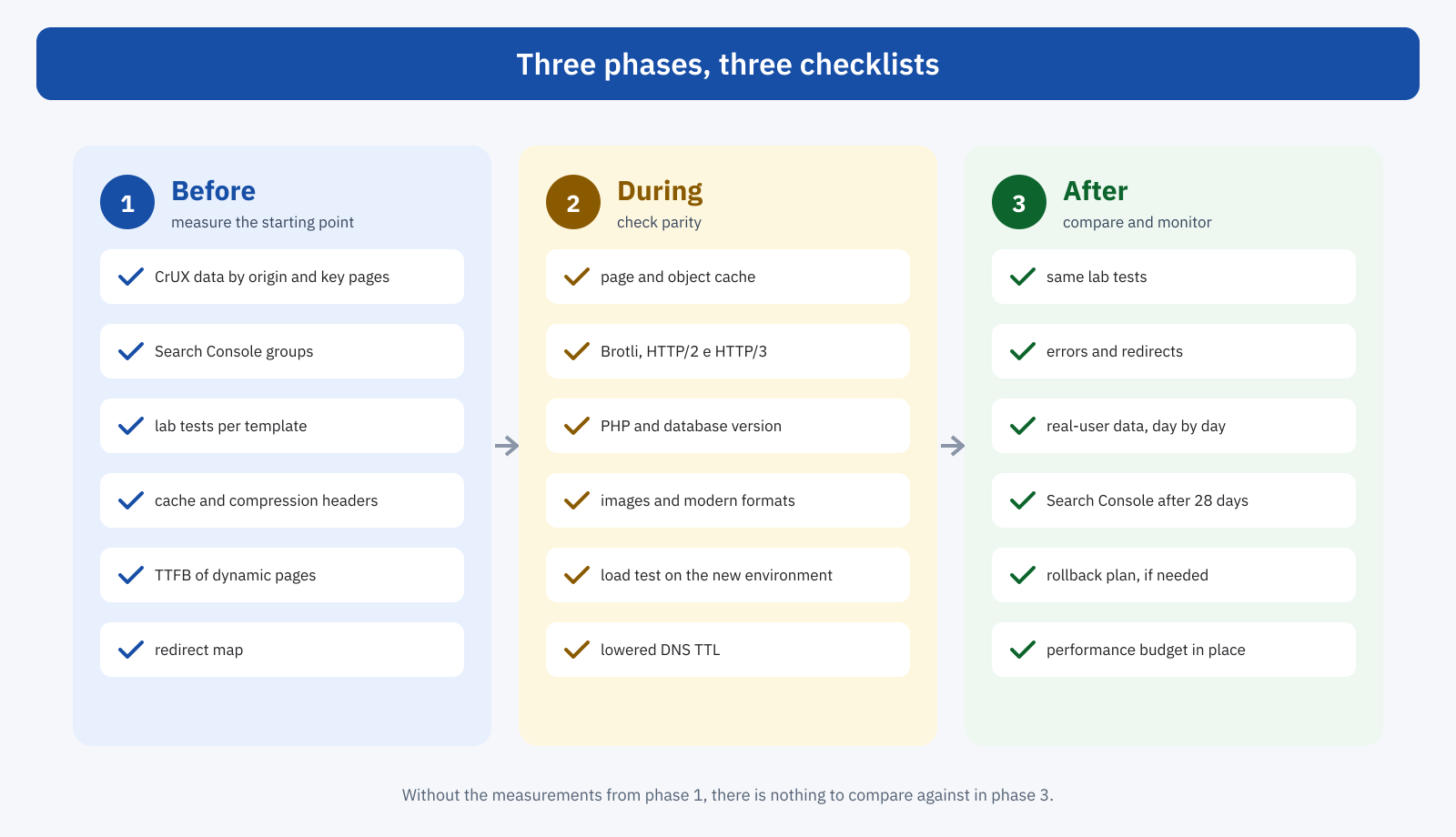
Before: take a snapshot of the starting point
The most important step, and the most neglected, is to measure the current state before touching anything. After the migration the old site will no longer exist, and without an accurate snapshot it will be impossible to say whether the new one is better or worse, and where.
- Field data. The Core Web Vitals values from the Chrome UX Report for the whole origin and for the most important pages, ideally with the historical series from the CrUX History API, and the status of URL groups in the Search Console report. If you have a Real User Monitoring system, the daily values per page template.
- Repeatable lab tests. For each main page template, a test with a tool that lets you repeat the same conditions, such as WebPageTest with a fixed location, device and connection, saving the results and the waterfalls. Three runs per page, to reduce variability.
- Technical configuration. The response headers of HTML, stylesheets, scripts and images: cache, compression, protocol. PHP and database version, type of page cache and object cache, CDN, DNS settings.
- Dynamic pages. The TTFB of cart, checkout, search, account area and admin dashboard, which depend entirely on the server and are the first to get worse on inadequate hosting.
- Redirects and URLs. The list of existing URLs and active redirects, needed both for SEO and to avoid redirect chains that add time before the first byte.
A simple script can collect the main headers of the key pages in a file, to compare later with those of the new environment:
#!/usr/bin/env bash
# Save headers and timings of the key pages to a file for comparison
for url in / /categoria/scarpe/ /prodotto/scarpa-trail/ /carrello/ /blog/; do
	echo "== $url"
	curl -so /dev/null -H 'Accept-Encoding: br, gzip' \
		-w 'ttfb=%{time_starttransfer}s http=%{http_version}\n' "https://esempio.it$url"
	curl -sI -H 'Accept-Encoding: br, gzip' "https://esempio.it$url" \
		| grep -iE '^(cache-control|content-encoding|x-cache|server|alt-svc):'
done > prima-della-migrazione.txt
During: check parity
The new environment must be checked before it receives real traffic, on a test address. The minimum goal is parity: everything the old site did well, the new one must keep doing. The most frequent losses are always in the same places.
- Cache. The page cache of the old hosting, often at server level and invisible in the WordPress dashboard, is not transferred with the site. On the new environment it has to be configured from scratch, with the same exclusions. The same goes for the object cache.
- Compression and protocols. Brotli or Zstandard, HTTP/2 and HTTP/3 depend on the server: check them with the headers and with DevTools, as explained in the articles on compression and HTTP/3.
- Browser cache. The expiry headers of static resources, often configured in the old server, must be replicated, together with the revalidation rules covered in the article on HTTP 304.
- Images. Conversion to modern formats, responsive sizes and optimization services, often tied to the old hosting or to plugins configured with specific keys and paths.
- Software. PHP and database versions at least equal to the previous ones, OPcache enabled, adequate memory limits.
- Capacity. A load test on the new environment, as described in the article on traffic spikes, checks that it holds up under real traffic, especially on dynamic pages.
If the migration includes a new theme or a redesign, front-end comparison is added to technical parity: page weight, number of requests, JavaScript, DOM size, LCP element for each page template. It is the ideal moment to set a performance budget: the new site must not weigh more than the old one, unless it is a conscious decision.
A few days before the switch it is worth lowering the TTL of the DNS records that will change, for example to five minutes, so that the change of address propagates quickly and any return to the old environment is just as fast. After the migration, once things are stable, the TTL goes back to its usual values, as explained in the article on DNS, TLS and connections.
Switch day
The switch should be scheduled for a low-traffic moment, away from campaigns and sales periods, with the necessary people available. Right after the DNS change, some checks must be done immediately: that the main pages respond correctly and from the new server, that the page cache works, that redirects reach the final destination in a single hop, that forms, cart and payments work. Warming the cache by visiting the most important pages avoids the first users finding a slow site because every page has to be generated.
A rollback plan should also be prepared: what to do, and in how much time, if the new environment shows serious problems. With a low TTL and the old environment still active for a few days, going back is a matter of minutes.
After: compare and monitor
In the following days you repeat exactly the same tests as in the first phase, under the same conditions, and compare the results. The headers collected by the script, the timings, the waterfalls: every difference must be explained. A higher TTFB on cached pages points to a cache that is not working or a server that is farther away; a larger transferred size for the same files points to different compression; new requests in the waterfall point to scripts or resources that were added.
Real-user data is the decisive check, but it arrives at different speeds depending on the source. Your own monitoring system shows the effect the next day; Chrome UX Report and Search Console data, calculated over 28 days, shift gradually and show the full effect only after a month.
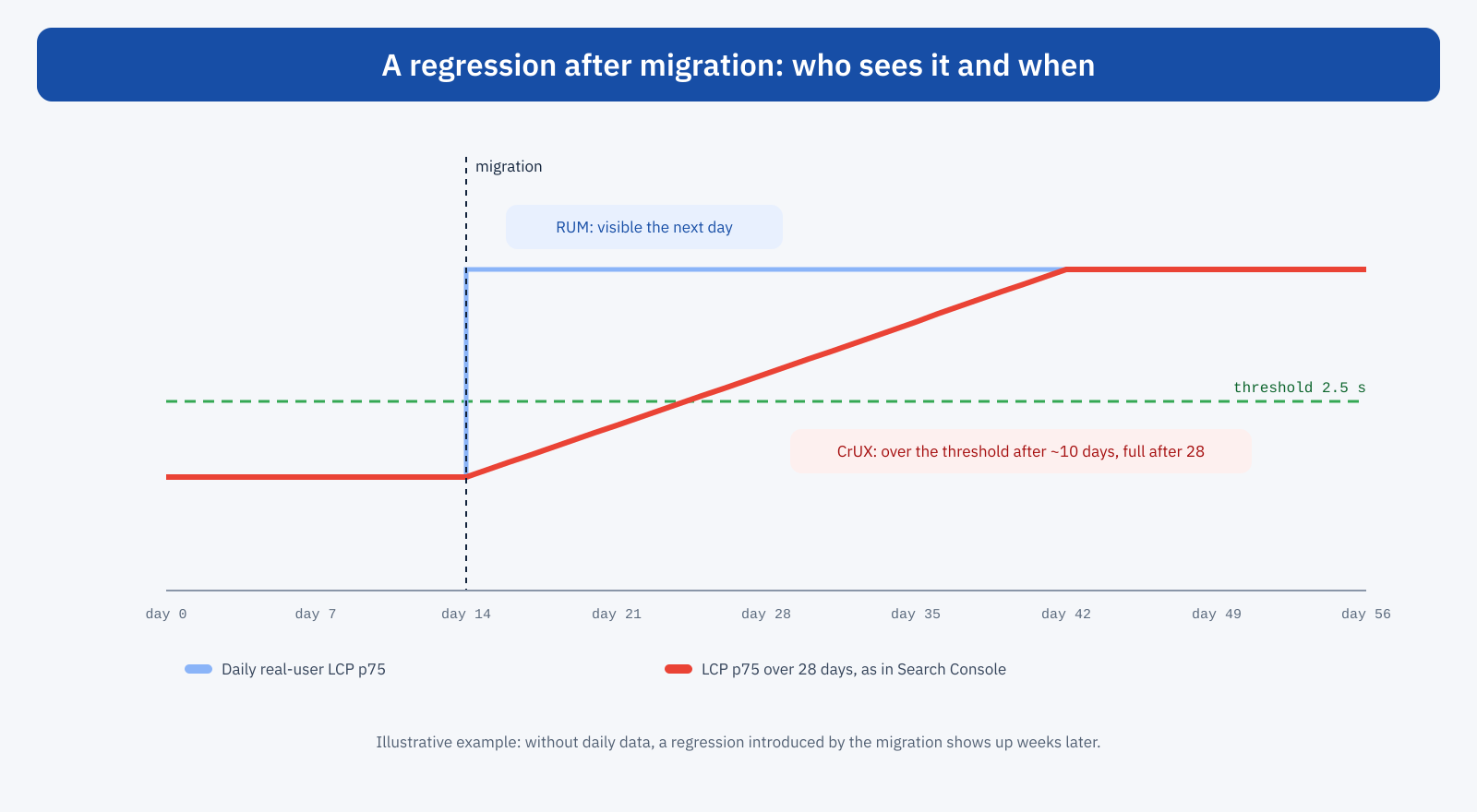
That is why, if you have no real-user monitoring system, the migration is a good occasion to switch one on a few weeks earlier: it lets you compare daily values before and after and step in right away. Failing that, the CrUX History API, with weekly data, at least offers a faster view than the Search Console report.
CMS and domain migrations
Some migrations come with extra complications. Moving from one CMS to another, or from a traditional site to a headless architecture, completely changes how pages are generated and served: comparing per page template becomes even more important, and it pays to watch how metrics behave in single-page architectures, as we saw in the article on Single Page Applications. A domain change, on the other hand, restarts the Chrome UX Report data from zero for the new origin: for a few weeks field data will be scarce or missing, and your own monitoring becomes the only reliable source.
An example
A services site moves from shared hosting to a more powerful VPS, aiming to improve response times. Lab tests on the new environment show the TTFB of dynamic pages cut in half, and the migration is considered a success. Three weeks later, Search Console reports a worse LCP on mobile. Comparing the headers collected before and after reveals the cause: the old hosting served pages from a server-level cache, which was not configured on the VPS, and compressed resources with Brotli, while the new server uses only Gzip. Cached pages, that is the vast majority of visits, became slower even though the server is more powerful. With the cache configured and Brotli enabled, the values go back to better than before. With the right measurements collected beforehand and daily monitoring afterwards, the problem would have surfaced the same day.
The most common mistakes
The same mistakes keep coming back. The first is measuring only the home page, which is almost always cached and rarely representative: regressions hide in product pages, articles and dynamic pages. The second is comparing tests run under different conditions, from different locations, devices or tools, and blaming the migration for differences that come from the test. The third is forgetting configuration that lives outside the site: CDN rules, headers added by the old server, redirects handled at hosting level, DNS records. The fourth is treating the migration as finished on switch day, with no period of active monitoring.
The people to involve
A migration touches different skills, and performance often sits in the middle. Whoever manages the hosting knows the server and cache configuration; whoever develops the theme knows the front end; whoever handles SEO knows URLs, redirects and Search Console; whoever runs marketing knows which scripts and campaigns are active. It is best to decide from the start who is responsible for performance in the project, with the job of collecting the initial measurements, checking parity and following the data in the following weeks, and it helps if the provider of the new hosting is told the goals, not just the technical requirements.
The short checklist
- Switch on real-user monitoring a few weeks earlier.
- Save field data, repeatable lab tests and headers for each page template.
- Configure cache, compression, protocols, browser cache and images on the new environment, and check them one by one.
- Run a load test on the dynamic pages.
- Lower the DNS TTL, prepare the rollback plan, choose a low-traffic moment.
- After the switch, repeat the same tests, compare, monitor daily data and check Search Console after a month.
In short
Migrations are one of the moments when sites most easily lose performance, through configuration that is not transferred, heavier themes or different infrastructure. The method to avoid it is simple but requires discipline: take a snapshot of the starting point with field data, repeatable tests and technical configuration; check parity on the new environment before the switch; repeat the same tests afterwards and monitor real-user data day by day.
Google’s data will arrive weeks late and will confirm the result; the real work is done before, with the measurements that make comparison possible, and right after, with monitoring that lets you step in. A well-prepared migration is not just neutral for performance: it is often the chance to improve it.
