When people talk about a site’s speed, they almost always think of what the server does to generate the page and what the browser does to show it. In between sits the network, which is usually taken for granted. Yet on a smartphone connected to a mobile network, a significant part of the loading time depends neither on the server nor on the browser, but on the number of trips the data has to make and on what happens when some packets get lost along the way.
HTTP/3, based on the QUIC transport protocol, was created precisely to reduce these costs. It is supported by all the major browsers, by the largest CDNs and by a growing number of web servers, and a substantial part of web traffic already uses it. In this article we look at what changes compared with HTTP/2, why the benefits are concentrated on mobile networks, how to enable it and what to realistically expect for Core Web Vitals.
From HTTP/1.1 to HTTP/3, in brief
With HTTP/1.1 each connection could handle only one request at a time: to download many resources in parallel, browsers opened up to six connections per domain, each with its own opening cost. HTTP/2 introduced multiplexing: several simultaneous requests on the same connection, split into independent streams. It was a big step forward, but with a structural limit: HTTP/2 runs over TCP, and TCP delivers data in a single strict order.
HTTP/3 keeps the same model as HTTP/2, with multiple requests on one connection, but replaces TCP with QUIC, a transport protocol built on UDP. QUIC integrates TLS 1.3 encryption directly into the transport, handles each stream independently and identifies connections with its own identifier rather than by address and port. These three choices produce the three main advantages: connections that are quicker to open, no chain blocking when a packet is lost, and connections that survive a change of network.
First advantage: fewer trips to get started
Before it can ask for a page with HTTP/2, the browser has to open a TCP connection, which takes a round trip to the server, and then negotiate TLS encryption, which with TLS 1.3 takes another round trip. Only on the third trip does the actual request go out. With QUIC, opening the connection and negotiating encryption happen together, in a single trip. When the browser has connected to the same server recently, QUIC also allows 0-RTT resumption: the request is sent together with the first packet, with no preliminary wait at all.
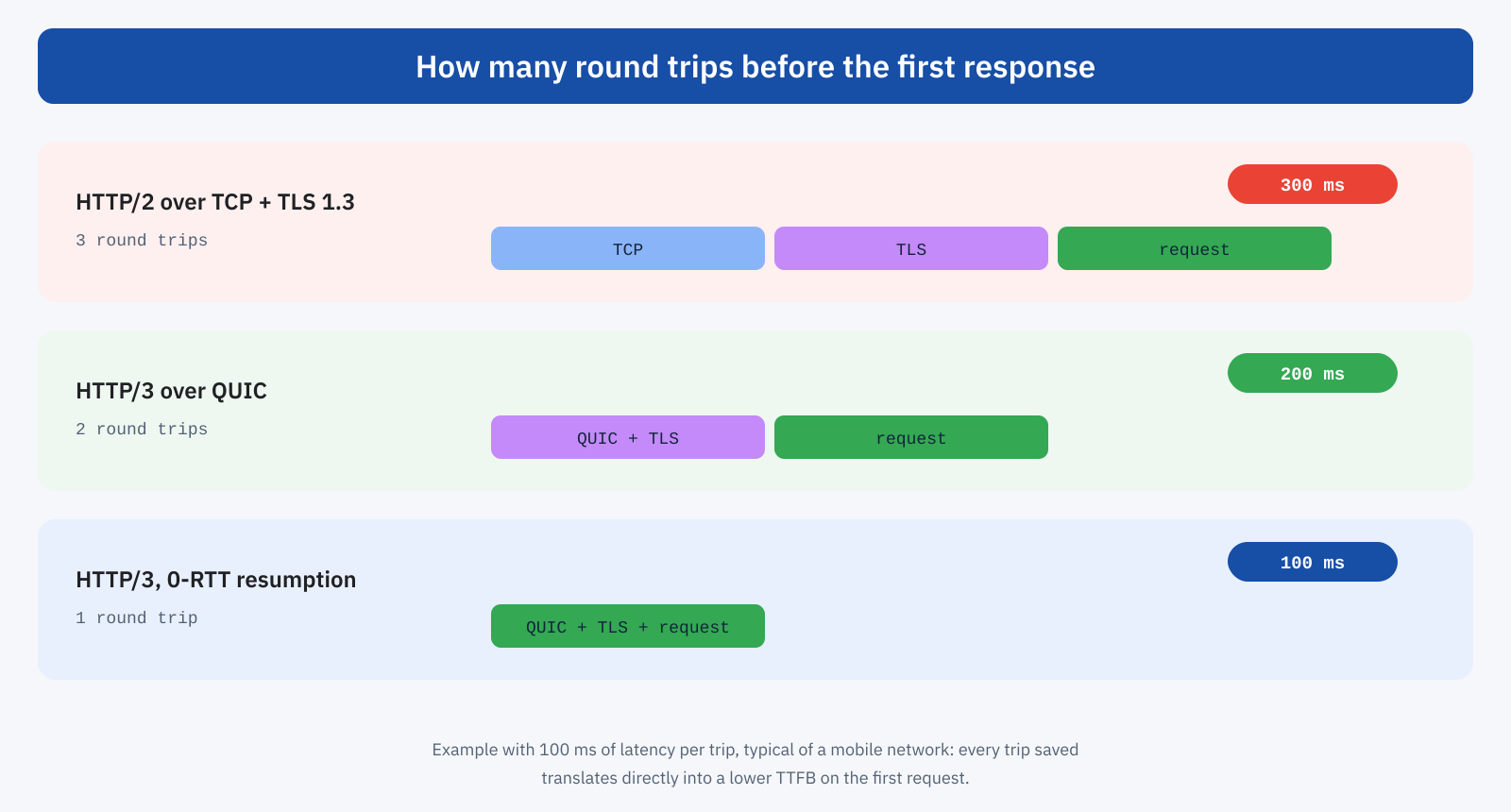
The value of a trip depends on latency. On fiber with a nearby server, a trip can take less than 10 milliseconds, and saving one is almost irrelevant. On a mobile network, where latency is often between 50 and 150 milliseconds and can rise much higher with a weak signal, every trip saved translates directly into a lower TTFB on the first request. And since LCP starts from TTFB, the gain propagates to the whole page.
It should be said that 0-RTT resumption has a security limitation: the data sent in the first packet could be replayed by an attacker who has intercepted it. For this reason it is used only for requests without side effects, such as loading a page, and servers refuse it for operations that change data. It’s a choice handled by servers and CDNs, but it’s useful to know about to understand why the 0-RTT advantage doesn’t apply to everything.
Second advantage: no chain blocking
The most important limit of HTTP/2 emerges when the network loses packets, which is normal on mobile networks and congested Wi-Fi. TCP guarantees that data reaches the application exactly in the order it was sent: if one packet is lost, all those that arrived afterwards wait until the missing packet is retransmitted. With HTTP/2, where HTML, CSS, images and scripts share the same TCP connection, the loss of a single CSS packet also blocks the HTML and the images, even though they arrived intact. This is the so-called head-of-line blocking.
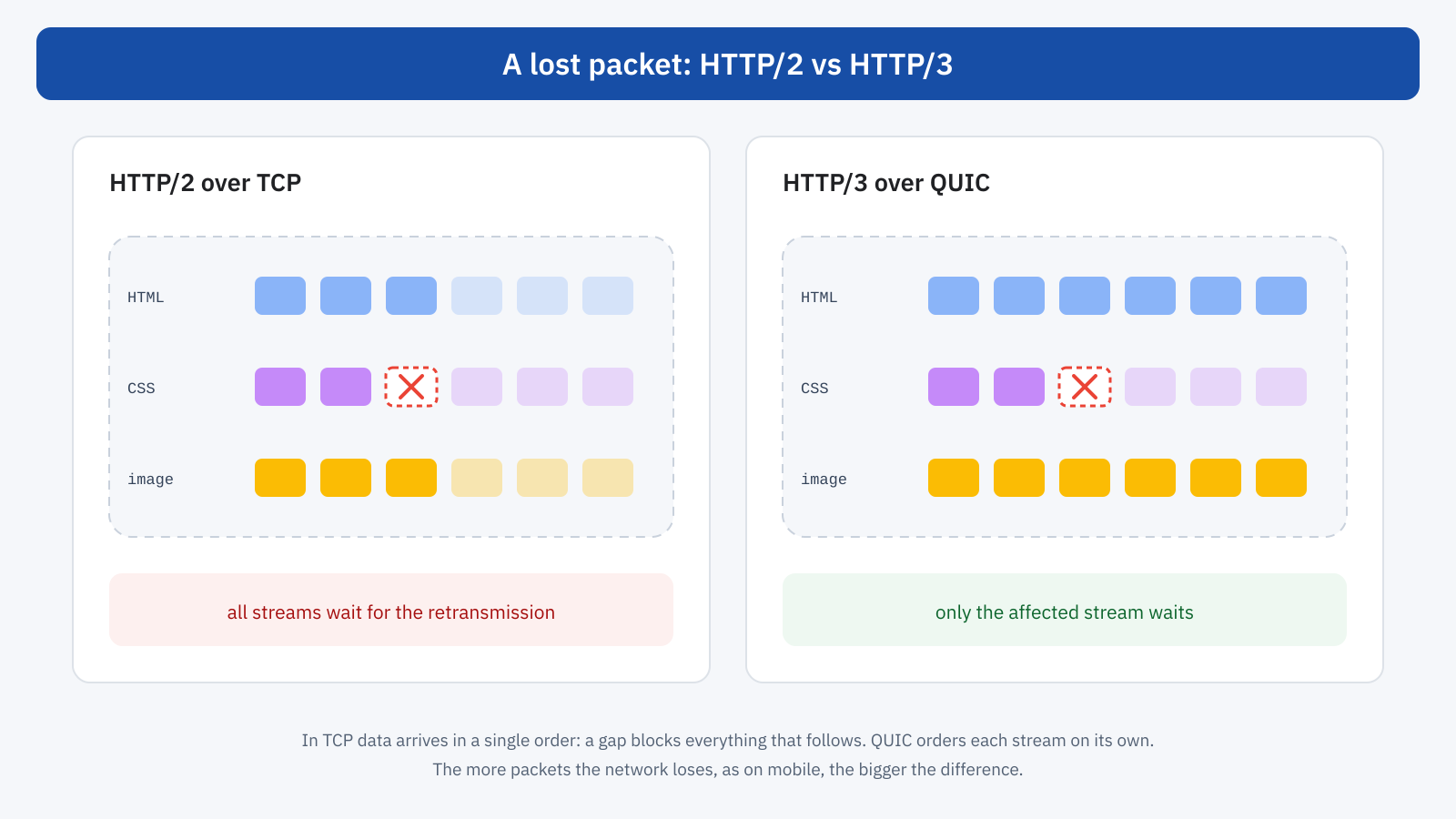
QUIC solves the problem by handling ordering per stream. If a CSS packet is lost, only the CSS waits; HTML and images keep arriving and being processed. On a stable network the difference is minimal, but with a packet loss rate of even just one or two percent, common on mobile, the difference in loading times becomes measurable, especially in the upper part of the distribution: the worst loads improve more than the average ones. And it’s precisely the upper part of the distribution that counts for Core Web Vitals, assessed at the 75th percentile.
Third advantage: switching networks
A TCP connection is identified by the address and port of both parties. When a smartphone moves from Wi-Fi to the mobile network, for example on leaving home or a shop, its address changes and all TCP connections break: they have to be reopened from scratch, with all the trips that entails. QUIC identifies the connection with its own identifier, independent of the address, and can therefore continue on the new network without starting over. For people browsing on the move it’s a concrete advantage, even if hard to see in lab tests.
How the browser discovers HTTP/3
A browser doesn’t know in advance whether a server supports HTTP/3. In the most common case, the first connection uses HTTP/2, and the server announces HTTP/3 support with the Alt-Svc header:
alt-svc: h3=":443"; ma=86400The browser stores the information and, from the following requests or the next visit, uses HTTP/3. This means a user’s very first visit often doesn’t benefit. To remove this step there is the HTTPS DNS record type, which announces the supported protocols already during name resolution: the browser can thus use HTTP/3 from the very first connection. The main CDNs publish it automatically when HTTP/3 is on.
There is also a safety mechanism: QUIC uses UDP, and some corporate, hotel or public networks block or limit UDP traffic on port 443. In that case the browser automatically falls back to HTTP/2 over TCP, with no errors for the user. HTTP/3 is therefore an improvement that is added, not a replacement that can break something.
How to enable it
The simplest way is a CDN or proxy that supports it: Cloudflare, Fastly, Akamai, Amazon CloudFront and many others offer HTTP/3 to users, often with an option to switch on in the dashboard. In this case the HTTP/3 connection covers the stretch between the user and the CDN node, which is exactly the one with the highest latency and losses; the stretch between the CDN and the origin server keeps using HTTP/1.1 or HTTP/2, over networks of much better quality. It’s also one of the concrete advantages of a CDN that is worth distinguishing from other features, as we saw when talking about Cloudflare.
On the server, support depends on the software. LiteSpeed has supported it natively for years, and it’s one of the reasons it often shows up in performance comparisons, as we saw in when the benchmark sees a different site. Nginx includes it in recent versions, with a dedicated module to enable at build time and in configuration; Caddy enables it by default; Apache has no native support and needs a proxy in front. In any case you need to open UDP port 443 in the firewall, a detail that is often forgotten and that makes HTTP/3 announced but unreachable.
server {
	listen 443 ssl;
	listen 443 quic reuseport;
	http2 on;
	http3 on;

	# Announce HTTP/3 to browsers
	add_header Alt-Svc 'h3=":443"; ma=86400' always;
}
One aspect to consider is resource consumption. QUIC is implemented in user space rather than in the operating system kernel, and encrypting each packet has a cost: for the same traffic, an HTTP/3 server generally uses more CPU than an HTTP/2 server. For CDNs it isn’t a problem; for a small shared server it can be. It’s one of the reasons why, on many infrastructures, leaving HTTP/3 to the CDN layer is the most sensible choice.
How to check that it works
In the Network panel of Chrome DevTools you can add the Protocol column: resources served over HTTP/3 show h3, those over HTTP/2 show h2. On the first visit it’s normal to see h2 on the document and h3 on the following resources, because of the discovery mechanism. From the command line, recent versions of curl built with HTTP/3 support let you force it with the --http3 option, useful to tell a server configuration problem from a network block.
On real users, the Navigation Timing and Resource Timing APIs expose the nextHopProtocol property, which indicates the protocol used for each request. Collected in a monitoring system together with the metrics, it lets you know what share of visits actually uses HTTP/3 and compare TTFB and LCP between the two populations. The Chrome UX Report doesn’t break data down by protocol, so the effect on field data is seen mostly as a general improvement of TTFB on mobile after activation.
const nav = performance.getEntriesByType( 'navigation' )[ 0 ];
console.log( nav.nextHopProtocol ); // "h3", "h2" or "http/1.1"
What to really expect
HTTP/3 doesn’t turn a slow site into a fast one. If the server takes a second to generate the page because there is no cache, saving a hundred milliseconds of connection changes little; if the page downloads three megabytes of JavaScript, the protocol won’t make them any lighter. The benefits add to an already well-optimized site and are concentrated where the network is the bottleneck: mobile users, high-latency networks, unstable connections, visitors far from the server.
Precisely for this reason, though, they are benefits that matter for Core Web Vitals. Field data is dominated by mobile, and the 75th percentile is made up of users in the worst conditions: those with a weak signal, on the move, on congested networks. These are exactly the users for whom HTTP/3 makes the biggest difference, and that’s why, all else being equal, enabling it tends to improve the tail of the distribution more than the average.
This is also why the benefits of HTTP/3 show up little in lab tests. Lighthouse and PageSpeed Insights simulate a slow network by applying a calculated slowdown, but they don’t reproduce packet loss or network changes, and the test’s first visit often still happens over HTTP/2. Tools like WebPageTest let you choose more realistic network profiles, but the reliable picture remains that of field data, as we saw when talking about why you need both CrUX and lab data.
In summary
HTTP/3 moves web requests onto QUIC, a UDP-based transport with built-in encryption. Compared with HTTP/2 over TCP it reduces the trips needed to open a connection, eliminates chain blocking when packets are lost and keeps connections alive when switching between different networks. These are modest advantages on a fast fixed network and significant on mobile ones, where the most critical Core Web Vitals are measured.
Enabling it is simple with a CDN, possible with modern web servers as long as you remember to open UDP port 443, and safe thanks to the automatic fallback to HTTP/2 where UDP is blocked. Check it with the DevTools Protocol column and measure it on real users with nextHopProtocol. It doesn’t replace caching, optimized images and lightweight JavaScript, but it completes the work at the point no other optimization can reach: the path of the data between the server and the user’s phone.
