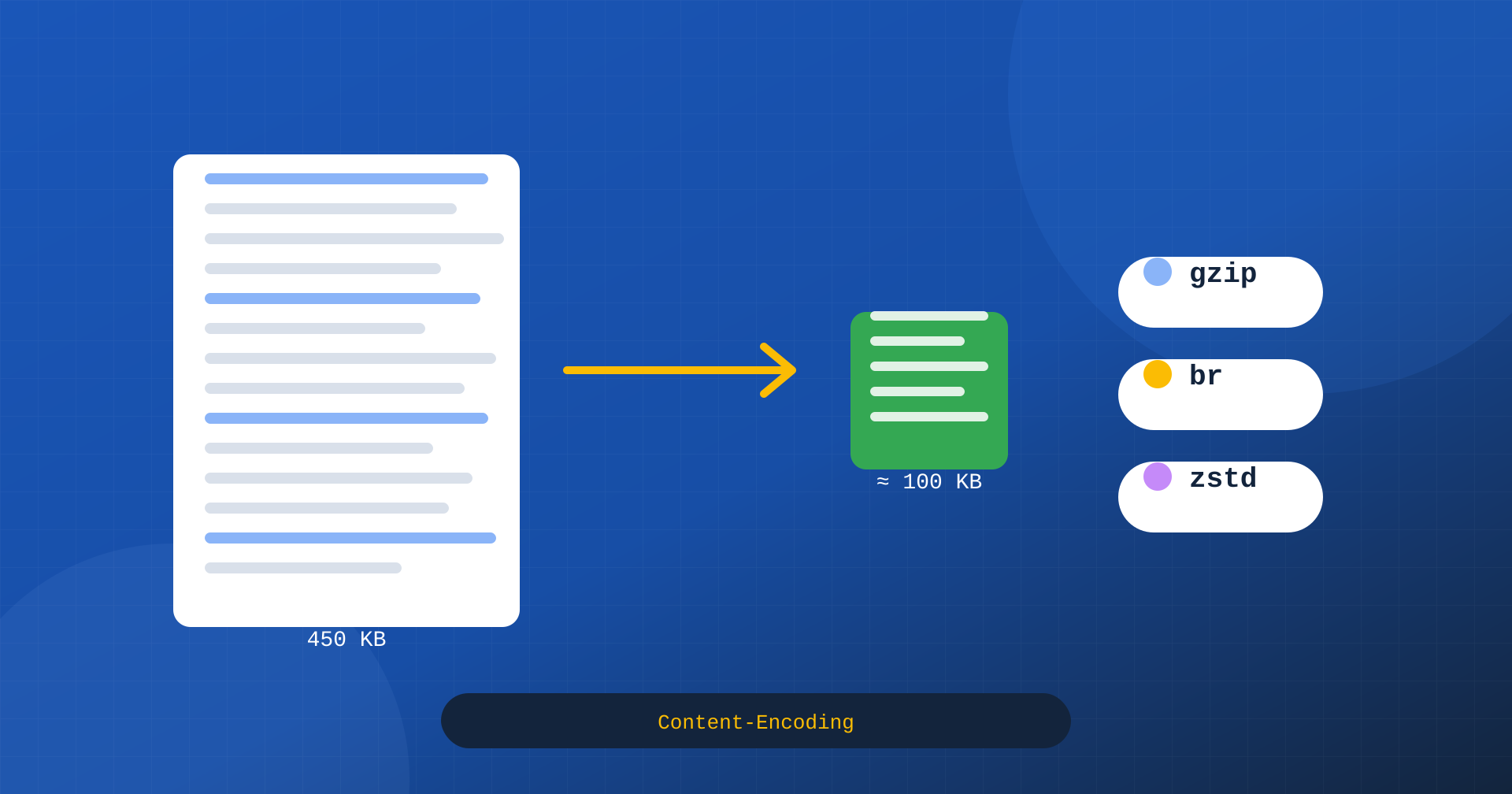
Of all the optimizations a website can have, compressing text resources is probably the one with the best ratio of effort to result. HTML, CSS, JavaScript, JSON and SVG are text, and text compresses very well: a 450-kilobyte JavaScript file can travel over the network as little more than 100. The browser receives it compressed, decompresses it in a few milliseconds and uses it as if it had arrived whole. Less data to transfer means pages that arrive sooner, especially on mobile networks.
For years the standard was Gzip. Then came Brotli, now supported everywhere, and more recently Zstandard, an algorithm born to compress data in Facebook’s systems and now supported by the main Chromium-based browsers and by Firefox. In this article we look at how HTTP compression works, how the three formats differ, how to choose levels and modes, how to configure them and what effect to expect on Core Web Vitals.
How HTTP compression works
HTTP compression is based on a simple negotiation. In every request, the browser uses the Accept-Encoding header to say which formats it can decompress: for example gzip, deflate, br, zstd. The server picks one of the accepted formats, compresses the response and declares it in the Content-Encoding header. The browser reads the header, decompresses and uses the content. If the server doesn’t compress, or if the browser accepts no format, the resource travels as it is.
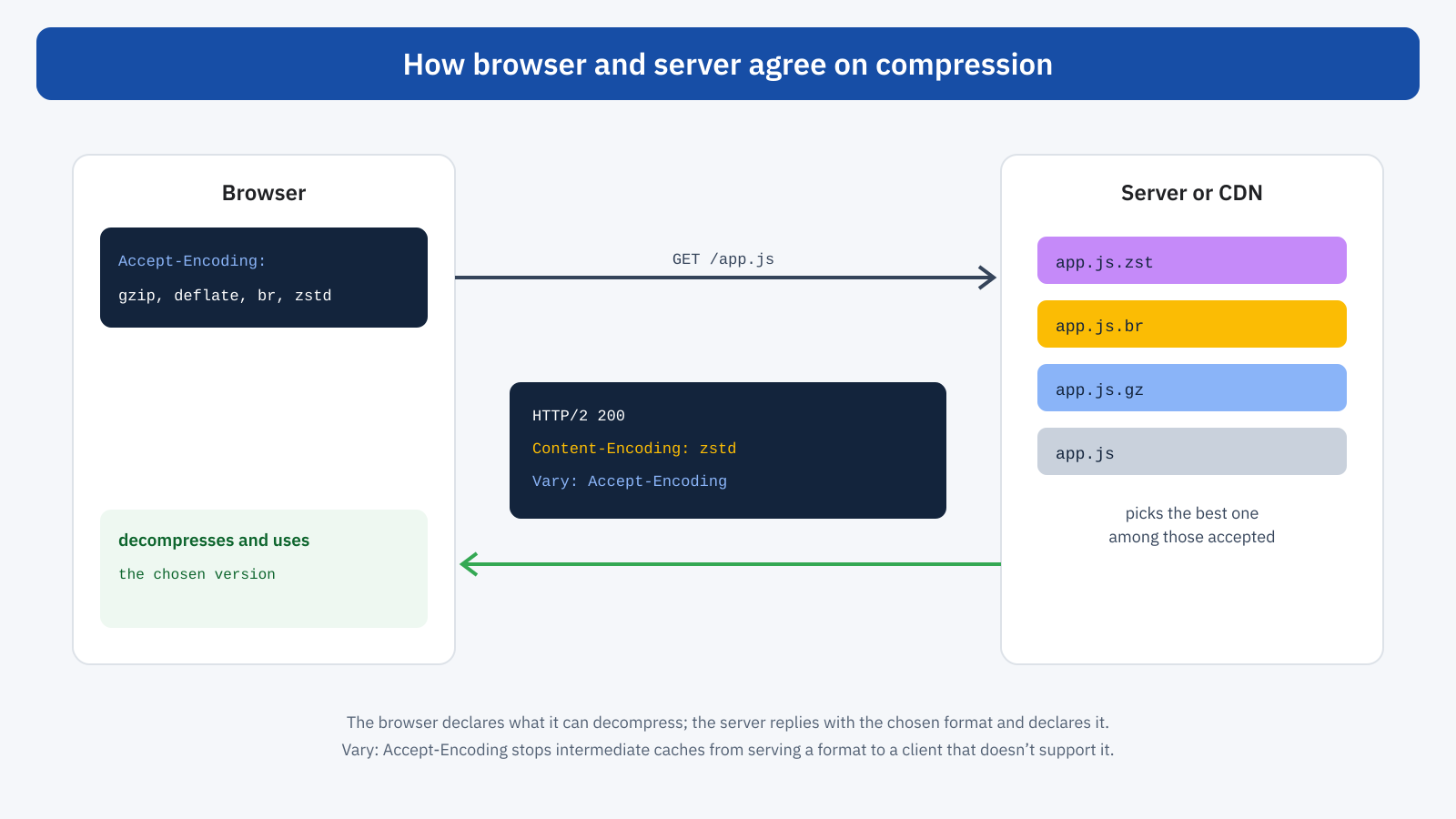
An important detail concerns intermediate caches, such as CDNs and proxies. Because the same URL can be served in different formats depending on the browser, the response must include Vary: Accept-Encoding, which tells caches to keep separate versions for each format. It is the same mechanism we saw for negotiating image formats: without it, a cache could serve a Zstandard-compressed response to a browser that can’t decompress it.
Gzip: the universal standard
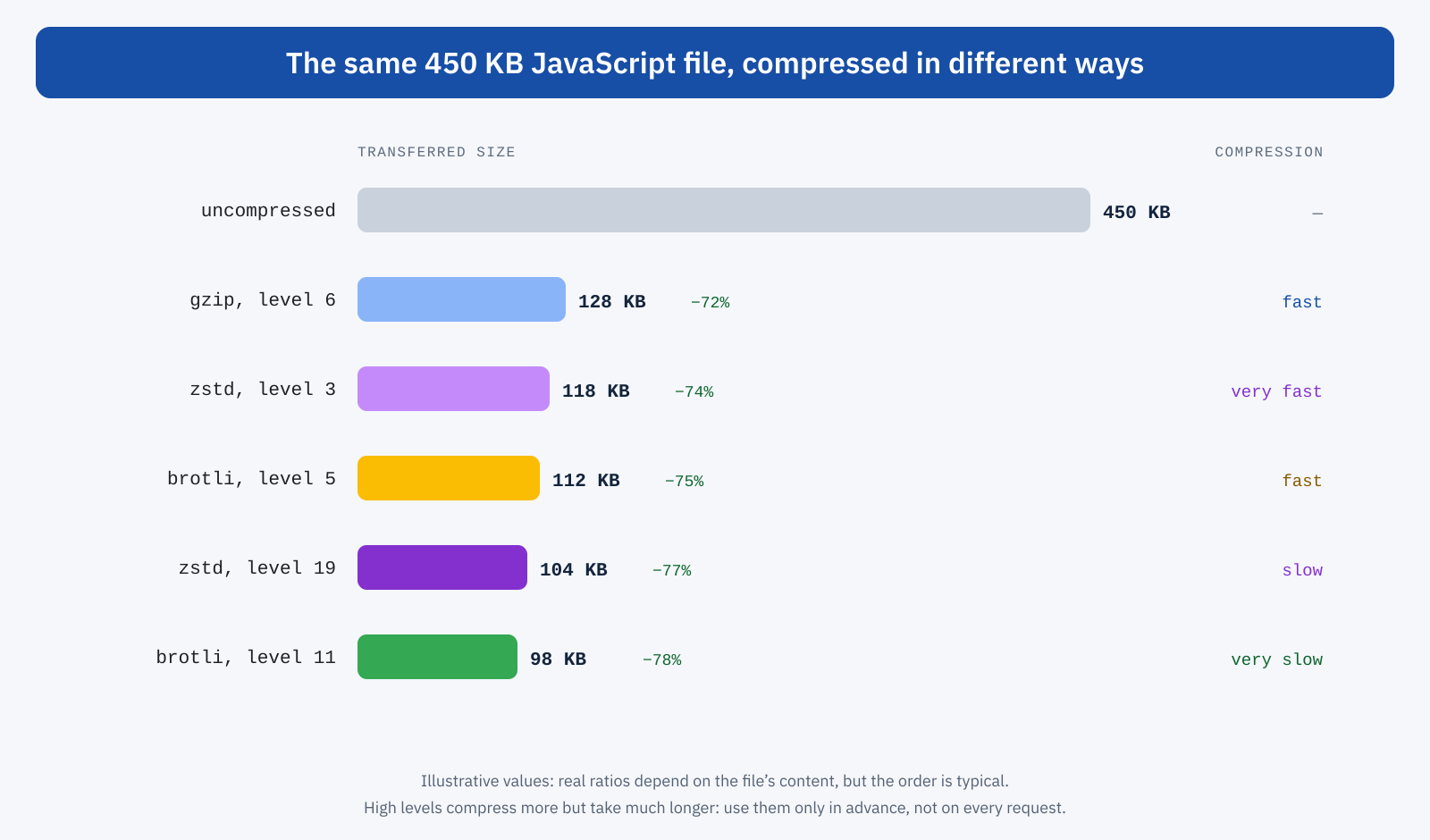
Gzip, based on the Deflate algorithm, has been supported by every browser and every server for over twenty years. It offers compression levels from 1 to 9: low levels are very fast and compress less, high levels compress more but take more CPU time. Level 6, the default in many configurations, is a good compromise. On typical text files, Gzip reduces size by 65-75%.
Today Gzip is mainly the fallback format: the one to offer to clients that support nothing better, such as some automated tools, old HTTP libraries and some bots. A modern server should always support it, but serving it to current browsers means giving up a few percentage points of compression.
Brotli: more compression for the web
Brotli was developed by Google and designed specifically for the web. Besides a more efficient algorithm, it includes a built-in dictionary of common words and fragments in HTML, CSS and JavaScript, which lets it compress better, especially small and medium-sized files. It is supported by all modern browsers, but only over HTTPS connections, and has levels from 0 to 11.
At equal speed, Brotli typically compresses 15-20% better than Gzip. At the top levels, 10 and 11, the gain increases further, but compression becomes very slow: tens or hundreds of times slower than the intermediate levels. This leads to the most important distinction in compression configuration, that between static and dynamic compression, which we’ll come back to shortly. Decompression, on the other hand, is fast at any level: for the browser, a file compressed at level 11 costs no more than one compressed at level 5.
Zstandard: the newcomer
Zstandard, abbreviated zstd, was created by Yann Collet at Facebook and released in 2016. It quickly became a standard in many areas outside the web: storage systems, databases, Linux distribution packages, file systems, data transfers between servers. It is described in RFC 8878, which also registers it as an HTTP content coding.
Its distinguishing feature is speed. At low and intermediate levels, Zstandard compresses much faster than Gzip while achieving similar or better compression ratios, and decompresses even faster. At high levels, up to 19 and beyond with the extreme modes, it comes close to Brotli, though generally without surpassing it on typical web files, where Brotli’s built-in dictionary makes the difference. In short: Brotli remains the champion of compression ratio on static web resources, while Zstandard offers the best balance between compression and speed when compressing on the fly.
On the support front, Chrome and the other Chromium-based browsers have accepted Zstandard since spring 2024, and Firefox followed shortly after. Safari, at the time of writing, does not advertise it in the Accept-Encoding header. Thanks to negotiation, this isn’t a problem: browsers that support it receive Zstandard, the others Brotli or Gzip. On the server side support is growing: some CDNs, such as Cloudflare, already offer it to browsers; web servers such as Caddy include it natively; for nginx and Apache there are third-party modules. It is reasonable to expect it to become more and more common in the coming years.
Static and dynamic compression
Choosing the format is only half the question. The other half is when to compress, and the answer changes depending on the type of resource.
Static resources, such as stylesheets, scripts, SVG fonts and JSON files that don’t change between one request and the next, can be compressed just once, in advance, at the maximum level. The compression cost, even if high, is paid once at publication time, and every later request receives the smallest possible file. This is static compression, or precompression: next to app.js you generate app.js.br, app.js.zst and app.js.gz, and the server picks the right file based on the browser’s header.
# Precompression at publication time
for f in dist/*.{js,css,svg,json}; do
	brotli --best --keep "$f"          # app.js.br, level 11
	zstd -19 --quiet --keep "$f"       # app.js.zst, level 19
	gzip -9 --keep "$f"                # app.js.gz, level 9
done
Dynamic resources, such as the HTML WordPress generates for each request or API responses, must instead be compressed on the fly, while the user waits. Here the compression time adds to the TTFB, and a level that is too high can cancel the advantage of a smaller file. For dynamic compression, intermediate levels are used: Brotli between 4 and 6, Gzip around 6, Zstandard between 3 and 6. This is where Zstandard shows its strength: at equal CPU time, it compresses more than Gzip and often as much as Brotli at intermediate levels.
Pages served from a page cache are an intermediate case: the HTML is dynamic, but it is generated once and served many times. Many caching solutions and many CDNs store the page already compressed, so the compression cost is paid only at generation. In these cases you can use a higher level than for compression on every request.
Server configuration
Configuration depends on the software. An example for nginx with the Brotli module, which is the most common case, combines static and dynamic compression:
# Dynamic compression
gzip on;
gzip_comp_level 6;
gzip_min_length 1024;
gzip_vary on;
gzip_types text/css application/javascript application/json image/svg+xml;

brotli on;
brotli_comp_level 5;
brotli_types text/css application/javascript application/json image/svg+xml;

# Static compression: use the .br and .gz files already present
brotli_static on;
gzip_static on;
With Caddy the configuration is even simpler, because it natively supports Zstandard and Gzip and chooses the format according to the browser’s preferences:
example.com {
	encode zstd gzip
	file_server {
		precompressed br zstd gzip
	}
}
On managed hosting or behind a CDN, there is often nothing to configure: compression is applied automatically, and the CDN can compress with Brotli or Zstandard even when the origin server only uses Gzip. It is still worth checking what actually reaches the browser, because the default settings are not always the optimal ones, as we saw when discussing Cloudflare.
What to compress and what not to
HTTP compression should be applied to text resources: HTML, CSS, JavaScript, JSON, XML, SVG, text files and fonts in uncompressed formats, such as TTF. It should not be applied to formats that are already internally compressed: JPEG, PNG, WebP and AVIF images, WOFF2 fonts, video, audio, ZIP archives and PDFs. Compressing them again reduces almost nothing and wastes CPU on both the server and the device. Very small files, under a kilobyte, don’t benefit either: the compression header can weigh more than the saving.
One special case concerns security. Compressing responses that contain both secret data, such as form protection tokens, and attacker-controllable content, such as request parameters reflected in the page, can expose you to a family of attacks known as BREACH, which deduces the secret by observing the size of compressed responses. The countermeasures don’t consist of giving up compression, but of not reflecting user input near secrets and varying tokens on every request, as modern frameworks do.
The effect on Core Web Vitals
Compression acts on resource transfer time, and therefore on all the metrics that depend on their arrival. Compressed HTML arrives sooner and the browser can start building the page earlier; render-blocking CSS arrives sooner and the first paint happens earlier; the necessary scripts arrive sooner. The effect is most evident on LCP and First Contentful Paint, and grows with the slowness of the network: on a slow mobile connection, saving 300 kilobytes of JavaScript can be worth several hundred milliseconds.
There is, however, a limit to keep in mind: compression reduces the bytes transferred, not the work the browser has to do afterwards. A 450-kilobyte JavaScript file compressed to 100 is still decompressed to 450 kilobytes, parsed, compiled and executed. The cost on the main thread, and therefore on INP and Total Blocking Time, remains unchanged. That is why compression doesn’t replace reducing code: it complements it. Less code, and that little compressed as well as possible.
Moving from Gzip to Brotli or Zstandard is generally worth a further 15-20% on text resources. It is not a leap comparable to going from no compression to Gzip, but on pages with a lot of JavaScript it is a concrete, free gain that doesn’t require changing the site’s code.
Beyond: compression dictionaries
The most interesting development in web compression concerns shared dictionaries. The idea is simple: when a site publishes a new version of a JavaScript file, most of the content is identical to the previous version, which the browser already has in cache. With the Compression Dictionary Transport mechanism, the browser can use the old version as a dictionary, and the server can send only the differences, compressed with Brotli or Zstandard. The result, in favorable cases, is a reduction of an order of magnitude compared with traditional compression.
The mechanism is supported in recent versions of Chrome and requires specific server configuration, so today it mainly matters for applications with frequent updates and large JavaScript bundles. But it shows the direction: compression is not a solved problem, and modern formats such as Zstandard, with their native dictionary support, are designed for these scenarios too.
How to check
In the DevTools Network panel, the Size column shows two values for each resource: the transferred size and the actual size after decompression. By adding the Content-Encoding response header as a column, you can see at once which format was used for each resource. If a JavaScript or CSS file shows the same transferred and actual size, it is not compressed.
From the command line, curl lets you simulate browser requests with different headers:
# Which format does the server choose?
curl -sI -H 'Accept-Encoding: zstd, br, gzip' https://example.com/app.js | grep -i 'content-encoding\|vary'

# How much does each version weigh?
for enc in gzip br zstd; do
	printf '%s: ' "$enc"
	curl -s -H "Accept-Encoding: $enc" https://example.com/app.js | wc -c
done
Lighthouse flags uncompressed text resources with a dedicated warning. It is a simple check, but surprisingly often it reveals forgotten files: stylesheets served from an unconfigured subdomain, translation JSON files, large SVGs, REST API responses.
A recommended configuration
- Static resources: precompressed at the maximum level in Brotli, and if the server supports it also in Zstandard, with Gzip as a fallback.
- Dynamic HTML and APIs: on-the-fly compression with Brotli at levels 4-6 or Zstandard at levels 3-6, Gzip 6 as a fallback.
- Cached pages: stored already compressed, at a higher level if generation is rare.
- Always:
Vary: Accept-Encoding, no compression for images, WOFF2 fonts and video, a minimum threshold of around a kilobyte.
In short
HTTP compression cuts the weight of text resources by three quarters or more, with a direct effect on load times and the metrics that depend on them. Gzip is the universal standard to offer as a fallback; Brotli offers the best compression for web resources, especially if precompressed at the maximum level; Zstandard, now supported by most browsers, offers the best balance between ratio and speed for on-the-fly compression.
The practical rule is to compress statics to the maximum in advance, compress dynamics at intermediate levels, not compress what is already compressed, and check in DevTools what really reaches the browser. And to remember that compression reduces bytes, not work: it remains essential, but it doesn’t replace a site that loads less code.
