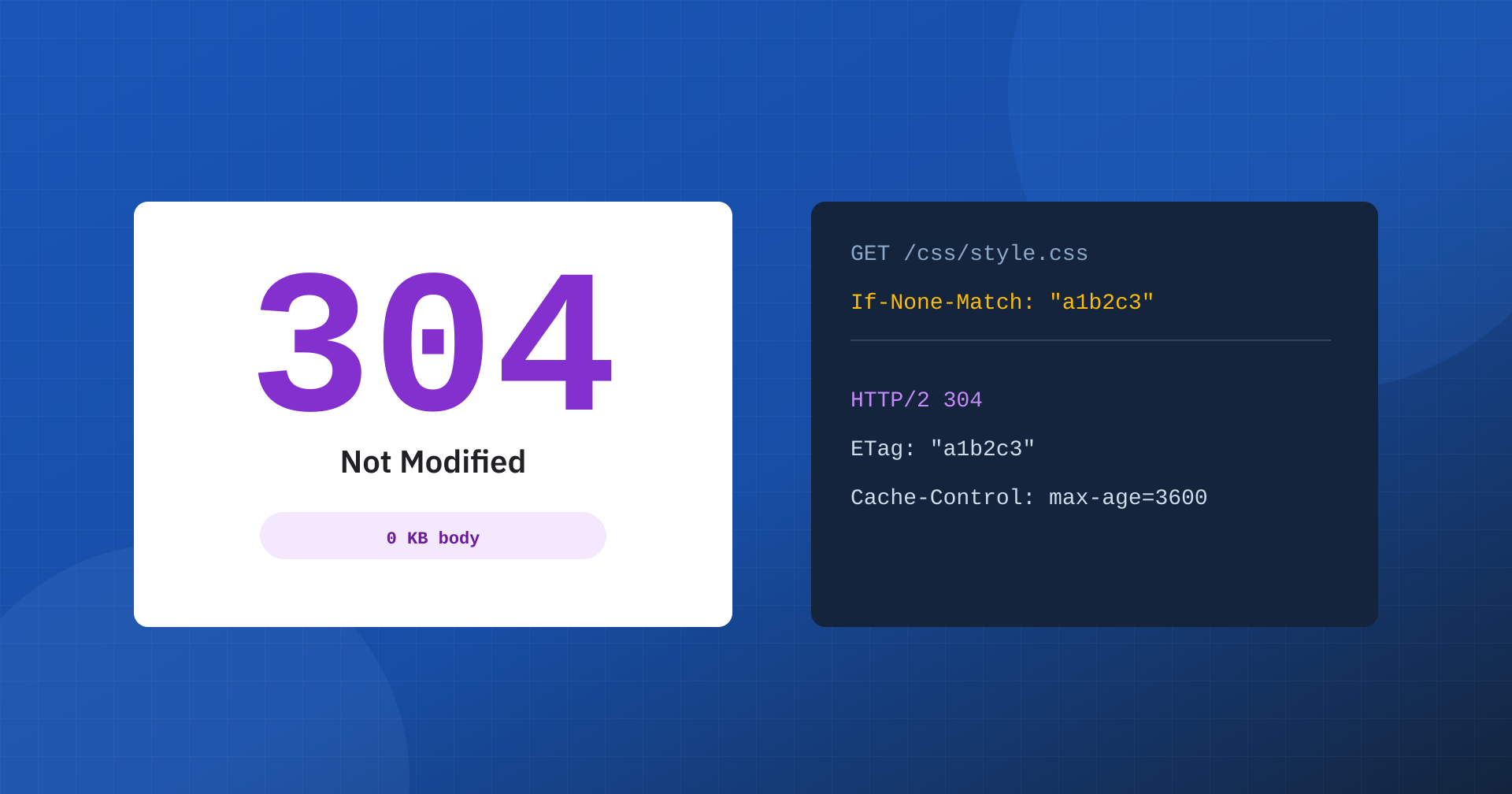
When people talk about speed, they think of page caching, CDNs, compression, lightweight images and less JavaScript. But a much less conspicuous mechanism works quietly on every return visit and every pass of a search engine crawler: the HTTP 304 Not Modified status code. It doesn’t change how the page looks and it adds no features, but it avoids transferring what the browser or the crawler already has. Configured well, it reduces traffic and server load, helps TTFB and makes crawling of your site more efficient.
What 304 Not Modified is
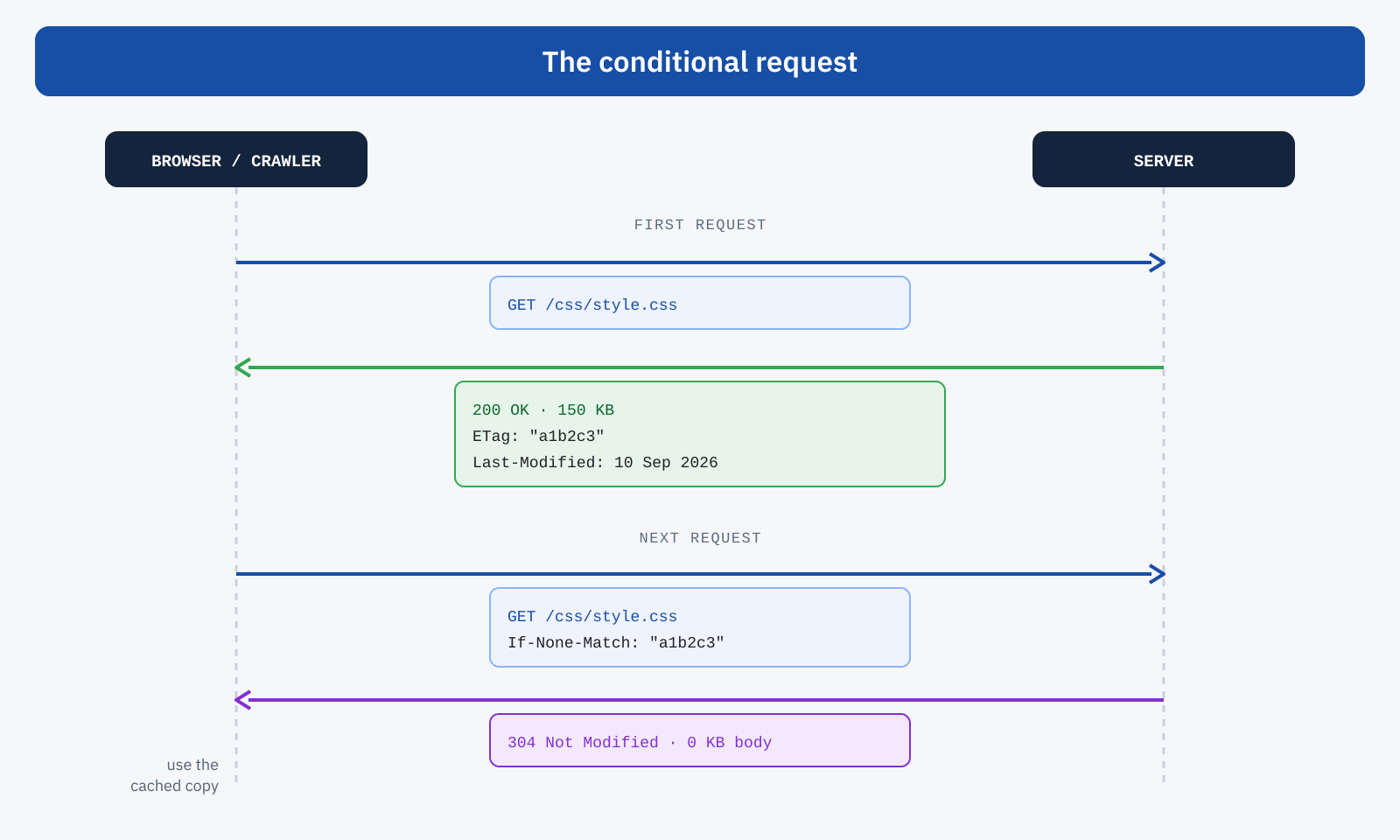
A 304 is the answer to a precise question: “has the resource changed since the last time I downloaded it?”. If the answer is no, the server doesn’t resend the content, only the headers with the 304 status, and the client keeps using the copy it has in its cache. If the resource has changed, the server answers with a normal 200 OK and the new content.
This isn’t an arbitrary cache, but the result of a conditional request. On the first request the server sends the resource along with a version identifier, the ETag header, and the date of the last change, Last-Modified. On later requests the client sends them back with If-None-Match and If-Modified-Since, and the server compares them with the current state.
Expiry and validation: two different things
To use the 304 well you need to tell apart two mechanisms that are often confused. Expiry, governed by Cache-Control: max-age, sets how long the client can use the copy without asking the server anything: during that period no request is sent. Validation comes into play afterwards: when the copy has expired, the client asks for confirmation with a conditional request and gets a 304 if nothing has changed.
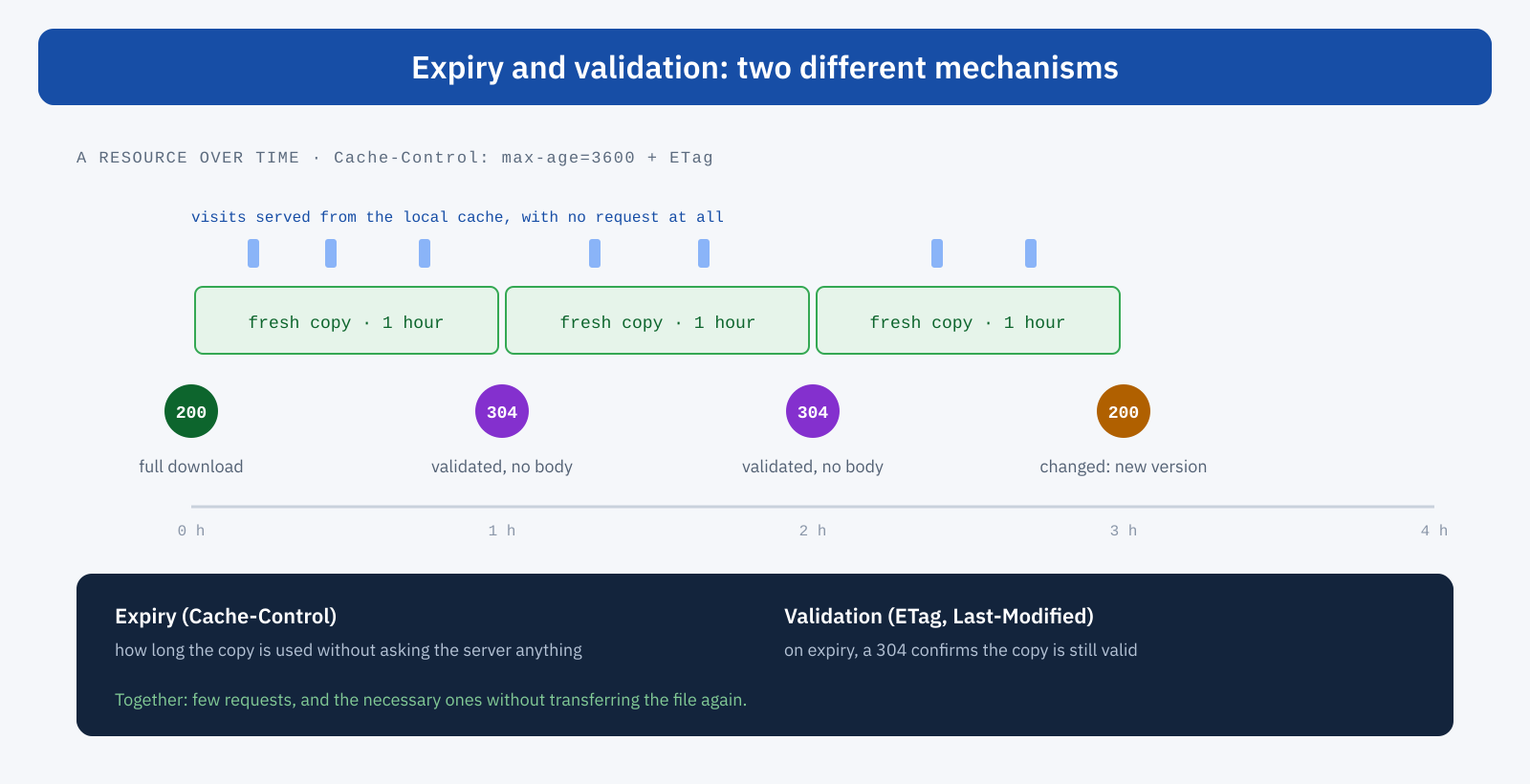
An effective setup combines the two: expiry times consistent with how often the content is updated, and reliable version identifiers to validate when needed. Expiry alone, with long times, risks showing outdated content; validation alone, without expiry, generates a request for every resource on every page. Watch out for a common misunderstanding too: Cache-Control: no-cache doesn’t mean “don’t cache”, but “always validate before using the copy”. If you really want to prevent storage, use no-store.
ETag or Last-Modified?
Last-Modified is simple: a date, compared with the one the client sends back. It has a precision of one second and depends on the file’s date, which can change even when the content doesn’t, for example after a new deploy. ETag identifies the actual version, often with a hash of the content, and is more precise.
In multi-server environments, though, the ETag needs care. Some web servers also compute it from filesystem data, such as the inode, which differs from node to node: the same file gets different ETags depending on which server answers, and validations fail. In a cluster it’s best to generate the ETag only from size and modification date, or at application, CDN or build level, consistently across all nodes.
# Nginx: ETag and Last-Modified are on for static files
etag on;
if_modified_since exact;

# Apache: ETag without inode, consistent across multiple servers
FileETag MTime Size
Why the 304 helps TTFB
A 304 response is tiny: headers only, no body. For the client it means being able to use the local copy right away; for the server, fewer bytes to send, less I/O and less CPU. But it’s important to be precise: the 304 doesn’t lower TTFB automatically. If, to decide that a page hasn’t changed, the application still has to start PHP, query the database and load all the plugins, the response time stays almost the same: you only save the transfer. The real benefit comes when validation happens in the lightest layers of the infrastructure.
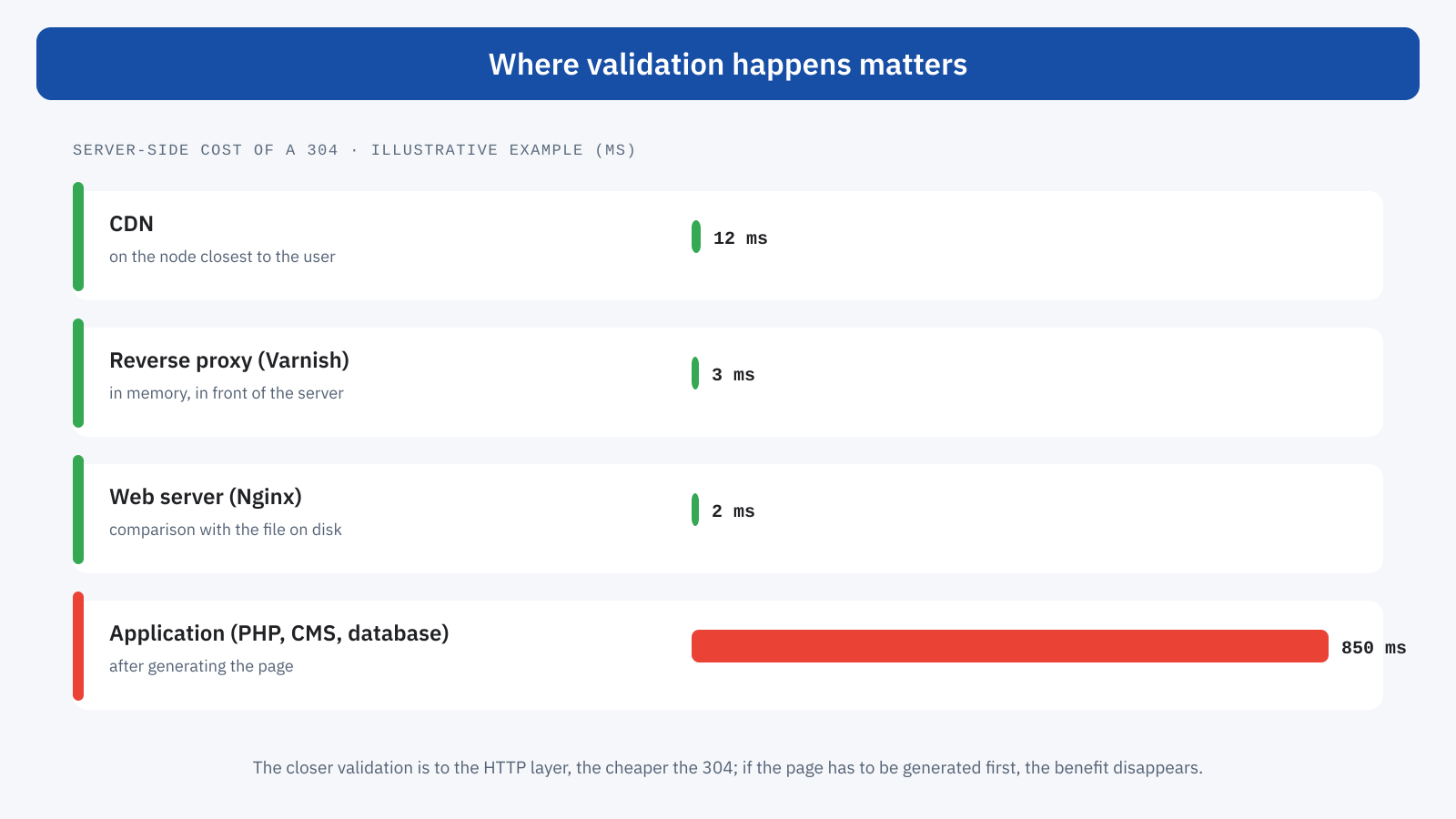
A CDN can validate directly on its own nodes, a reverse proxy such as Varnish can answer from memory without involving the application, and Nginx handles static files with ETag and Last-Modified very efficiently. The closer validation is to the HTTP layer and the further from application code, the more the 304 pays off. It’s the same principle as page caching, which we covered in TTFB and page caching.
304 and crawl budget
Search engines devote a limited amount of crawling resources to each site. Every inefficiency, such as slow responses or content downloaded again for no reason, can mean fewer pages visited and updates indexed later. Google has confirmed that its crawlers support conditional requests with ETag and Last-Modified: when an already known resource hasn’t changed, a 304 lets it verify the resource without downloading it again, with less work for both the crawler and the server.
In the Crawl stats report in Search Console, 304 responses appear among the status codes, and they show how often Googlebot finds unchanged resources. The 304 doesn’t improve rankings on its own and doesn’t magically increase the crawl budget, but on large sites, such as e-commerce catalogs or publishing archives, it contributes to more orderly crawling and a less strained server.
Static resources: where the 304 pays off most
CSS, JavaScript, images and fonts rarely change but are requested a great many times, by users and bots. Without the right headers the browser risks downloading them again on every visit with full 200 responses; with a good setup it reuses them from the cache and, when needed, validates them with a 304. The gain is felt on return visits and during traffic spikes, when thousands of identical requests compete with dynamic ones.
For files with the version in the name, such as app.8f3a21.css, you can do even better: a very long expiry and the immutable directive. As long as the name doesn’t change, the file isn’t even validated; with each new version the name changes and the browser downloads it. It’s the ideal strategy, and the 304 remains the tool for everything that can’t be versioned that way.
# Files with the version in the name: never validated until the name changes
Cache-Control: public, max-age=31536000, immutable

# Files without the version in the name: short expiry, then validation with a 304
Cache-Control: public, max-age=3600
ETag: "a1b2c3"
Dynamic HTML: use it with judgment
With HTML pages the matter is more delicate. A home page with frequently changing content, banners, widgets and personalized parts is not a good candidate for the 304, at least without a well-designed cache layer: if the application has to generate the whole page to find out whether it has changed, the 304 arrives too late to be useful, and a naive validation risks treating as unchanged content that varies by user, cart or geographic area. It works very well, however, for stable pages served by a reverse proxy: articles, documentation, landing pages, product pages that rarely change.
The most common mistakes
- Counting 304s as a sign of good health. Lots of 304s on files that never change point to an expiry that is too short: better to serve them straight from the local cache, with no request at all.
- Different ETags across nodes. In a cluster, the same file with different identifiers gets downloaded again and again.
- Validation in the wrong place. A 304 produced by the CMS after generating the whole page saves only bandwidth, not time.
- Conflicting headers. Plugins and layers that set contradictory directives produce inefficient request flows that are hard to understand.
- Personalized content validated as static. Anything that depends on session, cart or geographic area must be separated from the shareable content.
How to check it
Start from the headers: a first request to read ETag and Last-Modified, a second, conditional one to check that the response really is a 304.
# Read the cache headers
curl -sI https://www.yoursite.com/css/style.css | grep -iE "etag|last-modified|cache-control"

# Conditional request with the ETag you just read
curl -sI -H 'If-None-Match: "a1b2c3"' https://www.yoursite.com/css/style.css | head -1
HTTP/2 304
It’s worth repeating the test several times, to check that different nodes return the same ETag, and checking the behavior on page reload in the DevTools Network panel. The web server logs show how many requests end with a 304, on which resources and with what response time: if a 304 costs almost as much as a 200, validation is happening too high up the stack. For the SEO side, the same logs and the Crawl stats in Search Console show how much Googlebot uses conditional requests.
In summary
The 304 Not Modified lets you avoid resending what the client already has: fewer bytes, less work for the server, faster return visits and more efficient crawling for search engines. It works best together with a good expiry policy, with consistent ETags or reliable Last-Modified, and with validation left to the lightest layers of the infrastructure: CDN, reverse proxy and web server, not the application.
It’s not a trick or a shortcut, and it doesn’t replace a well-designed cache architecture. It’s rather the application of a simple principle that runs through all of web performance: the fastest work is the work you don’t do. Don’t resend a file, don’t generate a response again, don’t use bandwidth and CPU for nothing: over thousands of requests a day, it makes a difference.
