Optimizing a site is hard; keeping it optimized is harder still. Anyone who has followed a performance project knows the sequence well: weeks of work, Core Web Vitals finally in the good status, general satisfaction. Then, month after month, along come a new plugin for reviews, a pixel for a campaign, a carousel on the home page, an extra font for a headline, a chat script. None of these changes, on its own, seems serious. After a year the site is as slow as before, and nobody knows exactly when or why.
The performance budget is the tool that breaks this sequence. It is a set of explicit, agreed and automatically verified limits on what a page can weigh and how it must behave. It doesn’t stop the site from evolving, but it makes the cost of every addition visible and forces a conscious decision when you want to exceed it. In this article we look at what types of budget exist, how to define them, how to check them automatically and how to make them work in the organization.
Why sites become slow again
Performance degradation over time is not an accident, but a natural tendency. Every department has good reasons to add something: marketing a new tracking tool, sales a chat, design an animation, content larger images and embedded videos. Each addition brings a visible benefit to whoever asks for it and a performance cost spread across everyone, barely visible and hard to attribute. Without a mechanism that makes that cost explicit, the sum of reasonable decisions produces a slow site.
There is also a timing problem. The Chrome UX Report field data, the data that matters to Google, is updated over a 28-day window: a regression introduced today becomes fully visible only after weeks, when other releases have gone out in the meantime and the cause is hard to isolate. A budget checked at every release spots the problem at the moment it is introduced, when it is still easy to trace who caused it and why.
Three types of budget
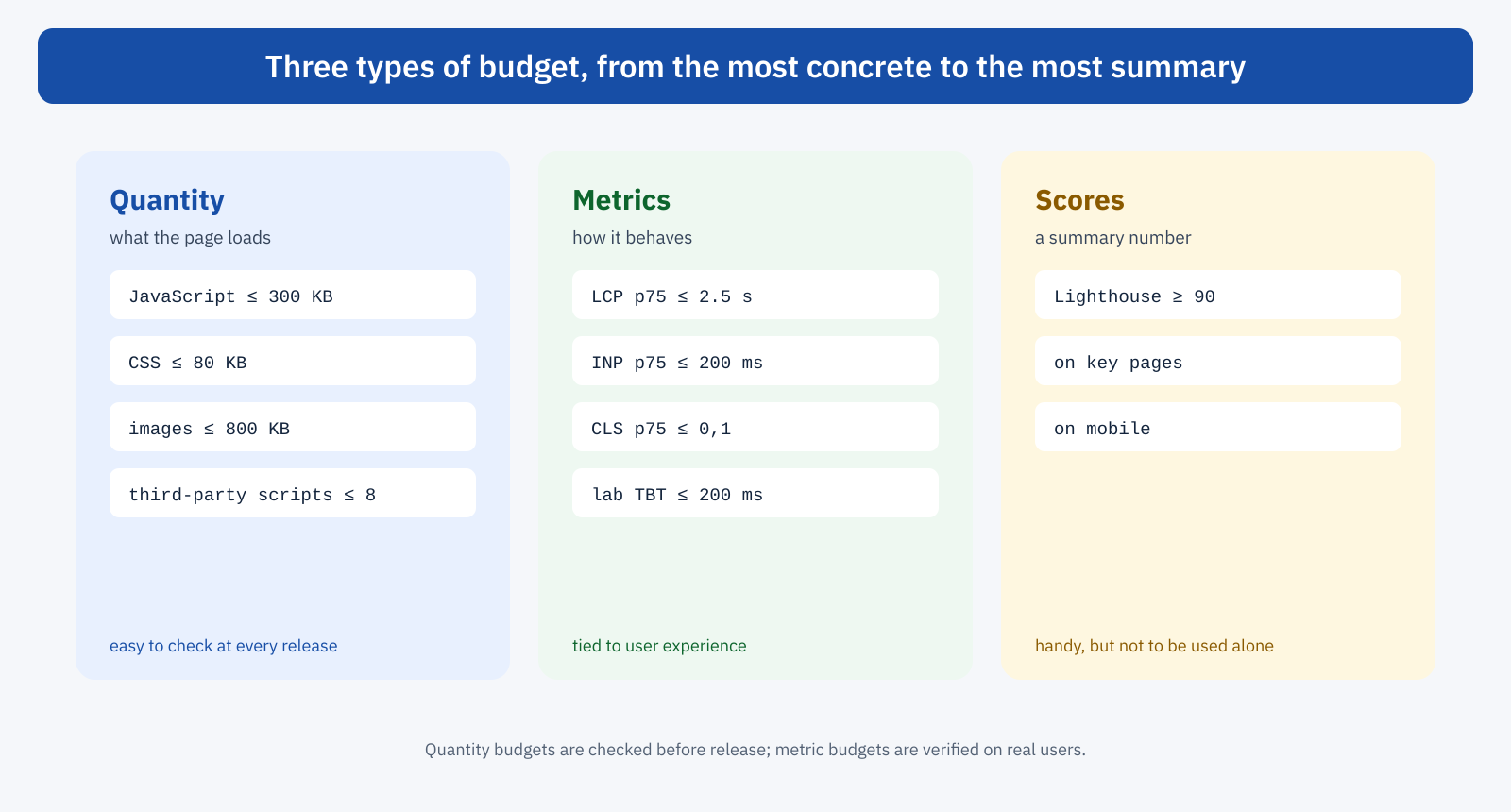
Performance budgets fall into three families, each with different advantages and limits. In practice they are used together.
Quantity budgets
Quantity budgets set limits on what the page loads: kilobytes of JavaScript, CSS, images and fonts, number of requests, number of domains or third-party scripts. They are the most concrete and the easiest for everyone to understand: “the JavaScript of the product page must not exceed 300 compressed kilobytes” is a rule that a designer, a developer and a marketing manager all understand the same way. They are also easy to check automatically and reliably, because they don’t depend on the variability of the network or the test device.
The limit is that they measure a cause, not an effect: a page can respect the JavaScript budget and still be slow because of a server without caching or a main image loaded late. That is why they need to be paired with metric budgets.
Metric budgets
Metric budgets set limits on timings: LCP, INP and CLS at the 75th percentile of field data, or lab values such as LCP and Total Blocking Time measured in a controlled test. They are directly tied to user experience and business goals, and the natural starting point is the Core Web Vitals thresholds. The limit is variability: lab tests fluctuate from one run to the next, and field data arrives with a delay. They therefore require more care in configuration, for example by repeating tests several times and using the median.
Score budgets
Score budgets set a minimum for a summary index, such as the Lighthouse performance score. They are convenient to communicate, but a score aggregates many metrics with weights that change between versions of the tool, and it can be improved with techniques that don’t improve the real experience, as we saw when discussing performance cloaking. They can sit alongside the other budgets, but not replace them.
How to define the limits
A useful budget is neither too generous, because it protects nothing, nor too strict, because it gets ignored at the first difficulty. A few criteria help find the right balance.
- Start from the current situation. If the site is already in the good status, the initial budget can be the current situation with a small margin: the goal is not to get worse. If it isn’t, set an achievable budget and lower it gradually as changes produce results.
- Work backwards from the metrics. To achieve an LCP of 2.5 seconds on a reference mobile network, how many kilobytes can the critical path weigh? The calculation, even a rough one, turns a time goal into verifiable quantity limits.
- Look at competitors. The performance of the main competitors, measured with the same tools, is a useful reference, especially for convincing decision makers: being faster than competitors is an argument that is easy to understand.
- Distinguish by page template. A home page, a product page and an article have different needs. A single budget for the whole site is too loose for some pages and too tight for others.
- Think mobile. Limits should be set for the hardest conditions, a mid-range smartphone on a mobile network: that is where the most critical Core Web Vitals are measured.
Automated checks before release
A budget that is checked by hand, now and then, is soon forgotten. Its value lies in the automated check, run on every change to the site before it reaches production. The most widespread tool is Lighthouse CI, which runs Lighthouse on a list of pages, compares the results with the configured thresholds and flags, or blocks, releases that exceed them.
{
	"ci": {
		"collect": {
			"url": [
				"https://staging.example.com/",
				"https://staging.example.com/category/shoes/",
				"https://staging.example.com/product/trail-shoe/"
			],
			"numberOfRuns": 3
		},
		"assert": {
			"assertions": {
				"largest-contentful-paint": [ "error", { "maxNumericValue": 2500 } ],
				"cumulative-layout-shift": [ "error", { "maxNumericValue": 0.1 } ],
				"total-blocking-time": [ "warn", { "maxNumericValue": 200 } ],
				"resource-summary:script:size": [ "error", { "maxNumericValue": 300000 } ],
				"resource-summary:stylesheet:size": [ "warn", { "maxNumericValue": 80000 } ],
				"resource-summary:third-party:count": [ "warn", { "maxNumericValue": 8 } ]
			}
		}
	}
}
In the example, the lighthouserc.json configuration file lists three pages representative of the main templates, repeats each test three times to reduce variability, and sets two severity levels: errors block the release, warnings flag it without blocking. A good practice is to start with all checks in warning mode, observe the variability of the results for a few weeks, and only then turn the most stable limits, such as those on resource weight, into errors.
The check plugs into the continuous integration system the project uses. With GitHub Actions, for example, a few lines are enough:
name: Performance budget
on: [ pull_request ]
jobs:
  lighthouse:
    runs-on: ubuntu-latest
    steps:
      - uses: actions/checkout@v4
      - run: npm ci && npm run build && npm run deploy:staging
      - run: npx @lhci/cli autorun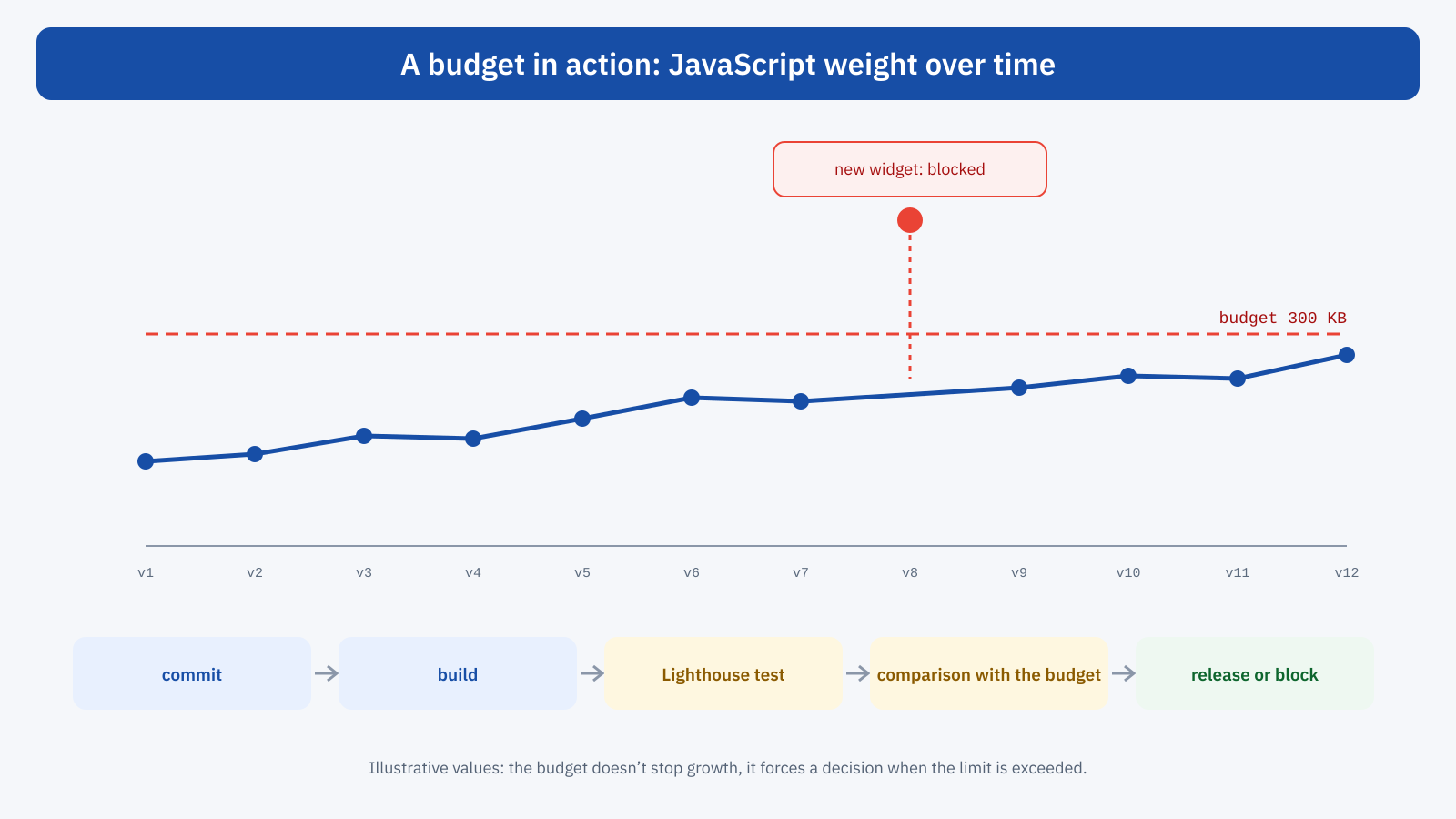
For projects with a front-end build process there are also more targeted checks, run directly on the files produced: tools such as size-limit, or the bundle size warnings of the main bundlers, flag immediately when a new dependency pushes JavaScript past the limit, even before running a test in the browser.
Checks after release
Checks before release see only what passes through the code. Many regressions, however, come from outside: a tag added by marketing through the tag manager, a third-party widget that updates, a huge image uploaded by an editor, a campaign that brings traffic from slower devices. For these you need a second level of checking, on real-user data.
A Real User Monitoring system lets you set alerts on the 75th percentile of metrics by page template: if the LCP of product pages on mobile exceeds the threshold for two consecutive days, or worsens by more than 10% compared with the previous week, someone gets a notification. Even a simple periodic check of CrUX API data, with a weekly comparison, is better than nothing. The goal is to notice a problem in days, not months.
Budgets for what doesn’t go through the code
Some of the most common sources of regression can’t be controlled by an automated test on the code, and require process rules. There are two main ones.
The first is third-party scripts. A budget on the number and weight of external scripts, with a register of who requested them, what they are for and until when, turns adding a new tag from an automatic gesture into a decision: if you want to add a tool beyond the limit, you remove another or justify the exception. The tag manager, which lets people add scripts without going through developers, is the point where this rule needs to be applied.
The second is content. Images uploaded at full resolution, videos embedded without a facade, home page sections built with heavy blocks. In WordPress some rules can be applied automatically, such as resizing oversized images on upload, which core already does above a certain size threshold, and conversion to modern formats. For the rest you need simple guidelines for editors and a periodic check of the most visited pages.
What happens when the budget is exceeded
A budget only makes sense if exceeding it has consequences, and the consequences must be decided beforehand. There are three options: optimize the new feature until it fits within the limit; remove something else to make room; consciously accept the overrun, updating the budget with an explicit justification. All three are legitimate. What the budget prevents is the fourth option, the most common one without a budget: exceeding the limit without noticing.
For this to work you need an owner: a person or a group that looks after the budgets, decides on exceptions and is accountable for them. Without an owner, the first urgent overrun, perhaps on the eve of a campaign, becomes the precedent that hollows out the rule. Tying budgets to business goals, as shown in the article on the return on investment of web performance, makes them much easier to defend when someone asks to exceed them.
A starting example
For a medium-sized WordPress site, a reasonable initial set might be the following, to be adapted to the real situation:
- Compressed JavaScript per page: at most 300 kilobytes, of which no more than 100 third-party.
- Compressed CSS per page: at most 80 kilobytes.
- Main image: at most 150 kilobytes in the format served to mobile.
- Fonts: at most two families, four files.
- Lab, mobile, median of three runs: LCP within 2.5 seconds, TBT within 200 milliseconds, CLS within 0.1.
- Field, 75th percentile by page template: all Core Web Vitals in the good status, with an alert for weekly regressions above 10%.
In short
Sites tend to become slow again because every addition has a visible benefit and a hidden cost. The performance budget makes that cost explicit: limits on quantity, metrics and, with caution, scores, defined by page template and for mobile conditions, checked automatically before every release with tools such as Lighthouse CI and monitored after release with real-user data.
The technical part is the easiest. The budget really works when it has an owner, clear rules for exceptions, and also covers what doesn’t go through the code, such as third-party scripts and content. It is the step that turns an optimization project, which sooner or later ends, into a quality of the site that is maintained over time.
