Dear Sean Giuseppe Semeraro, founder and sysadmin of Iweblab Srl, would you explain something to us? In the WordPress Italia Facebook group you published a post titled «A voler fare gli sboroni con il PageSpeed a 100» (roughly: “Showing off with a PageSpeed score of 100”), to tell everyone that nice TTFB numbers “say next to nothing” and that the only thing that matters is green on CrUX. Fine. Then explain to us why your site, which runs on your “Edge network”, the caching solution you sell to clients, answers in Europe with a TTFB 70% slower than ours, in Milan more than twice as slow, and 26% slower on the worldwide average?
A premise: our site, managedserver.it, uses no CDN at all, neither proprietary nor commercial.

We’ll take up the provocation because, besides the numbers, that post contains a wrong idea that is widespread among sysadmins and developers: that a site’s performance is all decided on the server, and that looking at a single data source, CrUX, is enough to know whether a job was done well. We’ll get there. First, the numbers.
The numbers: same tool, same metric
The first report is the one the post itself attaches: SpeedVitals on iweblab.sm, 22 October. The second is managedserver.it, with the same tool, on 24 October.
| TTFB (SpeedVitals) | iweblab.sm, with “Edge network” | managedserver.it, no CDN |
|---|---|---|
| Europe | 194 ms | 114 ms |
| Milan | 81 ms | 38 ms |
| Frankfurt | 86 ms | 71 ms |
| America | 620 ms | 534 ms |
| Worldwide average | 407 ms | 324 ms |
| Cache hit rate | not detected | 100% |
| Grade | C | B |
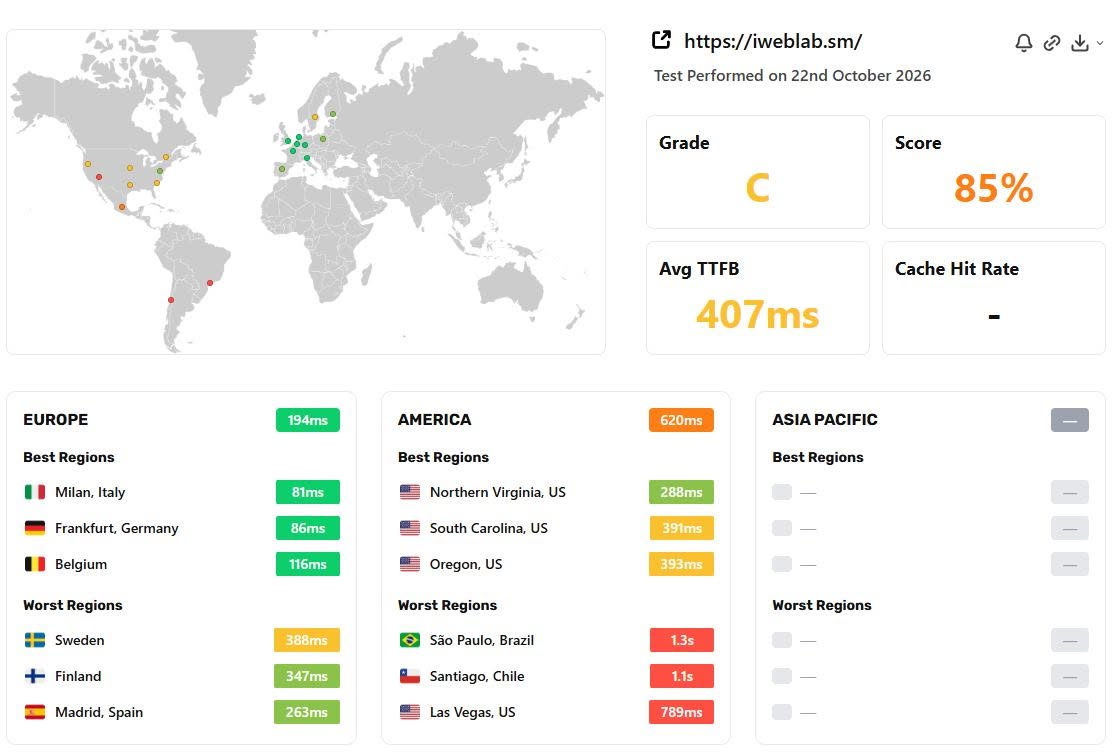
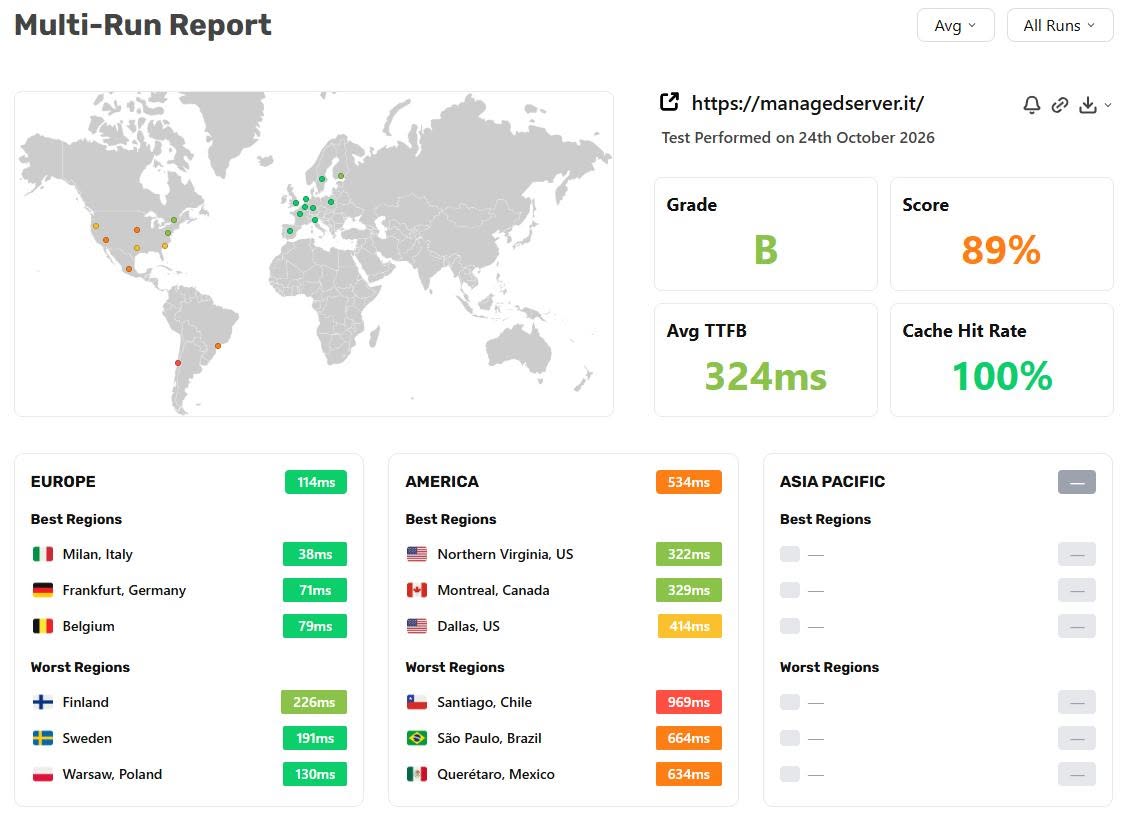
A site with no CDN that answers in Europe almost twice as fast as a site served by a network that, on your site, “keeps pages cached on its nodes and delivers them from nearby”. Something doesn’t add up. And it’s not the lab’s fault.
An “Edge network” that doesn’t deliver from nearby
Perhaps the reason is that your home-made CDN routes traffic with GeoDNS instead of anycast, and doesn’t work the way it should. You can see it in the Uptrends test: depending on the location, iweblab.sm resolves to different IP addresses. 95.110.225.107, an Aruba network, from Milan, Rome, Palermo and even Lille. 81.31.156.7, a network registered to Iweblab, from Frankfurt, Salzburg, Prague, Amsterdam, Leipzig and Eindhoven. 40.160.20.191, an OVH network in the United States, from Montreal and New York. With anycast the address would be the same everywhere and the network would pick the nearest node. Here DNS decides, with all the limits that implies.
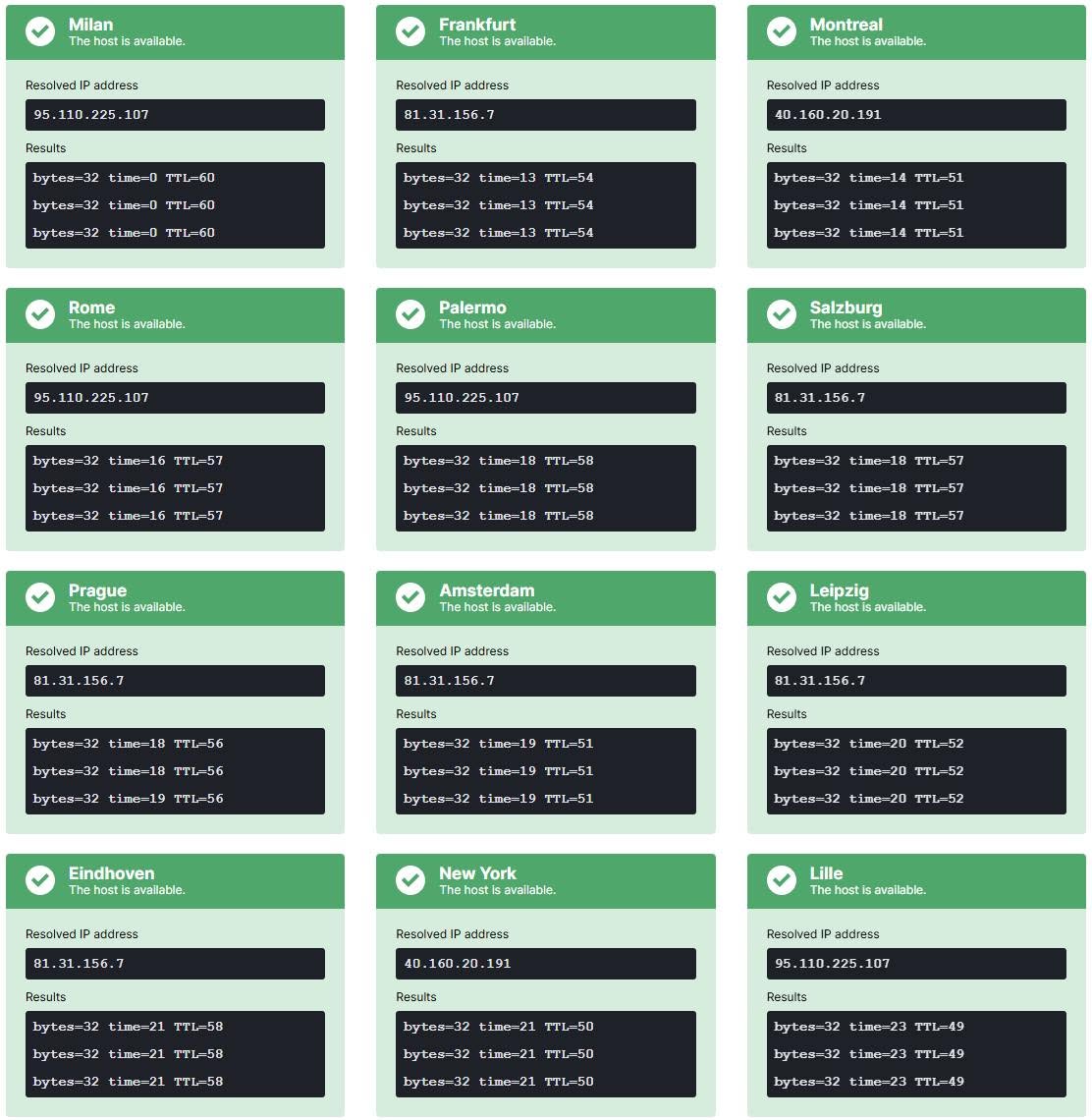
There is an even more telling detail. The ping to those nodes is very low: 13 ms from Frankfurt, 18 from Prague, 21 from New York. Yet the TTFB measured from Frankfurt is 86 ms and from Northern Virginia 288 ms. If the network takes about twenty milliseconds to reach the node, the rest of the time isn’t lost in the cables: it’s lost in the node, or behind the node, when the page isn’t cached and has to be requested from the origin.
Confirmation comes from your own “Googlebot Map” dashboard (the «Mappa Googlebot» in the screenshot). 90% of Googlebot’s requests go through the Vint Hill POP, in Virginia, the same OVH data center that Montreal and New York point to. Cache hit rate: 58.7%. Average TTFB: 241 ms. In the post you attribute them “only to the ocean in between”. But between Googlebot, which arrives from the United States, and a POP in Virginia there is no ocean. It shows up when the POP doesn’t have the page and has to ask for it in Europe: judging by that dashboard, about four times out of ten. The ocean isn’t a geographic fatality: it’s the symptom. The cause is the cache.
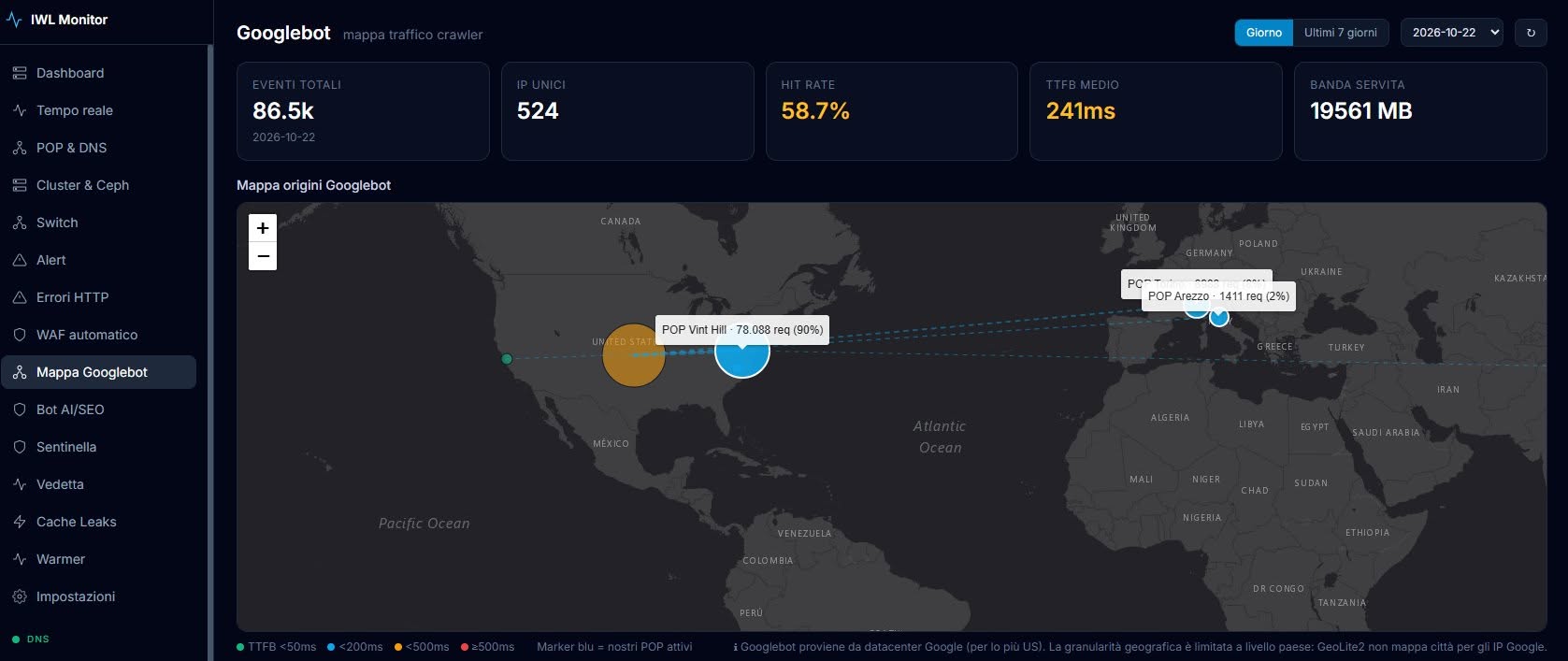
And this isn’t a cosmetic detail: in the crawl budget documentation Google explains that if a site’s response times get longer, the crawl limit goes down and Googlebot crawls less. Googlebot is not a Chrome user: here CrUX saves nobody.
The tempura shrimp
Let’s be clear: we admire anyone who tries to do things, whatever they are. A couple of months ago we decided to make tempura shrimp. We bought the best ingredients, watched and read dozens of videos and guides, full dedication and passion. The result? Inedible. Or rather: fine for us to eat at home, but certainly not to serve in any restaurant, not even the lowliest All You Can Eat.
The problem isn’t trying. The problem is that, faced with numbers like these, you don’t say “OK, actually I’m not ready, there’s work to do, I’m withdrawing the public offer, I’ll keep my head down for a year and come back”. No: you publish a post on WordPress Italia that tries to play it down, distorting even what Google recommends. Let’s see how.
1. “Lighthouse/PageSpeed fails above 600 ms”
Correct. But you’re using a diagnostic threshold to justify performance that can be improved considerably.
Google, in the official PageSpeed Insights documentation, wrote it in black and white: “You should reduce server response time to below 200 ms”. That page belongs to version 4 of PageSpeed Insights, now deprecated, and we say so for fairness. But it shows that Google has always pointed to targets far more ambitious than 600 ms. The 100 ms that the post attributes to Google, on the other hand, appear neither there nor in the Lighthouse documentation.
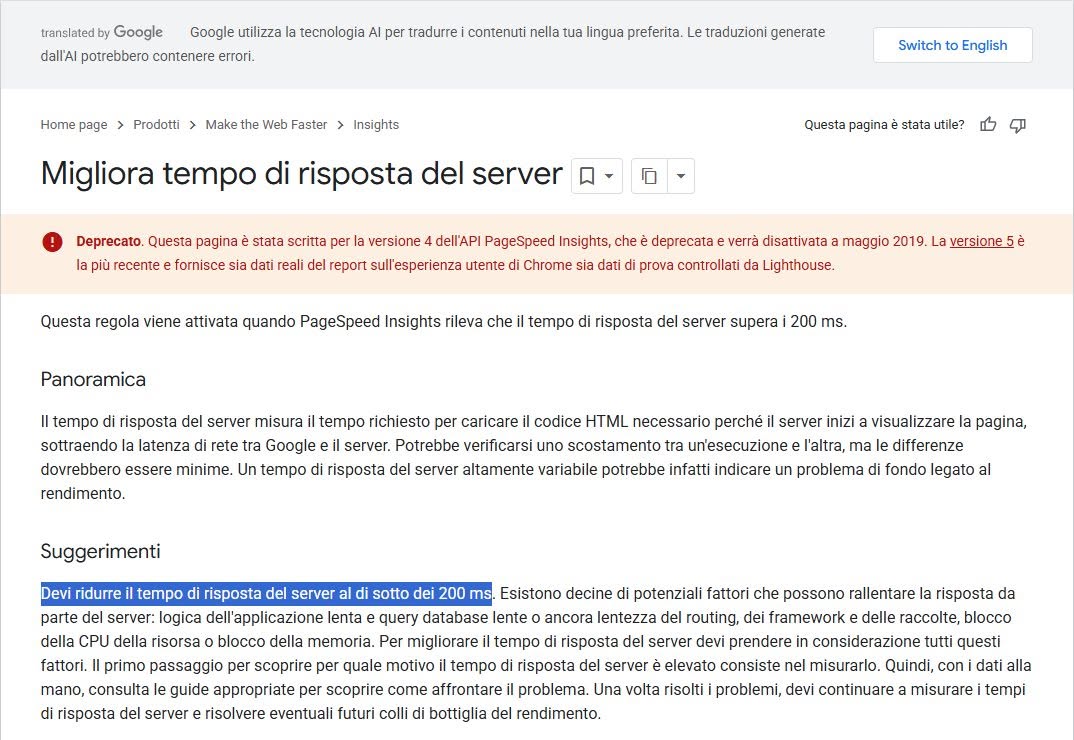
Today Lighthouse flags the problem above 600 ms, while real-user data classifies a TTFB of up to 800 ms as good. But these are three different concepts: optimization recommendations, diagnostic thresholds and statistical classifications of real experience. Confusing them means missing the difference between getting a passing grade and building infrastructure that is truly fast. Especially when we’re talking about broadband connections, geographically close servers and WordPress pages served entirely from cache.
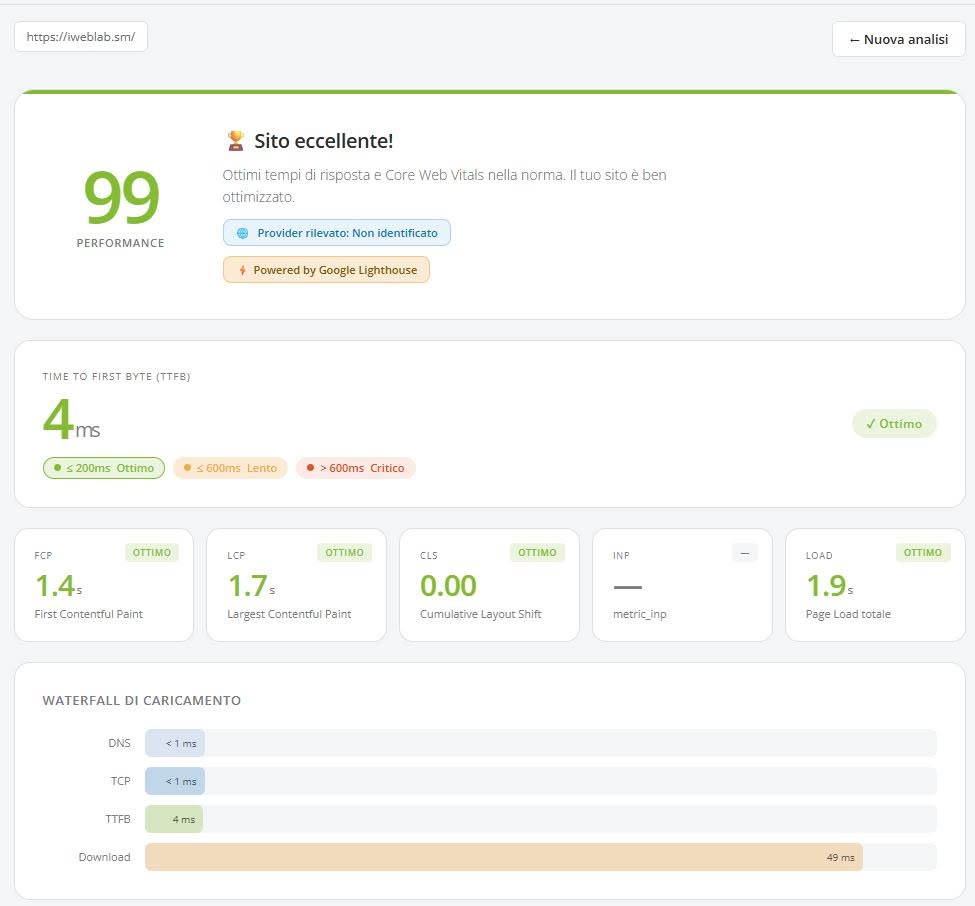
That Google doesn’t flag a problem under 600 ms doesn’t mean at all that a 500 ms TTFB is an excellent result. It only means it didn’t cross that specific diagnostic threshold. And the speed.host.it screenshot attached to the post is the proof by contrast: a single lab test, an empty INP, and the verdict “Core Web Vitals within the norm”.
2. “TTFB isn’t even a Core Web Vital”
It’s perhaps the most worrying claim. Not because it’s false, but because of what it implies.
TTFB is not one of the three official Core Web Vitals, which are LCP, INP and CLS. But it is a fundamental metric that comes before FCP and LCP: every millisecond lost before receiving the first byte is a millisecond less to finish rendering the page. Google itself explains it in its TTFB guide: TTFB precedes the other loading metrics, and the time that accumulates there carries over into all the following ones. Using the fact that it isn’t a Core Web Vital to downplay its importance means not having understood the relationship between the metrics.
The underlying problem is that the post uses statistical thresholds, designed to classify users’ experience, as if they were certifications of the technical quality of a job. They are two profoundly different things. A doctor doesn’t tell you you’re an athlete because your values fall within the normal ranges. In the same way, a sysadmin shouldn’t claim that an infrastructure is particularly fast just because PageSpeed Insights shows a green indicator. And above all, if you publicly sell performance optimization services, you should know this difference perfectly.
CrUX and LABS: two tools, two different questions
The post’s conclusion is that PageSpeed and Lighthouse are for “figuring out what to fix”, but that “the real grade” is CrUX: “100 is nice to show off. Green on CrUX is what counts”. It sounds balanced. In reality it ranks the two data sources, as if one were the grade and the other a hobby for techies. It isn’t so: CrUX and lab data don’t measure the same thing and don’t serve the same purpose. We explain it at length in Why you need both CrUX and LABS; here is the essential.
CrUX answers the question “what happened?”. It collects the real experiences of eligible Chrome users and evaluates the 75th percentile: a metric is good if at least three visits out of four fall within the threshold. But it covers a rolling 28-day window, so it reacts to changes with weeks of delay; it doesn’t include Chrome on iPhone or other browsers; and for many pages, or for low-traffic sites, the data simply isn’t there. Above all, it describes the audience you have today. If nine visitors out of ten browse on fiber with recent smartphones, a page can get excellent values even if, in absolute terms, it’s anything but light.
Lab data answers the question “what could happen, and why?”. It loads the page with a simulated device, network and processor, in controlled and repeatable conditions, and breaks it down: render-blocking resources, excessive JavaScript, long tasks on the main thread, oversized images, request chains that delay the LCP element. And it’s the only one that lets you compare before and after a change in a few minutes, instead of waiting a month. Saying that lab data doesn’t count because it’s synthetic is like saying a crash test is useless because it doesn’t reproduce every possible accident.
Putting the two together shows what neither shows alone: the headroom. Two sites with the same 2-second LCP in real-user data can be one well built and the other fast only because its audience has recent phones and very fast networks. For CrUX they are identical. As soon as a campaign, a spike in mobile traffic or a new market arrives, the first stays within the thresholds, the second doesn’t. A green CrUX with weak lab data isn’t a promotion: it’s a site with little headroom.
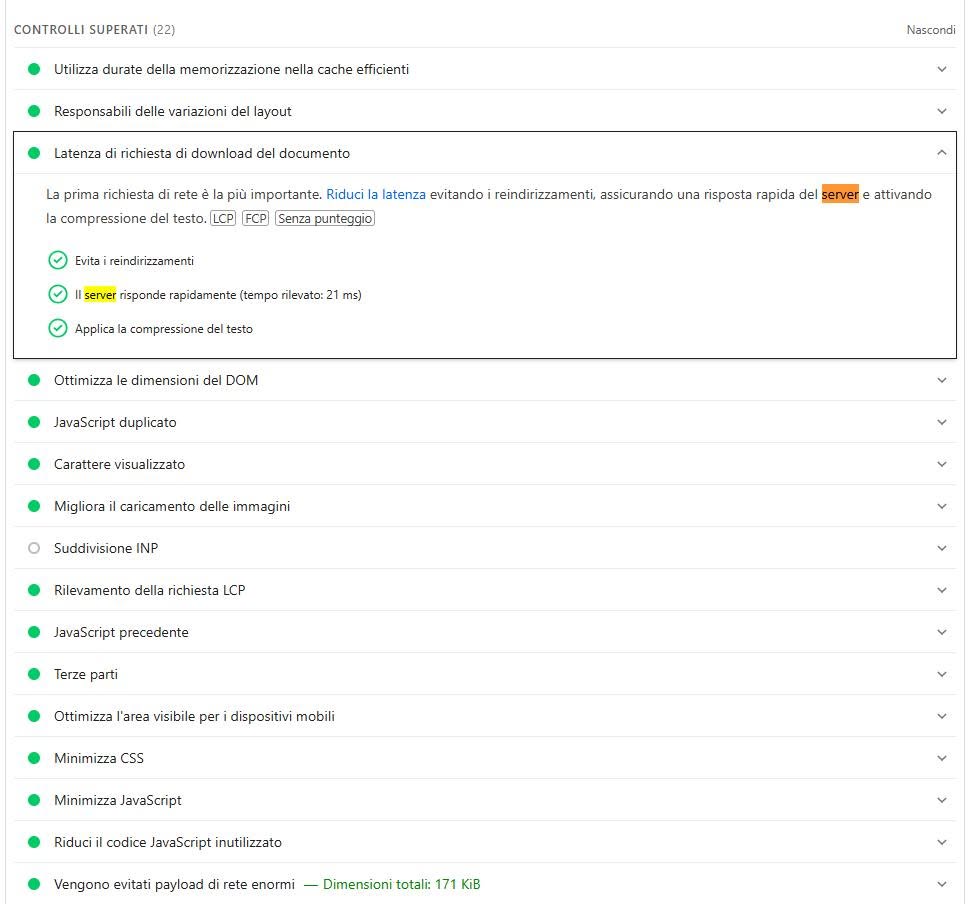
It works the other way around too, and this is where the post stumbles. It claims that INP is empty because “no lab test can measure it”. Google’s INP documentation says that INP can be measured in some lab tools, with a value that depends on the interactions performed during the measurement. In Lighthouse it’s empty because, in navigation mode, it loads the page and clicks nothing; that’s why Google points to Total Blocking Time as the lab reference. And in your own PageSpeed Insights screenshot, among the audits, there is the entry “INP breakdown” («Suddivisione INP»).
CrUX tells you there’s a problem. The lab tells you which one, and immediately verifies whether the fix works. Asking which of the two is “the real grade” is the wrong question: replacing the cult of 100 on PageSpeed with the cult of green on CrUX means changing idol, not method.
A sysadmin lecturing on web performance
And now to the point that, in our view, explains everything else. In the whole post there isn’t a word about JavaScript, CSS, the DOM, images or fonts. It talks about TTFB, thresholds and POPs. It’s the natural perimeter of a sysadmin: Brotli and zstd compression, HTTP/2 and HTTP/3, TLS, caching, server response times. Important things, which we do every day too. But they are a part of performance, not performance.
Core Web Vitals are largely decided in the browser. TTFB is only the first of the four phases into which Google breaks down LCP; after it come the load delay and load duration of the main resource and the render delay, which depend on how the HTML, CSS and images are built. INP depends on the JavaScript occupying the main thread when the user taps the screen. CLS depends on layout, fonts and content inserted late. A 4 ms TTFB doesn’t shorten by a millisecond the execution of 700 KB of JavaScript, doesn’t shrink a DOM of ten thousand nodes and doesn’t stop a banner from shifting the page.
That’s why talking about web performance purely from the sysadmin’s point of view, stopping at zstd, Brotli and TTFB and leaving out all the application-level optimization of DOM, JavaScript and CSS, is limiting. And when it’s done to teach others which data really counts, it’s a clear overstepping of competence. A site’s speed comes from the whole: a fast server is the starting point, an efficient application finishes the job. Anyone who knows only half the chain inevitably ends up saying the other half doesn’t matter.
A difficult subject, even for those who sell it
This affair proves one thing only: web performance is a difficult subject even for insiders, sysadmins and developers included. Diagnostic thresholds mistaken for targets, statistics mistaken for certifications, an ocean blamed where there are cache misses, the lab dismissed as a hobby and the application forgotten altogether. Anyone who has to choose who to trust with their site should demand data from multiple locations, thresholds quoted from the source, an intervention that goes from the server to the browser and an honest before-and-after comparison. That’s what we do. No shortcuts, and no cheating.
Sources: Google, Improve server response time (PageSpeed Insights v4, deprecated); web.dev, Time to First Byte (TTFB); Chrome for Developers, Lighthouse: server response time; web.dev, Optimize Largest Contentful Paint; web.dev, Interaction to Next Paint (INP); Google Search Central, Managing your crawl budget; iWebLab, iWebLab Cache. IP address ownership verified via whois. The iweblab.sm images are the screenshots attached to the original post and to the public tests cited, reproduced for the purpose of commentary.
