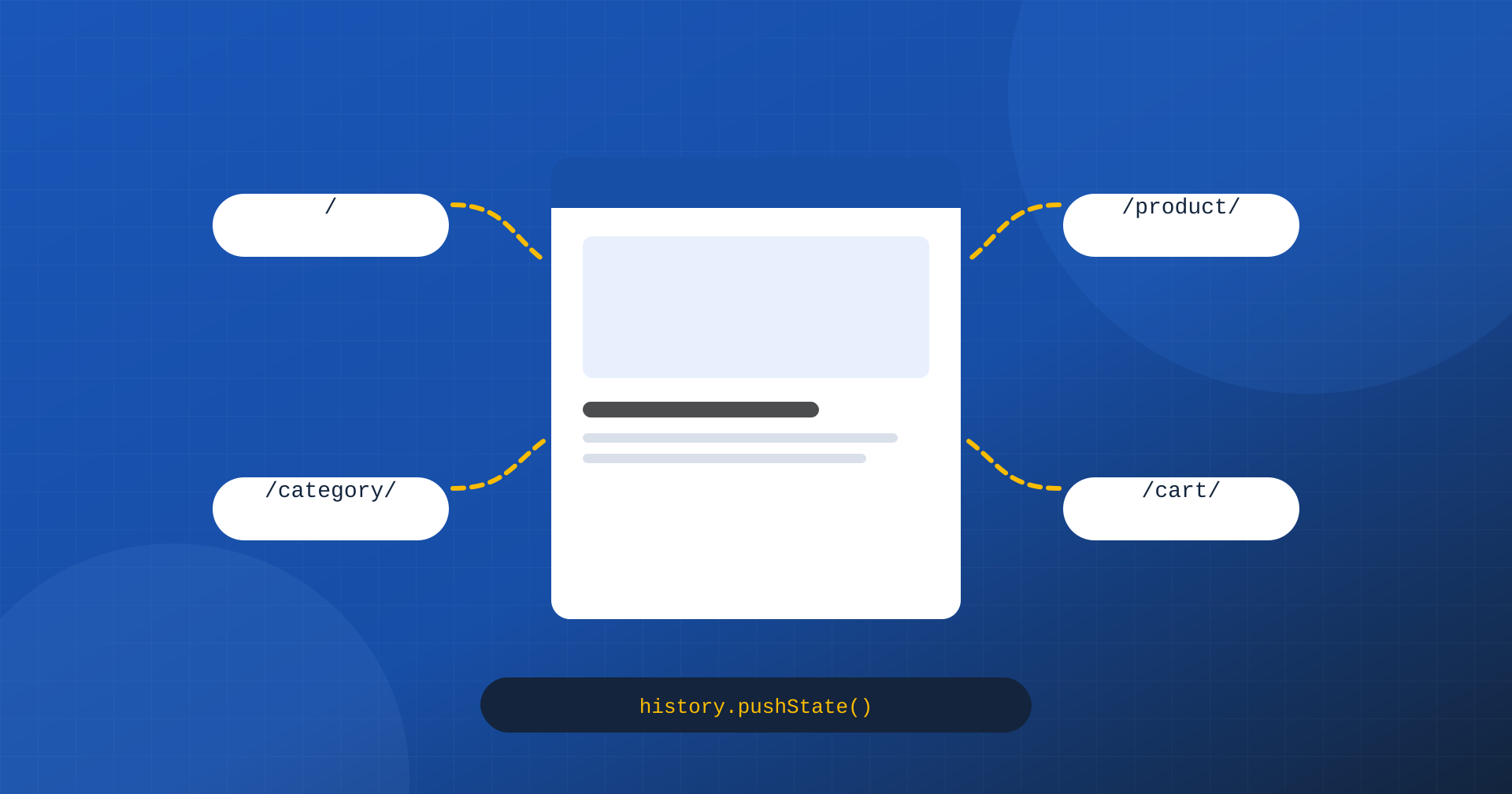
Over the last fifteen years a growing share of the web has been built as Single Page Applications, or SPAs: applications that load a single HTML page and then handle all navigation with JavaScript, changing content and address without ever reloading the page. React, Vue, Angular, Svelte and the frameworks built on top of them, such as Next.js and Nuxt, have become the standard tools for many projects, including sites that would once have been built with a traditional CMS. Even in the WordPress world the “headless” approach, with WordPress as the content source and a JavaScript front end, is increasingly common.
Core Web Vitals, however, were designed with the traditional model in mind, where every click on a link loads a new page. Applied to an SPA they produce unexpected effects: metrics that only measure the first page, values that accumulate over the whole session, big differences between what the user perceives and what the data reports. In this article we look at how the metrics behave in SPAs, what the typical performance problems of this model are, how modern frameworks deal with them and how to really measure the experience.
“Hard” and “soft” navigations
On a traditional site, every click on a link produces a full navigation: the browser asks the server for a new page, discards the previous one and builds the new one from scratch. Each navigation has its own LCP, its own CLS and its own INP, measured and attributed to the address of that page. This is the model Core Web Vitals were designed for, and the one the Chrome UX Report is based on.
In an SPA, only the first visit is a full navigation, called “hard”. Later clicks are “soft” navigations: JavaScript intercepts the click, downloads the data it needs, updates part of the page and changes the address with the History API, through history.pushState(). For the user the experience is that of a new page; for the browser, from the point of view of the metrics, it is always the same page changing its content.
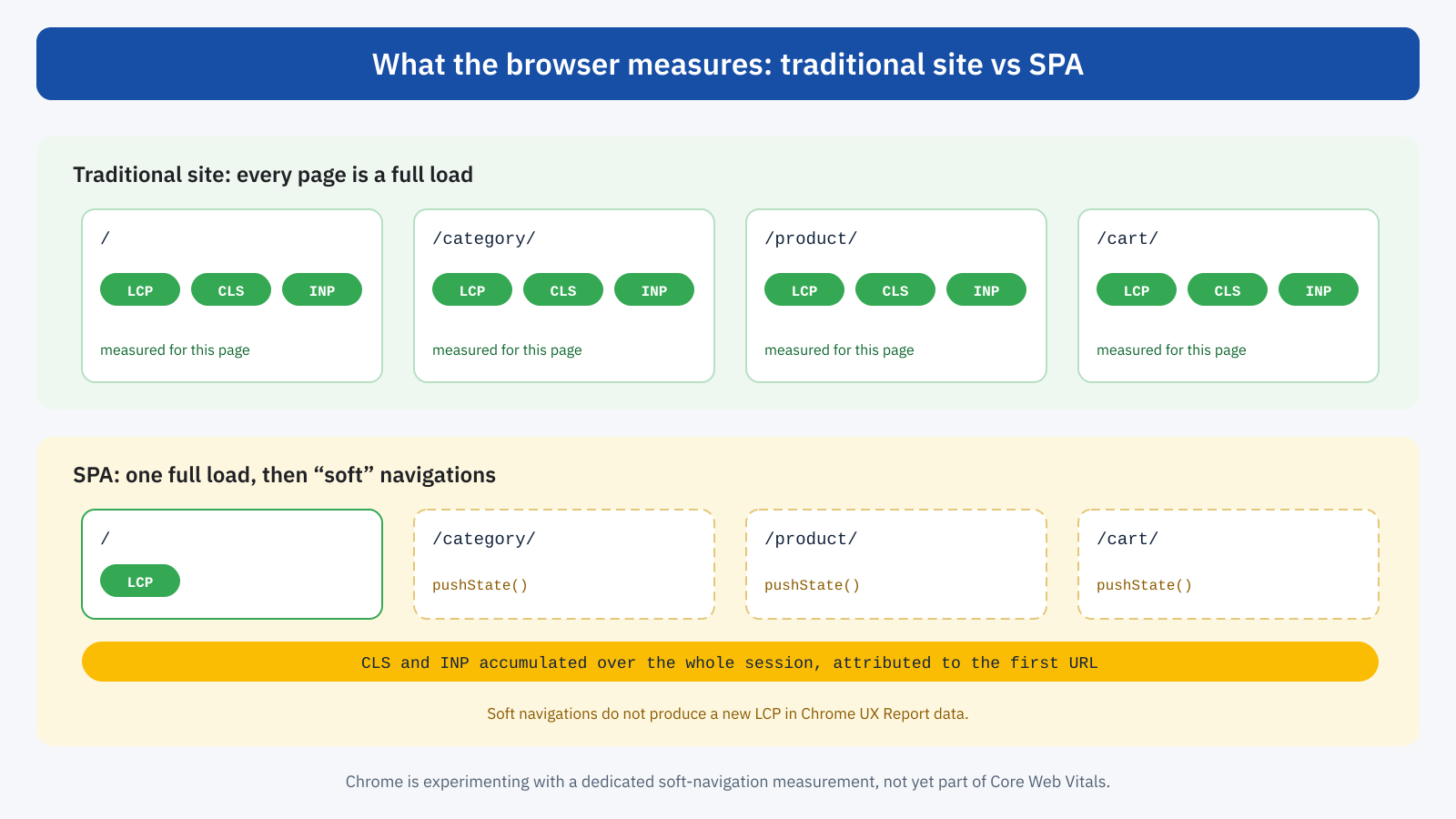
There are three consequences for the metrics. LCP is measured only on the first page: soft navigations, even slow ones, do not produce a new LCP in the field data. CLS and INP, on the other hand, are observed for the whole life of the page, that is for the user’s whole session in the SPA, and attributed to the address the session started with. A user who enters from the home page, browses categories and products for ten minutes and runs into a slow interaction in the cart contributes that slow INP to the home page’s data.
The result is a picture distorted in two directions. On one side, the LCP of SPAs tends to look better than the overall experience really is, because later navigations, which the user perceives as loads, are not measured. On the other, the CLS and INP of landing pages tend to look worse, because they collect problems that happen elsewhere and over very long sessions.
Measuring soft navigations
The problem is well known, and the Chrome team has long been working on a solution: a mechanism that recognizes soft navigations, when a user interaction changes the address and significantly updates the content, and treats them as navigations in their own right, with their own LCP, CLS and INP. The mechanism has been trialled in several phases and the web-vitals library offers experimental support for it. At the time of writing, however, it is not part of the official Core Web Vitals, it is not used in the Chrome UX Report and it does not affect Google’s assessment.
Until it becomes a standard, whoever runs an SPA has two complementary options: measure soft navigations themselves, with a Real User Monitoring system that records the time between the click and the completion of the update, and interpret the official data knowing what it includes and what it leaves out.
// Simplified measurement of a soft navigation
router.beforeEach( () => {
	performance.mark( 'navigazione-inizio' );
} );

router.afterEach( async () => {
	await new Promise( ( r ) => requestAnimationFrame( () => setTimeout( r, 0 ) ) );
	performance.mark( 'navigazione-fine' );
	const m = performance.measure( 'navigazione-soft', 'navigazione-inizio', 'navigazione-fine' );
	invia( { nome: 'soft-nav', valore: m.duration, pagina: location.pathname } );
} );
The first load: client-side rendering
The most classic performance problem of SPAs concerns the first page. In its simplest form, client-side rendering, the server sends an almost empty HTML document, with a container and a reference to a large JavaScript file. The browser has to download that file, parse it and run it; the code has to request data from an API, wait for the response and only then build the page. Until that moment the user sees a blank page or a loading skeleton.
On a fast computer with a good connection the chain can seem quick; on a mid-range smartphone, with hundreds of kilobytes of JavaScript to run, LCP can easily exceed three or four seconds. The browser, moreover, cannot discover the main image in advance, because it does not exist in the HTML: it is inserted by JavaScript at the end of the chain, and none of the optimizations covered in the article on LCP, from the preload scanner to high priority, can take effect.
Server-side rendering and hydration
The answer of modern frameworks is server-side rendering: the server runs the same application code, produces a complete HTML document and sends it to the browser, which can display it right away. The content and the main image are in the document, and LCP becomes comparable to that of a traditional site again. When pages can be generated in advance, at publication time, we talk about static generation, with even better results.
But the HTML generated on the server is only a picture of the page: to make it interactive, the browser still has to download and run the application’s JavaScript, which rebuilds the state of the components in memory and attaches the event handlers to the existing elements. This process is called hydration, and on complex pages it can take hundreds of milliseconds of work on the main thread.
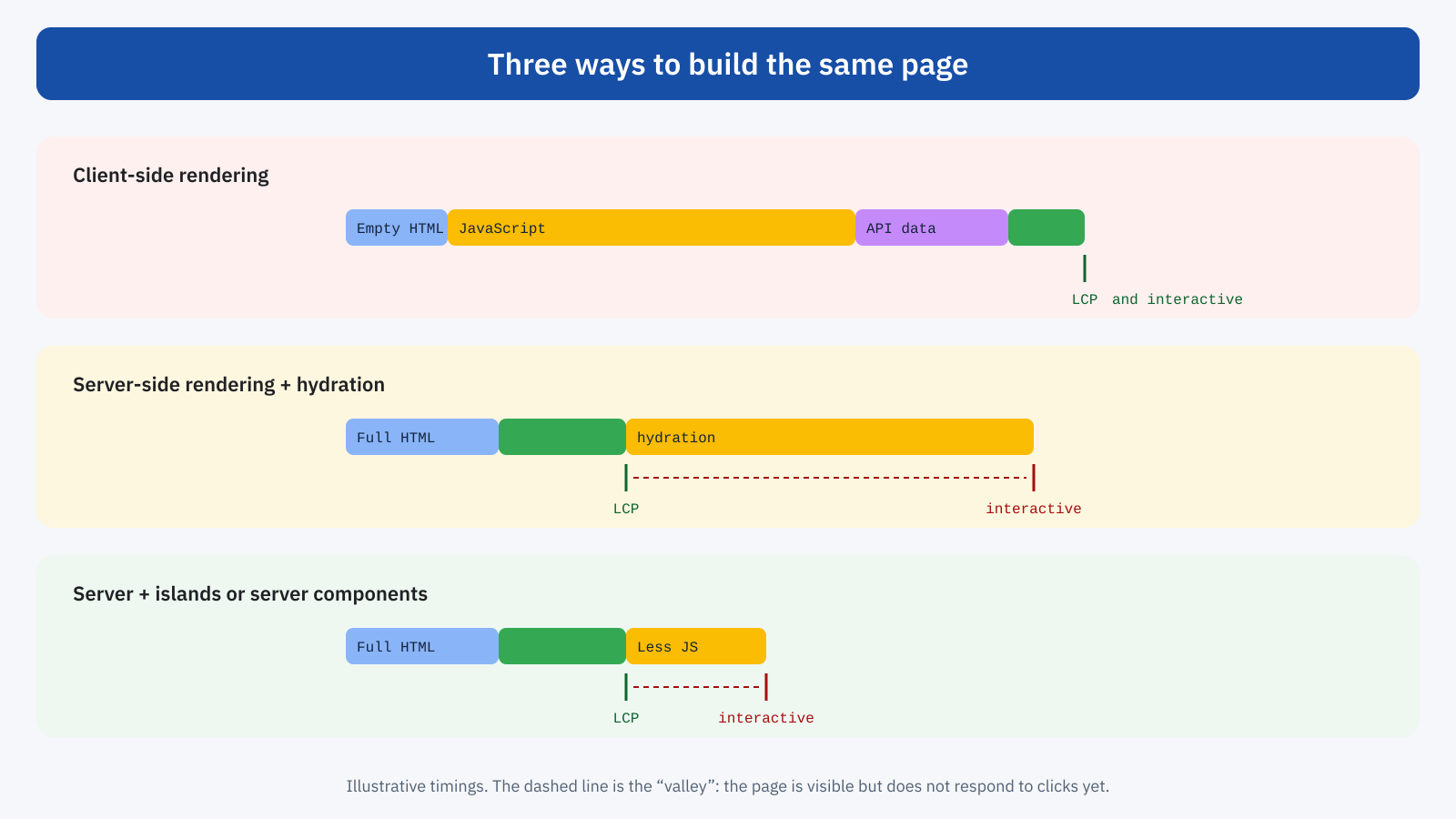
Between the moment the page is visible and the moment it is interactive, a sort of valley opens up: the user sees buttons and menus, taps them, but nothing happens, or the response arrives very late because the main thread is busy with hydration. This scenario directly worsens INP, and it is particularly frustrating because the page looks ready.
The answers of modern frameworks
In recent years frameworks have developed several strategies to reduce the cost of hydration, with one common principle: send the browser less JavaScript.
- Islands architecture. Frameworks such as Astro generate fully static pages and make only the parts that need it interactive, the “islands”, such as a cart or a search form. The rest of the page is not hydrated and requires no JavaScript.
- Server components. React Server Components, used for example by Next.js, allow some components to run on the server only: their code is never sent to the browser, and only the interactive components are hydrated.
- Progressive and selective hydration. Several frameworks hydrate first the components that are visible or that the user interacts with, and defer the rest.
- Resumability instead of hydration. Approaches like Qwik’s avoid hydration altogether: state is serialized into the HTML and a component’s code is downloaded only when needed, on the first click.
- Streaming. The server sends the HTML in chunks, as the data becomes ready, so the browser can show the fast parts of the page immediately without waiting for the slower ones.
None of these strategies is automatic: a Next.js application can be featherlight or very heavy depending on how it is written. But the right framework, used with awareness, makes it possible to achieve performance comparable to that of a good traditional site even with a modern architecture.
The problems of soft navigations
The advantage SPAs promise is smooth navigation: no reloads, fast transitions, preserved state. It is a real advantage when the application is well built, but several common practices cancel it out.
- Request waterfalls. The new page’s component is loaded, then it requests its data, then the child components request more data. Each step waits for the previous one, and the soft navigation can take longer than a full load. The solution is to load code and data in parallel, as early as on hover or click.
- Layout shifts. The new page appears in pieces, first the structure, then the images without dimensions, then the data: each arrival moves the content, and these shifts add up to the session’s CLS.
- No feedback on click. If the click starts loading but the page does not change until everything is ready, the user cannot tell whether the click worked. Immediate feedback, even just a loading indicator, improves perception and INP.
- Memory and long sessions. Components that are not removed properly, event listeners that pile up, data held in memory and never released: in long sessions the application gradually slows down, and every interaction gets heavier.
- Scroll position and focus. After a soft navigation the page has to return to the top, and focus has to move consistently for people using a keyboard or a screen reader. When this does not happen, the experience degrades even if the metrics look good.
The headless WordPress case
An increasingly common architecture uses WordPress only as a content management system, with content exposed through the REST API or GraphQL, and a separate front end built with a JavaScript framework. The claimed benefits are flexibility, security and performance. Performance, however, depends entirely on how the front end is built: a headless site with static generation and little JavaScript can be extremely fast; one with client-side rendering and a large application bundle can be much slower than the traditional WordPress site it replaced.
Before choosing this route for performance reasons, it is worth comparing it with what a well-optimized traditional WordPress site can already offer: page cache, a lightweight theme, few scripts, and the modern techniques that make navigation between pages almost instant even without an SPA.
The alternative: traditional pages with modern tools
One of the original reasons for choosing an SPA was the smoothness of transitions between pages. Today the browser offers tools that make this smoothness possible even with traditional pages, without the costs of a JavaScript application. Speculation Rules let you load the next page in advance and open it instantly; the back/forward cache makes going back to visited pages immediate; cross-document View Transitions, supported in recent browsers, allow smooth animations between one page and the next with a few lines of CSS.
/* Animated transitions between traditional pages, without JavaScript */
@view-transition {
	navigation: auto;
}

.copertina-articolo {
	view-transition-name: copertina;
}
For many content sites, catalogs and business sites, the combination of traditional pages generated on the server, efficient caching, prerendering and animated transitions offers an experience comparable to that of an SPA, with metrics measured correctly for every page and far less JavaScript. SPAs remain the natural choice for real applications, such as dashboards, editors and tools with a lot of state shared between screens.
How to measure an SPA
To assess an SPA correctly you need several layers of measurement. Chrome UX Report data remains the reference for the first load and for how Google sees the site, but it must be read knowing that CLS and INP include the whole session. A RUM system should record separately the metrics of the initial navigation and the duration of soft navigations, with the destination address, and for INP the element and the page where the interaction happened, not just the entry address.
In lab tests, besides the initial load, it is worth recording a few typical navigations with the DevTools Performance panel, with CPU throttling on: clicking a product from the category, adding to the cart, moving to checkout. These are the moments when the user judges how smooth the application is, and traditional tests, focused on the first load, do not see them.
In short
Single Page Applications change the way Core Web Vitals describe the experience: LCP measures only the first load, while CLS and INP accumulate over the whole session and are attributed to the entry page. Chrome is working on a dedicated measurement for soft navigations, but for now whoever runs an SPA has to supplement the official data with their own measurements.
On the performance side, client-side rendering penalizes the first load, server-side rendering solves it but introduces the cost of hydration, and modern frameworks reduce it by sending less JavaScript with islands, server components and selective hydration. For many content sites, though, the simplest route to a smooth experience today goes through traditional pages enriched with prerendering, the back/forward cache and View Transitions: the smoothness of an SPA, with the lightness and measurability of a classic site.
