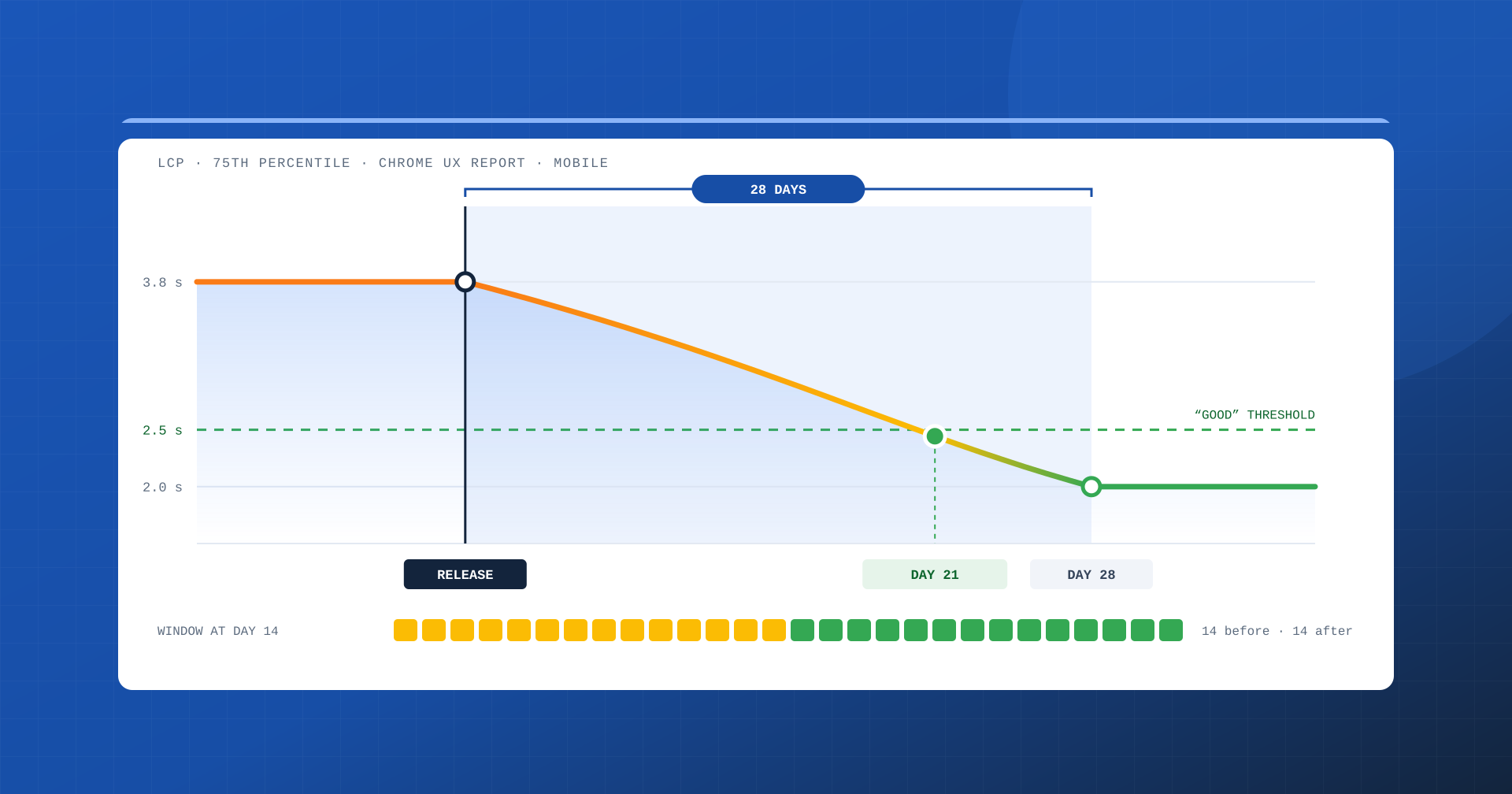
The release went well: the lab confirms an LCP cut in half, internal monitoring shows much faster pages. And yet, the next day, PageSpeed Insights still reports the same red numbers in the real-user section as a week earlier. It is not a bug and it does not mean the change did not work: it is the effect of the 28-day window with which the Chrome UX Report aggregates user data. Understanding how it works avoids wrong decisions, unrealistic expectations and more than one pointless argument with clients and colleagues.
What the Chrome UX Report is
The Chrome UX Report, CrUX for everyone, is the public dataset Google uses to collect the performance experienced by real Chrome users. Contributing are the browsers of people who have turned on history sync and usage statistics reporting, on desktop and on Android. The data is aggregated by origin, meaning the whole site, and by individual URL when the page has enough traffic, distinguishing between mobile, desktop and tablet devices.
For each metric, such as LCP, INP, CLS or TTFB, CrUX reports the distribution of experiences and the value at the 75th percentile: a page passes the assessment only if at least three visits out of four fall within the “good” threshold. This is the data that appears in the “Discover what your real users are experiencing” section of PageSpeed Insights and in the Core Web Vitals report in Search Console, and that Google uses as a page experience signal.
Two limits should be kept in mind from the start. The first: not all users are represented. Chrome on iOS does not contribute, nor do other browsers, so the iPhone audience of a fashion e-commerce site or a news publisher is effectively absent from the sample. The second: below a certain traffic threshold CrUX does not publish data for the URL, and PageSpeed Insights falls back to the values for the whole origin or states that the data is insufficient.
How the rolling window works
The CrUX data shown by PageSpeed Insights and returned by the CrUX API does not describe a single day, but the last 28 days. Every day the window moves forward: the most recent day comes in, the one from four weeks earlier drops out, and percentiles and distributions are recalculated over the whole set. It is a moving average, and like all moving averages it has a strength and a weakness.
The strength is stability: a spike of slow traffic on a single day, a temporary problem with an external provider or a weekend with a different audience do not upend the assessment. The weakness is inertia: any change, for better or worse, takes weeks to show up fully.
There are other views of the same data, with different timing. The dataset published on BigQuery is monthly and covers the previous calendar month. The CrUX History API instead returns a time series of 28-day windows sampled every week, useful for observing the trend over time. Search Console, finally, uses the same data, grouping similar URLs.
The level at which you read the data matters too. The origin value sums all the site’s pages in proportion to their traffic: in an e-commerce site it will be dominated by the home page, categories and product pages, in a news publisher by the day’s articles. A change to a little-visited page template can therefore greatly improve the individual URL and barely move the overall figure. Conversely, a slowdown of only the most-visited page template shifts the whole origin. Before judging a result, it is always worth asking what share of traffic that change actually touched.
Why improvements arrive gradually
Imagine a change that brings the LCP of mobile visits from 3.8 to 2.0 seconds at the 75th percentile, released in a single day with constant traffic. The day after the release, the window contains only one “new” day and twenty-seven “old” ones. After a week the ratio is one quarter to three quarters. Only on the twenty-eighth day does the window contain exclusively visits after the change.
The 75th percentile of a mixed distribution does not fall in an intuitive way. With realistic distributions the trend looks like this:
| Days since release | New visits in the window | Reported LCP p75 |
|---|---|---|
| 0 | 0% | 3.8 s |
| 7 | 25% | 3.4 s |
| 14 | 50% | 3.0 s |
| 21 | 75% | 2.4 s |
| 28 | 100% | 2.0 s |
The most important data is in the third column: the 2.5-second “good” threshold is only crossed around the third week, even though from day one every visit is already fast. For a good two weeks the report will keep showing a page that “needs improvement”. Anyone who does not know the mechanism risks concluding that the change had no effect, looking for nonexistent causes or, worse, reverting a correct change.
Regressions follow the same rule
The inertia works in both directions, and this is where the window becomes dangerous. A new plugin, a marketing script added in a hurry or a theme update that worsens INP does not show up in CrUX data the next day. The assessment stays green for days while a growing share of users experience a slower site. By the time the regression becomes evident in the report, the problem has been in production for two or three weeks, and fixing it will take another four weeks to be fully visible.
In business terms it means up to two months in which conversions and visibility can be penalized by a problem born in a single afternoon. That is why CrUX cannot be the only control tool: it is the final judge, but it always arrives late.
When the numbers change without touching the code
There is another effect that often surprises people: CrUX values can get worse or better without any release. The reason is that the window measures the experiences of the real audience, and the audience changes. A social campaign that brings many visits from budget smartphones, a sales period with load peaks on the server, traffic arriving from a country far from the data center or a particular seasonality all change the distribution even if the site stays the same.
Reading the data without knowing the commercial calendar leads to wrong conclusions. A worsening LCP that coincides with a campaign on a new audience is not necessarily a technical problem; an improvement during a month of mostly desktop traffic is not necessarily due to a change you made.
Search Console and fix validation
The Core Web Vitals report in Search Console inherits the same logic. It groups URLs with similar experiences and assigns each group the status “good”, “needs improvement” or “poor”. When you fix an issue you can start fix validation: from that moment Search Console observes the data for a 28-day period and only at the end confirms, or rejects, the resolution.
The practical advice is to start validation only when the fix is truly complete and verified, because a new release during the observation period can put the result back in question. And, in the meantime, avoid interpreting the weeks when the status stays unchanged as a failure.
How to work with the window, not against it
The 28-day window is not an obstacle to get around, but a constraint to take into account in the way you work. In practice we use three levels of observation, each with its own response time:
- Lab, before the release. Lighthouse and synthetic tests check in a few minutes that the change produces the expected effect and does not introduce obvious regressions. They say nothing about real users, but they are the quickest filter.
- Real-user monitoring, from the same day. A RUM system, even one based on the open source
web-vitalslibrary, collects metrics from visitors’ browsers, including those CrUX does not see, and lets you compare visits before and after a release within the first hours. It is the level that catches regressions before they become a business problem. - CrUX, as final verification. The official data confirms the result once the window has renewed. The CrUX History API lets you follow the trend week by week and compare like-for-like windows, without relying on a single PageSpeed Insights reading.
To these three levels we add a simple but valuable habit: noting the dates of every release, every new third-party script and the main campaigns. When a curve changes slope, knowing what happened three weeks earlier saves hours of investigation.
How to communicate it to decision makers
A good part of the friction in performance projects comes from a wrong expectation: “we released, so why is PageSpeed still red?”. Clarifying the timing of the window in advance turns a moment of tension into an expected step of the project. In our work plans we always indicate three dates: the release, the first feedback on RUM data and, at least four weeks later, the date on which we will present the official comparison on CrUX.
The same goes for results: a correct comparison puts two complete windows side by side, one entirely before and one entirely after the change, on the same type of device. Comparing a PageSpeed Insights screenshot from the day before with one from the day after, in either direction, proves nothing.
In summary
CrUX field data is the most reliable measure of real experience, but it always describes the last 28 days. An improvement only shows up in full after four weeks and often crosses the threshold around the third; a regression stays hidden for days and weighs on results for weeks. The audience, moreover, changes even when the code does not, and some users, starting with those on iPhone, do not appear at all.
Working well with this window means combining the lab, real-user monitoring and CrUX, each with its own role, and giving decision makers clear expectations about timing. The result does arrive: you just need to know when to look at it.
