Anyone who invests in paid advertising measures everything: impressions, clicks, cost per click, conversion rate, cost per acquisition. Rarely do they measure with the same care what happens in the seconds between the click on the ad and the moment the landing page becomes usable. Yet that is where part of the budget is lost: users who clicked, and for whom the advertiser paid, but who leave before seeing the offer. And page speed also enters into the assessment that advertising platforms make of the landing page, with effects on the cost of clicks.
In this article we look at how landing page speed affects campaign results, what we know about its role in the Google Ads Quality Score, which technical problems are typical of landing pages and how to measure them.
The paid click that never arrives
When a user clicks on an ad, the platform records the click and charges for it. From that moment the landing page starts loading. If the page takes several seconds to show anything, some users go back before seeing it: on a smartphone, on a mobile connection, inside the built-in browser of a social app, patience is limited. For the advertiser those clicks are costs with no chance of converting.
The phenomenon is visible in the data, if you know where to look. In the advertising platforms of social networks, for example, the difference between link clicks and landing page views, recorded only when the page’s pixel manages to load, is largely made up of users who abandoned during loading. In analytics tools, the same phenomenon appears as a difference between the clicks recorded by the advertising platform and the sessions attributed to the campaign, although other factors come into play here, such as cookie consent and tracking blockers.
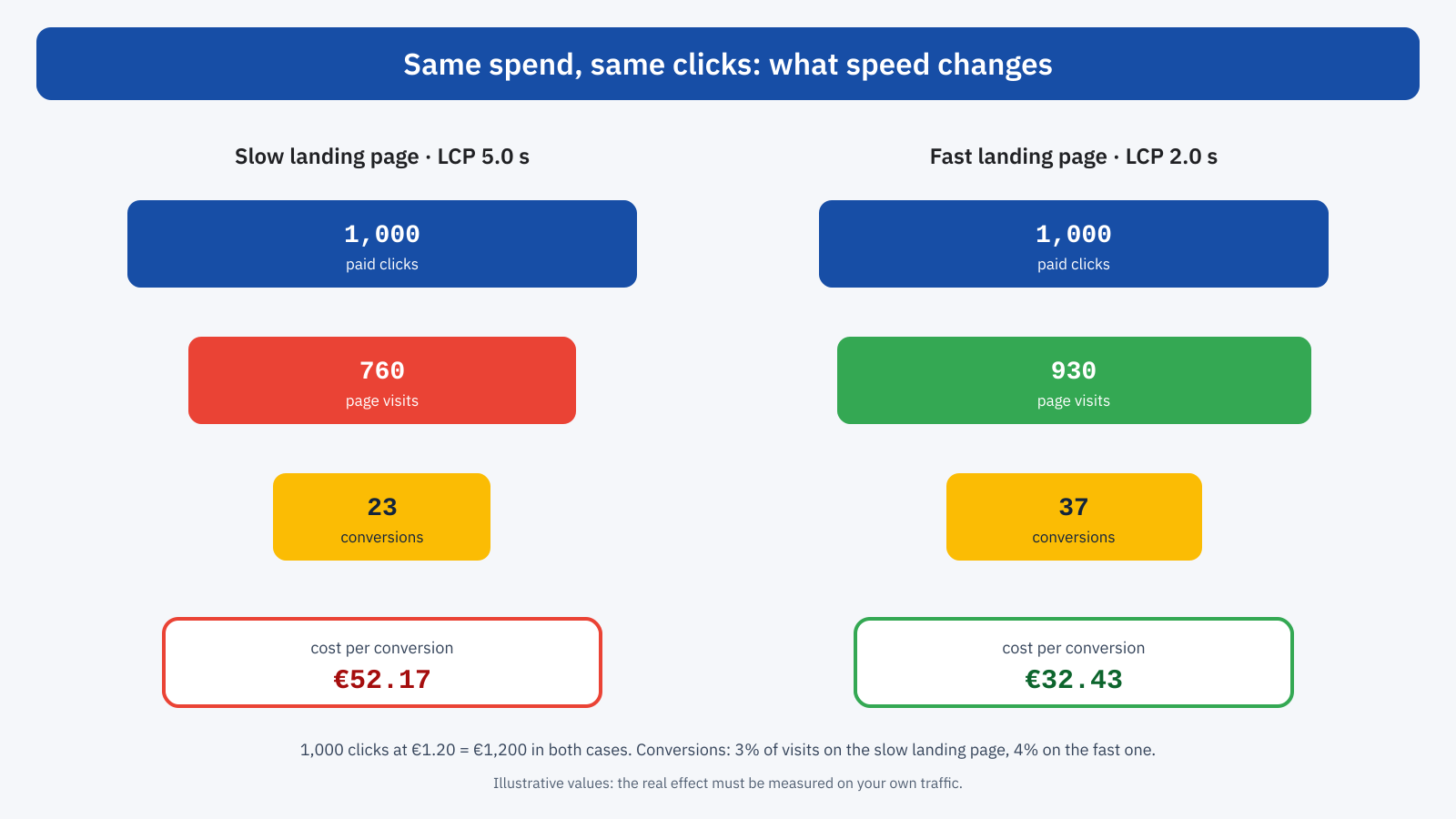
Speed acts on two levels. The first is how many users actually get to see the page. The second is how many of them convert: a page that responds slowly to taps, that shifts buttons just as the user is about to press them, that shows a form late, loses conversions even among those who arrived. As we saw when discussing the economic return of speed, the two effects multiply, and in paid campaigns the result can be read directly in the cost per acquisition.
Quality Score and landing page experience
In Google Ads, Quality Score is a rating from 1 to 10 assigned to each keyword, which sums up three components: expected click-through rate, ad relevance and landing page experience. Each component is rated as above average, average or below average. The score is a diagnostic tool: in the auction, Google uses quality assessments calculated in real time for every search, but these are based on the same factors. Better quality earns better positions for the same bid, or the same positions at a lower cost per click.
Landing page experience assesses how useful and relevant the page is to the person clicking: the match between ad and content, the clarity of the information, transparency, ease of navigation on mobile devices, and loading time. The Google Ads documentation explicitly lists loading speed, especially on mobile, among the things to work on to improve this component.
It is important not to overstate the weight of speed. Google does not publish the score’s formula, and speed is one of several factors in page experience, which in turn is one of three components. A very fast page that is poorly matched to the ad will not earn a good score. The right way to read the relationship is different: a slow page is an avoidable drag, both on the platform’s assessment and, above all, on user behavior, which is what ultimately determines the cost per conversion. The same goes for other advertising platforms, which use similar quality assessment systems.
Typical landing page problems
Campaign landing pages have characteristics that make them more exposed to performance problems than other pages on the site.
Parameters that bypass the cache. Every click on an ad adds one or more parameters to the URL: gclid for Google Ads, fbclid for Meta, msclkid for Microsoft Advertising, plus the utm_ parameters used for analytics. The value of gclid and the other identifiers is different for every click. If the page cache treats every different URL as a different page, every campaign visitor finds an empty cache: the server has to generate the page from scratch, and TTFB goes from a few tens of milliseconds to almost a second. It is one of the most frequent and least known problems: the page seems fast when you test it by typing in the address, and is slow precisely for the users you are paying for.
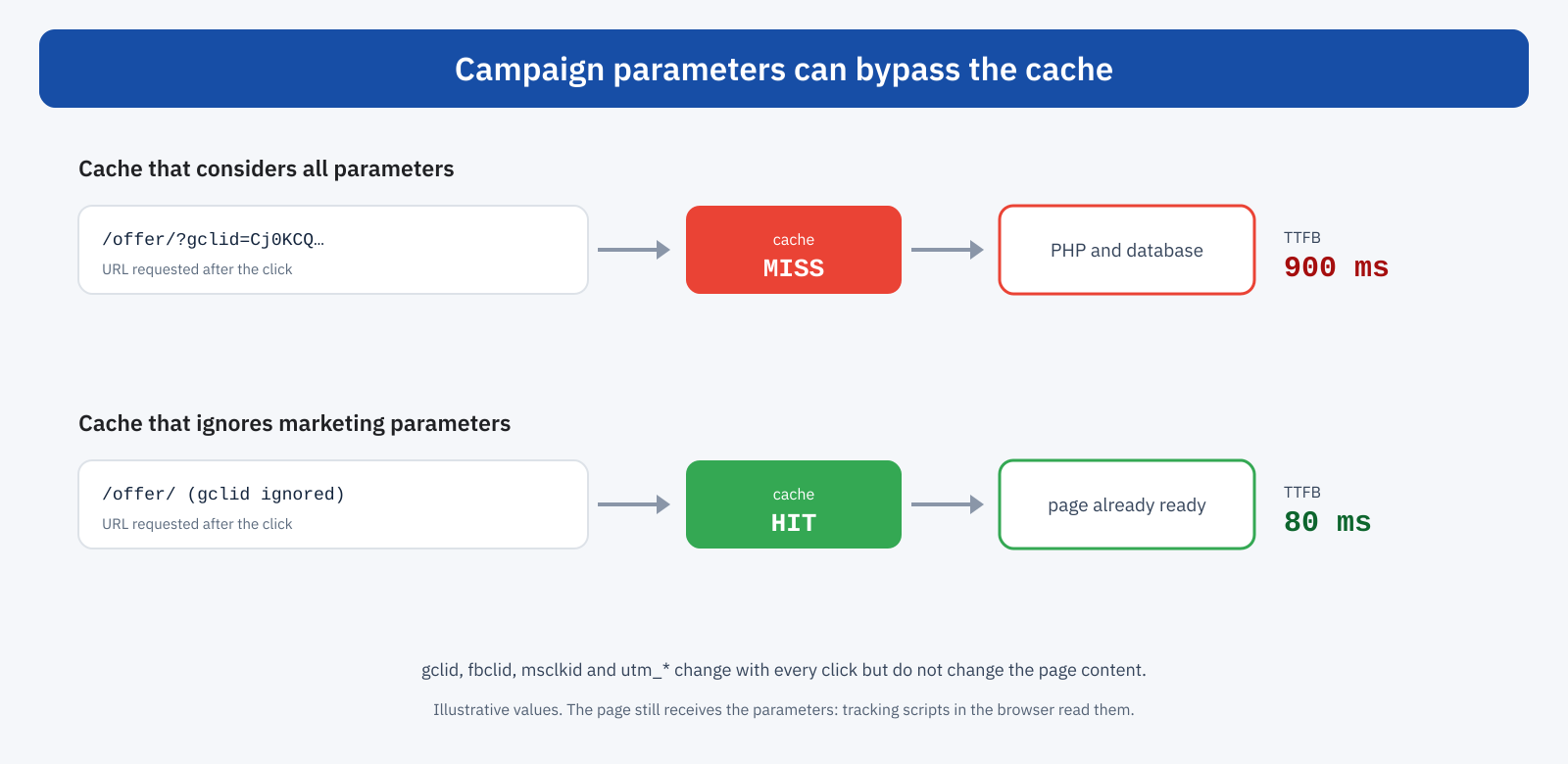
The solution is to configure the cache, on the CDN or the server, so that it ignores these parameters when deciding which page to serve. The page still receives the full URL in the browser, and tracking scripts can read the parameters as before. Many WordPress cache plugins and many CDNs have a ready-made list of parameters to ignore, but it is worth checking: parameters of less common platforms or custom ones are easily missing.
Pixels and marketing tools. Landing pages are often the pages with the most tracking scripts on the site: pixels for every platform you run campaigns on, behavior analysis tools, chat, A/B testing tools. Each adds work on the main thread, as seen in the pieces on third-party scripts and analytics tools. A/B testing tools deserve particular attention: some hide the page until they have applied the variant, to keep the user from seeing the change, and so directly delay LCP.
Page builders. Landing pages are often built quickly with visual builders or dedicated platforms, which favor build speed over loading speed: very large DOMs, generic CSS and JavaScript loaded in full, entrance animations on elements, as discussed in the article on the cost of page builders.
Hero images and videos. The top of a landing page is dominated by a high-impact image or video, which is almost always the LCP element. If the image is not sized correctly for smartphones, as explained in the piece on srcset and sizes, or if it is loaded late, LCP suffers directly.
The cookie banner. On a landing page visited for the first time, which means practically all campaign users, the consent banner always appears, and if it is poorly built it can become the LCP element or cause layout shifts.
Redirects. Some click tracking systems send the user through one or more intermediate URLs before the final page, adding connections and waiting time. Google Ads has used parallel tracking for years, which takes the user directly to the page while tracking happens in the background; for other platforms and for third-party systems it is worth checking how many hops there are between the click and the page.
Campaign audiences are different
Another reason landing pages deserve attention is that their audience is different from the site’s average. It almost always arrives for the first time, so with nothing in cache. It arrives largely from smartphones, often on mobile connections. A significant share, in social network campaigns, opens the page in the app’s built-in browser, which does not share cache and cookies with the main browser and which in some cases is slower. The site’s overall data, dominated by regular users browsing with a full cache, can therefore give a much rosier picture than the one campaign users experience.
How to measure
Campaign landing pages often have little organic traffic, and for this reason may have no data of their own in the Chrome UX Report. It is therefore best to combine several sources:
- lab tests with the full URL: test the page with PageSpeed Insights or WebPageTest using a URL that contains a dummy
gclidparameter and theutm_parameters, so as to reproduce the real cache situation; - response headers: many caches indicate in the headers whether the page was served from cache; checking them with and without parameters is the quickest way to uncover the problem described above;
- real-user monitoring: a real-user monitoring tool that also records the traffic source lets you compare the Core Web Vitals of campaign visitors with those of everyone else;
- platform data: the Google Ads landing pages report and the difference between clicks and landing page views in social platforms give indirect but spend-related indications.
Organizing the work
Landing pages are often managed by marketing people, with fast turnarounds and their own tools, while site performance is looked after by whoever handles the technical side. The result is that nobody takes care of landing page performance. Some practices help: an optimized landing page template to start from, instead of building every page from scratch; a performance budget that includes landing pages, with a check before every new campaign goes live; an inventory of pixels and marketing tools, with the rule that every new script must replace one or justify its cost; and a periodic comparison between campaign cost per conversion and the performance of their pages.
A concrete example
A services company invests a significant sum every month in search and social network campaigns, directed at about ten landing pages. Lab tests on the pages, done by typing in the address, give good results. Repeating the tests with the campaign parameters, TTFB goes from 60 milliseconds to over a second: the CDN cache treats every value of gclid and fbclid as a different page. In addition, the A/B testing tool hides the page for up to a second while waiting for the variants, and the page loads the pixels of five platforms, two of which are no longer used. After configuring the cache to ignore marketing parameters, removing the useless pixels and replacing the hiding mechanism with variants applied server-side, the LCP of campaign visitors drops noticeably. In the following weeks the gap between clicks and landing page views narrows and the cost per conversion falls, with the same budget and the same ads.
In short
In paid campaigns every click has a cost, and every user who leaves during loading is budget spent with no chance of return. Landing page speed affects the number of users who see the page, their conversion rate and, to a lesser but real extent, the assessment platforms make of the landing page, and therefore the cost of clicks. The most frequent problems are specific: tracking parameters that bypass the cache, excess pixels and marketing tools, A/B tests that hide the page, heavy builders, unoptimized hero images. They are measured by reproducing real conditions, with campaign parameters and on smartphones, and are often fixed with configuration work more than development. Of all performance investments, it is one of those whose return is easiest to measure.
