Measuring is essential: without analytics you do not know where visitors come from, what they do, which campaigns work and where the purchase path breaks. But measurement tools are not free for the people who visit the site. Every analytics script, every advertising pixel, every session recording tool adds code to download and run, connections to other domains and work on the device’s processor. On many sites, the sum of these tools weighs more than the site itself.
The paradox is plain: the tools you use to understand why users leave can be one of the reasons they leave. In this article we look at what tracking really costs, how to govern a tag manager, what changes with server-side tracking, when lighter analytics tools make sense and how to measure the impact of the measuring tools.
The cost of tracking
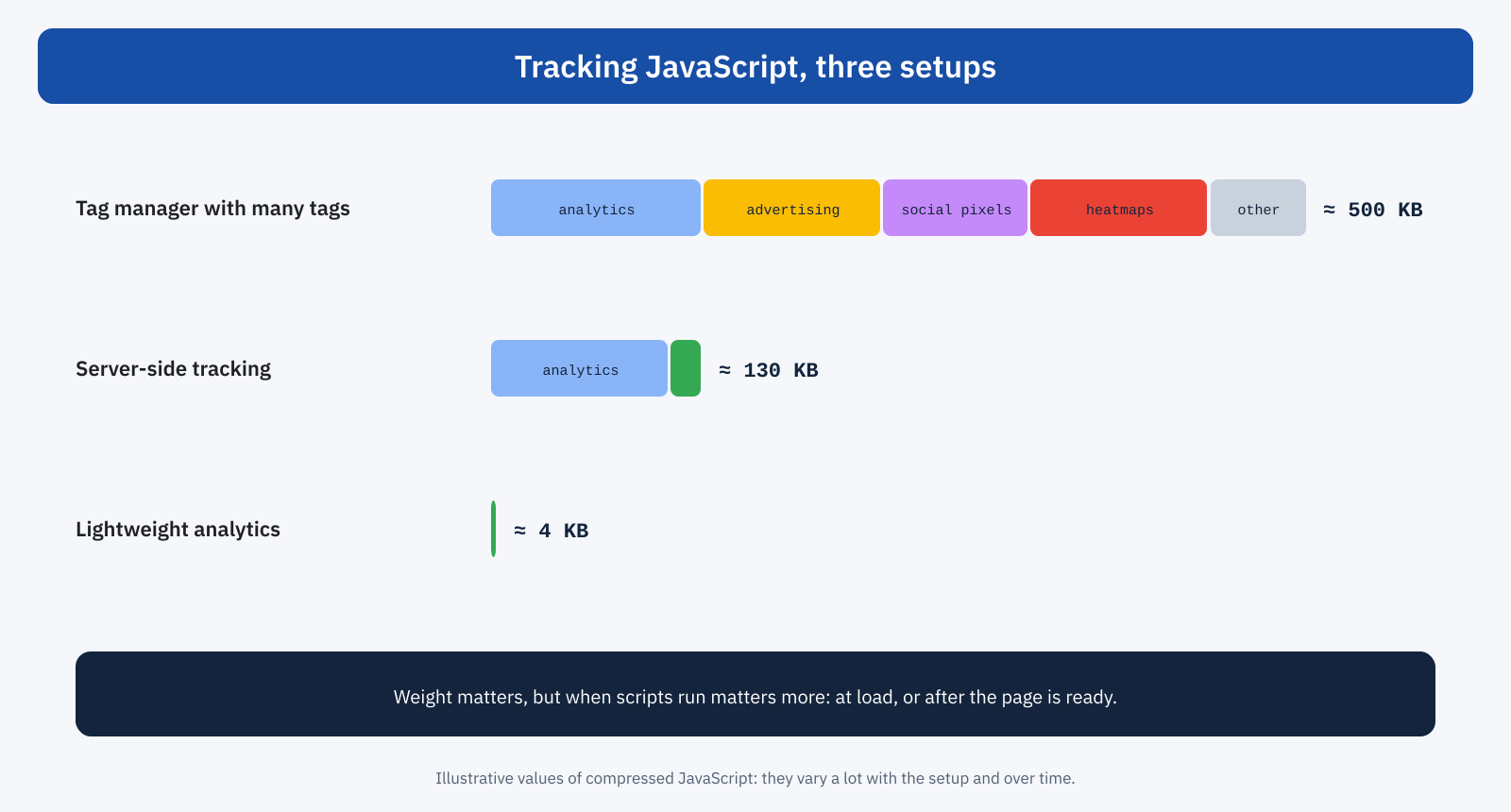
A modern analytics script weighs several tens of kilobytes compressed, often over a hundred, and its cost does not end with the download: it has to be parsed and executed, it registers handlers for page events, it sends network requests on every significant interaction. Multiplied by the number of tools present, analytics, advertising, social pixels, heatmaps, A/B tests, the total easily reaches half a megabyte of JavaScript, as we saw in the article on third-party scripts.
The effect on Core Web Vitals is of two kinds. During loading, scripts compete for bandwidth and for the main thread with the page’s resources, and can delay LCP. After loading, many tools listen to clicks, scrolls and mouse movements to record them: every user interaction also triggers their code, and INP suffers. Session recording tools, which rebuild every change on the page, are generally the heaviest from this point of view.
Governing the tag manager
The tag manager is the tool that lets marketing add and change tracking codes without going through developers. It is convenient, and that is why it often becomes the place where weight piles up: tags added for a campaign and never removed, tools tried for a month and forgotten, the same tool installed twice, once in the tag manager and once by a CMS plugin.
A periodic review of the container restores order. For each tag it helps to know who asked for it, what it is for, whether the data it collects is really used and until when it is needed. Tags with no answer to these questions can be paused and, after a few weeks in which nobody misses them, deleted. Configuration matters too: many tags can fire when the page has finished loading, or after a few seconds, instead of at the start, without losing significant data.
- Main analytics: on load, because it has to measure even those who leave immediately.
- Advertising conversion pixels: on conversion pages, not on all pages if they are not needed for remarketing.
- Heatmaps and recordings: only on a percentage of sessions and on the pages under analysis, for as long as needed.
- Chat and widgets: on first interaction or after a few seconds, as in the JavaScript delay technique.
A/B tests and the blank screen
One special case deserves attention: A/B testing tools that modify the page in the browser. To keep the user from seeing the original version for an instant before the variant, many suggest a snippet of code that hides the whole page until the test script has loaded and applied its changes. If the script arrives late, the page stays invisible, up to a maximum time that can reach a few seconds. The effect on LCP is direct and often heavy, and it affects all visitors, not just those in the test. The alternatives are to limit the snippet to the pages under test, reduce the maximum time, or run the tests on the server side, where the variant is decided before the page is sent.
Server-side tracking
Server-side tracking moves part of the work from the browser to a server controlled by the site. Instead of loading every vendor’s scripts in the browser, the page sends events to a single endpoint, usually a subdomain of the site, where a server-side container receives them, processes them and forwards them to the various analytics and advertising services.
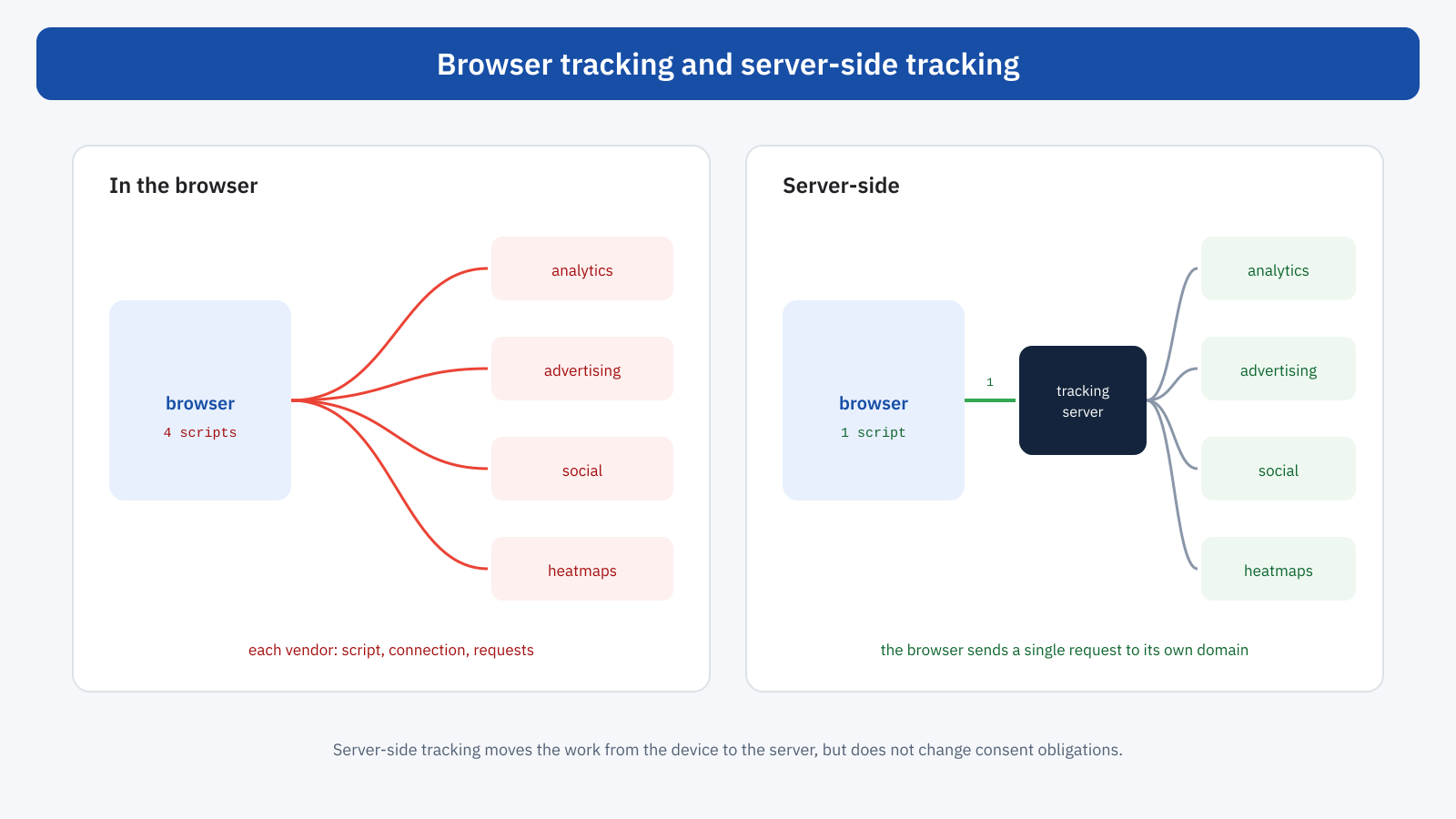
The performance benefits are concrete: fewer scripts in the browser, fewer connections to external domains, less work on the user’s device. There are control benefits too, because the site decides what data to forward to each vendor. The costs are the infrastructure of the tracking server, which has to be hosted and maintained, and a more complex setup. Above all, server-side tracking is not a way around consent: privacy rules apply in the same way, and data should be forwarded only when the user has given consent for that purpose, as explained in the article on consent banners.
Lightweight analytics tools
For many sites, especially publishing, corporate and services sites, measurement needs are simple: visits, most viewed pages, traffic sources, a few conversion goals. For these cases there are analytics tools designed to be light and privacy-friendly, with scripts of a few kilobytes, often cookieless, some of them self-hostable. They offer fewer features than the most widespread tools, but for many sites they are enough, and they also simplify consent management.
The choice does not have to be radical. Many sites keep the main tool for marketing and advertising needs, lightening its configuration, and add their own measurements, such as a Real User Monitoring system, for performance. The criterion is always the same: every piece of data collected must be worth the cost it imposes on visitors.
Interactions and INP
Event tracking, such as button clicks, form submissions and page scrolling, adds work to every interaction. A few precautions limit the impact. Data should be sent with non-blocking methods, such as navigator.sendBeacon, and after the interface has responded to the user. Very frequent events, such as scrolling, should be batched instead of sent one by one. And automatic tracking that listens to every click on the page should be enabled only if the data is really needed.
pulsante.addEventListener( 'click', () => {
	aggiornaInterfaccia();                      // 1. first, respond to the user
	requestAnimationFrame( () => setTimeout( () => {
		navigator.sendBeacon( '/eventi', JSON.stringify( { evento: 'aggiunta_carrello' } ) );
	}, 0 ) );                                   // 2. then tracking, after the paint
} );
The moment the main analytics script is loaded also deserves attention. Inserting it asynchronously, after the critical resources and without anticipating it with a preload that would put it in competition with the CSS and the main image, lets you measure almost all visits without affecting the first paint. The few visits that end before the script starts are, as a rule, an acceptable price compared with the benefit for all the others.
The WordPress case
On WordPress sites, tracking often comes from several sources at once: an analytics plugin, the tag manager inserted by the theme, an advertising plugin with its own pixel, an e-commerce plugin that adds its own events. The first step is to take inventory, looking in the DevTools Network panel at all requests to analytics and advertising domains, and tracing who generates them. Duplicates and forgotten tools are very common. The second is to centralize: a single insertion point, usually the tag manager, instead of codes scattered across theme and plugins.
Measuring the cost of the measuring tools
The cost of tracking is measured by comparing the page with and without the scripts. In Chrome DevTools you can block individual domains from the Network panel and reload; tools such as WebPageTest let you do the same in a repeatable way, comparing LCP, Total Blocking Time and page weight. The Performance panel, during an interaction, shows how much of the work is due to tracking scripts. In the field, comparing metrics before and after removing or deferring a tag, for example with the daily data from a monitoring system, gives the most reliable measure.
A policy for new tags
Cleaning up the tag manager once is useful; keeping it from filling up again is more important. A few simple rules, agreed between marketing and development, work well. Every new tag has an owner, a written purpose and a review date. Before activation, its weight and its effect on a test page are measured. Temporary tags, such as campaign ones, have an expiry date. And the overall number of active tools stays within an agreed limit, as in a performance budget: to add one, you consider another to remove. No complex procedures are needed, just a shared table and the habit of consulting it.
Fewer tools, better data
There is a side benefit that often comes as a surprise: reducing tools also improves data quality. Two analytics tools measuring the same thing give different numbers and fuel pointless discussions; duplicate tags inflate conversions; scripts that load late miss the shortest visits, those of people who leave immediately. An essential, well-documented setup produces more consistent numbers that are easier to interpret, and frees up time to analyze data instead of reconciling it.
An example
An online training site has a tag manager with 34 active tags, accumulated over five years of campaigns. The inventory reveals the analytics tool installed twice, six pixels from advertising platforms no longer in use, a heatmap tool active on all pages and all sessions, and an A/B test snippet that hides the page for up to four seconds, even though no test has been running for months. After the cleanup, 11 tags remain: the main analytics on load, the pixels of active campaigns only on the sign-up pages, heatmaps on ten percent of sessions and only on course pages, chat on first interaction. Third-party JavaScript shrinks by two thirds, mobile LCP improves by almost a second thanks to the removal of the A/B test snippet, and conversion numbers, previously inflated by duplicate tags, are consistent again with those from the management system.
In short
Analytics, pixels and behavior analysis tools are necessary, but they weigh on loading and on interactions, often more than the site itself. Governing them means taking inventory of tags, removing unused ones and duplicates, firing at the right time those that are not needed immediately, limiting heatmaps and recordings to a share of sessions, and preventing A/B tests from hiding the page.
Server-side tracking reduces work in the browser, at the cost of extra infrastructure and without changing consent obligations; lightweight analytics tools are a sensible choice for many sites with simple needs. In any case, the cost of the measuring tools must itself be measured: only then can you decide which data is worth the time it makes visitors wait.
