For most European visitors, the first thing that appears on a site is not the content but the cookie banner. It is a privacy-law requirement, and it is also an interface element with precise consequences for performance: it loads on every first visit, takes up a large part of the screen, and the click on “Accept” or “Reject” is often the user’s first interaction with the page.
For exactly this reason, a badly built cookie banner can worsen all three Core Web Vitals: it can become the LCP element, it can shift the content and generate CLS, and it can make the first interaction slow, worsening INP. In this article we look at how this happens and how to implement consent in a compliant way without sacrificing performance. This is not legal advice: decisions about the content of the banner should be made with whoever handles compliance, but the way it is loaded and displayed is a technical matter.
The banner as the LCP element
Largest Contentful Paint measures the moment the largest element visible on the initial screen is painted. On a smartphone, a cookie banner with long text, taking up half the screen or more, can easily be larger than the main image or the page title. In that case the LCP element is not the content but the banner text.
The problem becomes serious when the banner arrives late. Many consent management platforms load the banner through an external script, which the browser downloads after the HTML, sometimes after other scripts, and which in turn requests its configuration and texts from a remote server. The banner is painted only at the end of this chain, often with an entrance animation. If it is the largest element, the page’s LCP coincides with its arrival, even when the content was ready long before.
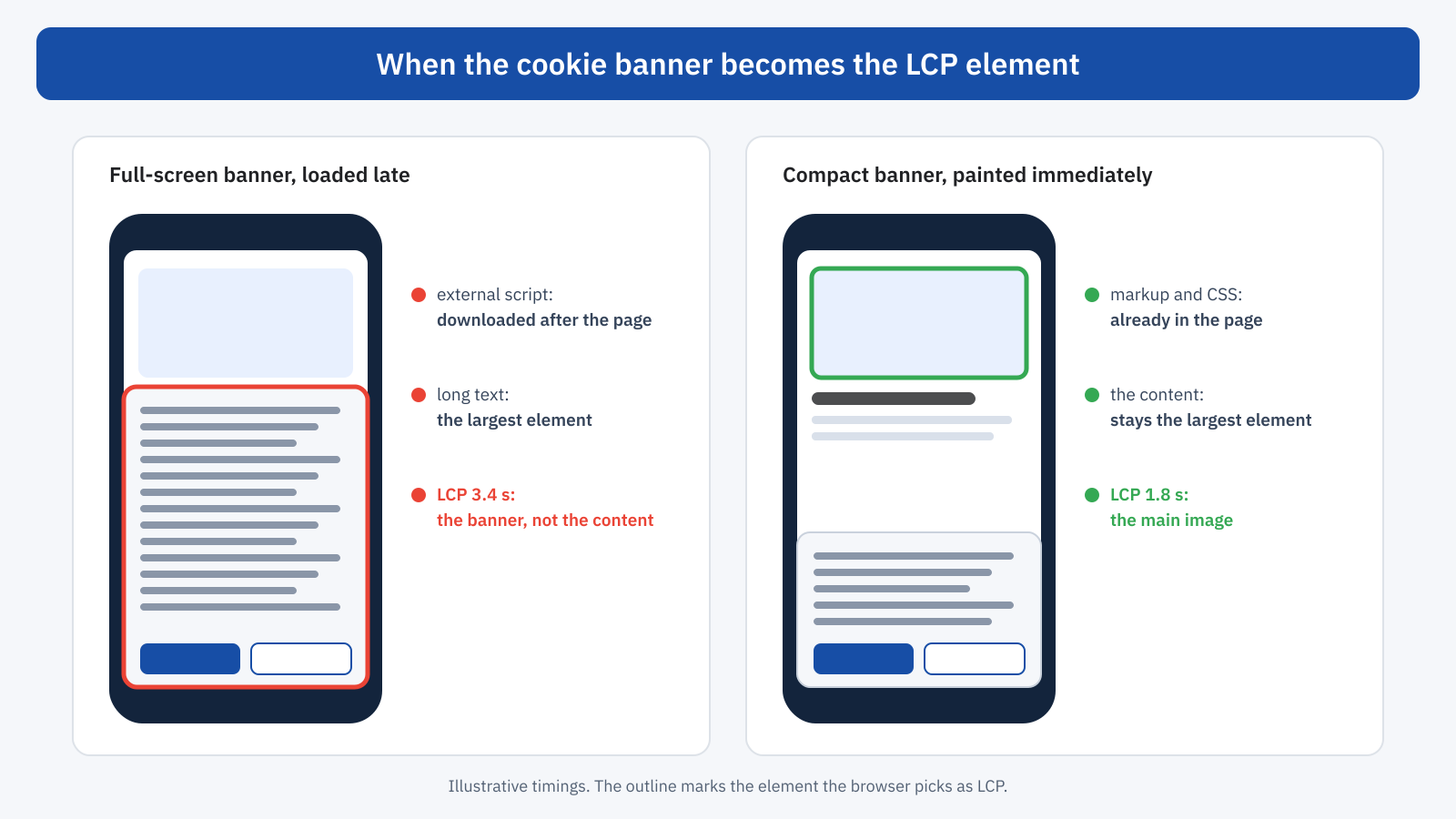
The solutions work on two fronts. The first is size: a compact banner, with short text and a link to the full information, takes up less space than the main content and does not become the LCP element. It is also more respectful of the user, who sees the page they were looking for right away. The second is timing: if the banner has to be large, it should at least appear early. Its markup and CSS can be included directly in the HTML, or the platform’s script can be loaded with priority, with a preconnect to the domain it comes from and without depending on other scripts.
One often overlooked detail concerns animations. A banner that fades in from zero opacity is only considered by the browser when it becomes visible, and a slow animation therefore delays LCP if the banner is the largest element. An immediate appearance, or an animation based only on position, avoids the problem.
The banner and CLS
The second problem is layout shift. A banner inserted into the page flow, for example a bar at the top that pushes all the content down when it appears, generates a shift that adds to CLS. The same happens, in reverse, when the banner disappears after the click and the content moves back up.
The solution is simple: the banner must overlay the content, with fixed positioning, and not be inserted into the page flow. A fixed panel at the bottom, or a modal window, moves nothing when it appears or when it disappears. Scroll locking applied to the page body while the banner is open should also be avoided: on desktop, the disappearance of the scrollbar widens the page by a few pixels and shifts all the content. If the lock is needed, the CSS property scrollbar-gutter: stable reserves the scrollbar’s space and avoids the shift.
.banner-consenso {
	position: fixed;
	inset: auto 0 0 0;         /* anchored at the bottom, above the content */
	max-height: 40vh;          /* does not take up the whole screen */
	overflow: auto;
	z-index: 1000;
}

html {
	scrollbar-gutter: stable;  /* no shift if scrolling is locked */
}
The click on “Accept” and INP
The third problem, and often the most serious, concerns INP. When the user accepts cookies, the consent platform has to activate all the tools that were waiting: analytics, advertising pixels, heatmaps, chat, embedded videos. In many implementations all of this happens in the same click event handler: the browser inserts dozens of scripts, runs them, and only at the end can it paint the banner closing. The user taps the button and for half a second nothing happens.
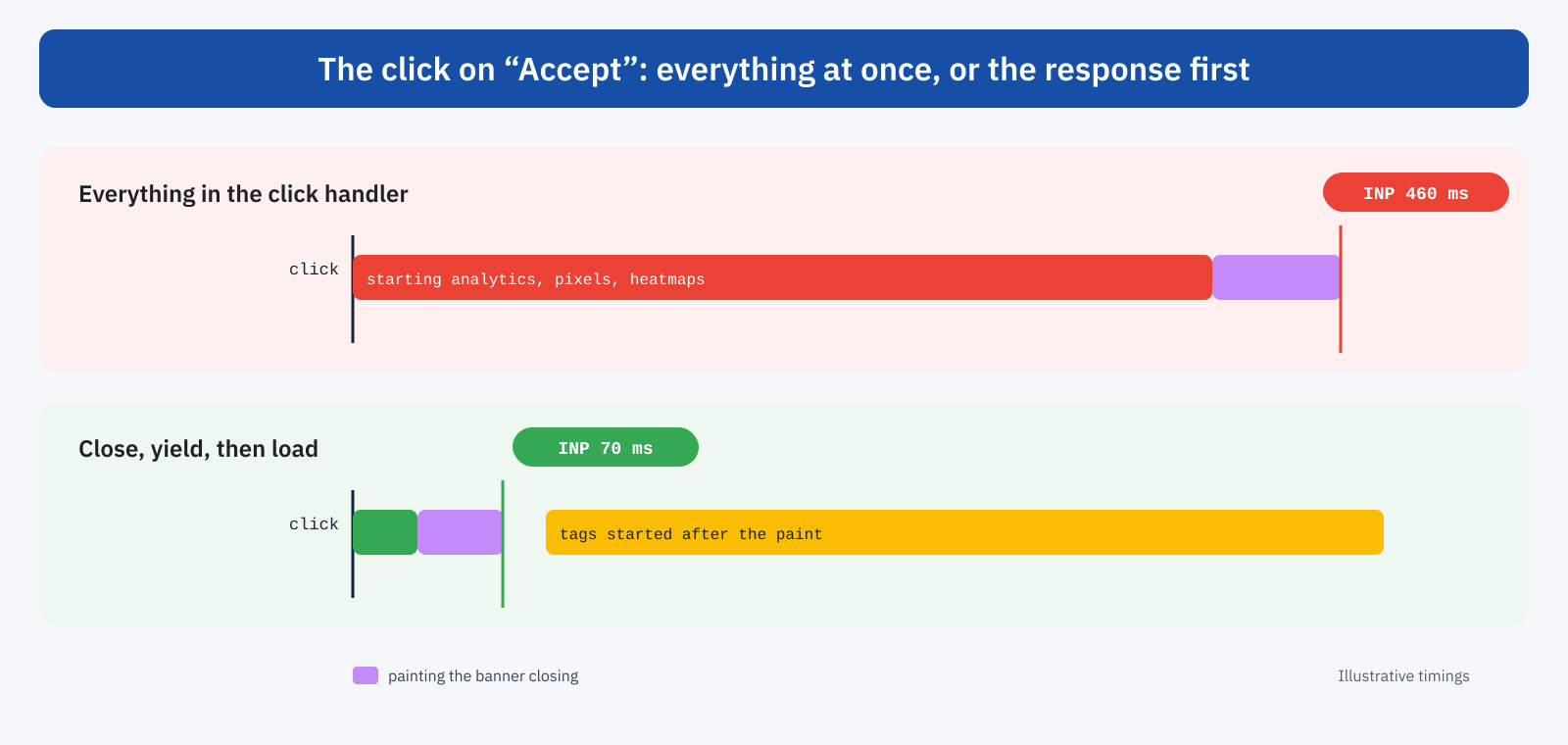
Since it is often the first interaction and, for many users, one of the few in the visit, this click can determine a page’s INP all by itself. The solution follows the principle seen in the article on the main thread: give immediate visual feedback, yield to the browser and only then do the heavy work.
pulsanteAccetta.addEventListener( 'click', async () => {
	banner.hidden = true;           // 1. immediate feedback
	salvaConsenso( 'accettato' );

	await new Promise( ( r ) => setTimeout( r, 0 ) ); // 2. let the browser paint

	attivaStrumenti();              // 3. analytics, pixels and other tags
} );
If you use a commercial platform, it is worth checking whether it offers this mode or whether it activates tags in a deferred way. In many cases the problem is not the platform but the number of tools that are activated on consent: it is one more opportunity to review which third-party scripts are really needed.
Google consent mode
For those who use Google’s tools, consent mode offers a different approach: tags are loaded from the start in a limited mode, without cookies, and at the moment of consent they only receive a state update, instead of being loaded from scratch. From a performance point of view this moves the work from the click to the page load: the click becomes lighter, but the scripts are still downloaded and executed during page load. It should therefore be evaluated together with the rest of the loading strategy, for example by deferring the tag manager until after the first paint.
The weight of the platform
Consent management platforms vary a great deal in weight and behavior. Some load a few kilobytes and show the banner almost immediately; others download hundreds of kilobytes of JavaScript, vendor lists, translations, stylesheets and fonts of their own, even for users who already gave consent on earlier visits. When choosing, it is worth comparing, besides features and compliance, the script weight, the number of requests, the possibility of hosting the resources on your own domain and the behavior for returning visitors.
For those who have already given consent, the ideal is for the platform to read the choice from a cookie or from local storage and not show or load anything superfluous. This is the most frequent case on sites with many returning visitors, and the one where a heavy banner is hardest to justify.
The WordPress case
On WordPress the banner is usually handled by a plugin, which can display its own banner or integrate an external platform. The settings to check are always the same: banner position and size, entrance animations, how scripts are blocked and then unblocked, whether the plugin loads on every page or only where needed. Some plugins generate the banner server-side, directly in the HTML, and are generally the fastest to show it; others build it via JavaScript after loading.
One delicate point is the interaction with page caches. If the banner is inserted into the HTML by the server, the cached page must be the same for those who have already given consent and those who have not: the banner should therefore always be included and shown or hidden by the browser based on the cookie, or loaded separately. Setups that generate different versions of the page depending on the consent cookie reduce the effectiveness of the cache and worsen TTFB precisely for new visitors.
A typical example
A news site notices a mobile LCP of 3.2 seconds in its field data, while lab tests indicate 1.6. RUM reveals that the most frequent LCP element is the cookie banner paragraph, long and loaded from an external platform after the advertising scripts. The click on “Accept”, moreover, activates a dozen tags and records an INP above 400 milliseconds. There are three interventions: banner text cut to two lines with a link to the privacy notice, platform script loaded first with a preconnect, tag activation postponed until after the banner closes. Within a month the field data shows a mobile LCP under 2.5 seconds and an INP for the first interaction in the good range, with no changes to the consent choices.
Beware of lab tests
There is an important pitfall in measuring these effects. Many platforms show the banner only to visitors from the European Union, based on location. Lab tests from PageSpeed Insights and other tools are often run from servers located outside Europe: the banner does not appear, and the test shows a different page from the one most European users see. The result is an apparently excellent LCP and CLS in the lab, and much worse field data, as we saw in the article on why you need both CrUX and lab data.
To assess the impact of the banner correctly, it is therefore best to use tools that let you choose a European location, run tests from a local browser with DevTools, taking care to clear cookies to simulate a first visit, and above all look at real-user data. A Real User Monitoring system with attribution quickly shows whether the most frequent LCP element is the banner text and whether the slowest interaction is the click on its buttons.
A checklist for the banner
- The banner is compact and does not exceed the main content of the initial screen in size.
- It appears immediately, without slow fades and without depending on a long chain of scripts.
- It overlays the content with fixed positioning and does not shift the content when it appears or disappears.
- The click on the buttons closes the banner immediately and activates the tags only after the paint.
- For those who have already chosen, it loads nothing superfluous.
- It is tested from a European location, with cookies cleared, and verified against field data.
In short
The cookie banner is the first element most European visitors see and touch, and for this reason it can affect all three Core Web Vitals: becoming the LCP element when it is large and arrives late, generating CLS when it pushes the content, worsening INP when the consent click activates all the tools at once.
A compact banner, painted immediately, overlaid on the content and with a click handler that responds before activating the tags solves most of these problems, with no compromise on compliance. Regulatory compliance and performance are not in conflict: they become so only when consent is implemented without thinking about who has to give it, that is, the users waiting to see the page.
