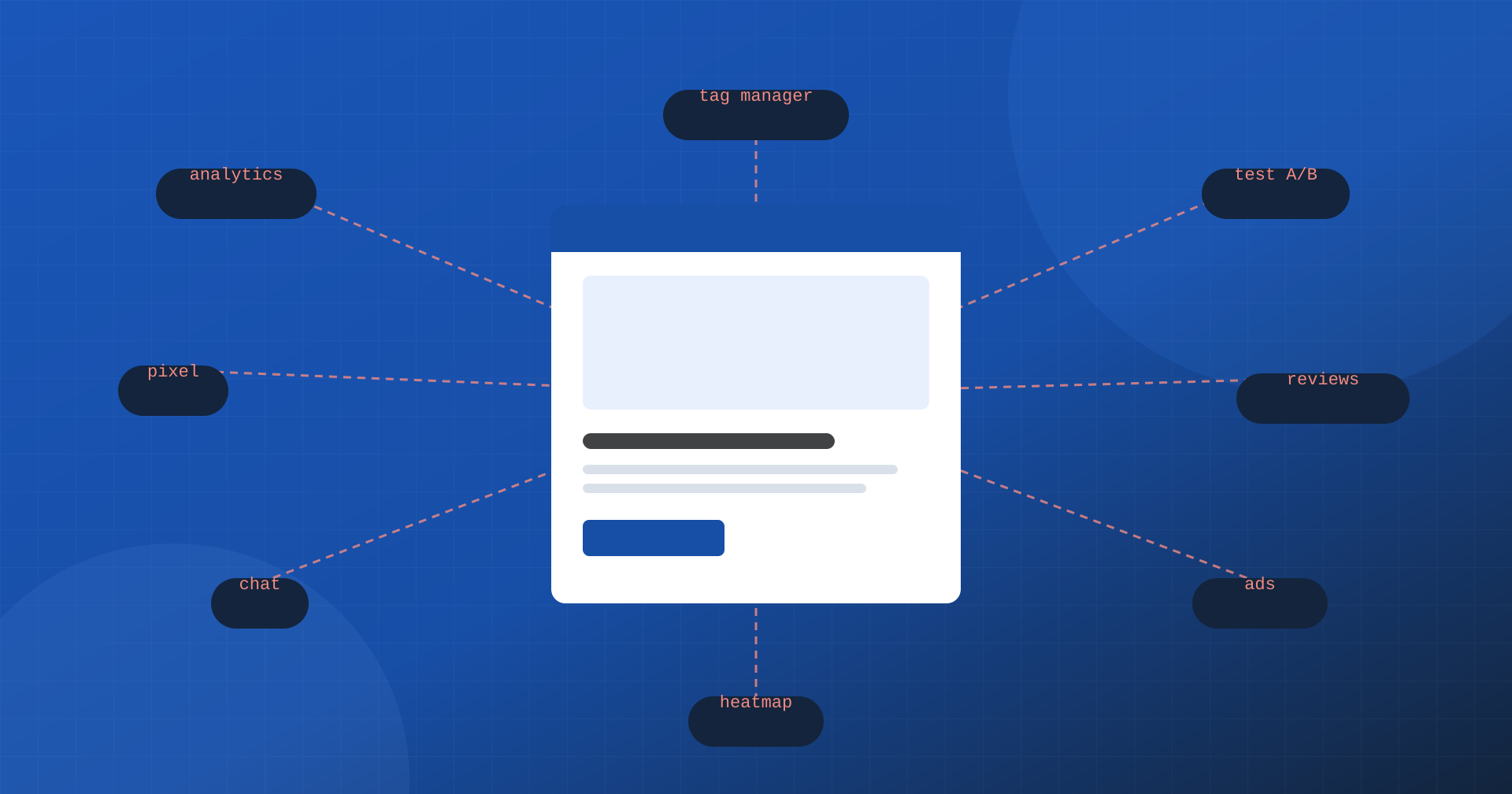
A modern site is rarely made of its own code alone. Alongside the theme and the application sit analytics tools, tag managers, advertising pixels, chats, review widgets, A/B tests, heatmaps, consent banners, embedded videos and maps. Each has a good reason to be there, and each was added at a different time, often by different people. The result is a substantial part of the page that nobody on the team wrote, that changes without notice and that, on many sites, weighs on Core Web Vitals more than everything else put together.
In this article we look at how third-party scripts affect loading, responsiveness and stability, how to measure their real cost and how to govern them without giving up the tools marketing needs.
What third parties are
A third party is any resource the page loads from a domain we don’t control: an analytics script served by the vendor, the code of a chat, a video player, a font from an external service, the images of a review widget. The distinction isn’t about usefulness, but about control: the code can change at any moment, can in turn load other resources and depends on the vendor’s infrastructure.
The most common categories are always the same: analytics and measurement, tag managers, pixels from advertising and social platforms, testing and personalization tools, chat and support, reviews and social proof, heatmaps and session recording, consent management, embedded content such as videos, maps and social posts, and of course advertising.
How they weigh on Core Web Vitals
The cost of a third party isn’t limited to the kilobytes downloaded. It acts on several fronts at once.
- New connections. Every different domain requires DNS resolution, a connection and TLS negotiation. On a mobile network each can cost hundreds of milliseconds, and a page with fifteen external domains pays for many of them.
- Main thread work. JavaScript has to be downloaded, parsed and executed, often in long tasks that block the browser. It’s the factor that affects INP the most: a tap that arrives while an advertising pixel is working has to wait.
- Render blocking. A synchronous script in the
<head>stops the page from being built until it has been downloaded and executed, delaying FCP and LCP. - Layout shifts. Widgets, banners and ads inserted after the first paint push the content around and worsen CLS.
- Unpredictability. The vendor can update its code at any moment: a page that was fast yesterday can slow down today without anyone having touched the site.
The cascade: tags that load other tags
The tag manager made it very easy to add tools without going through developers, and that is a real convenience. But it has also made growth invisible: every tag is a row in a panel, and every tag can load other scripts, which in turn load still others. The code actually executed on the page becomes a cascade that nobody has really designed.
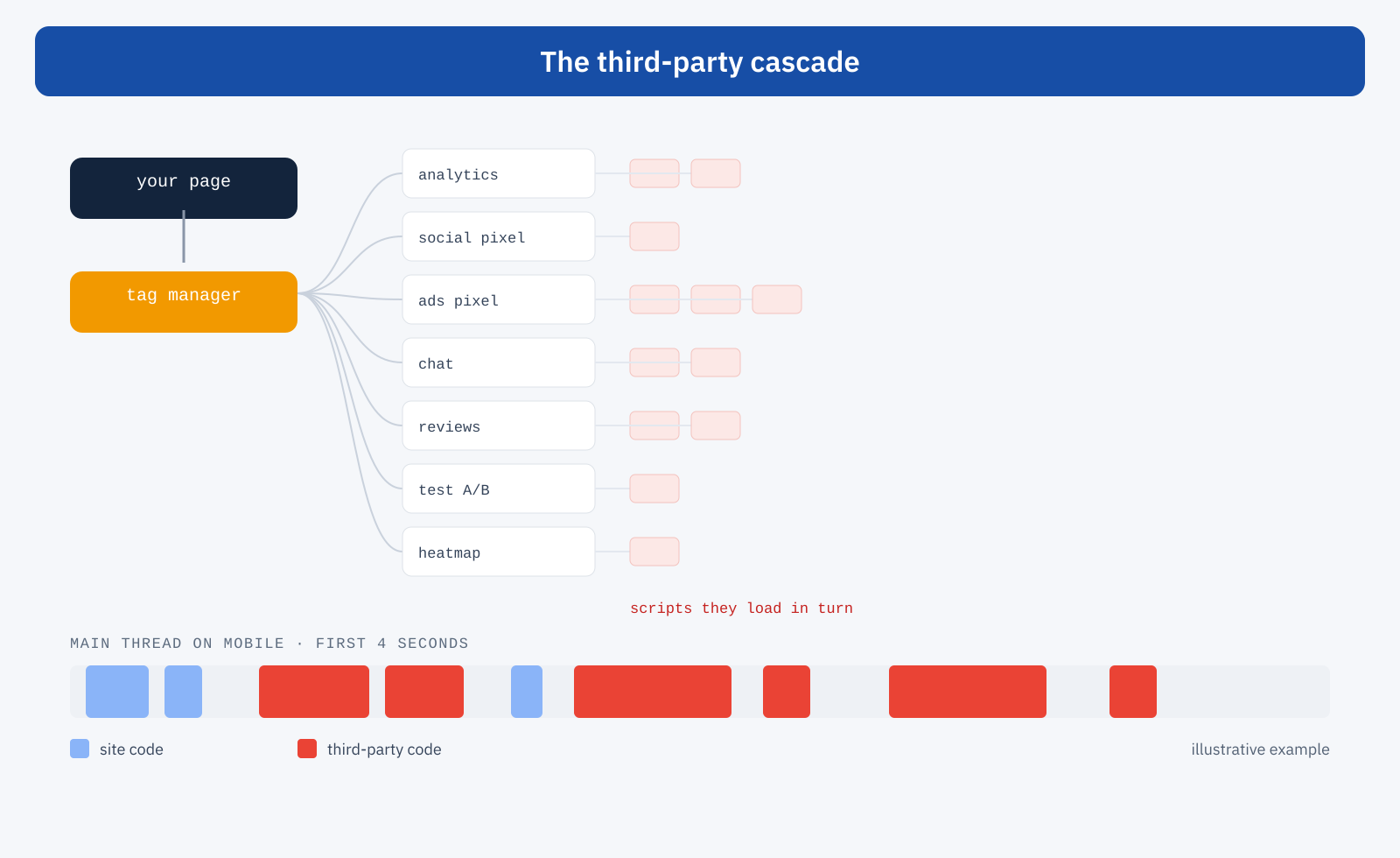
On the main thread of a mid-range smartphone, this cascade turns into long blocks of work that have nothing to do with the page content. In an audit it’s common for the site’s own code to take up a fraction of the execution time and the rest to be third-party.
The case of A/B tests
Testing and personalization tools deserve particular attention. To prevent the user from seeing the original version for a moment before the test version, many of them use a snippet that hides the entire page until the experiment script has loaded, with a maximum time that can reach a few seconds. From the point of view of the metrics it’s a silent disaster: for all that time the page is blank, and LCP bears the mark. If an A/B test is necessary, it’s better to run it server-side or to limit the snippet to the pages involved and to the shortest possible maximum time.
How to measure the real cost
Before acting you need to know how much each third party costs. There is no shortage of tools:
- Lighthouse summarizes the execution time and weight of third parties grouped by vendor, and flags those that block the main thread.
- The DevTools Performance panel shows in the trace which scripts occupy the main thread and when, distinguishing first-party from third-party code.
- Request blocking, available both in DevTools and in WebPageTest, lets you load the page without a given domain and compare the metrics: it’s the most direct way to measure the cost of a single vendor.
- Real-user monitoring, with attribution for INP and slow frames, reveals which scripts are involved in slow interactions on visitors’ devices.
The with-and-without comparison for a domain is particularly useful in discussions with marketing: turning “this script slows the site down” into “this script adds 400 milliseconds of blocking on mobile” makes the decision much more concrete.
First step: the inventory
Governing third parties starts with a list. For each script: what it does, who requested it and is responsible for it, on which pages it is really needed, how much it costs, and whether it is still used. In almost every audit you find tags from finished campaigns, test tools that were never switched off, two solutions doing the same thing, pixels for abandoned platforms. Removing what isn’t needed is the most effective optimization and the only one with no downsides.
Load less, and at the right time
For what remains, there are several levers and they need to be combined:
- Only where needed. The conversion pixel is needed on the order confirmation page, the chat perhaps only on product and contact pages, the map only on the store locator page. In the tag manager, a trigger limited to the right pages is enough.
- Never synchronous. Third-party scripts should be loaded with
asyncordefer, and never in a blocking way in the<head>, except for very rare, documented exceptions. - After the content. What isn’t needed on the first screen can start after loading or when the browser is idle. Deferring it until the first interaction is possible, but it moves the cost onto that very interaction, as we explained when talking about delaying JavaScript until the first click.
- Respecting consent. Profiling tools must not start before the user’s consent: it’s a legal obligation before it is an optimization, and it naturally reduces the load for those who don’t accept.
- Early connections, in moderation. For one or two critical domains, a
preconnectbrings DNS and TLS forward; used for all domains, on the other hand, it scatters resources.
Facades
For heavy embedded content the most effective technique is the facade: in place of the real component you show a static preview that looks like it, and the component loads only when the user shows they want to use it. An embedded video, for example, can load several hundred kilobytes of scripts and styles even if nobody will ever watch it; with a facade you show only the preview image and a button, and the player arrives on click.
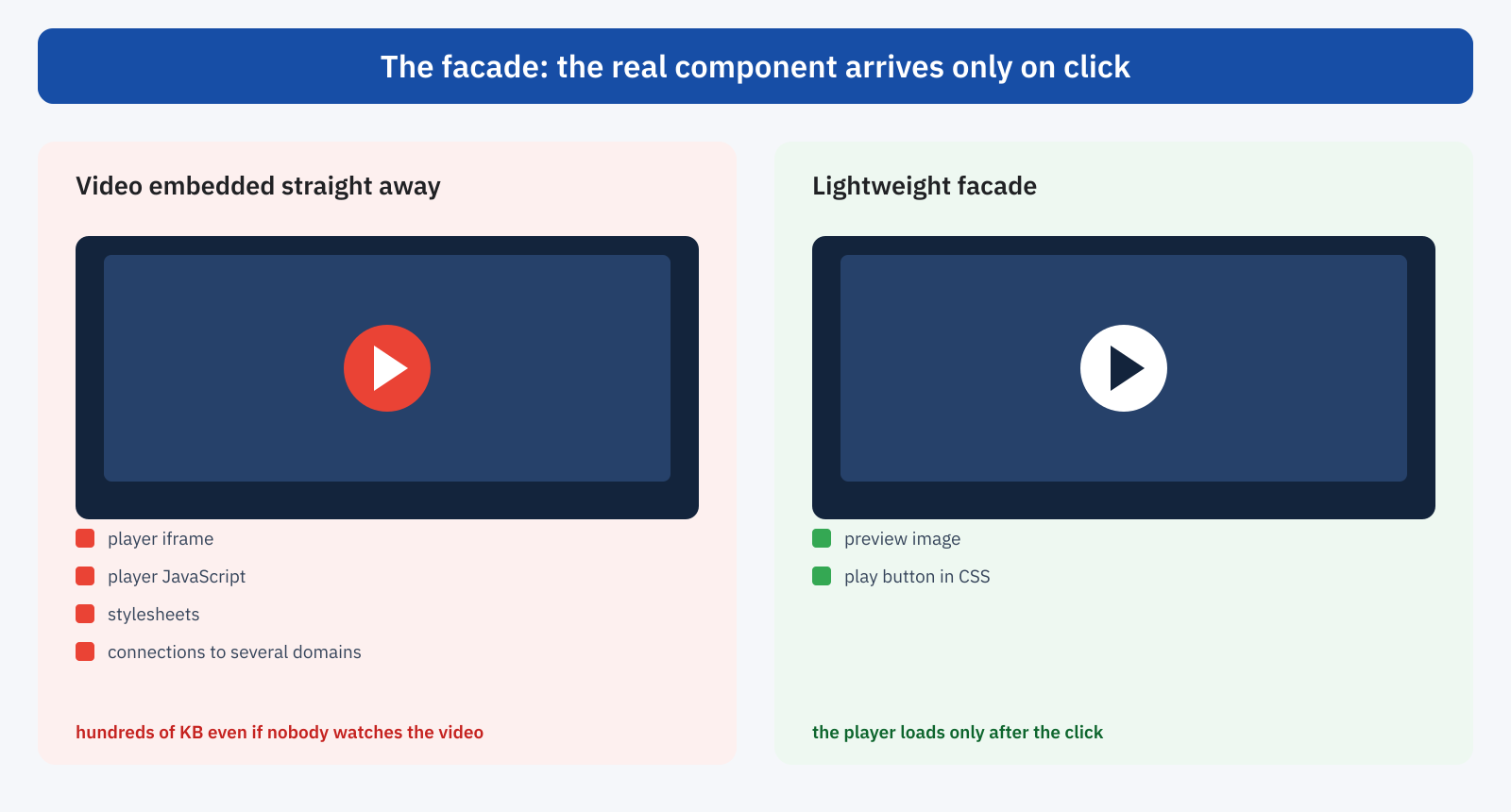
The same principle applies to chats, which can be replaced by a button that loads the widget only when tapped, to maps, which can start from a static image, and to embedded social posts. What matters is that the facade has the same dimensions as the final component, so as not to introduce layout shifts.
<button class="video-facciata" data-video="ID_DEL_VIDEO" aria-label="Play the video">
	<img src="/img/anteprima-video.avif" width="1280" height="720" alt="" loading="lazy">
</button>

<script>
document.querySelectorAll( '.video-facciata' ).forEach( ( el ) => {
	el.addEventListener( 'click', () => {
		const iframe = document.createElement( 'iframe' );
		iframe.src = 'https://www.youtube-nocookie.com/embed/' + el.dataset.video + '?autoplay=1';
		iframe.allow = 'autoplay; encrypted-media';
		iframe.width = 1280;
		iframe.height = 720;
		el.replaceWith( iframe );
	}, { once: true } );
} );
</script>
Moving the work to the server
An increasingly common route is server-side tracking: instead of loading a pixel for each platform in the browser, the page sends events to a single collection point on your own domain, which then forwards them to the various platforms from the server. The browser runs just one lightweight script, connections to external domains decrease and control over the data sent increases. It requires dedicated infrastructure and careful configuration, especially for consent, but on sites with many advertising pixels the benefit is significant.
When the license allows it, hosting some libraries on your own domain instead of loading them from the vendor’s service also eliminates connections and makes loading more predictable. It should be done with judgment, because you lose the vendor’s automatic updates.
An example of a clean-up
To make the method concrete, imagine a medium-sized e-commerce site with a tag manager that has accumulated about twenty tags over the years. The work generally takes place in four steps.
- Snapshot. You record the current state: domains contacted, weight and execution time of third parties in the lab on mobile, and INP and LCP from real-user data for the main pages, meaning home, categories, product pages and cart.
- Clean-up. Together with marketing you review the list: you remove pixels for platforms no longer used and forgotten test tools, merge duplicate solutions, switch off tags from finished campaigns.
- Reorganization. What remains is activated only where needed and after consent; chat and video move to a facade; tags not needed on the first screen start after loading; where the number of pixels justifies it, server-side tracking is evaluated.
- Verification. You repeat the lab measurements and, in the following weeks, compare the real-user data over the same time window, also checking that the marketing reports haven’t lost events.
The last point is often overlooked and is in fact essential: an optimization that breaks conversion tracking gets undone at the first meeting. Measuring both performance and marketing data before and after is what makes the result last.
A process, not a one-off job
Third parties tend to come back. A site cleaned up today fills up again within a few months, with every campaign and every new tool tried. That’s why you need rules shared between development and marketing: a performance budget for the main pages, a check before a new tag is added, an owner for each script and a periodic review of the inventory. Real-user monitoring, with alerts on Core Web Vitals thresholds, quickly signals when a new tool, or an update to an existing one, worsens the experience.
It’s also a matter of common language. Marketing needs to measure campaigns, and it is right; the technical team needs fast pages, and it is right too. Putting the cost of each tool on the table, in milliseconds and in impact on conversions, lets you decide together what is worth keeping.
In summary
Third-party scripts add connections, occupy the main thread, can block rendering and shift the layout, and change without notice. They often weigh on Core Web Vitals more than the site’s own code. Governing them means knowing them through an inventory, measuring their cost, removing what isn’t needed, loading the rest only where and when necessary, using facades for heavy components and, where it makes sense, moving the work to the server.
It isn’t about giving up marketing tools, but about treating them for what they are: code executed on customers’ devices, with a cost that falls on the experience and therefore on results. Every tag should earn its place on the page.
