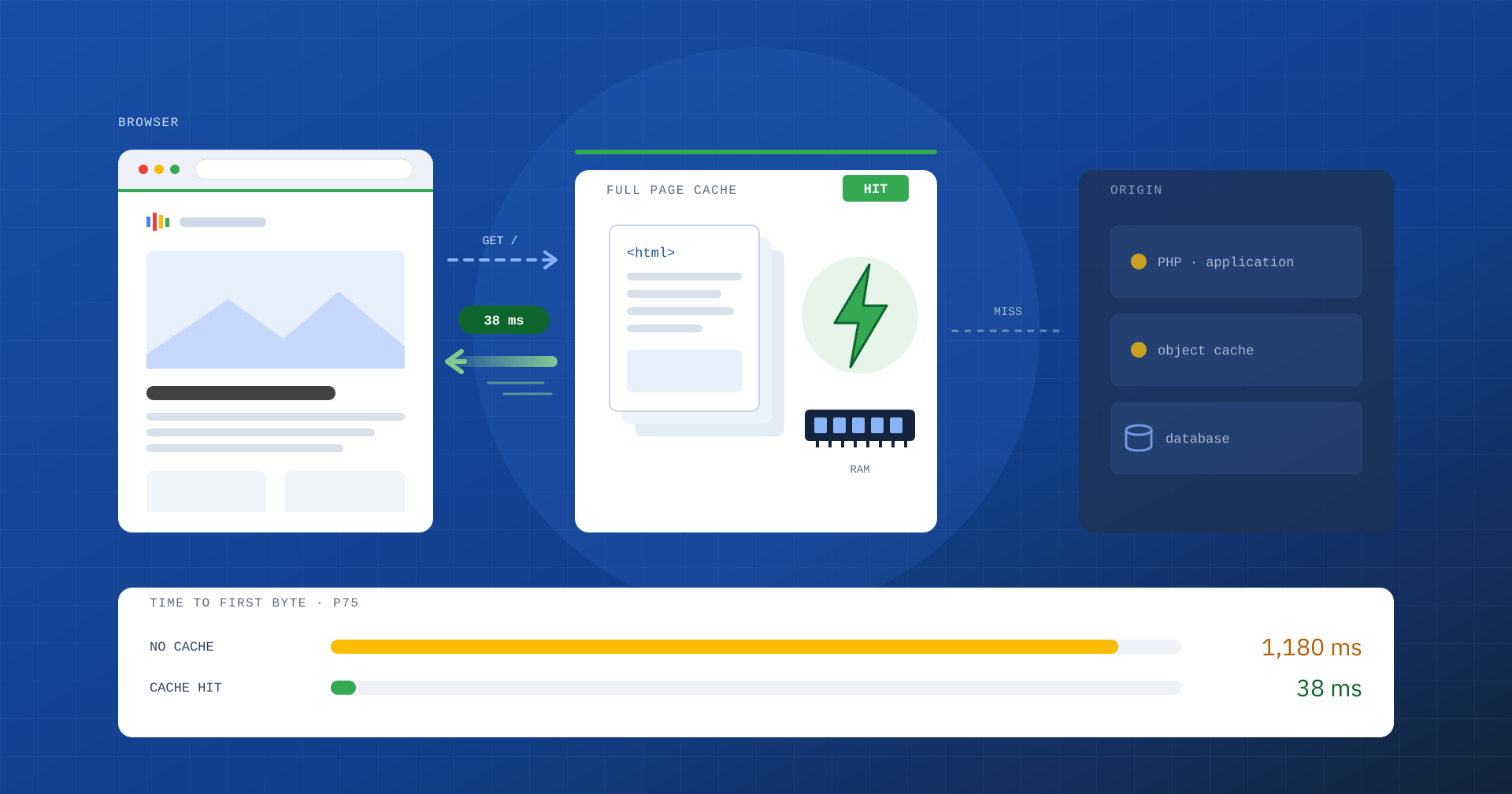
Before the browser can show a single pixel, it has to receive the first byte of the page from the server. The time between the request and that first byte has a name, TTFB, and it is the foundation on which every other speed metric rests. If the foundation is slow, no front-end optimization can make the site truly fast.
In this article we look at what TTFB measures, why it directly affects LCP and business results, and how page caching, with Varnish as the reference for enterprise-grade projects, can cut it by an order of magnitude. We also look at the cases where caching alone is not enough.
What TTFB is
Time to First Byte measures the interval between the start of navigation and the arrival of the first byte of the HTML response. It is not just “server time”: it includes any redirects, DNS resolution, opening the TCP connection, TLS negotiation and finally the time the server takes to process the request and start responding.
| Phase | What it depends on |
|---|---|
| Redirects | Redirect chains, for example from http to https and from the non-www domain to www |
| DNS | Quality of the DNS provider and record cache lifetime |
| Connection and TLS | Physical distance from the server, protocol (HTTP/2, HTTP/3), TLS configuration |
| Processing | Page cache, application code, database, server resources |
As a reference, a TTFB within 0.8 seconds at the 75th percentile is considered good, while over 1.8 seconds urgently needs improvement. TTFB is not one of the three Core Web Vitals, but it is a fundamental diagnostic metric: every millisecond spent before the first byte adds to FCP and LCP, and leaves less headroom for everything else.
Why TTFB matters for the business
Imagine an e-commerce site with a TTFB of 1.5 seconds. To stay within the 2.5 seconds of a good LCP, the browser has only one second to download stylesheets, fonts and the main image, and to draw the page. On a smartphone with an average mobile connection, that is an almost unreachable goal. The result is a poor LCP that no work on images or JavaScript can fully correct.
The consequences show up in the numbers: more drop-offs in the early stages of the visit, campaign landing pages that waste part of the clicks you paid for, category and product pages that respond slowly exactly when the traffic arrives. And there is a less visible but equally concrete effect: a server that takes too long to generate each page runs out of resources sooner. At peak moments, such as a promotion, a newsletter send or a news story going viral, TTFB does not grow linearly but explodes, all the way to errors and outages.
Search engines are affected too: a slow server limits the number of pages crawlers manage to fetch in the time available, a problem that on sites with large catalogs or archives translates into content being indexed late.
Page caching: the principle
In a CMS such as WordPress, WooCommerce, Magento or Joomla, each page is normally built on the fly: the server runs the PHP code, queries the database, assembles templates and content, and only at the end sends the HTML. It is work that can take hundreds of milliseconds or a few seconds, and it is repeated identically for every visitor.
Page caching, or Full Page Cache, starts from a simple observation: for the vast majority of visits the generated HTML is the same. So it makes sense to generate it once, store it and serve the ready-made copy to subsequent requests. When the requested page is in the cache it is called a HIT and the response goes out in a few milliseconds; when it is not, it is called a MISS and the request continues to the application, which generates the page and hands it to the cache for next time.
Two parameters determine how effective a cache is: the HIT rate, meaning the percentage of requests served without bothering the application, and the invalidation strategy, meaning how a page is updated when its content changes. A cache with a low HIT rate or one that serves stale content is, respectively, useless or harmful.
Varnish, the enterprise standard for Full Page Cache
Among the available solutions, Varnish Cache has for years been the first choice for enterprise-grade projects: large news publishers, e-commerce sites with extensive catalogs, portals with unpredictable traffic peaks. It is an HTTP reverse proxy that sits in front of the web server and keeps pages directly in RAM, responding without touching either PHP or the database. On suitable hardware it serves tens of thousands of requests per second with response times of a few milliseconds.
The reasons for its success, however, are not only about speed:
- VCL, a real configuration language. The Varnish Configuration Language lets you decide, request by request, what to cache, for how long, which cookies to ignore and which URL parameters to normalize. It is the difference between a generic cache and a cache designed around the application.
- Precise invalidation. With PURGE and BAN you can remove a single page or whole groups of pages the moment content changes, for example when a price is updated or an article is published, without emptying the whole cache.
- Grace mode. When a page expires, Varnish can keep serving the previous copy while it requests a new one in the background. If the application is slow or momentarily unreachable, users keep getting fast pages instead of an error.
- Peak protection. Several simultaneous requests for the same page that is not yet cached are merged into a single request to the application, preventing a traffic spike from turning into hundreds of identical computations.
- ESI (Edge Side Includes). A page can be composed of fragments with different cache rules, so a personalized part does not prevent caching everything else.
Keep in mind that the open source version of Varnish does not handle HTTPS directly: in production it is paired with a TLS terminator, such as Nginx or Hitch, which receives the encrypted connections and passes them to Varnish. It is a well-established architecture, but it has to be designed and maintained by people who know both components well.
The alternatives and when they make sense
Varnish is not the only way, and it is not always the best fit. There are three main options:
- CMS caching plugins. They save pages to disk and serve them through PHP or web server rules. They are easy to enable and suited to small sites, but the request still goes through part of the stack and the exclusion rules are often generic.
- Web server cache, such as Nginx’s FastCGI cache. More efficient than plugins and with no extra components, but with invalidation tools and conditional logic less rich than VCL.
- CDN cache. It brings pages close to users, also reducing network latency. It is an excellent complement for an international audience, as long as invalidation and personalized content are handled carefully. The most robust setup often combines a CDN with Varnish at the origin.
When caching is not enough
Page caching fixes TTFB for anonymous visits, but not all visits are anonymous. Logged-in users, people with products in the cart, and people completing checkout receive personalized pages that cannot be shared. In an e-commerce site, these are exactly the people closest to buying.
Then there are very common configuration mistakes that lower the HIT rate without anyone noticing: a cookie set for all visitors that makes them bypass the cache, campaign parameters such as utm_source or gclid that create a different copy of the same page for every click, expiry times that are too short, invalidations that empty the entire cache on every change.
That is why the “MISS” path has to be as fast as the “HIT” path is instant. It means working on the origin: a recent PHP version with a correctly sized OPcache, a persistent object cache such as Redis to avoid repeated queries, a database that is optimized and cleaned of options loaded on every request, sessions and temporary data accumulated over the years, and an application that does not do useless work on every page.
How to measure it
Users’ real TTFB is available in the Chrome UX Report, both for the whole origin and for individual pages with enough traffic. For diagnosis, however, you need to observe individual responses. A first check takes a single command line:
curl -s -o /dev/null -w "DNS %{time_namelookup}s · TLS %{time_appconnect}s · TTFB %{time_starttransfer}s\n" https://www.yoursite.com/By repeating the request several times you immediately see the difference between the first response, often a MISS, and the following ones served from the cache. Response headers such as X-Cache or Age tell you whether the page comes from the cache and how long it has been there, while the Server-Timing header lets the application declare how much time it spent in each phase. On the server, tools such as varnishstat and varnishlog show the overall HIT rate and the reason for each MISS.
In summary
TTFB is the starting point of every page: if it is slow, all the following metrics are slow. Page caching is the most effective tool for reducing it, and Varnish, with its in-memory storage, its configurable logic and its handling of peaks, is the reference solution when traffic and the value of the pages are high. But a cache only really works if it is designed around the application, with precise exclusion and invalidation rules, and if the path without the cache is still fast.
It is work that combines systems engineering and development: that is why we always tackle it by looking at server and application together, and verifying results on real-user data, not on a single test.
