
Ever since Google announced Core Web Vitals as a ranking factor, the same question comes up in every project: how much do they really matter for SEO? The answers going around swing between two extremes. On one side, those who consider them decisive and promise leaps up the rankings to anyone who takes their PageSpeed score to a hundred. On the other, those who consider them irrelevant, because they know of very slow sites firmly in first position. As often happens, reality lies in the middle, and is more interesting than either position.
In this article we try to answer with what Google has officially stated, with what is observed on real sites and, above all, by distinguishing between the direct effect of Core Web Vitals on rankings and their indirect effects, which are often worth much more.
What Google has said
Core Web Vitals entered the ranking systems with the Page Experience update, rolled out between June and August 2021 for mobile results and in early 2022 for desktop ones. Since then the Google Search Central documentation has changed shape several times, but the underlying message has remained consistent: Core Web Vitals are used by the ranking systems, and a good page experience is rewarded, but relevance and content quality come first.
Google has explained it explicitly: search always tries to show the most relevant content, even when the page experience could be better; but for many searches there are numerous helpful pieces of content that are similar to each other, and in those cases an excellent page experience can contribute to success. In 2023 Google also clarified that there is no single system called Page Experience that assigns a score: experience-related signals are considered by multiple systems, along with many others.
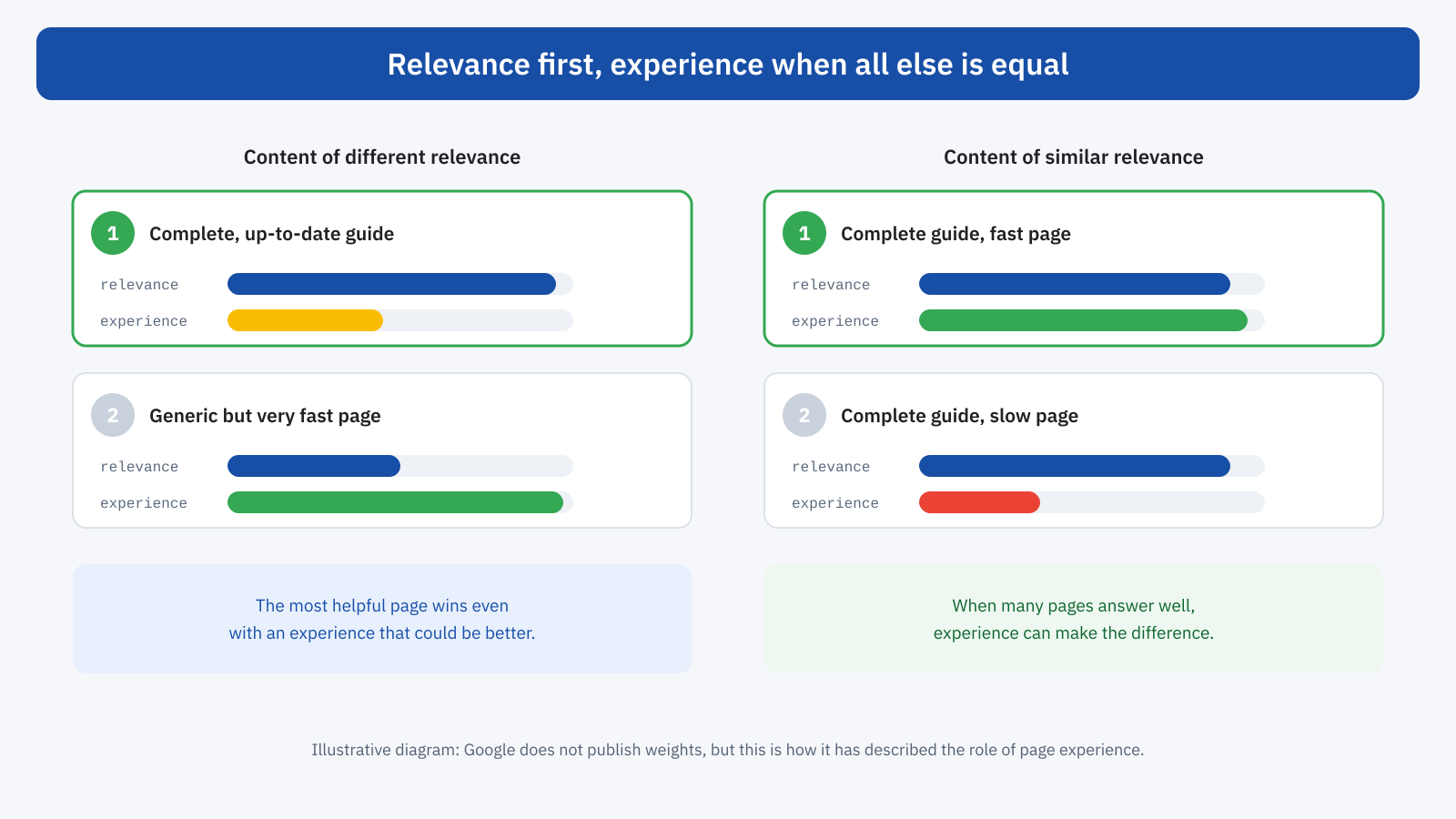
This explains why both extremes are wrong. Whoever sees a slow site in first position is seeing the first scenario: more relevant or more authoritative content wins even with a mediocre experience. Whoever sees an improvement after a performance intervention is often seeing the second: in a crowded sector, where many pages answer the same search well, experience becomes one of the elements that make the difference.
How they are assessed
One point that creates a lot of confusion is which data Google uses. Not the Lighthouse score, not the result of a PageSpeed Insights test run at some random moment, but the field data collected from real Chrome users, the same as in the Chrome UX Report, as we saw when talking about the differences between PageSpeed Insights and Lighthouse. Each metric is assessed at the 75th percentile over a rolling 28-day window, separately for mobile and desktop.
Assessment is done per page when the page has enough traffic, otherwise for groups of similar pages or for the whole domain. The Core Web Vitals report in Search Console shows exactly these groups, with the good, needs improvement or poor status for each metric. For pages without enough data, quite simply, the signal isn’t available.
The thresholds are well known: LCP within 2.5 seconds, INP within 200 milliseconds, CLS within 0.1. Since March 2024 INP has replaced FID as the responsiveness metric, with a threshold that is far more demanding in practice, and several sites that were good with FID have moved to needs improvement. The three metrics are described in detail in the articles dedicated to LCP, CLS and INP.
Not only Core Web Vitals
Core Web Vitals are the measurable part of page experience, but Google has always pointed to other aspects too: serving over HTTPS, mobile-friendliness, the absence of intrusive interstitials that cover the content as soon as you land on the page, a clear distinction between main content and advertising. These are elements that most professional sites respect today, but that are worth checking, especially for newsletter sign-up banners, promotional popups and cookie notices that fill the whole screen on mobile.
These aspects also have a direct link to the metrics. A popup that appears after loading can become the LCP element or shift the content and generate CLS; a heavy cookie banner can worsen the INP of the first interaction, which is often precisely the click to accept or reject. Taking care of page experience in the broad sense and taking care of Core Web Vitals are, to a large extent, the same job.
Passing the threshold, not chasing the score
An important practical consequence concerns goals. Google has indicated several times that the signal rewards reaching the good status, not endless improvement: going from an LCP of 4 seconds to 2.3 can have an effect, going from 1.8 to 1.2 seconds is unlikely to change anything in terms of rankings. In the same way, the Lighthouse score is not a ranking signal: a site with a score of 70 and all field metrics in the good status is, for Google, in a better situation than a site with a lab score of 98 and a poor INP among real users.
This doesn’t mean that improving beyond the threshold is pointless. It means that, beyond the threshold, the reasons for doing it are business ones, not direct SEO: conversions, abandonment, user satisfaction. It’s a useful criterion for deciding where to invest: first bring the page groups that aren’t good into the good status, then evaluate further improvements by their effect on business results.
The indirect effects
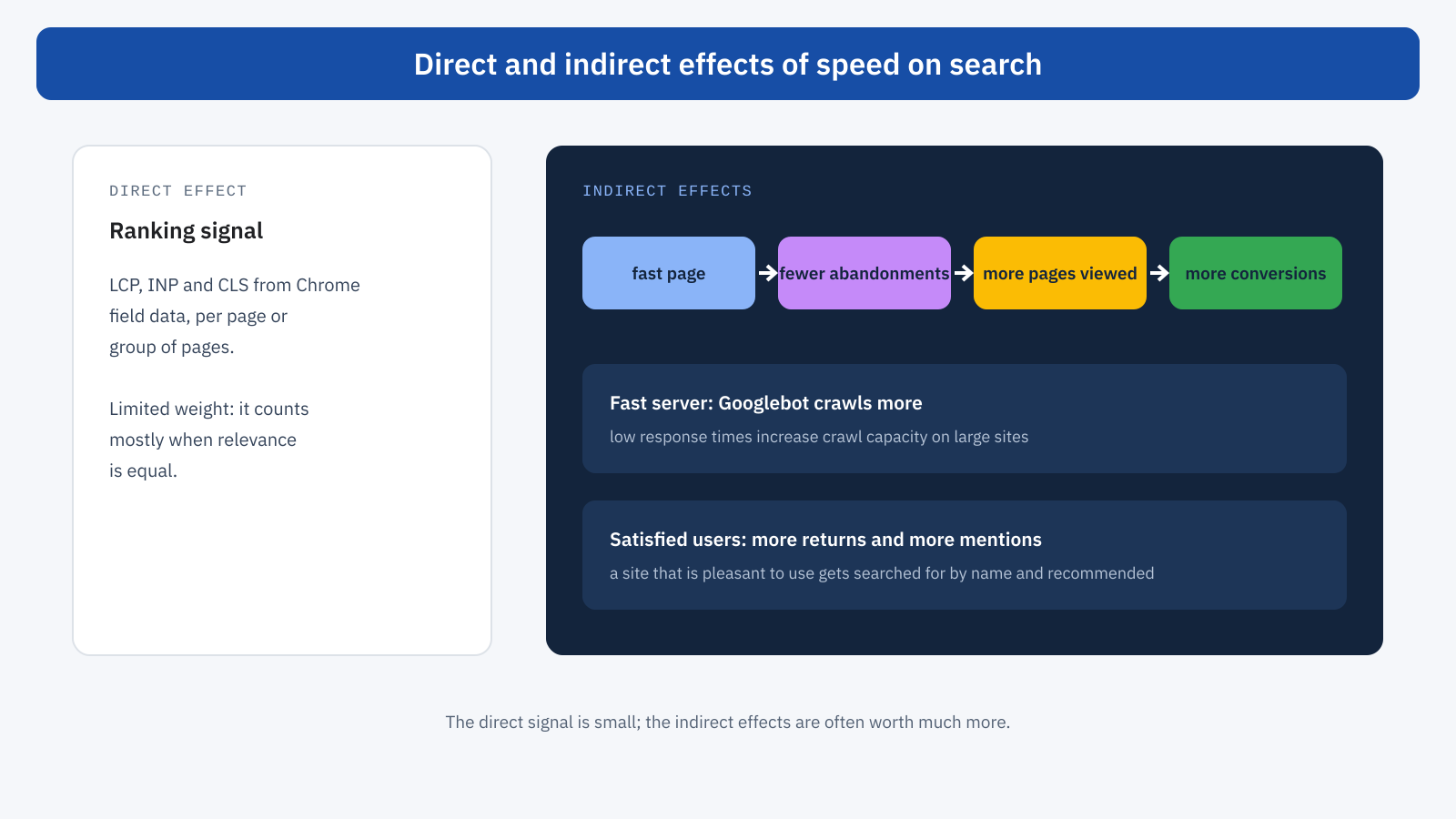
The direct signal is only part of the story. Performance influences search through less visible routes too, and often more relevant ones.
User behavior
A user who arrives from Google on a slow page has an alternative a click away: go back to the results and choose the next one. Google’s data indicates that the probability of abandonment grows rapidly with loading time on mobile. Every user lost this way is a user who doesn’t read, doesn’t convert, doesn’t return and doesn’t recommend the site. Even setting aside any hypothesis about how Google uses behavior signals, the economic result of organic traffic depends directly on how many visitors stay, and performance is one of the factors that determine it, as we saw when talking about what web performance is.
Crawling
The second effect concerns Googlebot. The number of pages Google crawls on a site also depends on the server’s ability to respond: if responses are fast, Googlebot can increase its crawl rate; if they slow down or generate errors, it reduces it so as not to overload the server. For a small site it’s irrelevant, but for an e-commerce site with tens of thousands of products or a publishing site with many new articles every day, a low TTFB means that new or updated pages are discovered and indexed sooner. The Crawl stats report in Search Console shows the average response time recorded by Googlebot and is the right place to check it.
Reputation and loyalty
Finally, there is a long-term effect. A site that is pleasant to use gets searched for by name, bookmarked, shared and cited. These are behaviors that strengthen a site’s position over time and that no technical optimization can simulate. Performance doesn’t create them on its own, but a slow, unstable site discourages them.
A typical case
Consider an online sporting goods store, with well-written product pages ranking well for many specific searches, but with a mobile LCP of 4 seconds and a poor INP because of a heavy size configurator. On searches with few valid competitors, the site holds its positions despite its performance. On more generic searches, where large chains and marketplaces with equally complete product pages compete, it stays steadily a few positions lower.
After an intervention that brings the product pages into the good status, the quickest and most evident effect is not in the rankings, but in behavior data: fewer users going straight back to the results, more products viewed per session, a higher conversion rate for organic traffic. On competitive searches, in the following weeks, you may see an improvement in positions, hard to attribute with certainty to the intervention alone. The economic return, however, is already measurable before and independently of this.
The most widespread myths
- “The PageSpeed score affects ranking.” No: what counts is the status of the field metrics, not the lab score, which is a diagnostic tool.
- “With good Core Web Vitals you reach the first page.” No: without relevant, authoritative content, a fast site is just a fast site that doesn’t answer the search.
- “If the site is slow, Google penalizes it.” Not in the sense of a penalty: experience is one of many elements assessed, and it weighs mostly in comparison with competitors of similar value.
- “Just optimize the home page.” No: assessment is done per page or per group of pages, and organic traffic lands largely on articles, categories and product pages.
- “Results show up the next day.” No: field data updates over a 28-day window, and the effect of an intervention becomes fully visible only after about a month.
How to set priorities
For an SEO manager or anyone running a site, Core Web Vitals should therefore be put in the right place: not a substitute for content strategy, but a baseline requirement that protects the value of the traffic you earn. In practice, a reasonable approach follows four steps.
- Read the Search Console report. Identify the page groups with poor or needs improvement status, distinguishing mobile and desktop.
- Cross-check with organic traffic. Prioritize the groups that get the most visits from Google or that matter most for the business: product pages, main articles, service pages.
- Diagnose and act. Use field data to understand which metric fails, and lab tests to understand why, as explained in the article on why you need both CrUX and lab data.
- Check after 28 days. Verify that the page groups have moved to the good status and, in the meantime, watch the behavior and conversion metrics, which react sooner.
Measuring the effect on rankings in isolation is hard, because content, competitors and algorithms all change in the same period. That’s why it’s better to evaluate performance work with metrics that respond more directly: bounce rate of organic landing pages, pages per session, conversions, crawl times. If these improve, the work had value, whatever its precise effect on positions.
In summary
Core Web Vitals are a real ranking factor but of limited weight: they don’t override relevance and content quality, but they can make the difference between pages of similar value, which is common in the most competitive sectors. Google assesses them with the field data of Chrome users, at the 75th percentile over 28 days, per page or per group of pages, and rewards reaching the good status more than improvement beyond the threshold.
The most important effects, however, are often the indirect ones: fewer users going back to the results, more pages viewed and more conversions for every organic visit, more efficient crawling on large sites. So the right question isn’t how many positions you gain with Core Web Vitals, but how much the traffic you already get is worth, and how much of it you lose along the way when the site is slow.
