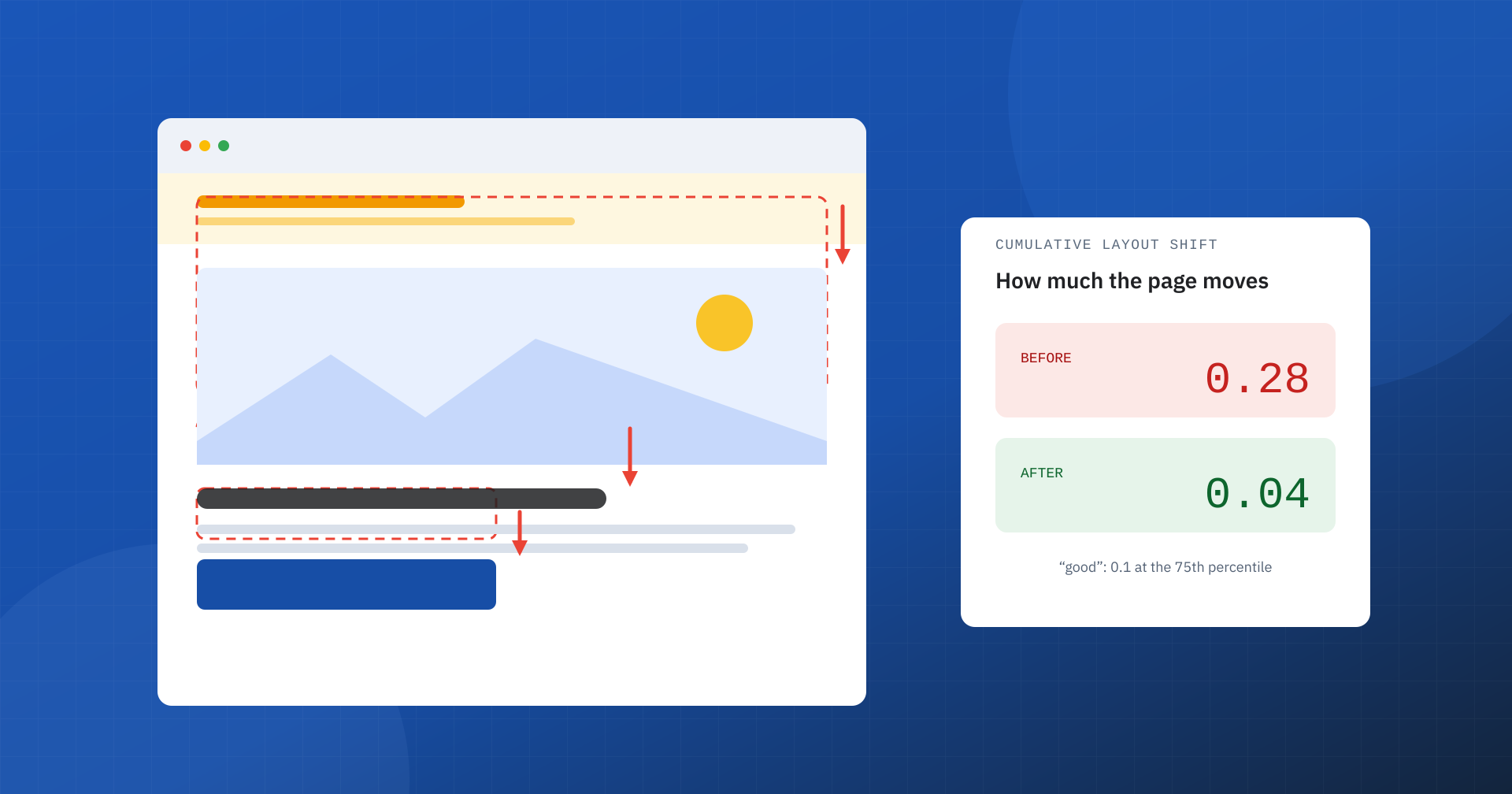
We have all been there: we are reading an article and the text slides down because an ad has appeared above it; we are about to tap a button and, an instant before, another element takes its place. It is the feeling of an “unstable” page, and among the Core Web Vitals it has a dedicated metric: CLS, Cumulative Layout Shift. Of the three metrics it is the least intuitive to calculate, but often the easiest to fix, and its impact on experience and conversions is very concrete.
What CLS measures
CLS measures the visual stability of a page, that is, how much visible elements unexpectedly change position while the user is using it. It does not count time, as LCP and INP do, but movement: it is in fact the only one of the three Core Web Vitals that is not expressed in seconds or milliseconds, but as a score with no unit of measurement.
The thresholds, assessed as for the other metrics at the 75th percentile of real visits, are these: up to 0.1 the result is good, between 0.1 and 0.25 it needs improvement, above 0.25 it is poor. A single large shift can be enough to cross the threshold.
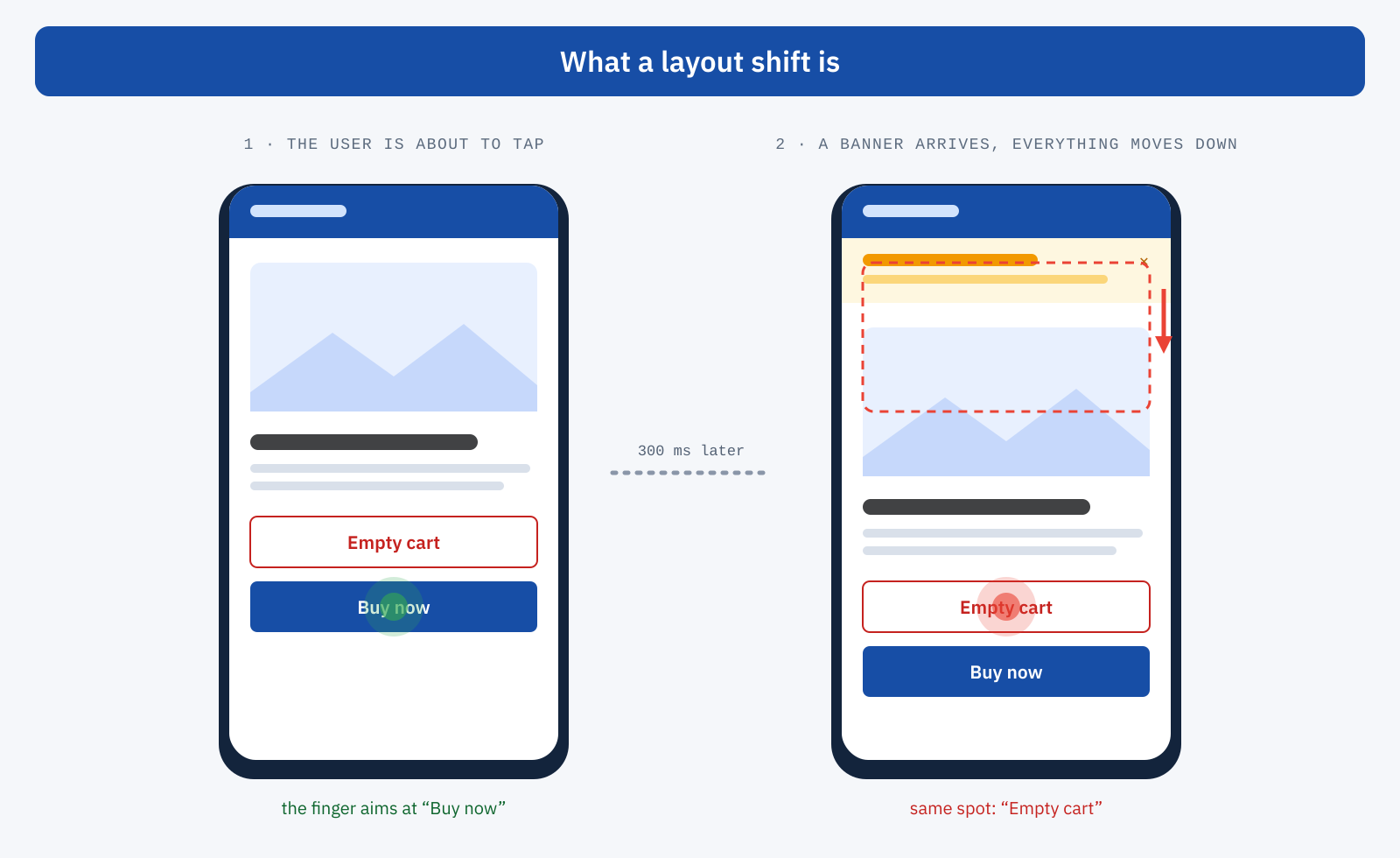
The word “unexpected” matters. If the user taps a button that opens a panel and the content moves to make room for it, the shift is an expected response and is not counted: shifts that occur within 500 milliseconds of an interaction such as a click, a tap or a key press are excluded. Scrolling the page, on the other hand, does not count as an interaction of this kind, and animations made with the CSS property transform do not produce layout shifts.
How the score is calculated
Every time a visible element changes position between one frame and the next, the browser calculates the score of that shift by multiplying two values. The impact fraction is the portion of the viewport occupied by the element before and after the shift, taken together. The distance fraction is the largest movement, divided by the larger dimension of the viewport.
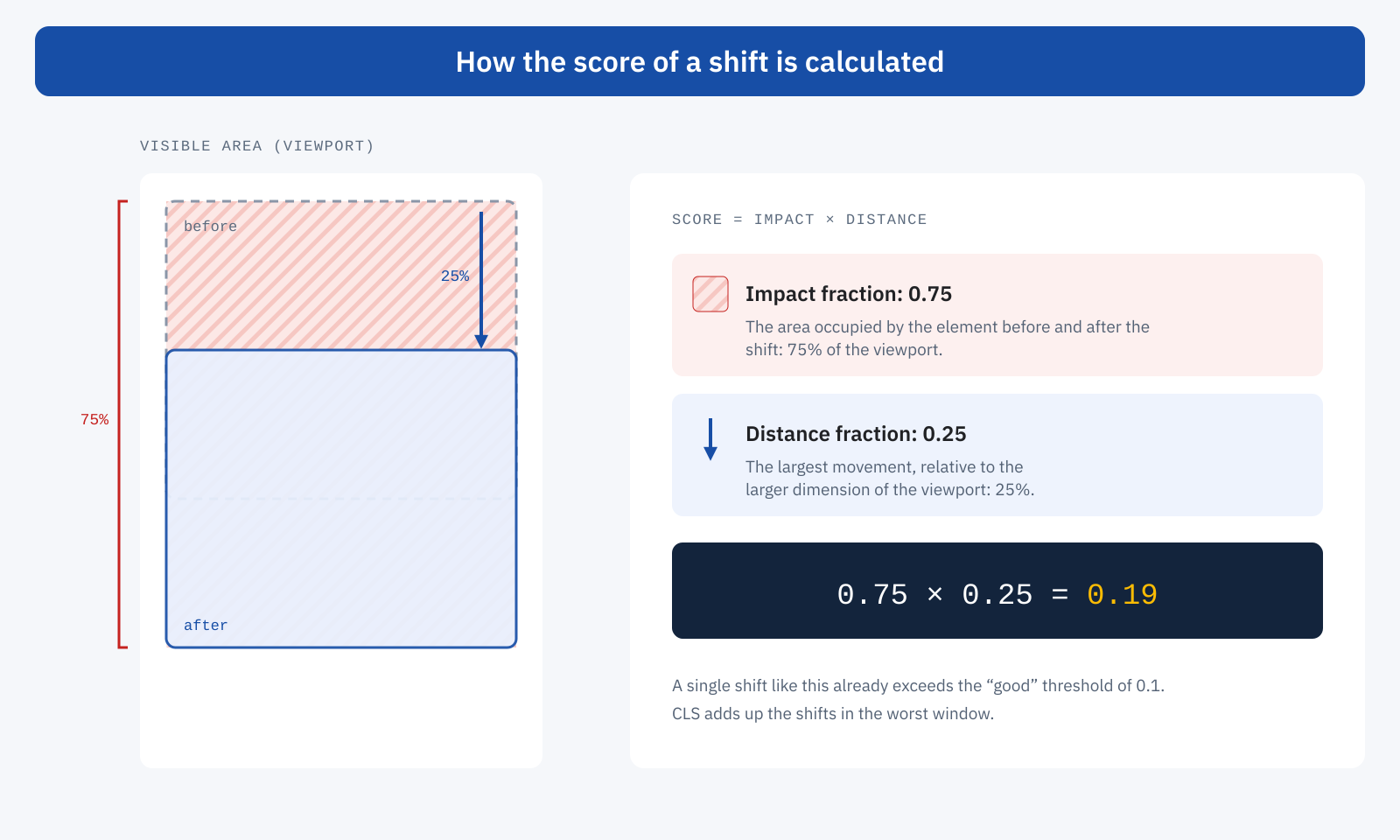
In the example, a block half the height of the screen moves down by a quarter of the screen height: together, the starting and ending positions cover 75% of the viewport, and the movement is 25%. The score is 0.75 × 0.25 = 0.19, already above the good threshold. Two practical consequences: large elements weigh much more than small ones, and even a shift of a few pixels in a block that fills most of the screen can be costly. This is why on smartphones, where an image or a banner takes up almost the whole viewport, CLS tends to be worse than on desktop.
Session windows
The “cumulative” in the name does not mean that all the shifts in a visit are added up. Since 2021, CLS groups shifts into session windows: a window closes when more than a second passes without shifts, and it cannot last more than five seconds. The CLS of the visit is the sum of the shifts in the worst window.
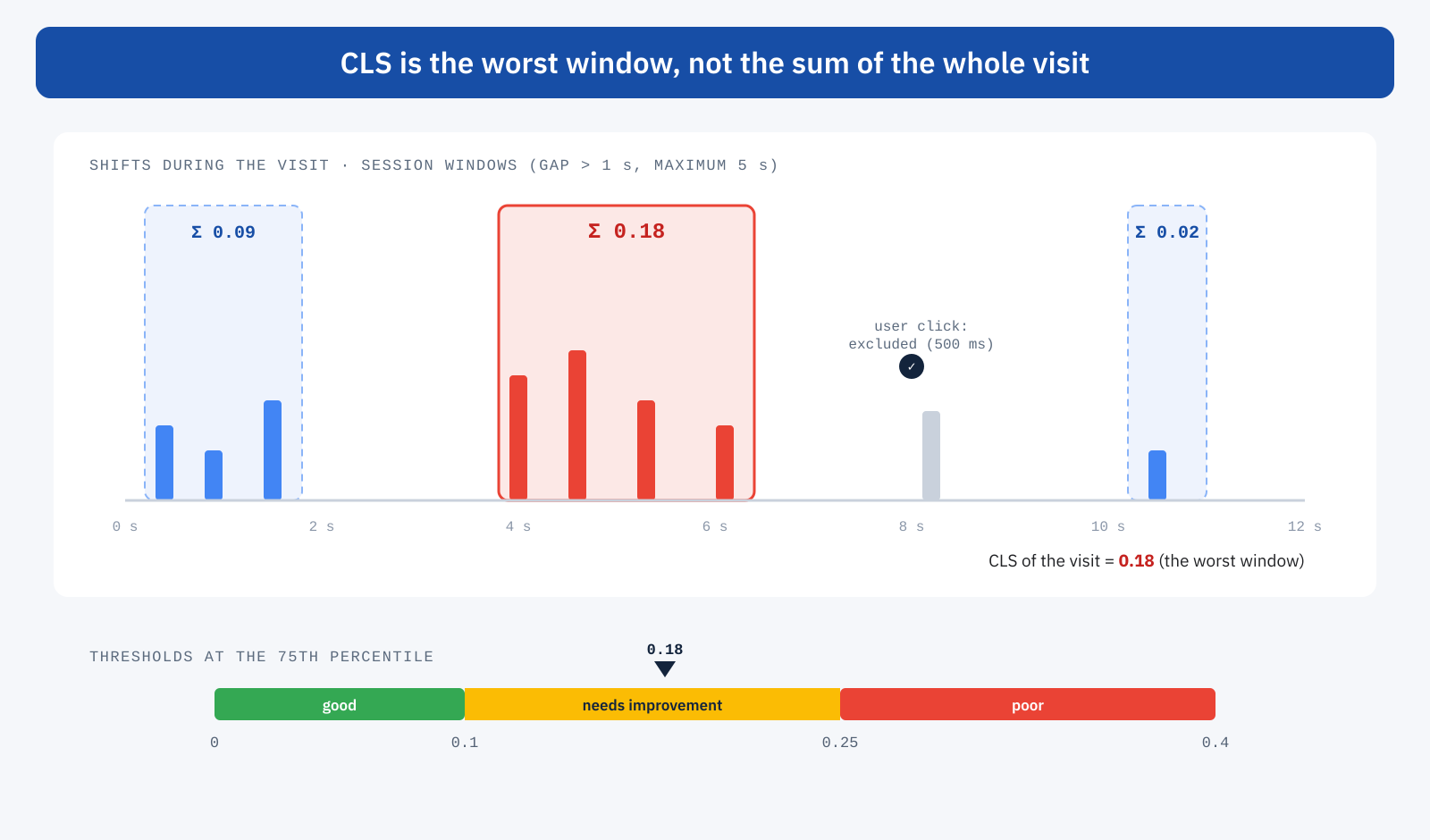
This safeguard avoids penalizing pages that stay open for a long time, such as applications or articles with infinite scroll, where a few small isolated shifts would add up unrealistically. But it also means that a burst of shifts concentrated in a few seconds, typical of the initial load, weighs enough to compromise the result.
Why CLS is a business matter
A layout shift is not just annoying. It produces wrong clicks: on an ad instead of the link you wanted, on “cancel” instead of “confirm”, on a different product from the one you wanted. It makes you lose your place in the text, forces you to find it again, and conveys the idea of a poorly cared-for site just as the user is deciding whether to trust it. In e-commerce and news publishing sites, where ads, promotional banners and widgets often load after the content, CLS is one of the first indicators to check. And, as part of Core Web Vitals, it contributes to Google’s assessment of the page experience.
The most common causes
- Images and videos without dimensions. If the browser does not know an image’s width and height in advance, it reserves zero pixels and shifts everything that follows when the file arrives.
- Ads, embeds and iframes. Ad slots, embedded videos, maps and social widgets often have dimensions known only after loading, and sometimes variable depending on the ad served.
- Content inserted after rendering. Notice bars, promotional banners, cookie notices at the top of the page, personalized messages, review badges: any element added above content that is already visible pushes it down.
- Web fonts. When the site’s font replaces the fallback font, text with different metrics changes the height and width of lines, shifting the blocks that follow.
- Late-arriving styles. CSS loaded asynchronously or after an interaction, as happens with some techniques for removing unused CSS or with components initialized by delayed JavaScript, changes the look of the page after the first render.
- Animations on layout properties. Animating
top,heightormarginmoves neighboring elements on every frame.
How to reduce it
There is just one general rule: every element must have its space reserved from the first render. For images it is enough to state the dimensions in the markup, letting CSS adapt them while keeping the proportions:
<img src="prodotto.webp" width="1200" height="800" alt="…">

img {
	max-width: 100%;
	height: auto; /* the browser uses width/height to calculate the proportions */
}

/* reserved space for an ad banner of known height */
.slot-adv {
	min-height: 250px;
}- Reserve space for ads and embeds with a minimum height or with
aspect-ratio, even when the ad might not arrive: an empty space is better than a shift. - Do not insert content above what is already visible. Bars and notices should be planned into the layout from the start, overlaid at the bottom or shown in response to an interaction.
- Align fallback fonts. Preloading the main font and using descriptors such as
size-adjustand metric overrides in the fallback font reduces the shift at the moment of swapping. - Animate with transform and opacity. These properties do not change the layout and do not produce shifts.
- Make pages eligible for the back/forward cache. When the user goes back, a page restored from the browser cache appears instantly and without shifts.
How to measure it, and why the lab is not enough
CLS is measured both in the lab and in the field, but with an important difference. Lighthouse, and therefore the lab section of PageSpeed Insights, observes only the initial load, without scrolling and without interacting. Everything that happens afterwards, such as an image without dimensions entering the screen while scrolling, an ad loading halfway down the page or a banner appearing after ten seconds, does not exist in the lab. Real-user data, on the other hand, records the whole visit. This is why it is not unusual to find a perfect CLS in the lab and an insufficient one in the field: it is one of the reasons you need both CrUX and lab data.
To find the shifts, Chrome DevTools highlights the regions that move during loading and, in the Performance panel, a dedicated track for layout shifts with the elements involved. In the field, the open source web-vitals library in its attribution build identifies the element responsible for the largest shift:
import { onCLS } from 'web-vitals/attribution';

onCLS( ( { value, attribution } ) => {
	console.log( 'CLS', value.toFixed( 3 ), {
		element: attribution.largestShiftTarget,
		time: Math.round( attribution.largestShiftTime ),
		loadState: attribution.loadState,
	} );
} );
Knowing which element shifts, and whether it happens during loading or later, is often enough to find the cause. And, as with the other metrics, improvements show up in the CrUX data gradually, over the 28-day window.
In summary
CLS measures how much the page moves under the user’s eyes and fingers. Each unexpected shift is worth impact fraction times distance fraction, shifts are grouped into session windows and the worst window counts; the good threshold is 0.1 at the 75th percentile. The causes are almost always the same: images and ads without reserved space, content inserted above what is visible, fonts and styles that arrive late.
The good news is that, unlike LCP and INP, CLS rarely requires infrastructure work: in most cases it is enough to design the layout so that every element has its place from the start. It is one of the investments with the best ratio of effort to result, for users and for the business.
