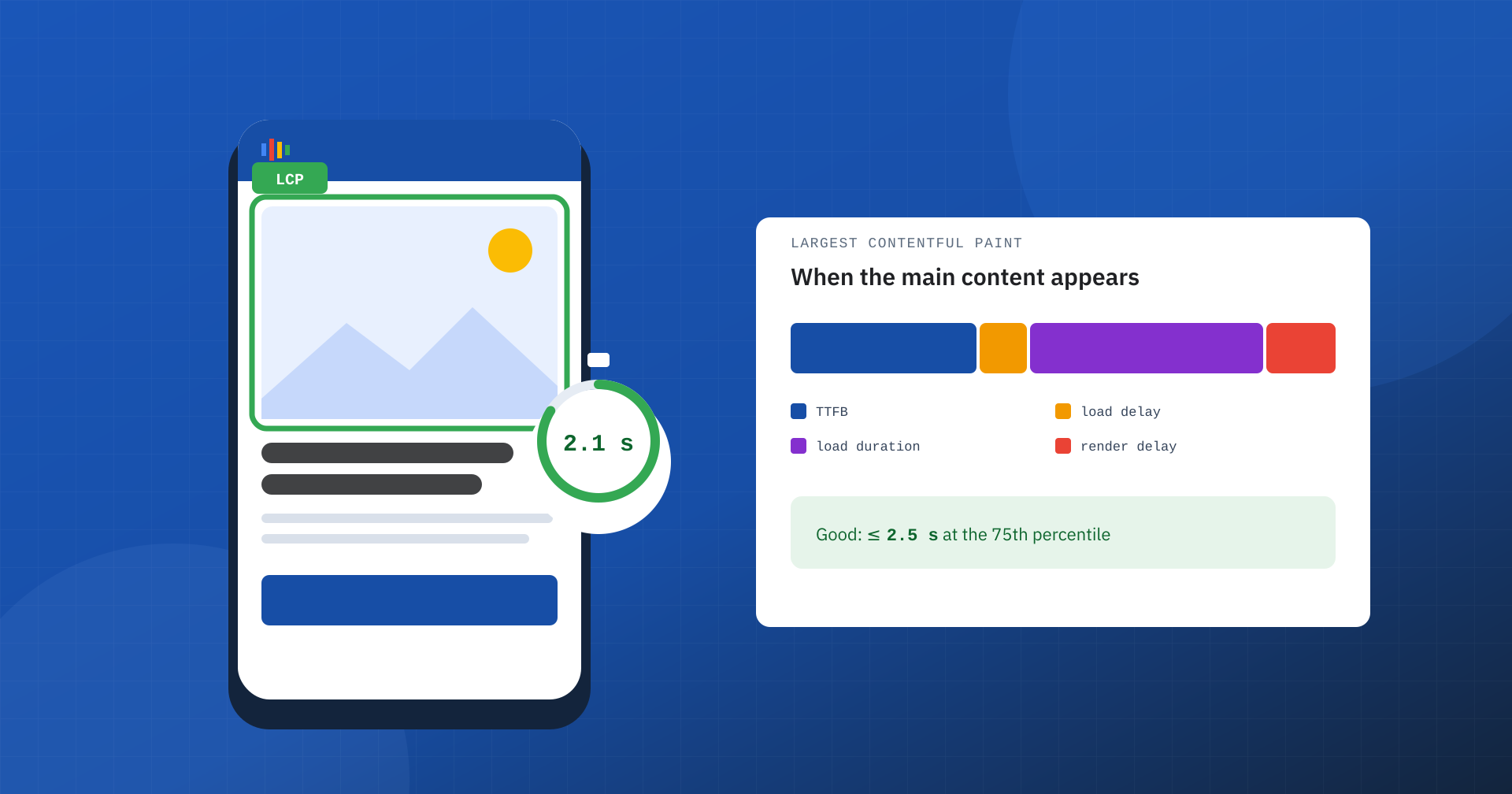
When we open a page, the question we ask ourselves is not “when has it finished loading everything?” but “when do I see what I was looking for?”. Largest Contentful Paint, LCP, is the Core Web Vitals metric that answers exactly this question: it measures when the main content of the page appears on screen. It is the metric most tied to the perception of speed, and also the one that most often separates a “green” site from one that fails Google’s assessment.
What LCP measures
LCP is the time from the start of navigation to the moment the largest element visible in the viewport is painted. It is not based on a technical event such as the full load of the document, but on what the user sees: on most pages the largest element is the main image, the article headline, the product photo or a prominent block of text.
The thresholds, assessed at the 75th percentile of real visits, are these: within 2.5 seconds the result is good, between 2.5 and 4 seconds it needs improvement, above 4 seconds it is poor. As with the other metrics, what counts is that at least three visits out of four fall within the threshold, not the average.
How the browser chooses the LCP element
The LCP element is not decided in advance. During loading the browser records, frame after frame, which is the largest element painted so far: at first it may be a headline, then a larger image that arrives later. Every time a larger candidate appears, the value is updated. Recording stops at the user’s first interaction, such as a tap, a click, a key press or scrolling.
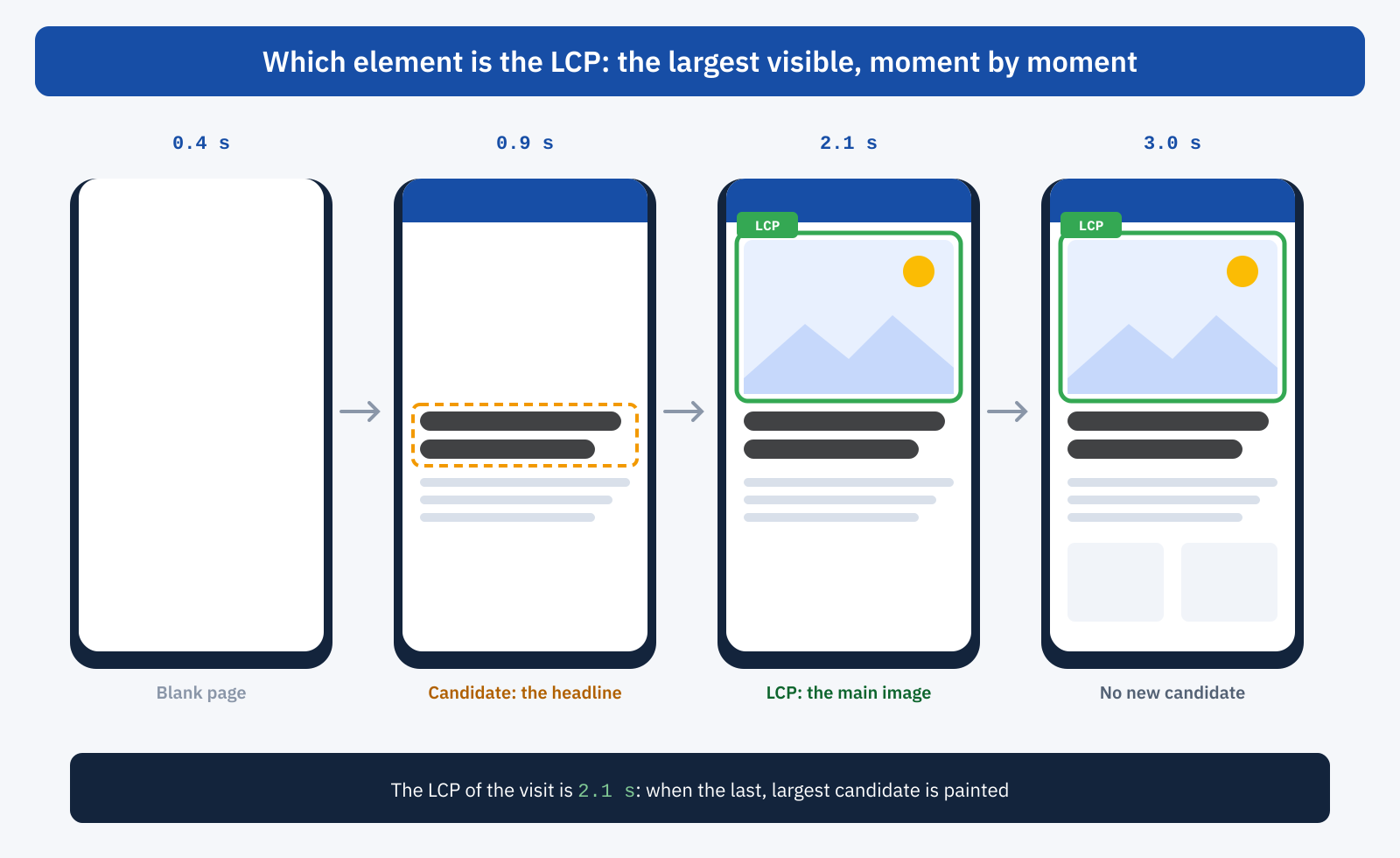
Candidates can be images, including those used as backgrounds through CSS, video posters and blocks of text. For images, what counts is the area actually visible in the viewport, and the browser excludes invisible elements and placeholders with very little information, such as the blurred images used during loading. One practical consequence: the LCP element can be different on smartphone and desktop, because what is visible and how much space it takes up changes. It should therefore be identified separately for the two types of device.
Why LCP is a business matter
Until the main content appears, the user cannot do anything: they cannot read the headline, see the product or tell whether they are in the right place. This is the moment when most abandonments happen, especially for people arriving from a campaign or a search result who have alternatives one tap away. A slow LCP translates into fewer page views, fewer add-to-carts and advertising budget spent on visits that never reach the content. And, as part of Core Web Vitals, it affects Google’s assessment of the page experience.
The four phases of LCP
The most useful way to reason about LCP is to break it down into its four phases, because each has different causes and remedies:
- TTFB: the time before the first byte of the HTML document arrives.
- Resource load delay: the time between the first byte and the start of the LCP image download. It is high when the browser discovers the image late.
- Resource load duration: the time needed to download the image.
- Element render delay: the time between the end of the download and the moment the element is actually painted, for example because the browser is waiting for stylesheets or scripts.
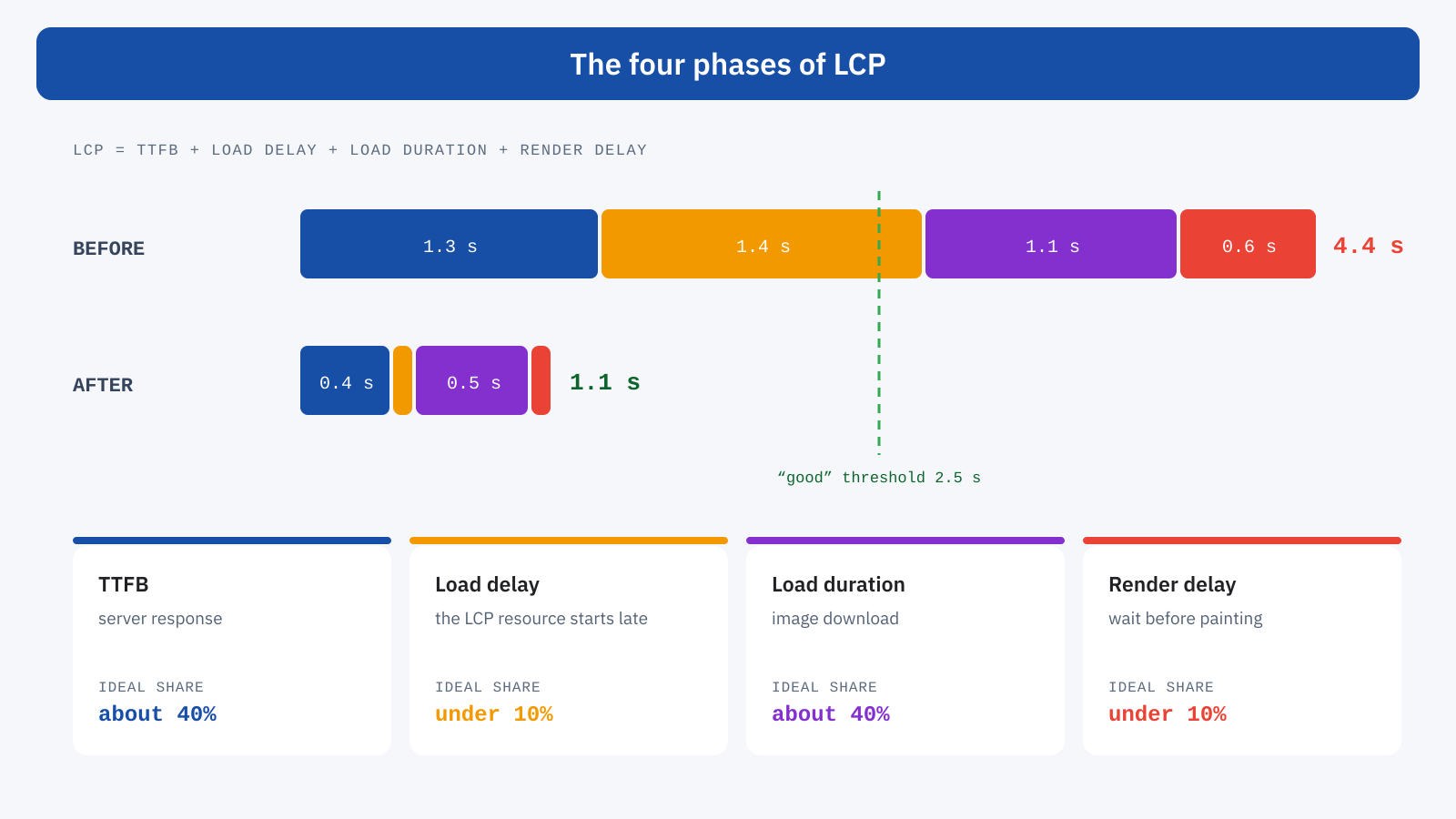
As a reference, on a well-optimized page TTFB and image download each take about 40% of the total time, while the two delays stay under 10%. If one of the phases is much larger than it should be, that is where the problem lies. In the example in the figure, the load delay alone is 1.4 seconds: the image was there, but the browser found it too late.
The most common causes
- A slow server. Without a page cache, every visit waits for the application to generate the HTML: everything else starts late. We covered this in the article on TTFB and page caching.
- An image discovered late. If the main image is a background defined in CSS, is inserted by a JavaScript slider or has the
loading="lazy"attribute, the browser requests it only after downloading and running other resources. - Images that are too heavy. A photo of several megabytes, in the same format for desktop and smartphone, takes a download time that no server optimization can make up for.
- Render-blocking resources. Stylesheets and synchronous scripts in the
<head>prevent the browser from painting the page, even when the image has already arrived. - Client-side rendering. If the main content is built by JavaScript, the LCP element exists only after the scripts have been downloaded, parsed and run.
How to improve it
The most effective rule is to let the browser find the main image right away, and tell it that it is important. It is enough for it to be present in the HTML as an <img> element, without deferred loading, with high priority and in a format and size suited to the device:
<img
	src="hero-1200.avif"
	srcset="hero-800.avif 800w, hero-1200.avif 1200w, hero-1920.avif 1920w"
	sizes="100vw"
	width="1920" height="1008"
	fetchpriority="high"
	alt="…">

<!-- if the image is a CSS background, announce it early -->
<link rel="preload" as="image" href="hero-1200.avif" fetchpriority="high">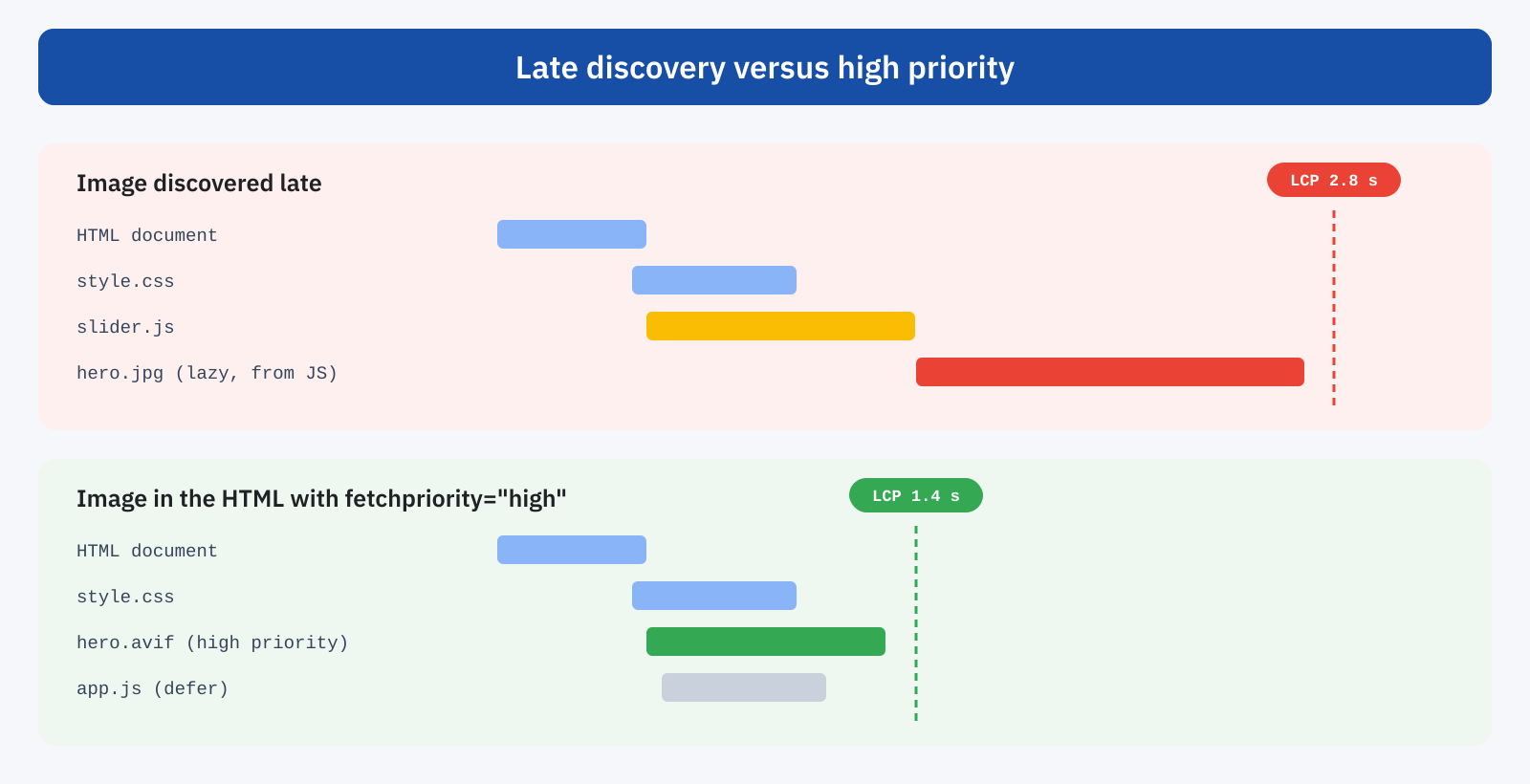
- Reduce the TTFB with a page cache at the origin, possibly combined with a CDN, and an application that is fast even when the cache cannot step in.
- Lighten the image with modern formats such as AVIF and WebP, sizes suited to each screen through
srcsetand calibrated compression. - Free up rendering by loading non-essential scripts in a non-blocking way and keeping critical stylesheets lean.
- Take care of fonts when the LCP element is text, by preloading the main font and using an immediate fallback font.
- Avoid carousels at the top of the page: a well-optimized static image is almost always faster than a slide initialized by JavaScript.
Finally, beware of shortcuts: techniques that delay all JavaScript or remove CSS automatically can improve LCP in the lab and worsen other metrics, as we saw when discussing delaying JavaScript until the first click.
How to measure it
PageSpeed Insights shows the real-user LCP at the 75th percentile from CrUX data and, in the lab section, indicates which element was considered the LCP. In the Performance panel of Chrome DevTools, the LCP breakdown by phase immediately shows which of the four weighs the most. In the field, the open source web-vitals library returns the same phases for real visits:
import { onLCP } from 'web-vitals/attribution';

onLCP( ( { value, attribution } ) => {
	console.log( 'LCP', Math.round( value ), 'ms', {
		element: attribution.target,
		ttfb: attribution.timeToFirstByte,
		loadDelay: attribution.resourceLoadDelay,
		loadDuration: attribution.resourceLoadDuration,
		renderDelay: attribution.elementRenderDelay,
	} );
} );
Lab and field can give different values: the lab test always starts with an empty cache and a single screen size, while real users have resources already cached, different devices and variable connections. This is why the lab is for understanding causes, and real-user data for verifying their effect, taking into account CrUX’s 28-day window.
In summary
LCP measures when the main content of the page appears: the largest visible element, chosen by the browser while the page is painted. Good within 2.5 seconds at the 75th percentile, it breaks down into four phases, TTFB, resource load delay, resource load duration and element render delay, which show precisely where to intervene.
In our experience the most frequent problems are always the same: a server without a page cache and a main image that is discovered late or too heavy. They are also the ones with the quickest return: a low TTFB and an image that is announced immediately, light and high-priority are often enough to bring LCP under the threshold, with an immediate effect on what users see and on how many of them stay.
