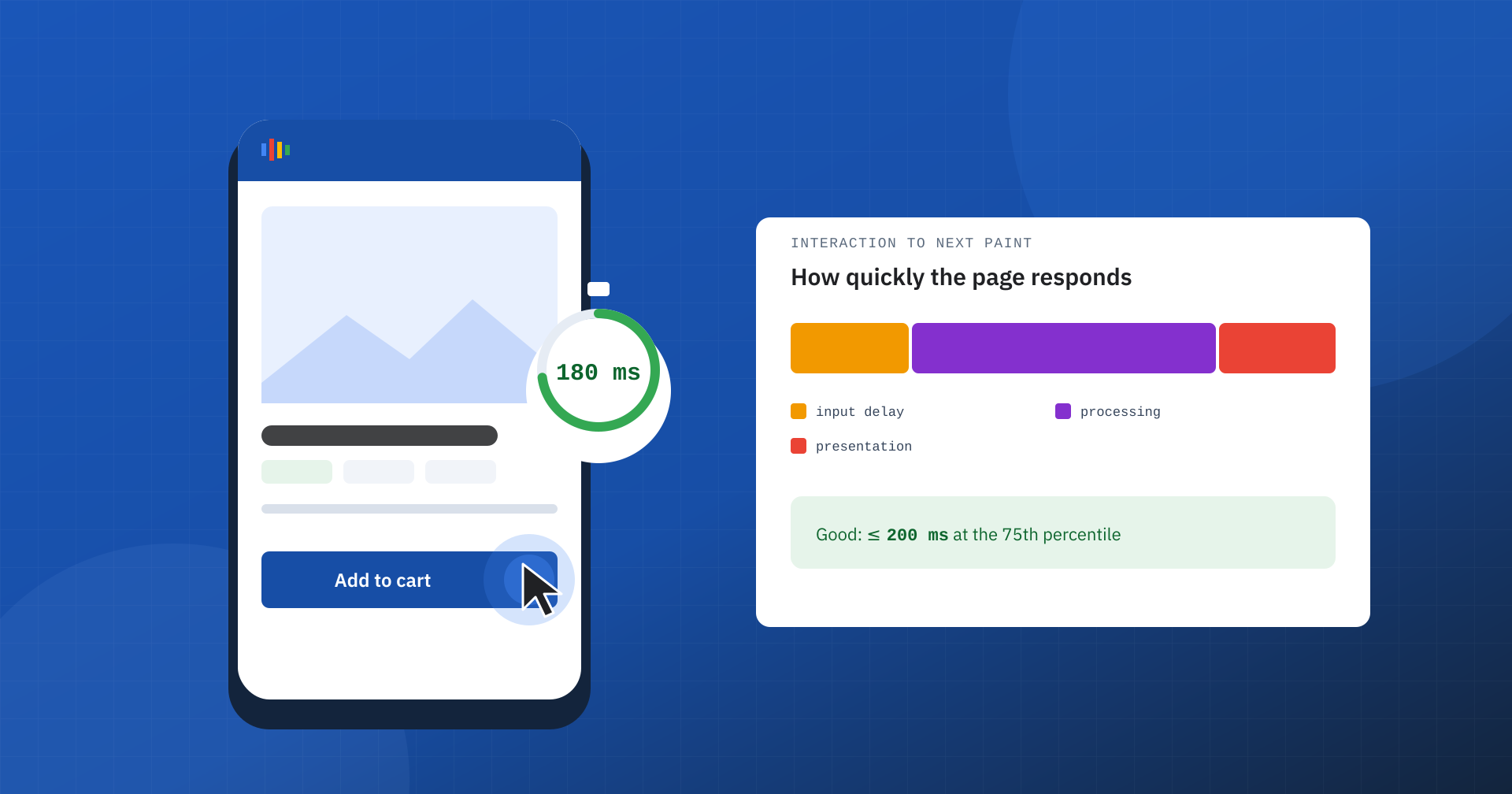
A page can appear quickly and stay perfectly stable, but if nothing happens for half a second after a tap on a button, the experience is frustrating all the same. The menu does not open, the filter is not applied, the product does not seem to be added to the cart, and the user taps again, or leaves. Interaction to Next Paint, INP, is the Core Web Vitals metric that measures exactly this: how quickly the page responds to what the user does.
What INP measures
INP measures the time between a user interaction, that is a click, a tap on the screen or a key press, and the moment the browser paints the next frame, the one that shows the user that something has happened. It is not enough for the code to start responding: what counts is when the response becomes visible.
Since March 2024, INP has replaced First Input Delay among the Core Web Vitals. The difference is substantial: FID measured only the delay of the first interaction, while INP considers all the interactions of the visit and their entire duration. The thresholds, at the 75th percentile of real visits, are these: within 200 milliseconds the result is good, between 200 and 500 it needs improvement, above 500 it is poor.
The anatomy of an interaction
Every interaction goes through three phases, and each can be responsible for a high INP:
- Input delay: the time the interaction waits because the browser’s main thread is busy with something else, for example a third-party script.
- Processing: the time needed to run the code that responds to the event, that is the handlers attached to the click or the key.
- Presentation: the time the browser takes to recalculate styles and layout and paint the new frame.
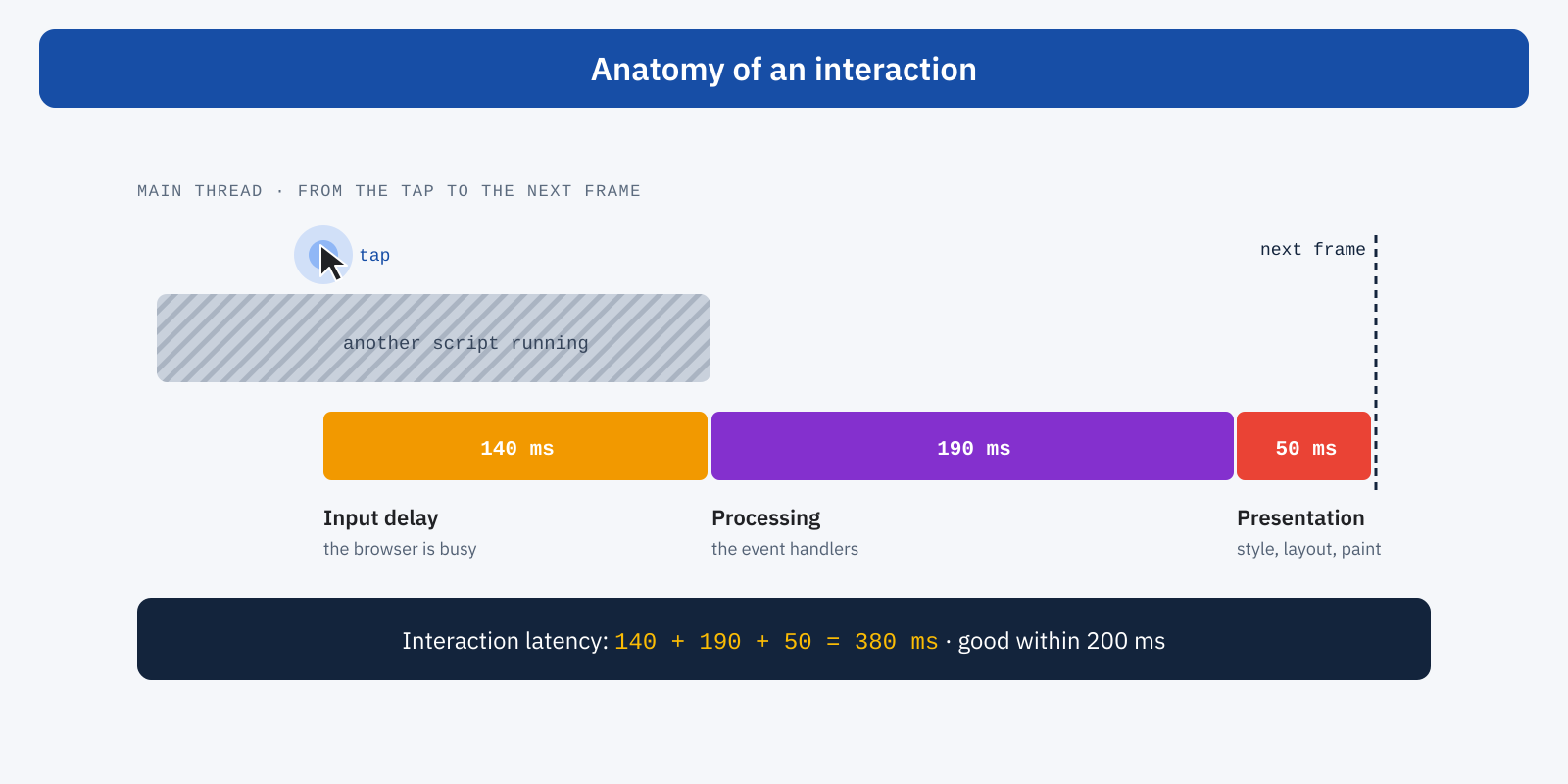
Telling the three phases apart is essential, because the remedies differ. A high input delay points to a main thread overloaded with work unrelated to the interaction; a long processing time points to event handlers that are too heavy; a slow presentation points to a page that is expensive to repaint, often because of a very large DOM or changes that force the browser to recalculate the layout several times.
Which interaction becomes the INP
During a visit the user interacts many times, and the browser measures each interaction. The INP of the visit is the latency of one of the worst: for most pages, with fewer than fifty interactions, it coincides with the slowest; for pages with a great many interactions, such as web applications or games, one in every fifty is ignored, so that a single isolated episode does not decide the result. Scrolling the page and moving the mouse over elements are not counted interactions.
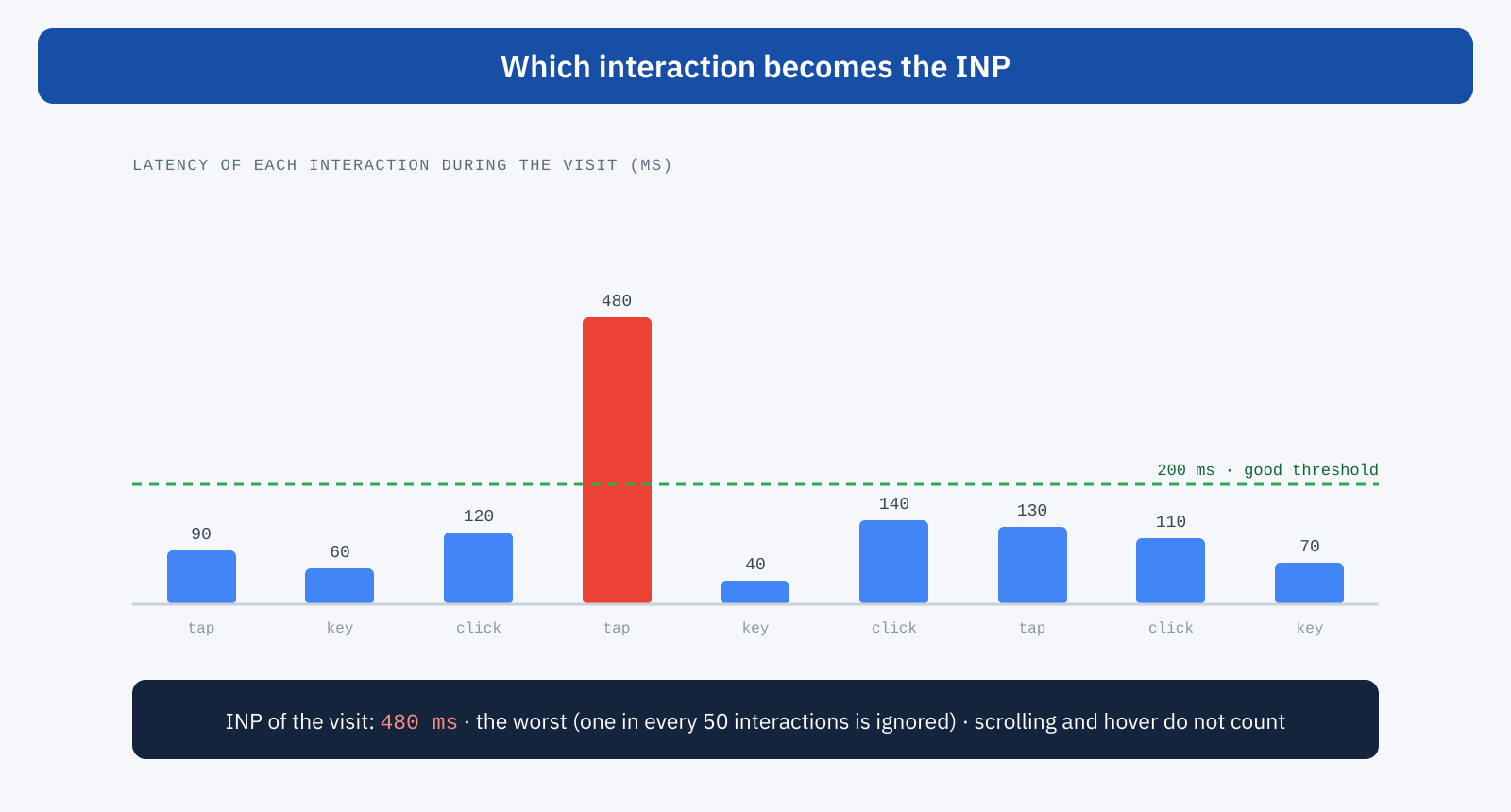
It is a deliberate choice: the user remembers the button that did not respond, not the ten that worked. To improve INP you therefore need to find the slowest interactions, not just make the already fast ones faster.
Why INP is a business matter
Slow interactions arrive at the moments when the user is doing something important: choosing a size, applying a filter, adding a product to the cart, filling in a form, opening the menu to look for a section. A page that does not respond generates repeated taps, duplicate actions, doubts about what has happened, and in the end abandonment right along the path that leads to conversion. It is also the metric most tied to the perception of a site’s quality: a page that is slow to respond seems broken, even when it is not.
The most common causes
- Long tasks on the main thread. Scripts that run tens or hundreds of milliseconds of work without interruption block any interaction that arrives in the meantime.
- Third-party scripts. Marketing tags, advertising pixels, chat, analytics and A/B testing tools add work that often concentrates right when the user starts to interact.
- Heavy event handlers. A click that updates many parts of the page, sends tracking data, recalculates filters and prices all at once, before showing any response.
- Pages that are expensive to repaint. A DOM with thousands of elements, complex stylesheets, alternating layout reads and writes that force the browser to recalculate several times.
- JavaScript deferred until the first click. Techniques that delay all scripts until the first interaction concentrate the work at exactly that moment, as we explained when discussing delaying until the first click.
How to improve it
The guiding principle is to leave the main thread free to respond. The first tool is to break long tasks into smaller chunks, periodically handing control back to the browser: the total work stays the same, but an interaction can slip in between one chunk and the next instead of waiting for everything to finish.
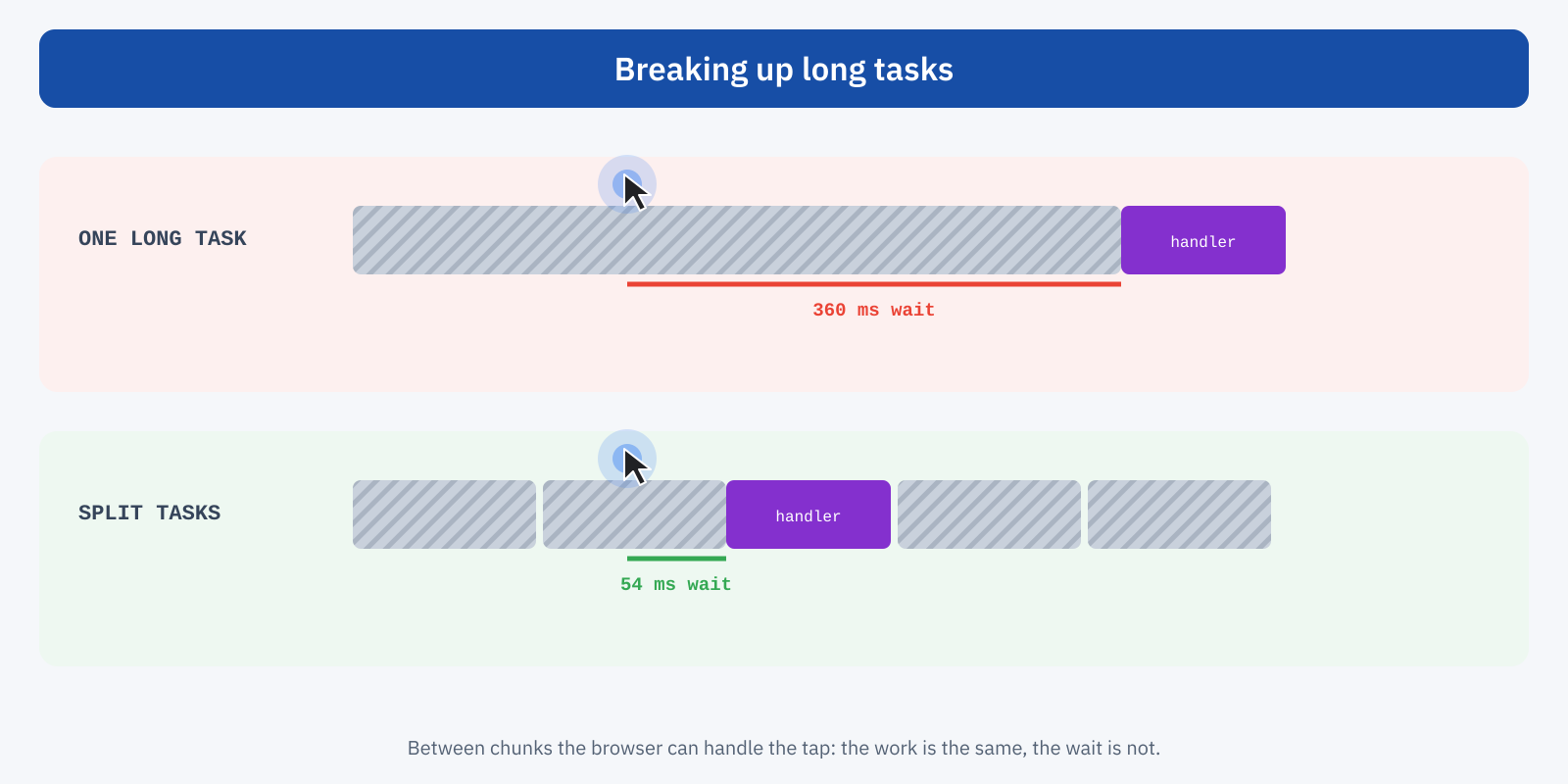
The second principle is to show a response immediately and defer the rest. In a click handler it pays to update first what the user sees, such as the button state or a loading indicator, and only afterwards run the non-urgent work, such as sending tracking data:
// Yields control to the browser, with a fallback where scheduler.yield does not exist.
const yieldToMain = () =>
	globalThis.scheduler?.yield?.() ?? new Promise( ( r ) => setTimeout( r, 0 ) );

button.addEventListener( 'click', async () => {
	button.classList.add( 'is-loading' ); // visible response right away
	await yieldToMain();                  // the browser paints the frame
	updateCart();                         // necessary work
	await yieldToMain();
	sendTracking();                       // non-urgent work, last
} );- Reduce the JavaScript loaded on every page, removing unnecessary plugins and libraries and loading components only where they are needed.
- Govern third parties: limit their number, load them in a non-blocking way and check their real cost on interactions.
- Keep the DOM and the complexity of styles contained, and use
content-visibilityfor off-screen sections. - Avoid forced layout recalculations, grouping size reads before modifications.
- Move heavy work off the main thread, into a web worker or onto the server, when it does not directly concern the interface.
How to measure it
INP is by its nature a field metric: it requires real interactions, and a lab test that merely loads the page performs none. This is why Lighthouse does not report INP and uses Total Blocking Time as an indirect indicator of the risk. The real values can be read in PageSpeed Insights and in Search Console from CrUX data, remembering that they update over a 28-day window.
For diagnosis, the Performance panel in Chrome DevTools shows in real time the latency of the interactions we perform on the page, and lets us record a trace to see what occupies the main thread at that moment. In the field, the web-vitals library in its attribution build reports the element, the type of interaction and the duration of each phase:
import { onINP } from 'web-vitals/attribution';

onINP( ( { value, attribution } ) => {
	console.log( 'INP', Math.round( value ), 'ms', {
		element: attribution.interactionTarget,
		type: attribution.interactionType,
		inputDelay: attribution.inputDelay,
		processing: attribution.processingDuration,
		presentation: attribution.presentationDelay,
	} );
} );
Collecting this data from real users, even for a limited period, is often the quickest way to find out which button or script is responsible: slow interactions almost always concentrate on a few elements and a few pages.
In summary
INP measures how much time passes between a user interaction and the frame that shows its effect, across all the interactions of the visit, and reports one of the worst. It is good within 200 milliseconds at the 75th percentile and breaks down into input delay, processing and presentation. The causes are almost always an overloaded main thread, heavy event handlers and pages that are expensive to repaint.
Improving it mostly means doing less work, and doing it at the right time: less JavaScript and fewer third parties, split tasks, a visible response right away and non-urgent work deferred. It is the optimization you feel most in everyday use, because it concerns the moment when the user asks the site for something and expects a response.
