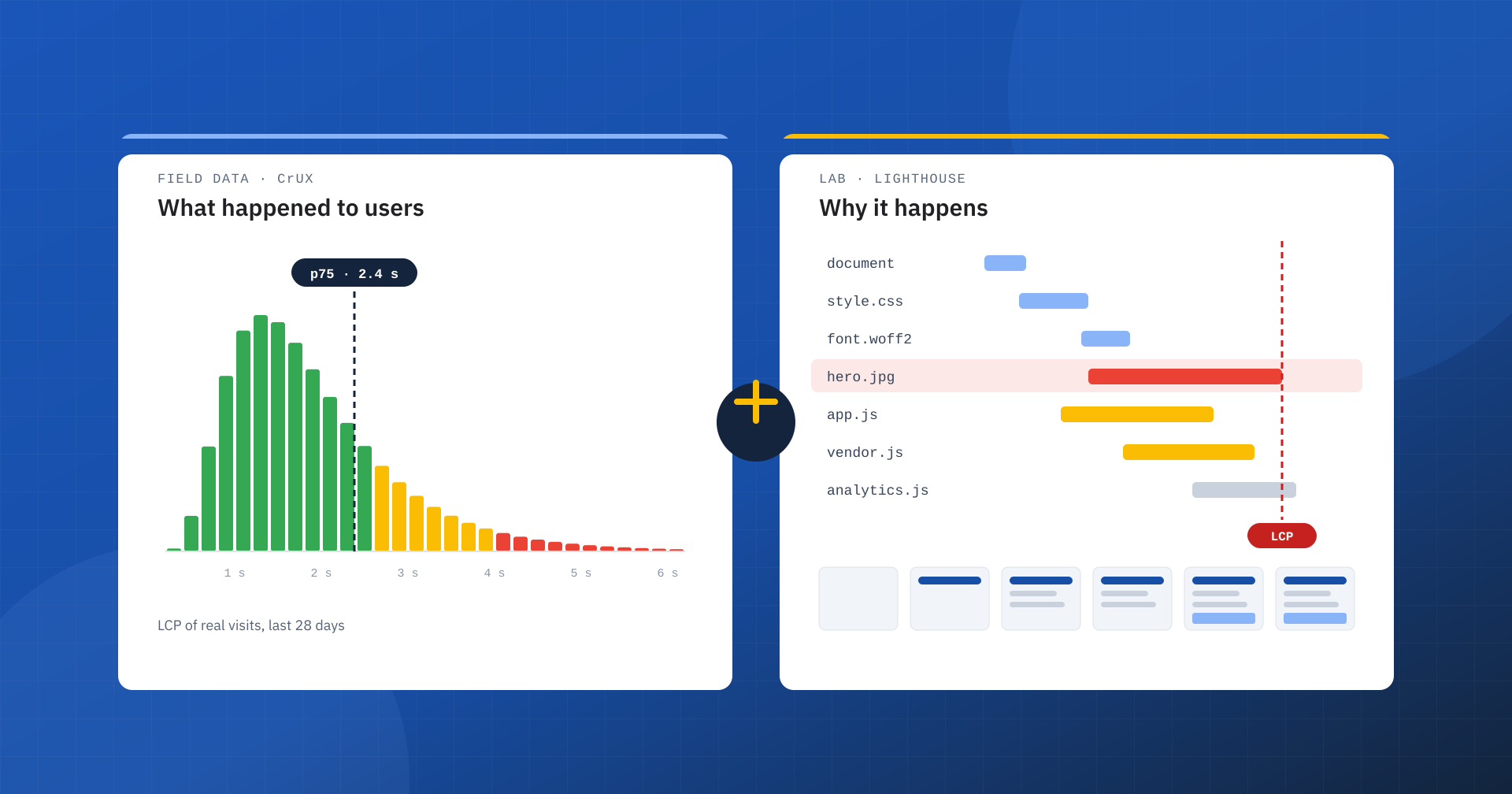
A paradox circulates among people who work on web performance. On one hand, it is rightly recognized that real-user data is what counts. On the other, a hasty conclusion is often drawn: if only real data matters, lab tests can be ignored. If the Chrome UX Report is green, what does it matter that Lighthouse flags a slow LCP, a high Total Blocking Time or a mediocre score?
It matters, and a lot. CrUX and lab data, which for brevity we will call LABS, do not measure the same thing and above all do not serve the same purpose. The former tell what happened to the users who visited the site. The latter show how the page behaves under controlled, repeatable and, if we want, harsher-than-usual conditions. Giving up one of the two means working with half the information.
The false myth: green CrUX, fast site
The reasoning is well known: Google evaluates Core Web Vitals with real data, so the only goal is to pass the CrUX assessment, and the lab section of PageSpeed Insights becomes a detail. The problem is that two different questions get confused: what happened, and what could happen.
CrUX collects the real experiences of eligible Chrome users and aggregates them by URL or by origin. It does not compute an average, but evaluates the 75th percentile: a metric is “good” if at least three experiences out of four fall within the threshold. The current thresholds are 2.5 seconds for LCP, 200 milliseconds for INP and 0.1 for CLS. The percentile limits the effect of extreme cases and is far more meaningful than an average, but precisely because it describes a distribution it does not guarantee that every user is browsing quickly: it only says that the majority is.
Who you are really measuring
Take a site whose audience comes largely from big cities, with recent smartphones connected over fiber, fast Wi-Fi or low-latency 5G. It is this population that dominates the experiences collected by CrUX. If nine users out of ten browse in favorable conditions, the page can get excellent values even if, in absolute terms, it is anything but light.
Now open the same site from an area with weak mobile coverage, on a congested 4G network and with a mid-range smartphone. A main image of 800 KB, four fonts from external domains, 700 KB of JavaScript, an advertising script, the consent banner and a few third-party widgets were almost invisible on fiber; here they become seconds of waiting. The site has not become heavier: it already was. It was the network and devices of the usual audience that cushioned the weight.
Geography is just the most intuitive example. Device, processor power, network type, latency, browser cache, the behavior of the visitor and many other factors all matter. Part of the audience, moreover, does not appear in the data at all: Chrome on iPhone and other browsers do not contribute to CrUX.
CrUX correctly describes the audience you have today. Not all the users you might have tomorrow.
What field data does and does not say
CrUX data is representative of the experiences actually collected for that site, not of every possible browsing condition. And that is as it should be: the job of field data is to tell the real world. The mistake arises when this characteristic is turned into an absolute conclusion. “CrUX is green, so the site is fast” is a different statement from the correct one: “at least 75% of the experiences collected over the last 28 days fall today within the good thresholds”.
Then there is the time factor. PageSpeed Insights data covers a rolling 28-day window: a change that makes the page worse today shows up immediately in a lab test, while in real data it emerges gradually, as new experiences replace the old ones. This is not a flaw in CrUX, but the natural consequence of a measure aggregated over time.
What lab data is for
The lab answers another question. Not “how did our visitors browse?”, but “how does this page behave if we remove the external variables and subject it to a reproducible scenario?”. Lighthouse, the same engine PageSpeed Insights uses for the lab section, loads the page with a simulated device, network and processor and breaks the load down.
That is how problems that are hard to see in aggregate data emerge: render-blocking resources, excessive JavaScript, long tasks on the main thread, oversized images, a request chain that is too long before the LCP element, unused CSS, third-party scripts. And the lab has an advantage real data cannot offer: repeatability. Before and after a change you can compare equivalent conditions, in a few minutes.
Saying that lab data is “fake” because it is synthetic is an error of perspective. A crash test does not reproduce every possible accident, but nobody considers it useless: it puts the vehicle in a known condition and observes how it reacts. In the same way, a site that keeps LCP low, JavaScript light and the main thread free even in conditions harsher than those of its usual audience has something extra.
Performance headroom
That something extra is headroom. Imagine two sites with the same LCP of 2 seconds in real data. The first is well built: HTML generated quickly, effective cache, compressed images, few critical resources, little JavaScript, a server that responds in a few milliseconds. The second reaches the 2 seconds mainly because its audience uses recent hardware and very fast connections, while the page weighs several megabytes and carries a lot of JavaScript.
Looking only at CrUX they seem equivalent. From a performance engineering point of view they are not at all: the first keeps working well when conditions worsen, the second degrades quickly as soon as latency, network congestion or processor load increase. The lab is the tool that makes this difference visible.
Red LABS and green CrUX
This is the situation that sparks the most debate: the site passes Core Web Vitals in the field, but Lighthouse reports mediocre performance. Do you have to act on every warning? No, and certainly not by chasing 100: the score is not a goal in itself. But ignoring the report would be just as wrong. A clearly negative lab often indicates a site with little headroom, whose good real-world performance depends in part on the audience’s favorable conditions. If the test shows 2 MB of JavaScript, huge images or an LCP that arrives after a long chain of requests, the fact that today’s users manage to compensate does not turn those problems into good practice.
Green LABS and red CrUX
The opposite also happens: Lighthouse is excellent, but real data shows insufficient LCP, INP or CLS. The lab says that in the test scenario the page behaves well; CrUX says that in the real world something goes wrong. Factors come into play that a single synthetic load does not represent: subsequent interactions, personalized content, consent banners, advertising, scripts loaded only under certain conditions, very slow devices. INP, in particular, depends on real interactions, which an automated test does not perform: that is why techniques such as delaying JavaScript until the first click can improve the lab and worsen the field. And it should not be forgotten that there are configurations capable of serving the test a different page from the one users get. In these cases CrUX is the starting point: it points to the problem the lab will have to reproduce and explain.
The workflow: CrUX, LABS, change, CrUX
Asking which of the two data sets is “the right one” is the wrong question: both are, because they answer different questions. A sensible optimization process uses field data to identify problems and weigh their impact, and the lab to understand their causes.
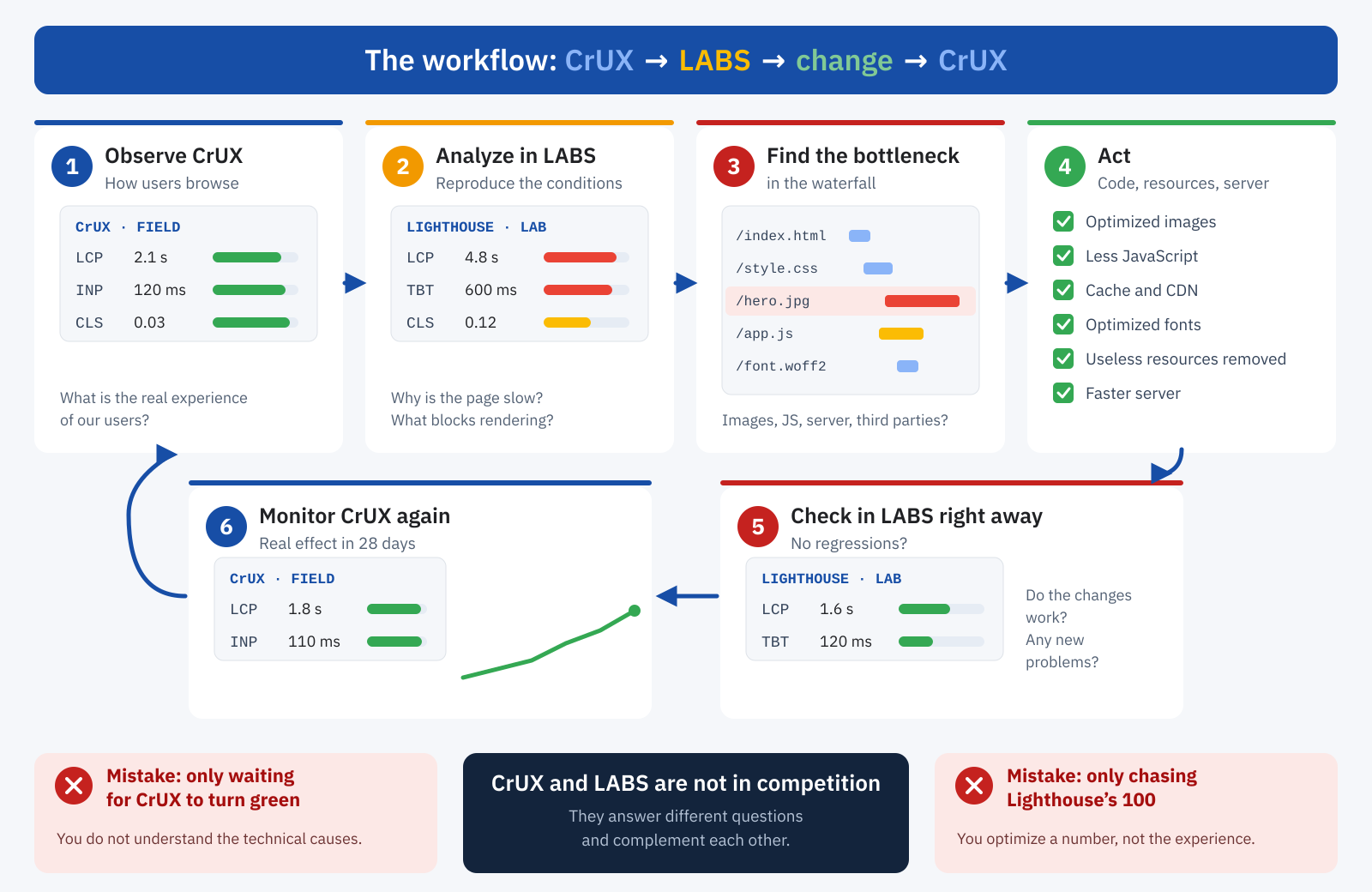
- Observe CrUX data to understand how users really browse and which pages and metrics are critical.
- Analyze the pages in the lab, trying to reproduce the problematic conditions.
- Identify the technical bottleneck in the waterfall, in the main thread or on the server.
- Apply the change.
- Check straight away in the lab that no regressions have been introduced.
- Monitor real data in the following weeks to measure the effect on users.
It is a far more rational approach than either passively waiting for the real-data box to turn green or compulsively chasing Lighthouse’s 100 without asking whether users will really perceive the difference.
Don’t forget the server
Good performance comes from the entire stack, not just the front end. The browser cannot build a page the server has not yet started sending: slow queries, overloaded PHP, no page cache, a badly configured object cache or undersized resources lengthen the response time. TTFB is not a Core Web Vital, but it propagates along the whole loading chain and weighs above all on LCP. With users close to the data center and well connected, some of these inefficiencies stay hidden; controlled tests, with waterfalls and different network conditions, let you separate the back end’s responsibilities from the front end’s.
When the audience suddenly changes
There is one last aspect that shows how risky it is to rely only on the average conditions of your audience: the composition of traffic can change quickly. An international campaign, content that goes viral, growth in a new market bring users farther from the server, with slower networks and less powerful devices. In theory the same effect could be caused on purpose, by buying cheap traffic from areas with worse connectivity to damage a competitor’s data. There is no guarantee that such an operation would work, and Core Web Vitals are only one of the many signals Google uses, but the scenario helps make the point.
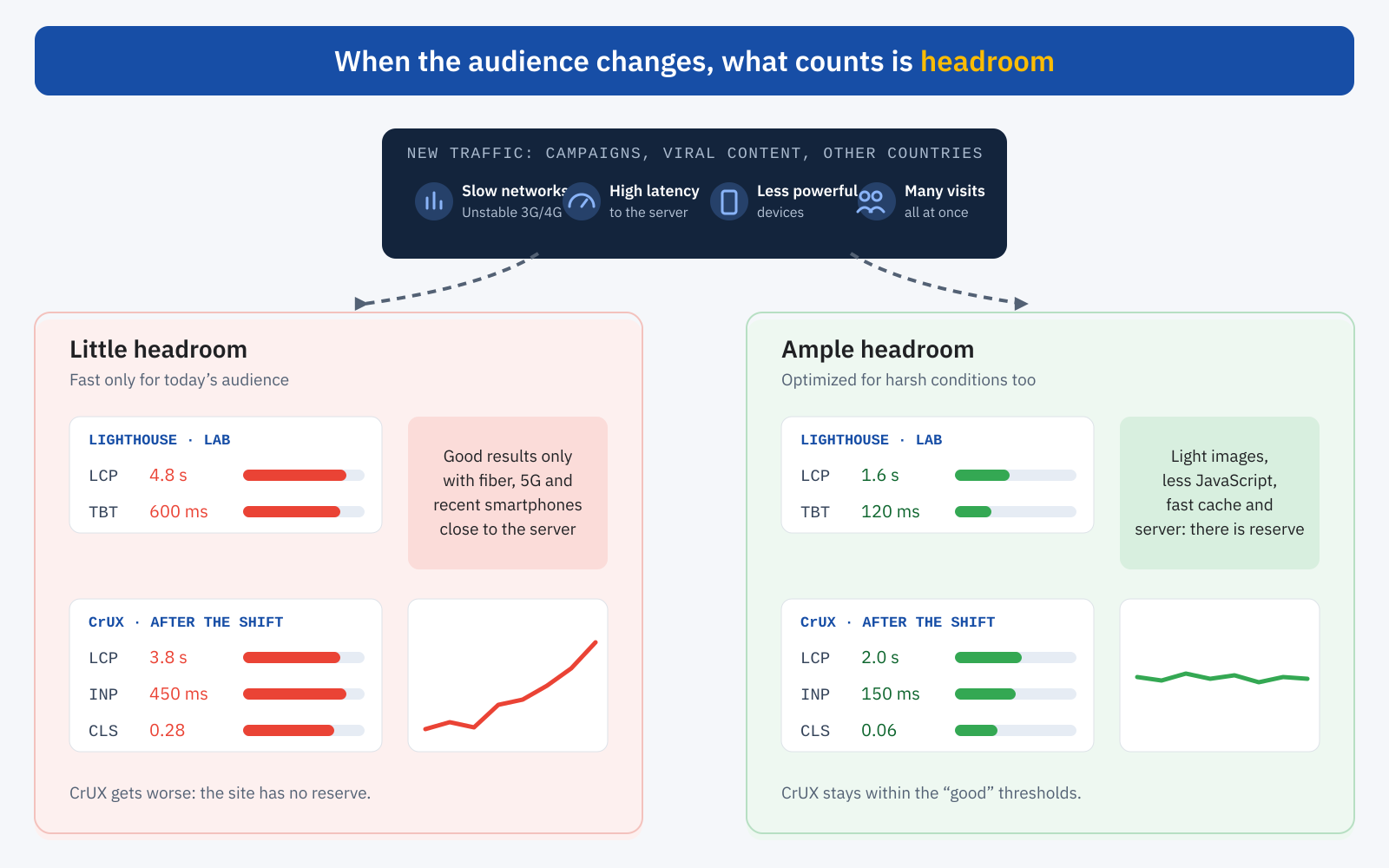
CrUX does not use all visits and does not compute an average: it only considers eligible users and evaluates the 75th percentile. So there is no rule of the type “so many slow visits cost so many points”. But if a sufficient share of new, slower experiences enters the sample, the distribution changes. A site that already has little headroom in the lab, with an LCP close to the threshold, hundreds of requests and heavy images, quickly exceeds the limits as soon as the favorable conditions disappear. A site optimized for harsh scenarios too has a reserve instead: a few hundred extra milliseconds of latency do not push it out of the thresholds. Taking care of lab data thus becomes a form of hardening, not against an algorithm, but against the idea of a site that is fast only as long as nothing changes.
In summary
You do not have to choose between CrUX and LABS, but know their limits and advantages. CrUX tells what happened to real users, on the networks and devices they actually used: it is the reference for the Core Web Vitals assessment. The lab lets you create controlled conditions, compare before and after, find bottlenecks and measure a page’s headroom. If your audience browses almost only on fiber and with latest-generation smartphones, CrUX can be excellent even with significant inefficiencies: it is not wrong, it is describing today’s audience. The lab helps you understand what will happen tomorrow, or what is already happening to the less fortunate users.
And then there is the simplest test of all: use the site the way people use it. Open it on your smartphone in a crowded café, in a building with poor coverage, on vacation where the signal comes and goes. That is where images arriving late, elements shifting and buttons not responding show up. Network throttling in DevTools remains valuable, but it does not replace direct experience: if the site feels slow to you, in real conditions, it is slow for part of your users too. A truly fast site is not one with three green indicators today, but one that stays fast when the network slows down, the device is less powerful and the audience changes.
