On a news site, a slow page costs readers. In an online store it costs orders, and the link is far more direct. A 2020 Deloitte study carried out with Google, covering dozens of sites across different sectors, found that an improvement of just a tenth of a second in mobile load times was associated, in retail, with an increase in conversions of about 8%. It is not a universal law, but it confirms what anyone running an e-commerce site sees every day: speed is not a technical detail, it is a line on the profit and loss statement.
WooCommerce is the most widely used e-commerce platform in the WordPress world, and it is also one of the places where Core Web Vitals are lost most easily. Not because it is slow in itself, but because it combines the traits of a CMS with those of an application: public pages that can be cached, personal pages that cannot, sessions, carts, price and shipping calculations, payment scripts and a very rich plugin ecosystem. In this article we follow the purchase journey, page by page, to see where things slow down and what to do about it.
Category pages: the shop window
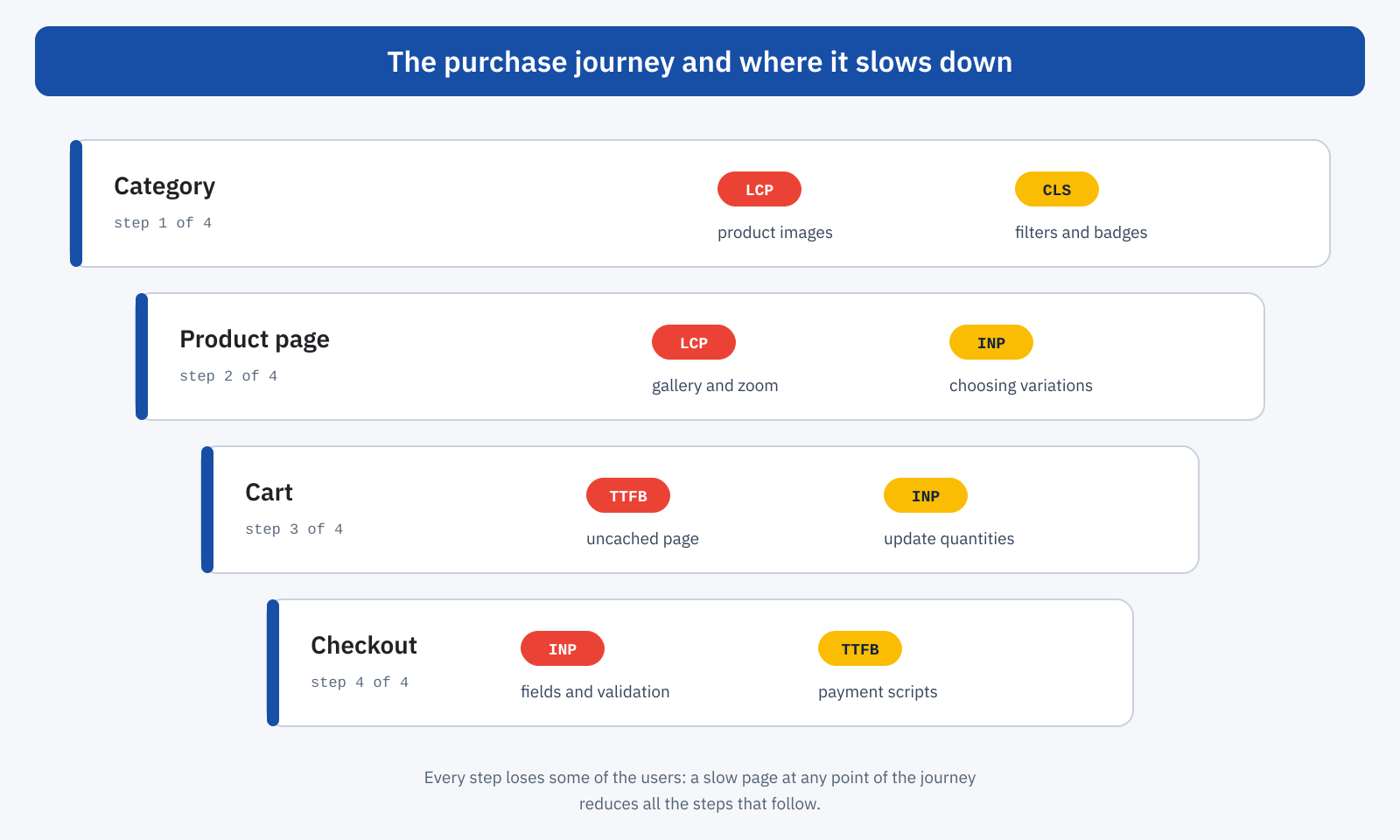
The category page is often the first contact with the store, especially for visitors coming from Google or from a campaign. It is a grid of products with images, prices, badges and filters, and its typical problems concern LCP and CLS.
For LCP, the largest element is almost always the first product image or a category banner. The rules are the ones we saw for LCP: images in the first row must not be lazy-loaded, the main one can receive fetchpriority="high", and all of them must be served in the right format and size. A catalog with thousands of photos uploaded by suppliers, often several megabytes each, is the ideal case for automatic conversion to WebP or AVIF and for correct responsive sizes.
For CLS, the recurring culprits are faceted filters that appear after loading, discount or availability badges inserted via JavaScript, prices updated after the first paint by currency or price-list plugins, and promotional banners that push the grid down. Every element that arrives later must have space reserved from the start, as explained in the article on CLS. The heaviest filter plugins deserve particular attention on the server side as well: queries on taxonomies and product attributes, on large catalogs, can noticeably raise the TTFB of filtered pages, which are rarely cached.
The product page: where the decision is made
The product page is where the user decides whether to buy, and it is often the heaviest page in the store: gallery with zoom and lightbox, variations, reviews, related products, installment payment widgets, advertising pixels, sometimes video. The main image is almost always the LCP element: it must be in the initial HTML, not generated by a JavaScript slider, and it must have explicit dimensions. The later gallery images can be lazy-loaded, and zoom only on interaction.
Variations deserve a discussion of their own. For variable products, WooCommerce puts the data of all variations into the page, in an attribute that JavaScript reads to update price, image and availability when the user picks a size or color. Beyond a certain threshold, 30 variations by default, the data is no longer included and every choice triggers a request to the server. In both cases the interaction can become slow: with a lot of data, because of the work on the main thread; with requests, because of the wait for the response. It is one of the places where a store’s INP gets worse most often, especially on mid-range smartphones, and it is also the moment when the user is closest to buying.
The Add to cart button is the other critical interaction. If the click starts an AJAX request, updates the mini cart, opens a side panel and sends events to several advertising platforms, all in the same task, the user may wait several hundred milliseconds with no visual feedback. The rule is to give feedback immediately, such as a button that changes state, and move the rest to after the paint.
The cart and the caching problem
For an anonymous visitor, a store’s pages can be served from the page cache, with a TTFB of a few tens of milliseconds, as we saw when discussing TTFB and page caching. But as soon as the user adds a product to the cart, WooCommerce sets session cookies, such as woocommerce_items_in_cart, and most cache setups stop serving cached pages to that user, across the whole site. It is a prudent choice, to avoid showing someone else’s cart to a visitor, but it has a paradoxical consequence: the most valuable users, the ones who have already chosen something, browse the slowest version of the store.
Cart, checkout and customer account cannot be cached by definition. Their TTFB depends entirely on PHP and the database, and what makes the difference here is the PHP version, an object cache such as Redis, cleaning up autoloaded options, session handling and high-performance order storage (HPOS), which WooCommerce uses by default on new stores and which moves orders into dedicated tables.
Cart fragments
Then there is a mechanism that for years penalized WooCommerce stores even with caching enabled: the so-called cart fragments. To update the mini cart in the header, a script sends an AJAX request to ?wc-ajax=get_refreshed_fragments, which cannot be cached and requires WordPress to run in full. The page arrives from the cache in a few milliseconds, but right afterwards the server still has to do work.
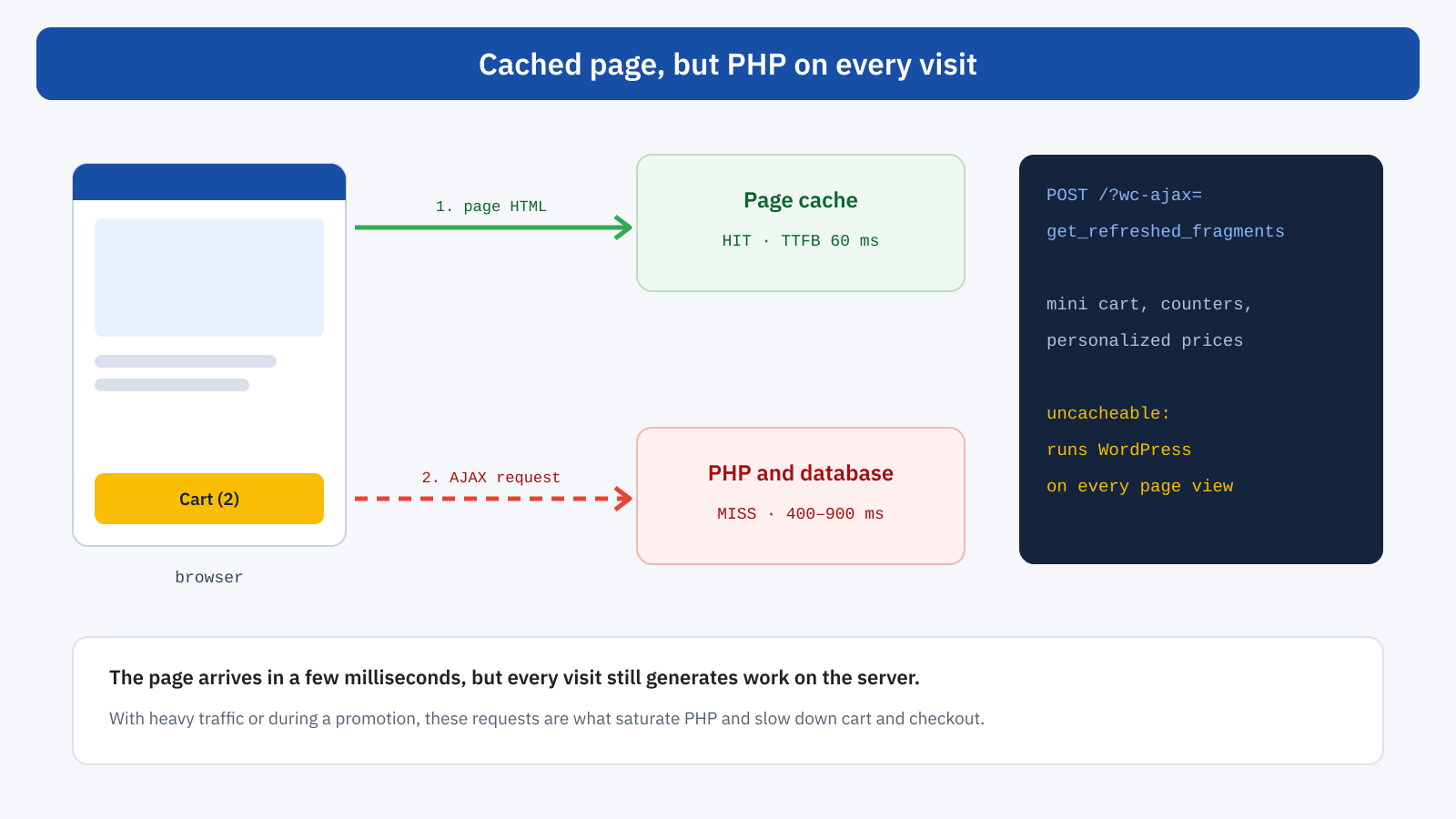
Since version 7.8, WooCommerce loads this script only where the classic mini cart widget is actually used, and the block-based mini cart uses a different, lighter API. Many themes and plugins, however, re-enable it on every page. Checking is simple: in the Network panel of DevTools, on any page, look for the get_refreshed_fragments request. If it appears even when the cart is empty, it is a cost paid on every page view, and during a high-traffic promotion it can saturate PHP resources exactly when they are needed for cart and checkout.
Checkout: the last yard
Checkout is the page with the highest value per visit and often the one least cared for in terms of performance. It is a form with many fields, each of which can trigger validations, shipping and tax calculations, and summary updates; and it hosts the payment method scripts, which in turn load iframes and resources from external domains.
- Updates on every field. In the classic checkout, changing the address, postcode or shipping method starts a request to update the summary. If the server is slow, every change turns into a visible wait. The speed of this request depends on the TTFB of dynamic pages, and therefore on the same measures described above.
- Payment scripts everywhere. Many payment plugins load their own scripts on every page of the site, even where they are not needed, to show promotional messages or quick-pay buttons. Limiting them to the product page, cart and checkout, where they are really needed, lightens everything else.
- Fields and autocomplete. Address autocomplete, VAT number validation, real-time checks: useful, but each one adds work to the main thread while the user types. They should be measured with INP, not just tried by hand on a fast computer.
- Block checkout. The block-based checkout, the default in recent installations, handles updates through the store’s dedicated API and generally behaves better than the classic checkout, but you should check the compatibility of every plugin that touches checkout before migrating.
E-commerce third parties
An online store tends to accumulate more third-party code than any other site: pixels from several advertising platforms, remarketing tools, review widgets, chat, recent-purchase notifications, installment payments, loyalty programs, A/B tests. Each one has a commercial rationale, and each one takes time from the main thread. The method for keeping them under control is the one described in the article on third-party scripts: inventory, measure the cost, remove what is no longer used, defer what is not needed right away. In an e-commerce site there is an extra advantage: the value of each tool can be compared with the revenue it helps generate, and therefore with the cost in conversions that its weight entails.
Measuring by page template
A store has few page templates and many pages per template: a home page, a few dozen categories, thousands of products. Core Web Vitals should therefore be read by group. Search Console already groups similar URLs; a real-user monitoring system lets you go further, splitting the data by template, by device and, above all, by user state: anonymous, with products in the cart, logged-in customer. It is often the only way to see that the store is fast for those who arrive and slow for those who are buying.
The next step is to connect this data to business metrics. Comparing the conversion rate of sessions with good LCP or INP against that of sessions with poor values, on the same page template, gives a concrete measure of what an improvement is worth. It is also the most effective way to set priorities: a change to the product page with a measurable effect on conversions is worth more than a perfect score on a corporate page.
Where to start
- Cache and TTFB. Page cache for anonymous visitors, object cache for dynamic pages, up-to-date PHP, a clean database, HPOS enabled. Without this foundation, the rest yields little.
- Uncacheable requests. Check cart fragments and any other AJAX request that fires on every page.
- Catalog images. Modern formats, correct sizes, no lazy loading for above-the-fold images, priority for the main image on the product page.
- Purchase journey interactions. Variations, add to cart, quantity updates, checkout fields: measure INP and give immediate feedback.
- Third parties and plugins. Limit scripts to the pages where they are needed, remove what brings no value, defer the rest.
- Internal navigation. Once the basics are in place, Speculation Rules between category and product and compatibility with the back/forward cache make the most frequent moves instant, forward and back between listing and product page.
In short
In WooCommerce, Core Web Vitals are lost along the whole purchase journey: LCP and CLS on categories, LCP and INP on the product page, TTFB and INP in cart and checkout. The most underestimated issue is caching: users with an active cart, the ones closest to buying, often browse without a page cache and bear the full weight of PHP and the database, on top of uncacheable requests such as cart fragments.
The way forward is to measure by page template and by user state, connect the metrics to conversions and intervene in order: first the server foundation, then superfluous requests, images, interactions and third parties. In an online store every tenth of a second has a measurable economic value, and knowing where it is lost is the first step toward getting it back.
