Of all the resources on a page, JavaScript is the most expensive. A 200-kilobyte image, once downloaded, only has to be decoded and painted. A 200-kilobyte script has to be downloaded, then parsed, compiled and run on the main thread, the same one that has to respond to the user’s taps and clicks. On a mid-range smartphone this work can take hundreds of milliseconds, with direct effects on INP and, often, on LCP too.
The tools used today to build a site’s JavaScript offer effective techniques to reduce its cost: splitting the code into pieces loaded only when needed, automatically removing unused parts, avoiding translating code for browsers nobody uses any more. These are concepts often wrapped in technical jargon, bundle, chunk, tree shaking, that discourages anyone who does not write code every day. In this article we explain them simply, with concrete examples, for those who need to understand what to ask a developer or to evaluate a supplier’s work.
From source code to bundle
The JavaScript of a modern site is not written as a single file. It is divided into modules: one for the menu, one for the gallery, one for the cart, plus the third-party libraries it relies on. Before being published, a tool called a bundler, such as Vite, webpack, esbuild or Rollup, collects all these modules, resolves the dependencies between them and produces one or more files optimized for the browser, called bundles. During this step it can also minify the code, that is remove spaces and comments and shorten names, and adapt it to the browsers it targets.
The simplest configuration produces a single bundle with all the site’s code, loaded on every page. It is convenient, but every page pays the cost of all the features, including those it does not use: the home page downloads the checkout code, the blog post the product gallery’s. As the site grows, the bundle grows with it.
Code splitting: load only what is needed
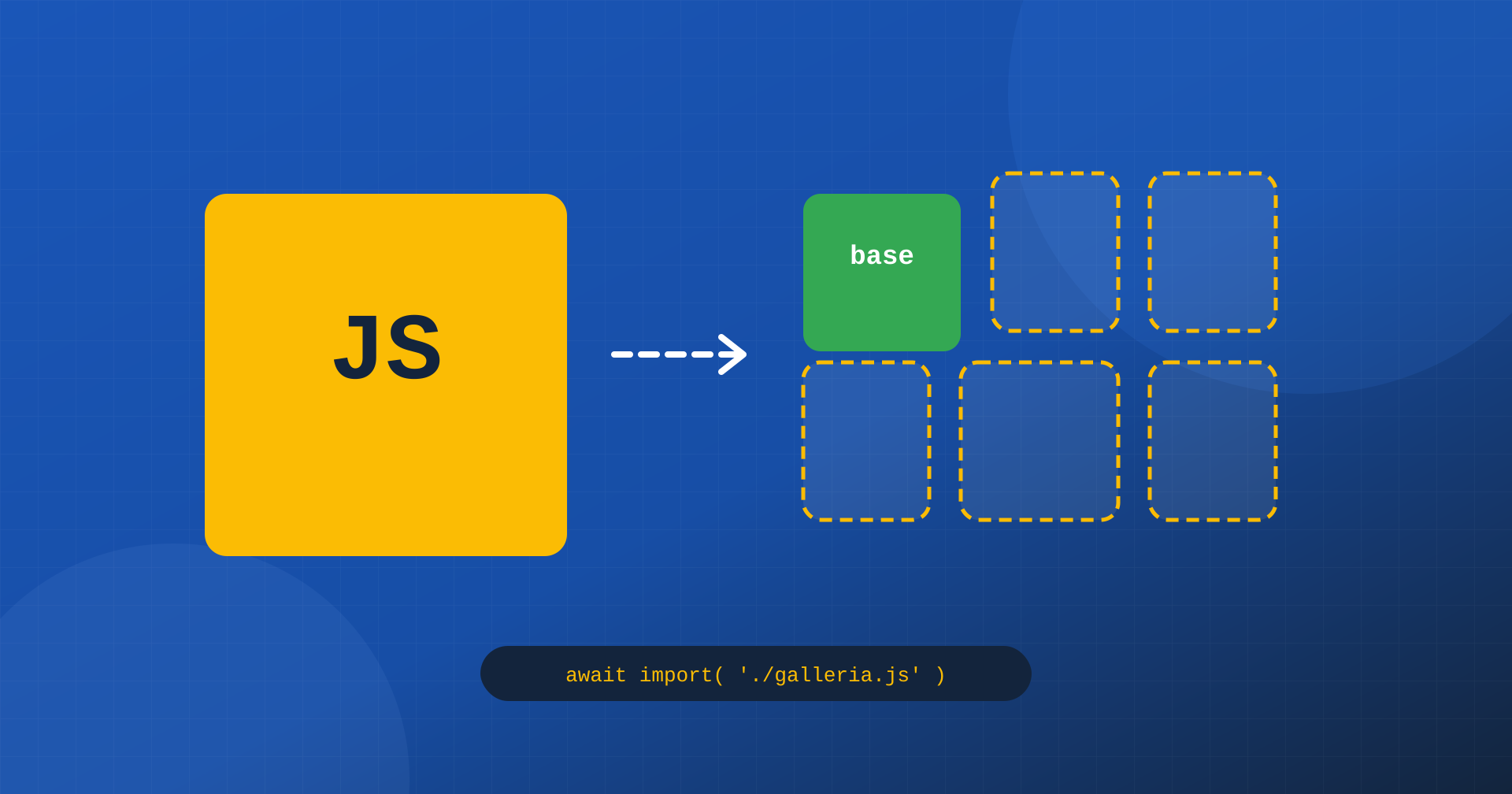
Code splitting solves the problem by producing several bundles instead of one. A base bundle contains what is needed everywhere, such as the menu and common functions; other bundles, called chunks, contain specific features and are loaded only on the pages or at the moments when they are needed.
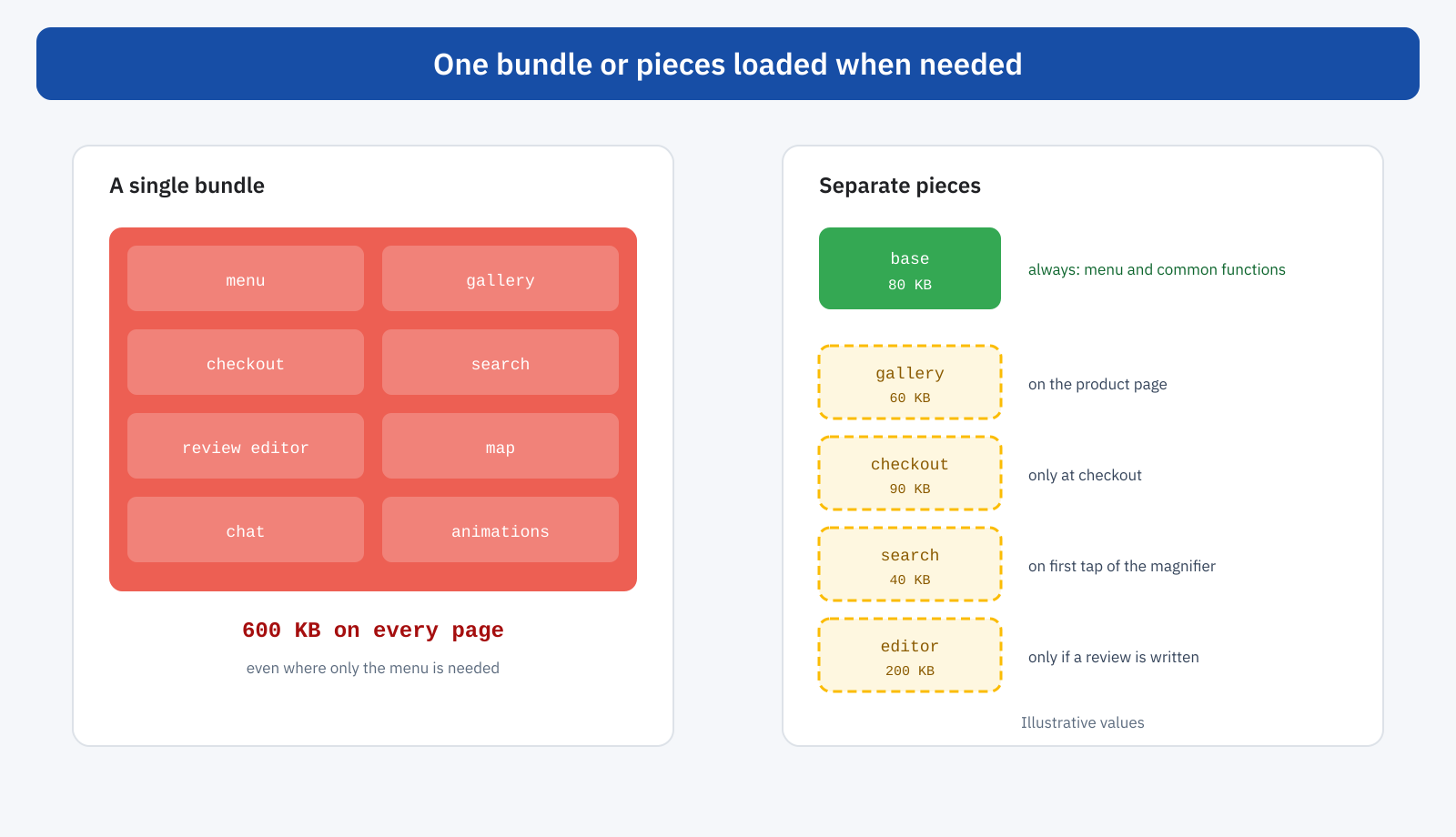
Splitting can follow two criteria. By page, or by route: each type of page has its own bundle, and the product page does not load the checkout code. By feature: parts that are only needed after a user action, such as the editor for writing a review, the full-screen image viewer or search with suggestions, are loaded only when the user uses them. The tool for this is the dynamic import, a language feature that loads a module at the moment of need:
const pulsante = document.querySelector( '.apri-galleria' );

pulsante.addEventListener( 'click', async () => {
	// The gallery code is downloaded only on the first click
	const { apriGalleria } = await import( './galleria.js' );
	apriGalleria( pulsante.dataset.prodotto );
} );
The bundler recognizes import() and automatically produces a separate bundle for galleria.js and its dependencies. The first click requires a short download, which can be brought forward when the user approaches the button or with a modulepreload, as explained in the article on preload, preconnect and fetchpriority; all the users who do not open the gallery, on the other hand, pay nothing.
Splitting should be done in moderation. Too many small pieces multiply requests and can create chains, in which one piece discovers the next only after being run. A good rule is to separate what is big and used by few, and keep together what is small and used by many.
Tree shaking: removing what is not used
The second concept concerns libraries. A utility library may offer dozens of functions, and a site uses perhaps three. If the code imports the whole library, the bundle contains all of it. Tree shaking is the bundler’s ability to analyze which functions are really imported and used and to remove all the others, like dead leaves falling from a tree.
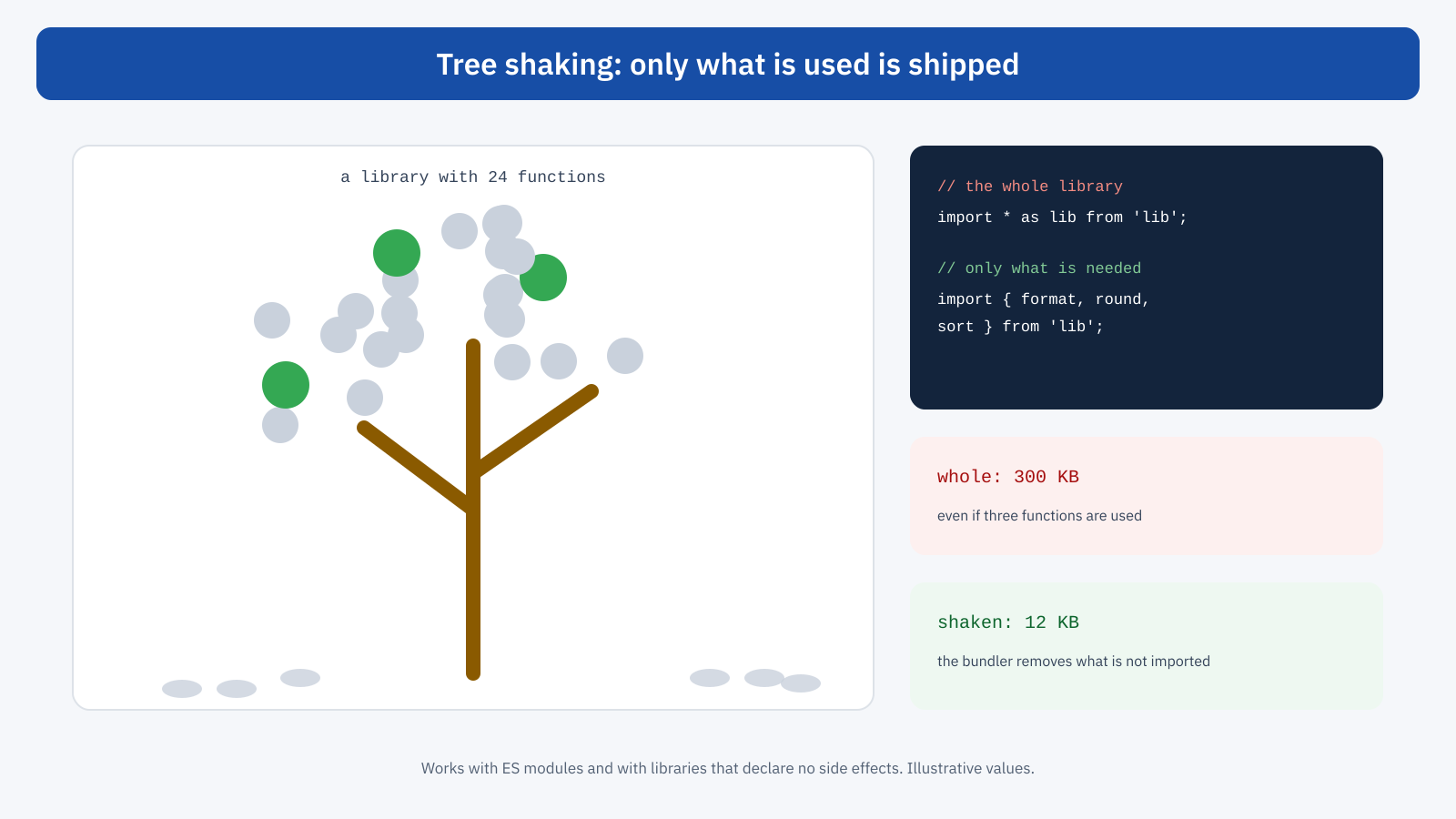
Two conditions are needed for it to work. The first is that the code uses JavaScript’s standard modules, with import and export statements that the bundler can analyze before execution; libraries written with older module systems do not lend themselves to this analysis. The second is that the library declares it has no side effects, that is that importing one piece does not run code that is needed elsewhere. Modern libraries are generally designed for this; for older ones there are often alternative versions or separate per-function packages.
// Imports the whole library: the bundle contains all of it
import _ from 'lodash';
_.debounce( aggiorna, 200 );

// Imports only the function used: the rest is removed
import { debounce } from 'lodash-es';
debounce( aggiorna, 200 );
A frequent pitfall is files that re-export everything from a single point, convenient for whoever writes the code but able, in some configurations, to drag much more than necessary into the bundle. The way to find out is to look at what really ends up in the bundle, with the analysis tools described below.
Writing for today’s browsers
For years JavaScript was translated, at build time, into a version compatible with very old browsers, and accompanied by polyfills, that is code that reproduces missing features. The result was bulkier code that was slower to run even for those using a modern browser. Today the browsers in use support almost all modern language features, and configuring the bundler for the browsers visitors actually use, rather than for those of ten years ago, reduces bundle weight with no effect on users. Analytics data on visitors’ browsers is the basis for this choice.
Dependencies: the weight you do not see
In many projects the biggest part of the JavaScript is not the code written by the developers, but that of the libraries it relies on. A date library, an animation one, a carousel one, a UI framework: each adds tens or hundreds of kilobytes. Before adding a dependency it is worth asking whether the browser already offers the feature: formatting dates and numbers with the internationalization APIs, animations with CSS, element selection and network requests with native functions, which have made much of jQuery unnecessary. Online services let you know in advance the weight of a library and its alternatives.
How to see what is in the bundle
The first step of any optimization is knowing what you are loading. Bundle analysis tools, available for all the main bundlers, produce a visual map in which each module is a rectangle proportional to its weight: at a glance you can see which library takes up half the bundle, which module appears twice, which code ends up on pages that do not use it.
In the browser, the Coverage panel of Chrome DevTools shows for each JavaScript file how much of it was actually run during page load and use. A high percentage of unused code does not mean it should be removed, because part of it is needed at later moments, but it indicates where code splitting could be more effective. Lighthouse reports a similar indication with the suggestion to reduce unused JavaScript.
The WordPress case
In WordPress, JavaScript comes from several sources: the theme, plugins, the core. The official development tools, such as the scripts package for blocks, use a modern bundler and produce separate bundles for each block. Since version 6.5 WordPress also supports native JavaScript modules, with its own interface to register and load them, and blocks can declare scripts to load on the front end only when the block is present on the page, as we saw when discussing block themes.
For the code of custom themes and plugins, the simplest rule is to load each script only where needed, with conditions in the script registration, instead of including it on all pages. For third-party plugins, control is more limited, but script management tools let you disable them on the pages where they are not used. And for scripts that are not needed at first load, delaying until the first interaction, described in the article on delaying JavaScript, is the equivalent of a dynamic import applied from the outside.
// The theme’s carousel only on pages that contain it
add_action(
	'wp_enqueue_scripts',
	function () {
		if ( is_singular() && has_block( 'tema/carosello' ) ) {
			wp_enqueue_script_module( 'tema-carosello', get_theme_file_uri( 'js/carosello.js' ) );
		}
	}
);
An example
An online store with a custom-developed theme loads on every page a single JavaScript file of 540 compressed kilobytes. Bundle analysis shows that a third is taken up by a date library, used only to show delivery times, and by a full animation library, used for two effects on the home page; another third is the code of the product configurator and the checkout, also present in blog posts. There are four fixes: dates are formatted with the browser’s native APIs, the two animations are rewritten in CSS, the configurator and checkout become separate bundles loaded only on their pages, and the full-screen image viewer is loaded with a dynamic import on the first tap on a photo. The base bundle drops to 110 kilobytes; the product page loads 220 kilobytes in total instead of 540. Script execution time at load falls by more than half on mid-range smartphones, and the INP of product pages in field data moves into the good state.
What to ask whoever develops
For those who do not write code but have to evaluate a project, a few questions help to understand whether JavaScript is handled with care. How much JavaScript, compressed, does each page template load? Is the code split by page and by feature, or is there a single bundle? What are the three heaviest dependencies, and are they really necessary? Which browsers is the code compiled for? Is there a performance budget on JavaScript weight, checked at every release? The answers say far more than a score.
In short
JavaScript is the most expensive resource on a page, because it has to run on the same thread that responds to the user. Modern bundlers offer three main levers to reduce its cost: code splitting, which loads each piece only on the pages and at the moments when it is needed, with dynamic imports; tree shaking, which removes unused functions from libraries; and compiling for today’s browsers, which avoids unnecessary translations and polyfills.
To these are added careful choice of dependencies, periodic analysis of bundle contents and, in WordPress, loading scripts only where needed. No complex architectures are needed: you need to know what you are loading and why, and load only that. Compression, covered in the article on Brotli, Gzip and Zstandard, reduces the bytes transferred; reducing the code also reduces the work, and that is where INP is decided.
