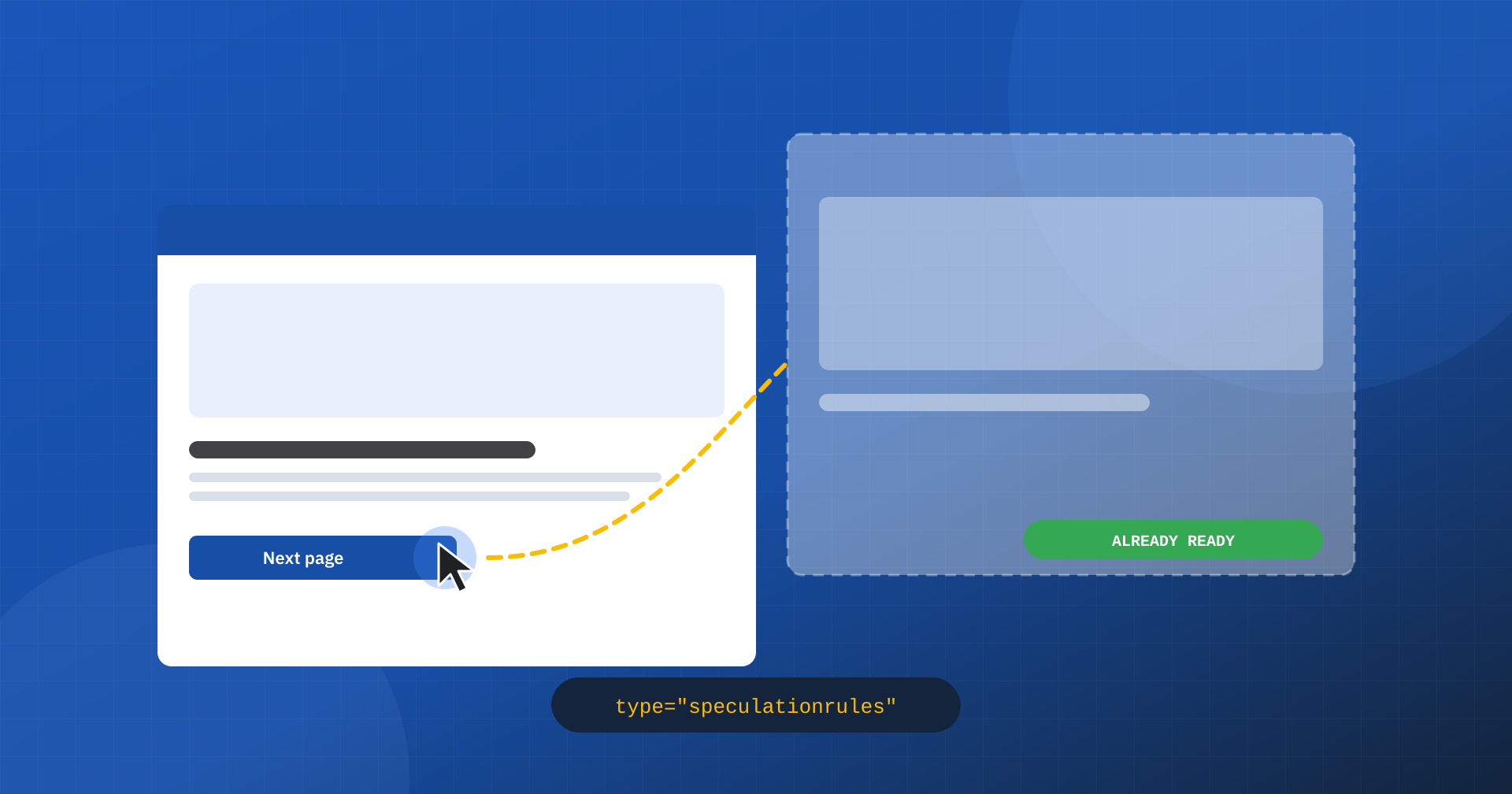
Much of web performance work consists of making what happens after the click faster: a faster server, lighter resources, more efficient rendering. But there is a way to do more: start loading the next page before the user opens it. If the browser has already downloaded and even painted the page by the time the user taps the link, navigation becomes effectively instant. That is what the Speculation Rules API makes possible, with its two main tools, prefetch and prerender.
In this article we look at how it works, what results it can deliver on Core Web Vitals, how to configure it prudently and which side effects to keep under control, from analytics to server load.
Prefetch and prerender: the difference
With prefetch the browser downloads the HTML document of the next page in advance and keeps it aside. When the user clicks, the document is already available: you save the time of the request to the server, that is the TTFB, but images, stylesheets and scripts still have to be downloaded and the page built.
With prerender the browser goes much further: it loads the entire page in an invisible tab, downloads the resources, runs the JavaScript and paints it. On click, the ready page is simply shown. This is the case where navigation becomes instant, but also the one that uses the most resources, both on the device and on the server.
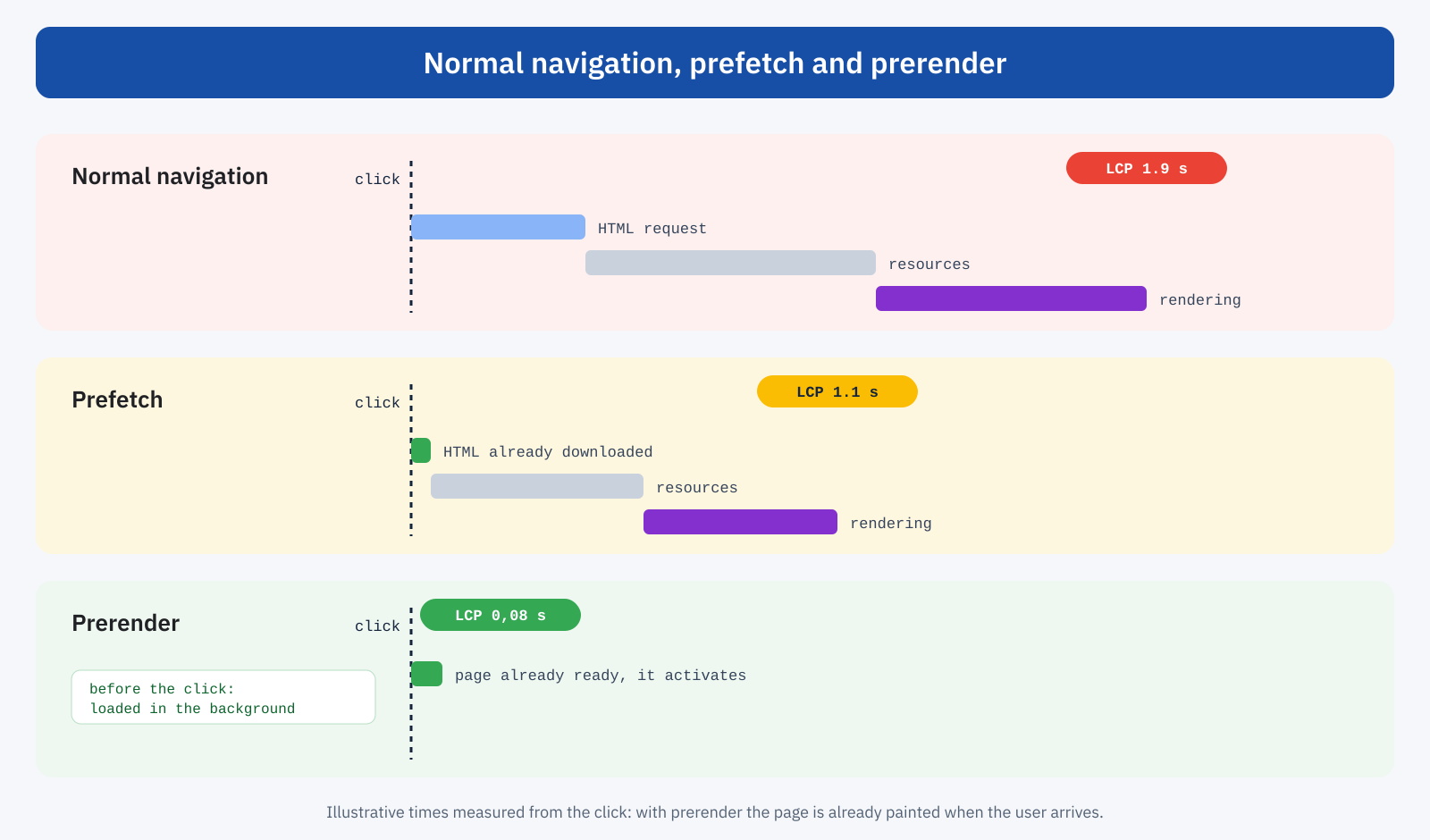
There is an important detail for the metrics. For a prerendered page, LCP and the other loading metrics are measured from the moment the user really opens it, not from when the browser started loading it in the background. A page activated from a successful prerender therefore shows an LCP very close to zero, and these visits count in the real-user data of the Chrome UX Report.
How the rules are written
Rules are declared with a JSON block in a <script type="speculationrules"> element. They can list specific URLs or, more conveniently, describe which links on the page are candidates, with conditions on addresses and CSS selectors:
<script type="speculationrules">
{
	"prerender": [{
		"where": {
			"and": [
				{ "href_matches": "/*" },
				{ "not": { "href_matches": "/cart/*" } },
				{ "not": { "href_matches": "/checkout/*" } },
				{ "not": { "href_matches": "/*\\?*add-to-cart=*" } },
				{ "not": { "href_matches": "/wp-login.php" } },
				{ "not": { "selector_matches": ".no-prerender" } }
			]
		},
		"eagerness": "moderate"
	}]
}
</script>
In this example all internal links are candidates for prerender, except cart, checkout, links that add products to the cart, login and any link marked with a dedicated class. Rules can be placed in the HTML or sent with the Speculation-Rules HTTP header, which points to a JSON file: useful when you want to manage the configuration at server or CDN level.
Eagerness: how far ahead to go
The eagerness property decides when the browser should start. It’s the most important choice, because it balances two opposing needs: the earlier you start, the more likely the page is ready on click; the earlier you start, the more pages you load that the user will never open.
- immediate: as soon as the rules are read.
- eager: very early, on weak signals of interest.
- moderate: when the pointer stays on a link for about 200 milliseconds.
- conservative: when the user presses a finger or the mouse button on the link, an instant before the actual click.
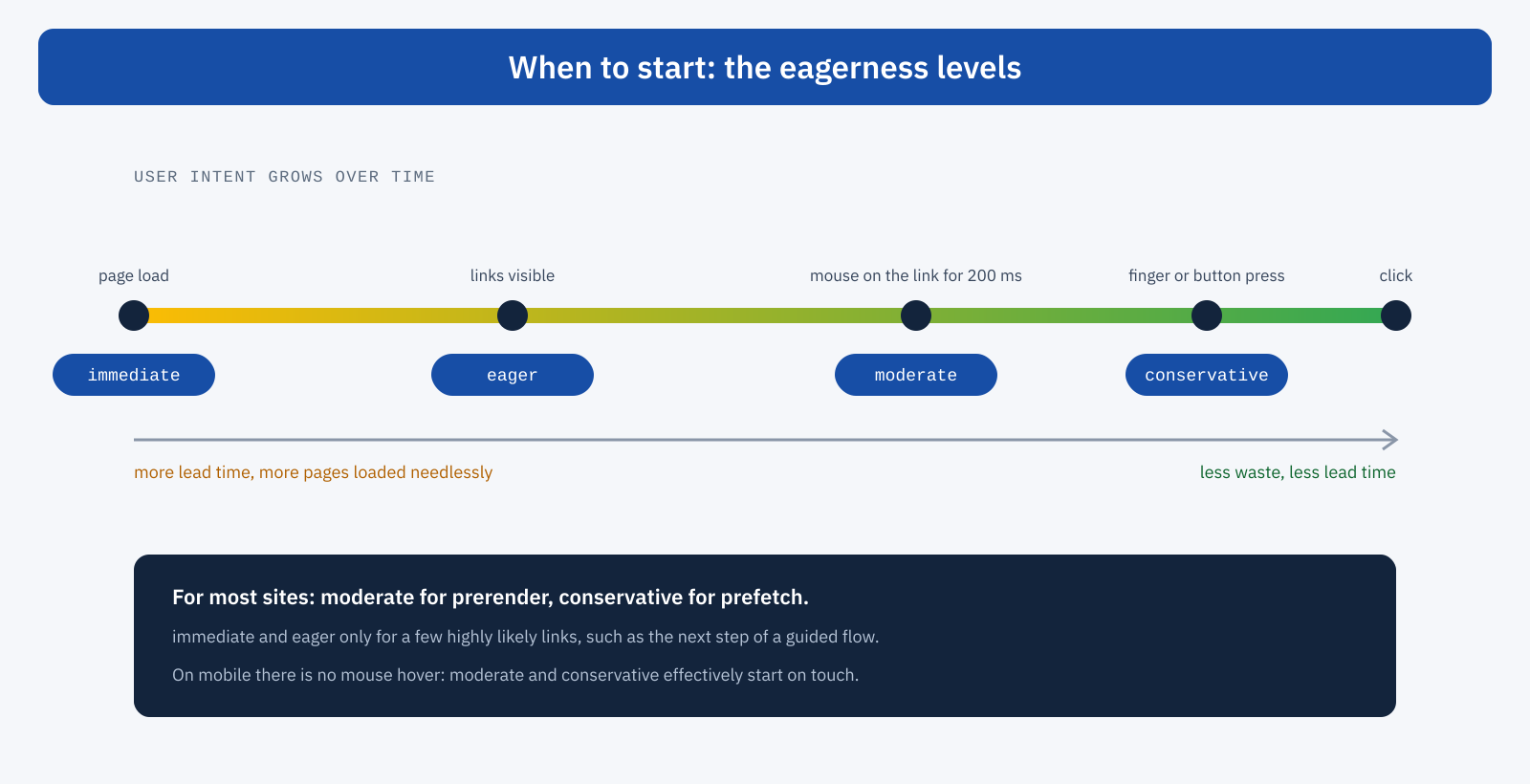
For most sites, moderate for prerender and conservative for prefetch strike a good balance. immediate and eager should be reserved for a few highly likely links, for example the next step of a guided flow or the first result of a search. Remember that on smartphones there is no mouse hover: the moderate and conservative modes effectively start on touch, and the lead time is shorter. Even an advantage of a hundred milliseconds, though, adds to all the other optimizations.
Support and WordPress
Speculation Rules are supported by Chromium-based browsers, such as Chrome and Edge. Other browsers simply ignore the block, with no errors: for their users navigation stays the normal one. It’s therefore a progressive enhancement, which needs no fallback.
Since version 6.8, WordPress includes speculative loading natively: for logged-out visitors it inserts prefetch rules with conservative eagerness, excluding the admin areas. It’s a prudent starting point, which can be made more incisive by switching to prerender or a different eagerness through the filters provided by the core, after checking the effects on analytics and the server.
The configuration is changed with the wp_speculation_rules_configuration filter, which accepts the mode (prefetch or prerender) and the eagerness. A second filter, wp_speculation_rules_href_exclude_paths, lets you add paths to exclude, with the same wildcard syntax used in the rules:
// Prerender with moderate eagerness for logged-out visitors
add_filter(
	'wp_speculation_rules_configuration',
	function ( $config ) {
		if ( is_array( $config ) ) {
			$config['mode']      = 'prerender';
			$config['eagerness'] = 'moderate';
		}
		return $config;
	}
);

// Paths never to load ahead of time
add_filter(
	'wp_speculation_rules_href_exclude_paths',
	function ( $paths ) {
		$paths[] = '/cart/*';
		$paths[] = '/checkout/*';
		$paths[] = '/my-account/*';
		return $paths;
	}
);
The core already excludes the admin area, login files and addresses with query parameters automatically, and doesn’t generate rules for logged-in users, for whom pages are often personalized and not cached. Individual links can also be excluded by adding the no-prerender class, which the core recognizes, or no-prefetch to exclude them from plain prefetch as well. Anyone using optimization plugins that insert their own rules must check they don’t end up with two overlapping configurations: the browser reads both, and the result can be more aggressive than intended.
The side effects to manage
Loading pages the user might not open has consequences that need to be anticipated before enabling prerender at scale.
- Links that change state. A prerender makes a GET request and, in the case of prerender, also runs the page’s JavaScript. Links that add to the cart, log the user out, confirm a subscription or record a vote must never be candidates: they must be explicitly excluded, and ideally they shouldn’t be plain links.
- Analytics and advertising. A page that is prerendered but never opened must not count as a page view. The main analytics tools already handle the case, but custom code, pixels and ads need checking: the browser exposes the
document.prerenderingproperty and theprerenderingchangeevent, which let you postpone actions until the real activation. - Server load. Every needless prerender is an extra request. On a site with an efficient page cache the cost is minimal; on dynamically generated pages without a cache it can become significant. The browser sends the
Sec-Purposeheader on speculative requests, so the server can recognize them and, if necessary, reject them at peak times. - Personalized content. Pages that depend on data that changes between the prerender and the activation, such as dynamic prices or availability, must be excluded or updated at the moment of opening.
// Postpone an action until the page is actually shown
function quandoVisibile( azione ) {
	if ( document.prerendering ) {
		document.addEventListener( 'prerenderingchange', azione, { once: true } );
	} else {
		azione();
	}
}

quandoVisibile( () => inviaVisualizzazione() );
The browser, for its part, sets limits: the number of simultaneous prerenders is small, and on devices with little memory, or with data saver or battery saver mode on, speculations may be suspended. It’s a further reason not to see them as a guarantee, but as an opportunistic accelerator.
Which pages benefit most
Speculative loading works best where the user’s path is predictable: from the category page to the product page, from the article list to the article, from search to the first result, from the cart to the checkout, provided the latter is handled with due care. On publishing sites and e-commerce stores, where an important share of visits continues to a second page, the effect on the experience is immediate: it feels like an application that responds instantly.
It doesn’t replace the other optimizations, though. The first page of a visit, the one that arrives from Google or a social network, can’t be prerendered by the site itself; and, as we saw when talking about Critical CSS, for many visits the first page is also the last. Speculation Rules speed up internal navigation; the loading of the entry page is left to a well-optimized server, cache and front end.
The relationship with the back/forward cache
Prerender speeds up forward navigation, toward pages not yet visited. For backward navigation there is a complementary mechanism, the back/forward cache, which keeps the pages just left in memory and restores them instantly when the user presses the Back button. Together they cover a very large part of internal navigation: forward ones are anticipated by Speculation Rules, backward ones are served from the browser’s memory.
The two techniques also share some rules of good coexistence. Code that assumes a page is loaded only once, and that the user sees it right away, needs revisiting in both cases: with prerender the page exists before being seen, with the back/forward cache it becomes visible again without being reloaded. The prerenderingchange and pageshow events are the points at which to update analytics, dynamic content and interface state. We will cover the back/forward cache and the reasons why it often doesn’t work in detail in the next article.
How to check that it works
In the Application panel of Chrome DevTools, the section dedicated to speculative loading shows the rules read from the page, the candidate URLs, the status of each speculation and, when it fails, the reason. It’s the main tool for checking exclusions and eagerness. In the Network panel speculative requests are recognizable, and on the server the Sec-Purpose header lets you measure their volume in the logs.
In the field, the Chrome UX Report distinguishes navigation types and reports the share of visits that arrived via prerender: following it over time, together with LCP at the 75th percentile, shows the real effect of the configuration. Real-user monitoring can do the same at the level of an individual page, distinguishing prerendered visits from normal ones.
Gradual adoption
The recommended path is progressive. You start with conservative prefetch, already active on recent WordPress, and check there are no unwanted effects. Then you move to prerender with moderate eagerness on the most predictable sections, such as from the article list to the single article or from the category to the product page, with explicit exclusions for everything that changes state. You check analytics, logs and server load, and only then extend the configuration to the rest of the site. Every step is measured: navigation types and LCP in real-user data, speculative requests on the server, any differences in marketing reports.
In summary
Speculation Rules let the browser download or even paint in advance the page the user is about to open. Prefetch removes the wait for the server, prerender makes navigation practically instant, with an LCP close to zero for activated pages. Eagerness regulates the trade-off between lead time and waste, and WordPress already includes a prudent version of it.
Like any powerful tool, it needs careful configuration: exclusions for links that change state, correct handling of analytics and advertising, control of server load and gradual adoption. Done well, it turns the site’s internal navigation into an experience users perceive as immediate, and it’s one of the few interventions that improve speed without making anything lighter: things simply arrive sooner.
