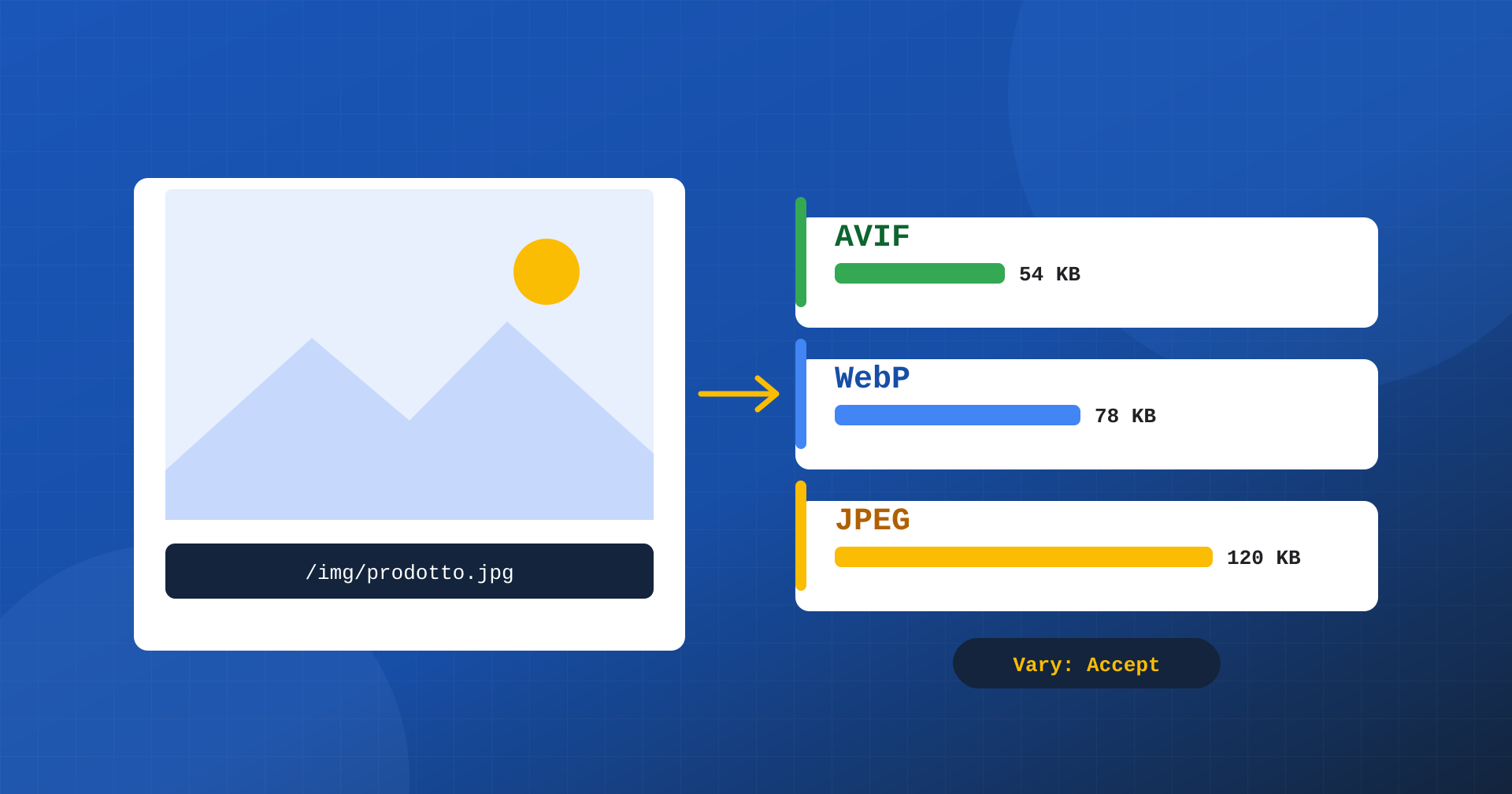
On almost every site, images are the heaviest part of the page, and very often the largest element on the first screen is a photo: the product, the article, the cover. Reducing its weight means shortening the download of the element that determines LCP, using less bandwidth on mobile devices and easing the load on servers and CDNs. Modern formats, WebP and AVIF, deliver the same perceived quality with files much lighter than JPEG. The problem is how to serve them without excluding people who don’t support them and without breaking caches. In this article we look at conditional serving, meaning the same URL returning the best format for each browser, and the header that makes it safe: Vary: Accept.
WebP and AVIF: how much you save
WebP, introduced by Google, typically compresses photographs 25-35% better than JPEG at the same perceived quality, and supports transparency and animation. AVIF, derived from the AV1 video codec, goes further: on many photographs it can halve the weight compared with JPEG, handles gradients and skies better and supports wide color gamuts. These are indicative figures, because the result depends on the image content and the quality settings, but the direction is constant: for the same look, AVIF is usually the lightest, WebP is in the middle, JPEG is the heaviest.
All the major up-to-date browsers support WebP, and the vast majority support AVIF too. Still, there are outdated devices and versions around that don’t, as well as clients that aren’t browsers: email programs, social previews, archiving tools. Serving only AVIF would be risky; serving only JPEG means giving up the savings. You need a way to give each client the best format it can read.
Two routes: the markup or the server
The first route is to leave the choice to the browser through the markup, with the <picture> element. You list the available versions in order of preference and the browser uses the first one it supports:
<picture>
	<source type="image/avif" srcset="/img/prodotto.avif">
	<source type="image/webp" srcset="/img/prodotto.webp">
	<img src="/img/prodotto.jpg" width="1200" height="800" alt="…">
</picture>
It’s a robust solution and transparent to caches, because each format has its own URL. But it requires changing the markup of every image: themes, page builders, content entered over the years in the editor, product images generated by plugins. On large, layered sites it is often impractical.
The second route is conditional serving, also called content negotiation: the markup stays the same, with the usual /img/prodotto.jpg, and the server chooses which file to return based on what the browser says it supports. It’s the approach that lets you optimize an entire existing site without touching a line of HTML, and it’s the one we look at in depth here.
How content negotiation works
Every time the browser requests an image it sends the Accept header, with the list of formats it can display. A recent browser declares something like image/avif,image/webp,image/apng,image/svg+xml,image/*,*/*;q=0.8. The server reads this header, checks whether an AVIF or WebP version of the requested image exists and returns the lightest of the supported ones. The address doesn’t change: what changes are the content and the Content-Type header, which declares the actual format.
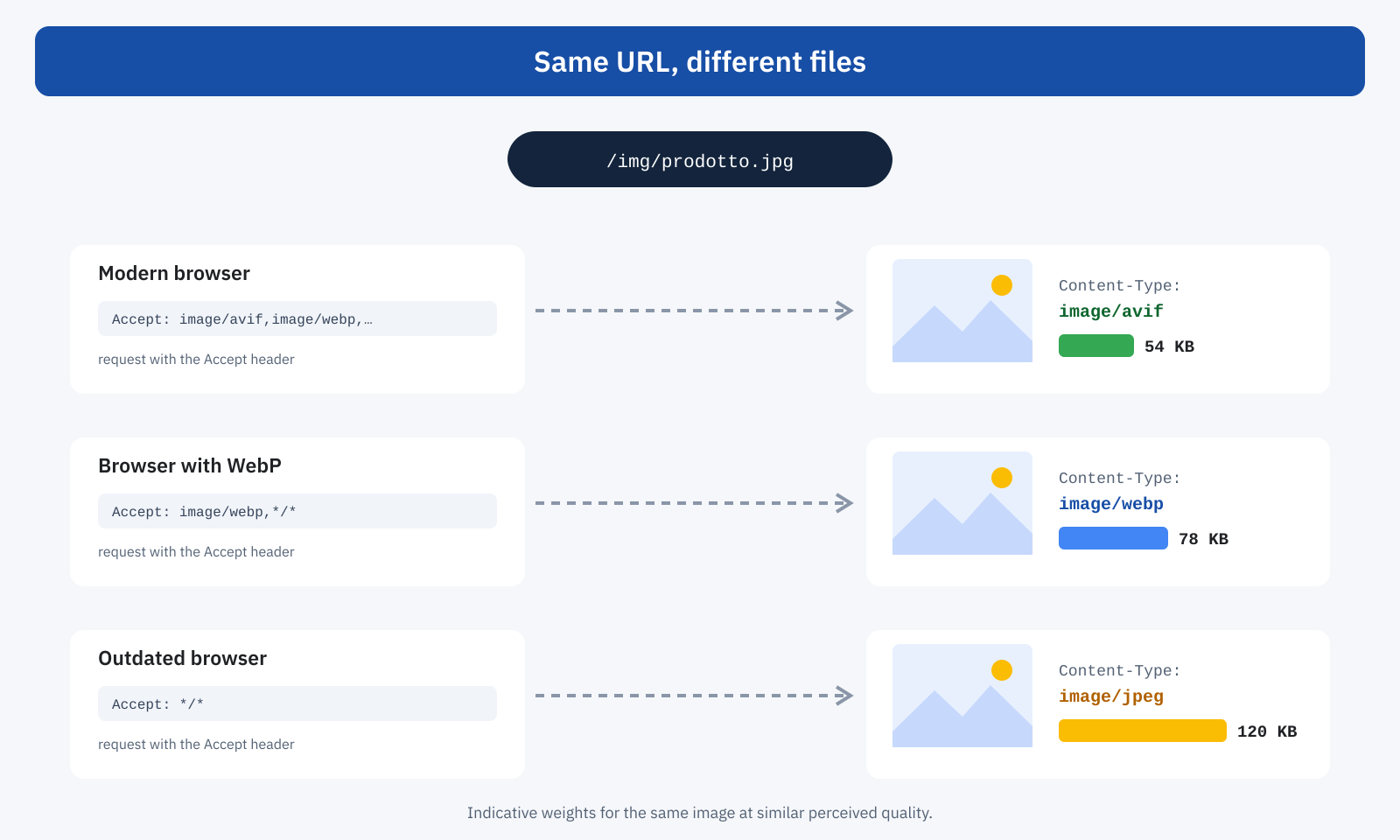
So far everything seems simple. The delicate point is that between the browser and the server there are almost always caches: the CDN, a reverse proxy such as Varnish, sometimes corporate proxies. And a cache, by definition, stores a response and reuses it for later requests to the same URL.
Vary: Accept, properly explained
A cache identifies each response with a key, which originally is simply the URL. If the same URL can produce different responses depending on how the request is made, the cache has to know, otherwise it will reuse the first response it received for everyone. The Vary header exists for exactly this: it’s a server response header that tells caches “this content also depends on these request headers”. With Vary: Accept the server says the response changes according to the Accept header, and caches must include it in the key.
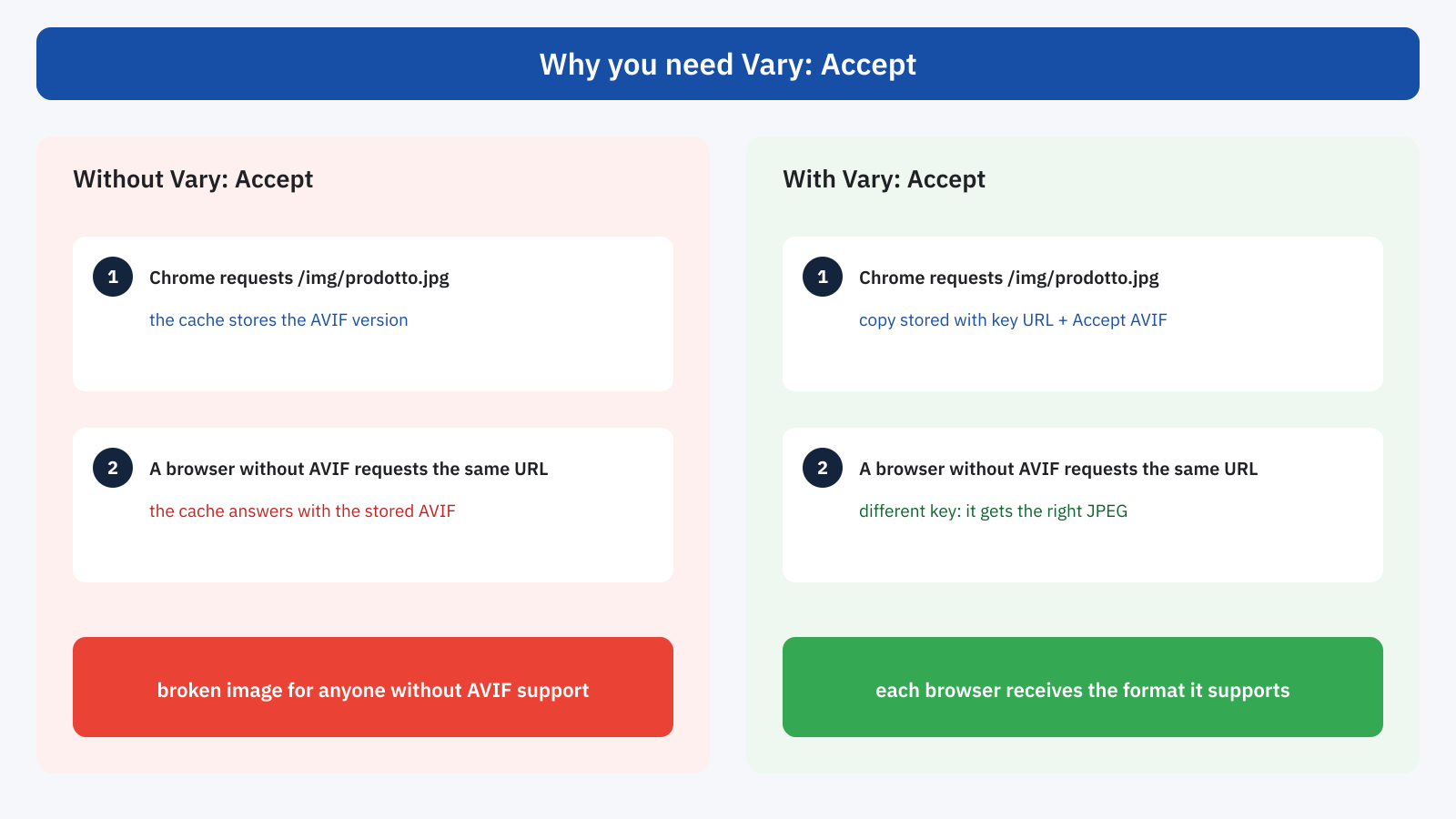
Let’s see what happens without it. A modern browser asks for /img/prodotto.jpg, the server answers with the AVIF version and the CDN stores it, tied to the URL alone. Shortly afterwards a browser that doesn’t support AVIF arrives and asks for the same URL: the CDN finds a valid copy and returns it. Result: an image that browser can’t decode, in other words an empty box. With Vary: Accept, instead, the CDN stores the AVIF response tied to the combination of URL and the first browser’s Accept header; when the second one arrives, with a different Accept, the key doesn’t match and the request goes on to the server, which returns the JPEG.
Three details make the difference between a correct setup and one that works only some of the time:
- Vary must be sent on all variants, JPEG included. If the JPEG response arrives without
Vary: Accept, a cache considers it valid for everyone and will serve it to browsers that would support AVIF too, cancelling the savings. It’s the most common mistake. - The Content-Type must declare the real format. An AVIF file served as
image/jpegcan be rejected or mishandled by browsers and intermediaries. - Vary applies to validation too. Conditional requests with ETag, which we covered in the article on the 304 status code, must refer to the right variant: each format has to be treated as a distinct resource, with its own version identifier.
The flip side: cache fragmentation
Vary: Accept solves the correctness problem, but creates an efficiency one. The Accept header isn’t the same for everyone: it changes between browsers, between versions of the same browser, between request types. A cache that uses the full value as part of the key ends up storing dozens of copies of the same image, one for each variant of the header, even though the really different files are only three. Every new combination is a MISS, the HIT rate collapses and the origin receives many more requests than necessary.
The solution is to normalize the header before it becomes a cache key: reduce the dozens of possible values to just three, “avif”, “webp” and “jpeg”, based on what the client really supports. That way each image has at most three copies in the cache, one per format.
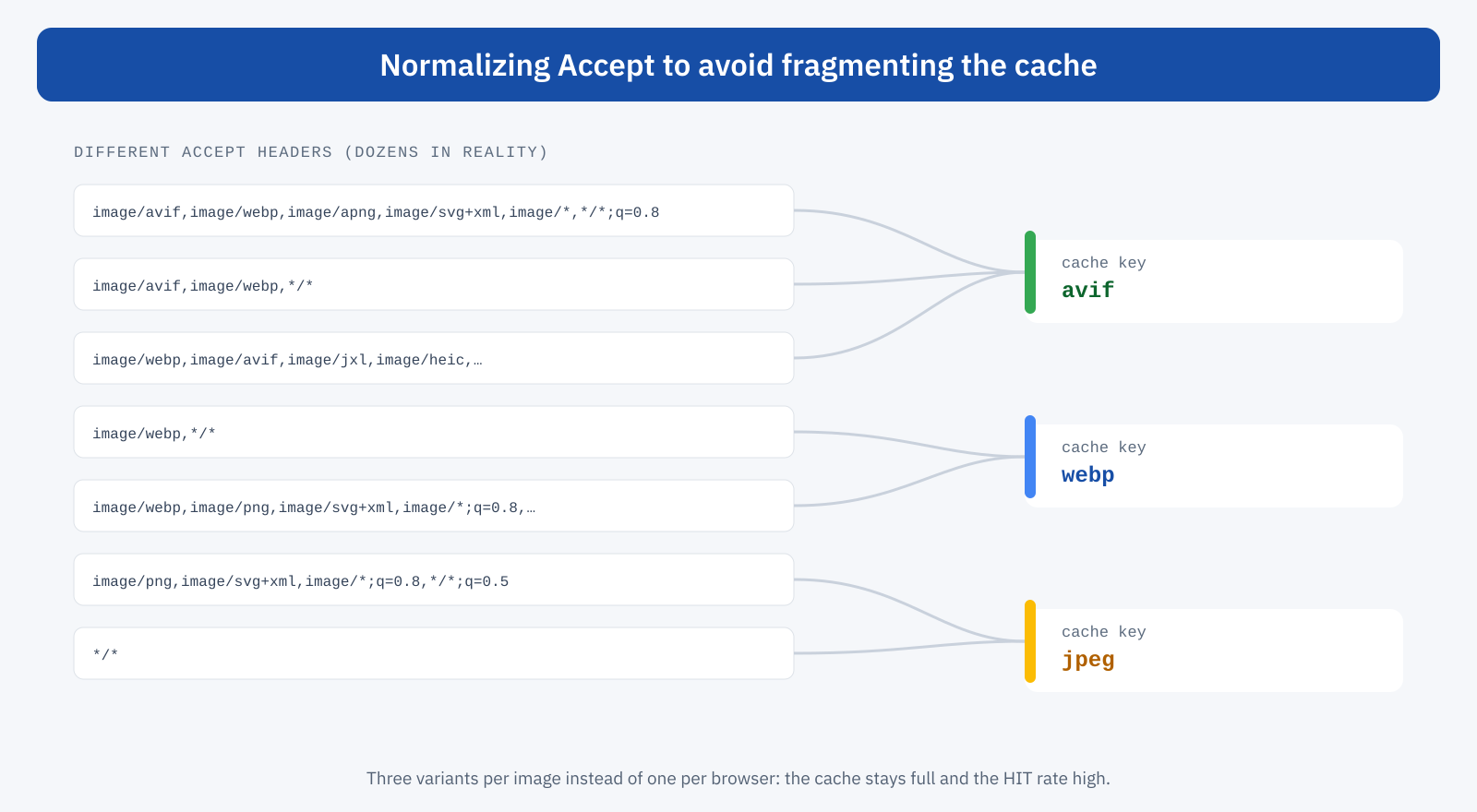
In Varnish, normalization is done when the request comes in, rewriting the header before it is used for the cache lookup. Varnish handles Vary natively, so it will now compare only three possible values:
sub vcl_recv {
	if (req.url ~ "\.(jpe?g|png)(\?.*)?$") {
		if (req.http.Accept ~ "image/avif") {
			set req.http.Accept = "image/avif";
		} elseif (req.http.Accept ~ "image/webp") {
			set req.http.Accept = "image/webp";
		} else {
			set req.http.Accept = "image/jpeg";
		}
	}
}
With CDNs you need to check case by case. Some ignore Vary or accept it only for a few values, others offer dedicated image settings that handle format and cache keys internally, others still require you to explicitly include the normalized header in the key. Before enabling conditional serving behind a CDN it’s worth reading how it treats Vary and checking the behavior with real requests: it’s the point where something most often breaks, as we saw when talking about Cloudflare and caching.
An example with Nginx
A simple way to implement conditional serving is to generate the modern versions in advance, next to each image, with a suffix: prodotto.jpg.avif and prodotto.jpg.webp. Nginx picks the suffix based on Accept and serves the first existing file, falling back to the original:
map $http_accept $img_suffix {
	default         "";
	"~*image/avif"  ".avif";
	"~*image/webp"  ".webp";
}

location ~* \.(?:jpe?g|png)$ {
	add_header Vary Accept always;
	try_files $uri$img_suffix $uri =404;
}

# If they are missing from the mime.types of the version in use:
types {
	image/avif avif;
	image/webp webp;
}
The regular expressions in the map are evaluated in the order they are written, so AVIF, if declared, takes precedence over WebP. The Vary header is added to every response from the block, JPEG included, and the Content-Type follows the extension of the file actually served. An equivalent setup can be built with Apache and mod_rewrite, checking the Accept header and whether the file exists.
How to generate the variants
WebP and AVIF versions can be created when images are uploaded, by a plugin or a CMS procedure; at build time, for static sites or themes; or on the fly by an image optimization service, which then keeps them in cache. The important rule is not to encode them on every request: AVIF compression in particular is much slower than JPEG, and doing it in real time without a cache would shift the cost onto the TTFB of the images.
Quality should be calibrated by eye, comparing versions on the site’s typical images: the best values for a product photo on a white background aren’t the same as for a landscape or a screenshot with text. And the format doesn’t replace dimensions: a 2,000-pixel AVIF served to a smartphone is still wasted. Conditional serving chooses the format, while srcset and sizes keep choosing the right size for the screen.
Picture or conditional serving?
| <picture> | Conditional serving | |
|---|---|---|
| Markup changes | Yes, for every image | No |
| Who chooses the format | The browser | The server, based on Accept |
| URL per format | Distinct | A single one |
| Cache configuration | No special care | Vary: Accept and normalization |
| Images already in the content | To be rewritten | Optimized immediately |
| Main risk | Markup not updated | CDNs that ignore Vary |
The two routes can also coexist: <picture> for images controlled by the theme, such as the cover or the main image, and conditional serving for everything that comes from the content.
Pitfalls to know about
- Files saved with the wrong extension. Someone who saves an image from the browser can end up with a file named
.jpgthat actually contains an AVIF, which some programs won’t open. - Clients that don’t declare formats. Social previews, email programs and automated tools often send
Accept: */*: they must receive the JPEG, which is exactly what a correct setup does. - Vary forgotten on one variant. A single response without
Varyis enough to contaminate a shared cache. - Cache key with the full Accept. Without normalization the HIT rate for images collapses and the origin ends up serving much more traffic.
- On-the-fly encoding without a cache. Converting to AVIF on every request makes images lighter but slower to arrive.
How to check that it works
The most direct check is to simulate different browsers by changing the Accept header and watching Content-Type, Vary and, if present, the CDN’s cache status:
# Browser that supports AVIF
curl -sI -H "Accept: image/avif,image/webp,*/*" https://www.yoursite.com/img/prodotto.jpg \
  | grep -iE "content-type|vary|content-length"

# Client that doesn’t declare modern formats: it must receive the JPEG
curl -sI -H "Accept: */*" https://www.yoursite.com/img/prodotto.jpg \
  | grep -iE "content-type|vary|content-length"
By repeating the requests you check that the cache returns the right variant every time. In the DevTools Network panel the type column shows the format received and the size column the actual weight; in lab tools, the modern image formats audit should disappear. In real-user data the effect shows up on LCP, especially on mobile.
In summary
WebP and AVIF consistently reduce image weight, and with it the loading time of the page’s main element. Conditional serving lets you adopt them on an existing site without changing the markup: the same URL returns the best format each browser says it supports through the Accept header.
The key to doing it safely is Vary: Accept, present on every variant, which stops caches from serving a format to someone who doesn’t support it. The key to doing it efficiently is normalizing Accept to just three values, so as not to fragment the cache. With variants generated in advance, verified CDNs and responsive sizes, the result is the same site, with images identical in users’ eyes and tens of kilobytes less on every page.
