
It happens often: the site slows down, the server response time grows, the hosting panel reports CPU use close to the limit, but Google Analytics shows no increase in visitors. The reason is that a growing share of site traffic does not come from people. Search engine crawlers, crawlers that collect content for AI models, SEO analysis tools, scrapers that copy prices and texts, automated scans looking for vulnerabilities: all of them request pages from the server, and many do not show up in analytics tools because they do not run JavaScript.
This traffic is not measured by Core Web Vitals, which collect only real-user data. But it affects them, because it consumes the same resources needed to respond to users. In this article we look at how to recognize it, why it weighs more than the number of requests would suggest, and how to filter it without harming rankings or legitimate services.
Who the automated visitors are
Not all automated traffic is unwanted, and telling the categories apart is the first step in deciding what to do:
- search engine crawlers, such as Googlebot and Bingbot: essential for rankings, usually well behaved, they respect the robots.txt file and adapt their rate to the server’s capacity;
- AI crawlers: they collect content to train models or to answer user questions. Some identify themselves and respect robots.txt, others do not; some download large numbers of pages in a short time;
- SEO and monitoring tools: services that analyze links, rankings and content on behalf of their customers, often for competing sites;
- scrapers: programs that copy prices, product pages or articles, often with fake identities so as not to be recognized;
- scans and attacks: automated requests looking for login pages, exposed configuration files, known plugin vulnerabilities, or trying passwords on
wp-login.phpandxmlrpc.php; - legitimate services: uptime monitoring, feed readers, link previews on social networks, payment system notifications. Few requests, but they must not be blocked.
Why they weigh more than the requests they make
A well-configured site serves most pages to users from the page cache: the home page, recent articles, the main categories. People tend to visit the same pages, and those pages are almost always already ready. Bots behave differently. A crawler that wants to read the whole site also requests articles from ten years ago, archive page number 200, a shop’s filter combinations, internal search results. These are pages the cache does not hold, and which therefore require running PHP and querying the database.
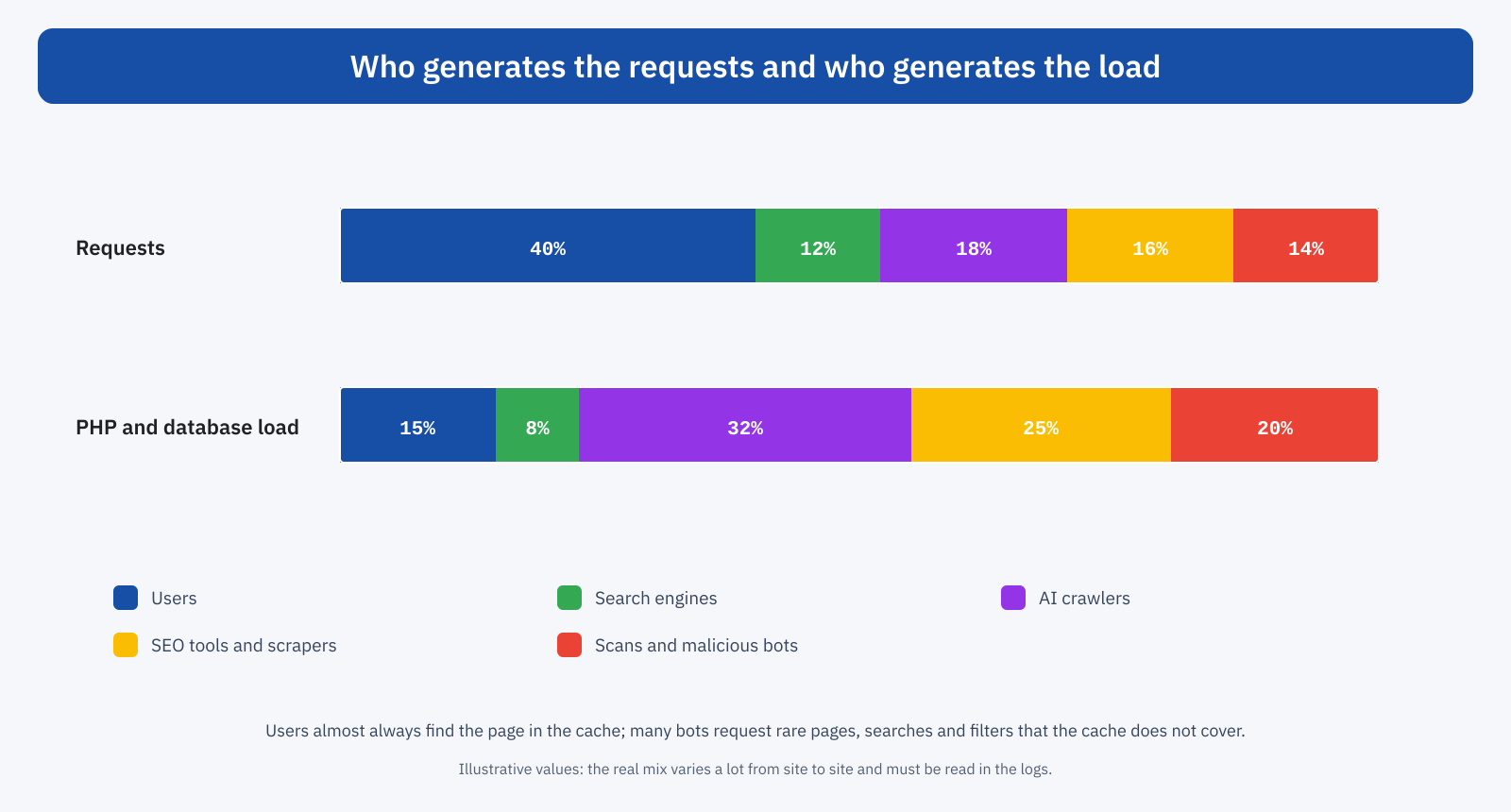
The result is that bots, even when they generate a minority share of requests, can generate most of the server’s work. On online stores the problem is amplified by faceted navigation: every combination of filters, sorting and pages is a different URL, and a crawler that follows all the links can generate millions of requests, each of which runs expensive queries, as we saw when discussing WooCommerce and the WordPress database.
When the server is busy answering bots, user requests wait in a queue. TTFB grows, and with it LCP. Dynamic user requests, such as cart, payment and account area, are the hardest hit, because they cannot be served from the cache. It is the same mechanism described for traffic spikes, except that this spike brings no customers.
Recognizing them: server logs
JavaScript-based analysis tools, as we saw when discussing analytics, see only the visitors who run the scripts, that is almost exclusively people. To see bots you have to look at the access logs of the web server or the CDN, which record every request with IP address, date, requested URL, response code, size and user agent. Even without dedicated tools, a few commands give a clear picture:
# The 20 user agents with the most requests
awk -F'"' '{print $6}' access.log | sort | uniq -c | sort -rn | head -20

# The 20 IP addresses with the most requests
awk '{print $1}' access.log | sort | uniq -c | sort -rn | head -20

# Internal search and filter requests
grep -cE '\?s=|filter_|orderby=' access.log
If the server also logs the processing time of each request, you can go beyond counting and sum the time per user agent or per address: that is the figure that really says who consumes the resources. Many hosting panels and many CDNs offer ready-aggregated statistics, with the distinction between human and automated traffic. For Googlebot, the Search Console crawl stats report shows the number of requests per day and the average response time seen by the crawler.
One caution: the user agent is declared by whoever makes the request and can be fake. Many scrapers present themselves as Googlebot or as a normal browser. To check that a request really comes from Google, you do a reverse DNS lookup on the IP address, which must return a name in Google’s domains, followed by a forward lookup to confirm; alternatively, Google and the other major search engines publish the address ranges of their crawlers.
Robots.txt: useful but voluntary
The robots.txt file tells crawlers which parts of the site not to visit. It is the first tool to use, because legitimate crawlers respect it and it costs nothing: excluding internal search results, filter combinations, and cart and account pages immediately reduces useless requests from search engines and well-behaved crawlers.
User-agent: *
Disallow: /?s=
Disallow: /*?*filter_
Disallow: /*?*orderby=
Disallow: /carrello/
Disallow: /mio-account/

# AI crawlers you do not want to let in
User-agent: GPTBot
User-agent: CCBot
Disallow: /
The limit is that robots.txt is a request, not a block: bots that do not respect it, or that present a fake identity, ignore it. Also, some directives are not supported by everyone: the Crawl-delay directive, for example, is respected by some engines but not by Google, which adjusts its rate based on the server’s response. There is no single answer on whether to block AI crawlers: it depends on how much the site cares about visibility in assistants’ answers and on how much that traffic weighs. What matters is that it is a conscious choice, based on log data. Blocking Googlebot or Bingbot, on the other hand, has direct effects on rankings and should be avoided.
Filtering before the origin
The most important principle is to stop unwanted requests as far as possible from PHP and the database. A request blocked by the CDN costs the server nothing; one blocked by a WordPress security plugin costs almost as much as serving it, because to reach the plugin WordPress has to start up anyway.
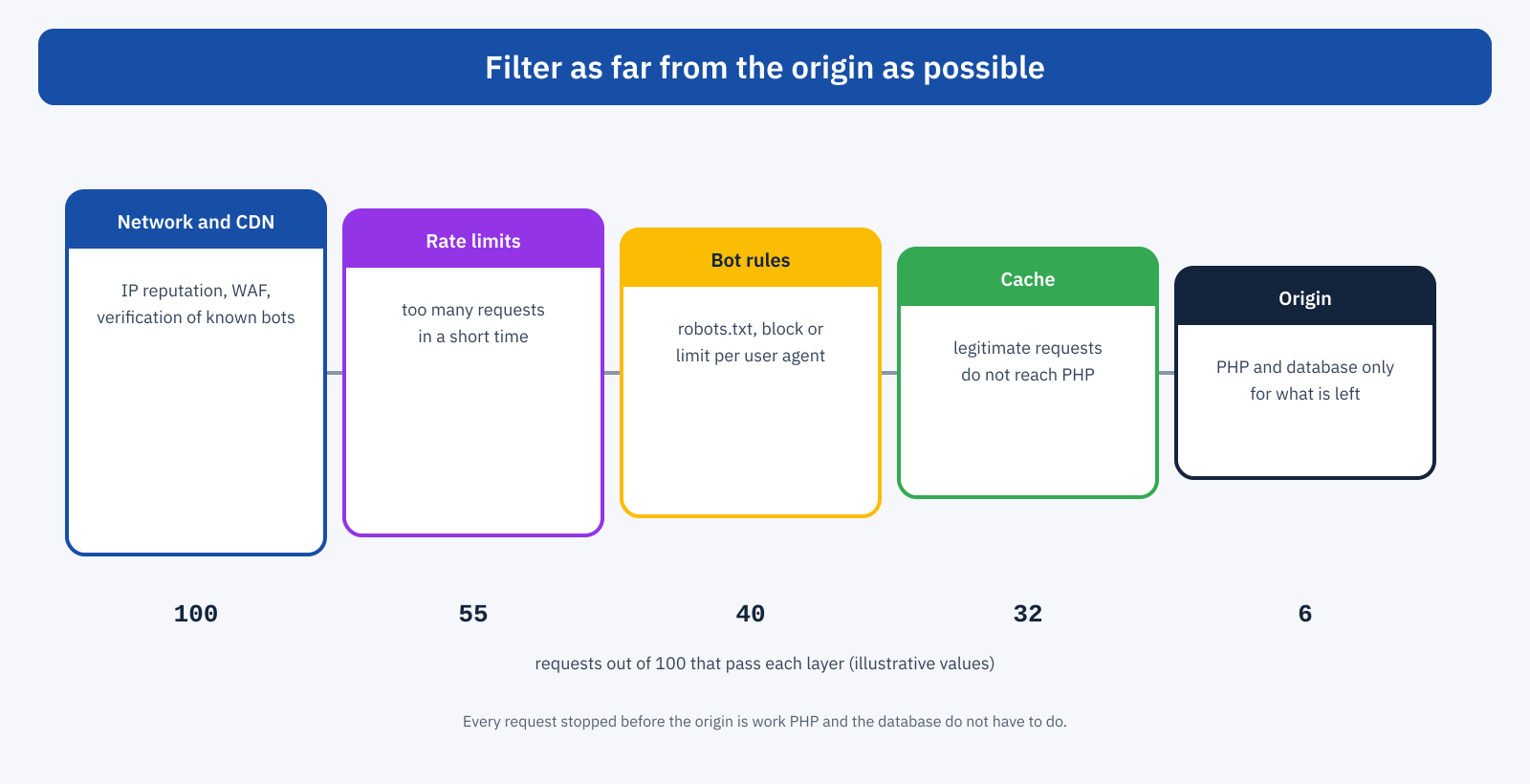
The layers of defense, from the outermost to the innermost, are these:
- CDN and web application firewall (WAF): they block requests from addresses with a bad reputation and known attack attempts, and many offer verification of legitimate crawlers and specific rules for AI crawlers. As discussed in the article on Cloudflare, they are not a universal solution, but for this job they are the most effective tool;
- rate limits: a maximum number of requests per address in a time interval, applied by the CDN or the web server, stops the most aggressive bots without touching people, who do not request dozens of pages per second;
- rules by user agent and path: targeted blocks for bots that do not respect robots.txt, and protection of sensitive paths such as
wp-login.phpandxmlrpc.php, the latter to be disabled if not used; - cache: serve bots’ legitimate requests from the cache too, preventing useless parameters, such as tracking ones or random ones, from generating different versions of the same page;
- origin: only the requests that really have to be processed reach the application.
At web server level, a rate limit is set up with a few lines. An example for Nginx, which limits internal searches to two requests per second per address, with a small tolerance for bursts:
# In the http block: the key is empty (so no limit) if it is not a search
map $arg_s $chiave_ricerca {
	""      "";
	default $binary_remote_addr;
}
limit_req_zone $chiave_ricerca zone=ricerca:10m rate=2r/s;

# In the server block
server {
	# ...
	limit_req zone=ricerca burst=5 nodelay;
	limit_req_status 429;
}
The exact configuration depends on the server and the hosting, and must be tested carefully: a limit that is too tight can block real users who share the same address, such as a company’s employees or the customers of a mobile carrier.
Reducing what bots can request
Besides filtering, it pays to reduce the surface bots can explore. A shop’s filter combinations can use links that crawlers do not follow, or parameters excluded in robots.txt; internal search pages can be excluded from indexing; little-used tags and archives can be removed. Error responses, such as pages not found, should be light and, where possible, cached for a short time: scans generate thousands of requests to nonexistent URLs, and in many installations each one runs the whole of WordPress.
Another point is wp-cron, which in WordPress is triggered by visits: with a lot of automated traffic it runs continuously. Replacing it with a system scheduled job, at regular intervals, removes a useless load. Finally, a persistent object cache reduces the cost of the requests that reach the origin anyway.
What not to block
The opposite risk is blocking too much. Besides search engines, you must let through the services the site needs: payment system notifications, monitoring services, feed readers, the systems that generate link previews on social networks and in messaging apps, integrations with management systems and marketplaces. Before enabling a blanket block, such as a mandatory check for all unrecognized traffic, it is worth checking in the logs which legitimate services access the site and planning exceptions. Every change should then be monitored for a few days, checking errors in the logs and in the Search Console crawl report.
A concrete example
An online store with about two thousand products notices that the TTFB of category pages, in real-user data, has doubled over a few weeks, with no changes to the site and no increase in visits in analytics. The logs show that over half of the requests come from a few crawlers exploring all the filter combinations, and that some of them present as a normal browser but come from a few address ranges of cloud providers. The fix is to exclude the filter parameters in robots.txt, enable verification of known crawlers and a per-address rate limit on filtered pages in the CDN, and block the address ranges the scraping comes from. The server load drops dramatically, and users’ TTFB returns to its previous values, without changing a line of the theme.
In short
An important part of servers’ work is done for visitors who are not people. Bots often request pages the cache does not cover, and so they weigh on the server more than the number of their requests suggests; when the server is saturated, real users pay, with a worse TTFB and LCP. To tackle the problem you need server logs, because analytics tools do not see bots; you need to tell useful crawlers from unwanted ones, checking the declared identities; and you need defenses at several levels, as far from the origin as possible: robots.txt, CDN and WAF, rate limits, an effective cache for bots too. All the while leaving the door open to the services the site needs.
