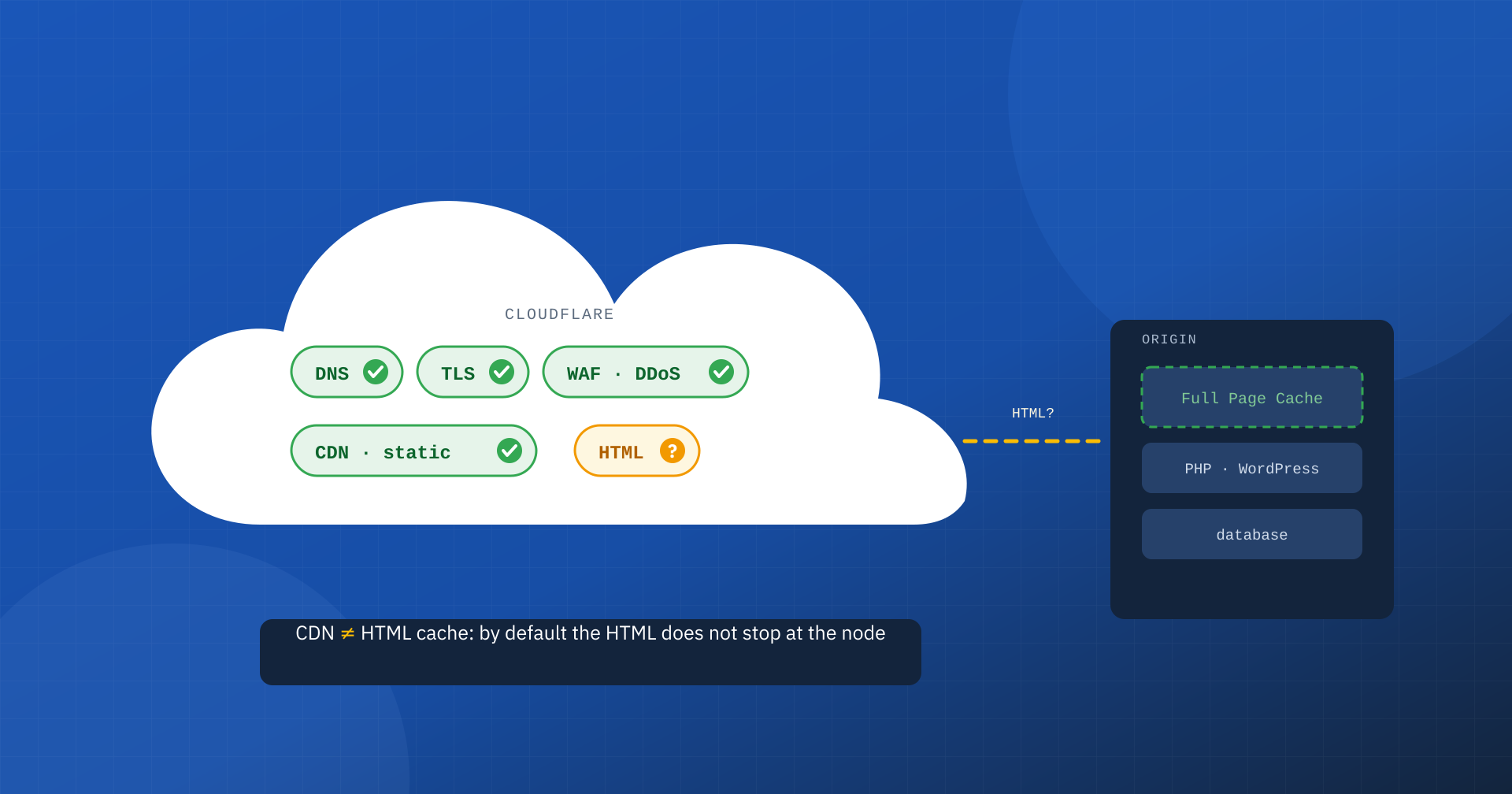
When a site is slow, many people’s first reaction is almost a reflex: “let’s put Cloudflare on it”. The nameservers are changed, the proxy is switched on, and the pages are expected to become instant. Sometimes something improves, often much less than expected, and the pages’ TTFB stays exactly what it was. The reason, in most cases, is a basic confusion between two different functions: the CDN, which distributes static files, and the Full Page Cache, which keeps ready-made HTML pages.
Cloudflare is an excellent tool and we use it often. But it is not a cure-all, and to make it really work on performance you need to know what it does by default, what it does not do and what needs to be configured. Let’s go through it in order.
What Cloudflare really is
Cloudflare is a global network that sits between visitors and the site’s server, the origin. When the proxy is active, every request first reaches one of its nodes, spread across hundreds of cities, and only if necessary goes on to the origin. On this privileged position Cloudflare builds many services: DNS, TLS certificates, protection against DDoS attacks, a web application firewall, bot management, HTTP/3 support and, of course, a CDN for static content.
Many of these services work well from day one and on their own justify adopting Cloudflare, especially on the security side. The problem arises when it is taken for granted that, being “a CDN”, Cloudflare automatically speeds up the whole site, pages included.
CDN and Full Page Cache: the most widespread confusion
A CDN keeps copies of static files, such as stylesheets, scripts, images and fonts, on nodes close to users. These are files that are the same for everyone and rarely change: serving them from a node a few kilometers away instead of from the origin server reduces latency and lightens the infrastructure.
The Full Page Cache instead keeps the page’s HTML document, that is the result of the work of PHP and the database. It is what determines the TTFB, the time the browser waits before it can start building the page, and it is therefore the foundation of LCP. Without an HTML cache, every visit forces the origin to generate the page again, even if all the images arrive very quickly from the CDN.
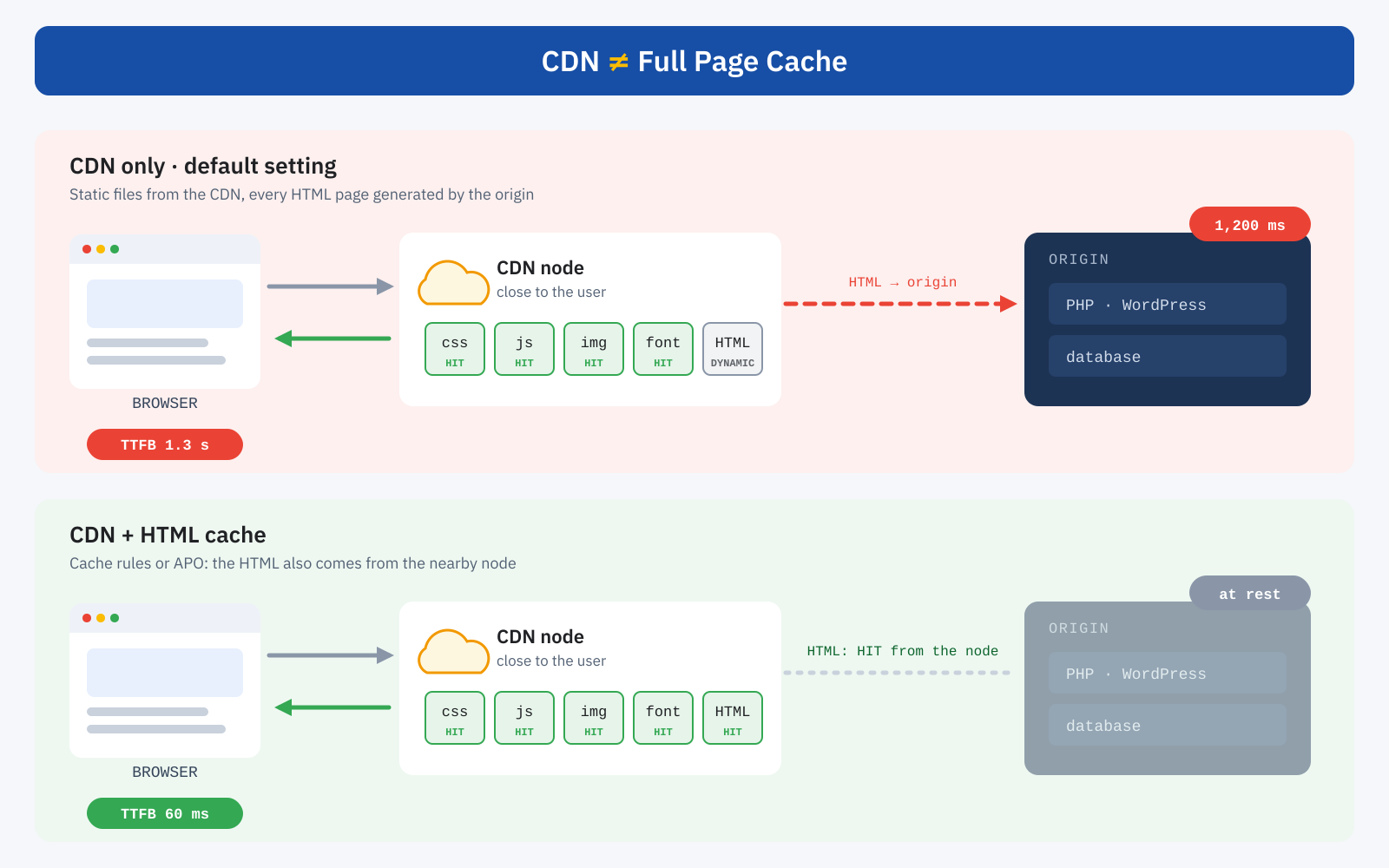
The two functions can sit in the same place, on the Cloudflare node, or in different places, with the CDN at the edge and the Full Page Cache at the origin, for example with Varnish. But they remain two different things, and enabling one does not mean having the other.
By default, HTML is not cached
With the default configuration, Cloudflare caches files based on their extension: images, stylesheets, JavaScript, fonts, documents such as PDFs and a few other formats. HTML pages are not on the list. Every page request therefore goes through the node without stopping and reaches the origin, exactly as if Cloudflare were not there, with the added intermediate hop.
It is a cautious and correct choice: HTML can contain personal information, such as the name of a logged-in user or the contents of a cart, and caching it without care would be dangerous. But it means that, if the site’s problem is a slow origin, enabling Cloudflare does not solve it.
How to check it in a minute
Cloudflare adds the cf-cache-status header to every response, which indicates whether the resource was served from the cache. One request from the command line is enough:
curl -sI https://www.iltuosito.it/ | grep -i cf-cache-status
cf-cache-status: DYNAMIC

curl -sI https://www.iltuosito.it/wp-content/themes/tema/style.css | grep -i cf-cache-status
cf-cache-status: HIT| Value | Meaning |
|---|---|
| HIT | Served from the node’s cache |
| MISS | Eligible for caching, but not yet present: request sent to the origin |
| DYNAMIC | Not eligible for caching: this is the case for HTML with the default settings |
| BYPASS | Cache skipped by a rule or by the origin’s headers |
| EXPIRED, REVALIDATED | Stale copy, downloaded again or revalidated with the origin |
If pages respond with DYNAMIC, Cloudflare is acting as a CDN and a shield, but not as a page cache.
Why caching HTML is not trivial
A well-done HTML cache always requires three elements. The first is a rule that establishes what to cache. The second is a set of exclusions for what must never end up in the cache: admin area, login, cart, checkout, customer area, and in general visits from users recognized by cookie. The third, the most delicate, is an invalidation mechanism: when an article is updated or a price changes, the cached copy must be purged, otherwise visitors will see outdated content.
A mistake in the second point is serious: the page seen by an administrator, with the edit bar, or by a customer with their cart, could be served to the next visitor. A mistake in the third point is more insidious: prices, availability or news that are out of date for hours.
Cache rules
To cache HTML you use Cloudflare’s cache rules, which have replaced the old Page Rules and their “Cache Everything” setting. A rule can make HTML eligible for caching, set how long to keep it on the nodes and define exclusion conditions, by path or by cookie. Some advanced features, such as exclusion by cookie, were long reserved for the higher plans: before designing the configuration it is worth checking what your plan includes.
There is an important detail for anyone coming from Page Rules: there only the first matching rule was applied, whereas cache rules are all evaluated, in order, and later ones can override earlier ones. Exclusions therefore go at the bottom. A minimal configuration for WordPress and WooCommerce has this shape:
# Rule 1: make the site’s HTML eligible for caching
(http.host eq "www.iltuosito.it")
→ Eligible for cache · Edge TTL: 2 hours

# Rule 2 (after the first): exclude dynamic areas and recognized users
(starts_with(http.request.uri.path, "/wp-admin")
 or http.request.uri.path eq "/wp-login.php"
 or starts_with(http.request.uri.path, "/carrello")
 or starts_with(http.request.uri.path, "/checkout")
 or starts_with(http.request.uri.path, "/mio-account")
 or http.cookie contains "wordpress_logged_in"
 or http.cookie contains "woocommerce_items_in_cart")
→ Bypass cache
It is a starting point, not a universal configuration. Every site has its own dynamic paths, its own APIs, plugins that set cookies and pages that change often: they must be identified one by one and checked with the cf-cache-status header.
APO: HTML caching designed for WordPress
For WordPress sites Cloudflare offers a ready-made solution: APO, Automatic Platform Optimization. It is a paid add-on on the free plan and included in the higher plans, activated through Cloudflare’s official WordPress plugin. APO caches HTML pages on Cloudflare’s network, automatically excludes visits with the typical WordPress and WooCommerce cookies, such as those of logged-in users or the cart, and above all handles invalidation: when content is published or edited, the plugin tells Cloudflare which pages to purge.
For a blog or a news publishing site on WordPress, APO is often the simplest way to get a real HTML cache on the nodes, with a low TTFB for visitors all over the world. But it is not magic either: it works only with WordPress, depends on the plugin for invalidation, and must be checked carefully when the site shows different content by language, currency, geographic area or device, or when other cache plugins work in parallel.
The pitfalls nobody tells you about
- WordPress nonces. Many forms and AJAX requests include in the HTML a security code with limited validity, usually a few hours. If a page stays cached longer, that code expires and contact forms, searches or buttons stop working for whoever receives the old copy. The HTML TTL must be chosen with this in mind too.
- Low-traffic sites. Each node has its own cache. If a site receives few visits, many pages are not cached on the node the user comes through and the request goes on to the origin anyway, with one more hop. Cloudflare’s tiered cache reduces the problem, but does not eliminate it.
- Purging everything. The button that clears the whole cache is handy, but it forces every node to rebuild it from scratch, with a spike of requests to the origin at exactly the wrong moment. Better to purge only the URLs concerned, by hand or through a plugin.
- Debugging. With multiple nodes and multiple cache layers, two users can see different versions of the same page. Without a method and without reading the response headers, finding the cause of a problem becomes long and expensive.
Cloudflare and origin cache: layers that complement each other
The right question is not “Cloudflare or Varnish?” but which job to assign to each layer. The browser cache avoids downloading again what the user already has. The CDN serves static files from nearby and, if configured, the HTML too. The Full Page Cache at the origin, with Varnish as the reference for the most demanding projects, makes fast every request the node cannot serve on its own. The object cache and a well-optimized application make fast even what cannot be cached, such as the cart or the customer area.
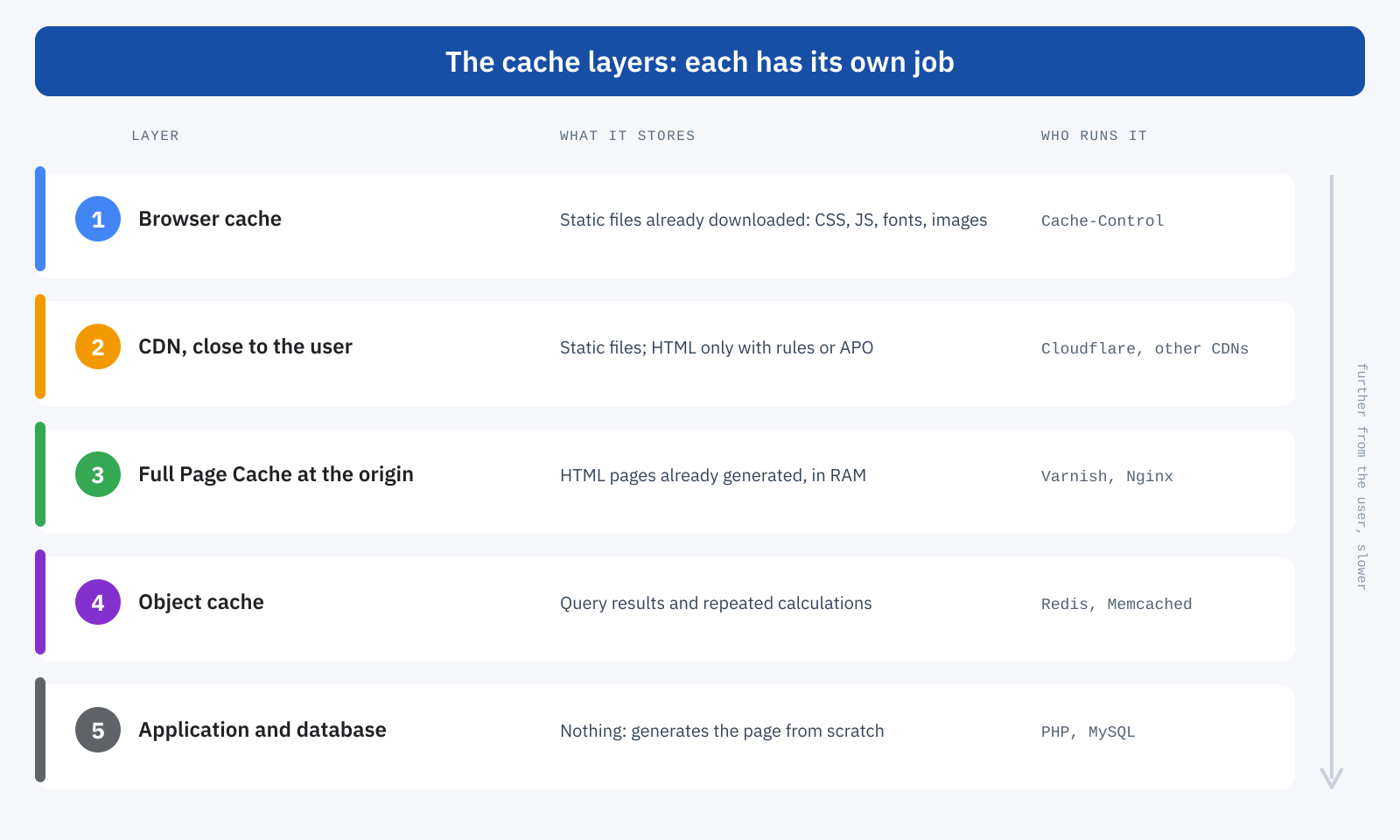
In this architecture Cloudflare is valuable, but it is one of the layers. A slow origin stays slow for all the requests the edge cache does not intercept: logged-in users, carts, freshly updated pages, nodes with the cache still empty. And that is exactly where an e-commerce site’s conversions are decided.
The other “miracle” features
Cloudflare also offers optimizations that promise improvements with one click, such as image compression or Rocket Loader, which defers JavaScript loading. They can be useful, but they should be treated like any other automatic optimization: enable them one at a time and measure. Deferring JavaScript, in particular, can improve lab tests and worsen real responsiveness, for the same reasons we described when discussing delaying JavaScript until the first click.
How to work out what your site needs
- Measure the TTFB of the main pages and check
cf-cache-status: if the HTML isDYNAMICand the TTFB is high, the problem is the origin or the absence of a page cache. - Assess how much of the traffic is anonymous: the higher it is, the more an HTML cache, on the nodes or at the origin, will have an effect.
- List the dynamic parts of the site, the cookies that identify them and how often content changes: these are the ingredients of exclusions and expiry times.
- Choose where to put the HTML cache: Cloudflare rules, APO for WordPress, Varnish at the origin or a combination, depending on audience, traffic and budget.
- Verify the result on real-user data, not just with a test: TTFB and LCP at the 75th percentile are the final judge.
In summary
Cloudflare is not a cure-all, but it is an excellent tool when you know what you are asking of it. By default it is a CDN and a shield: it serves static files from nearby and protects the site, but lets HTML through to the origin. To speed up pages you need an HTML cache, which can be configured on the nodes with cache rules or with APO for WordPress, or at the origin with a Full Page Cache such as Varnish, ideally in combination.
Confusing the CDN with the Full Page Cache leads you to believe you have solved a problem that is still there. Telling them apart lets you build an architecture in which each layer does its part, and in which even the requests no cache can serve, such as those of users about to buy, stay fast.
