Among WordPress optimization tips, “install Redis” has become almost a reflex. Performance plugins suggest it, hosting providers offer it as an add-on, even WordPress’s Site Health tool recommends it. Yet on many sites, enabling Redis produces no visible improvement, while on others it radically changes the speed of the most important pages. The difference does not depend on Redis, but on which problem you are trying to solve.
In this article we look at what the WordPress object cache is, how it differs from the page cache, when a persistent cache such as Redis really makes a difference, when it is useless, and how to configure and measure it properly.
Page cache and object cache: two different things
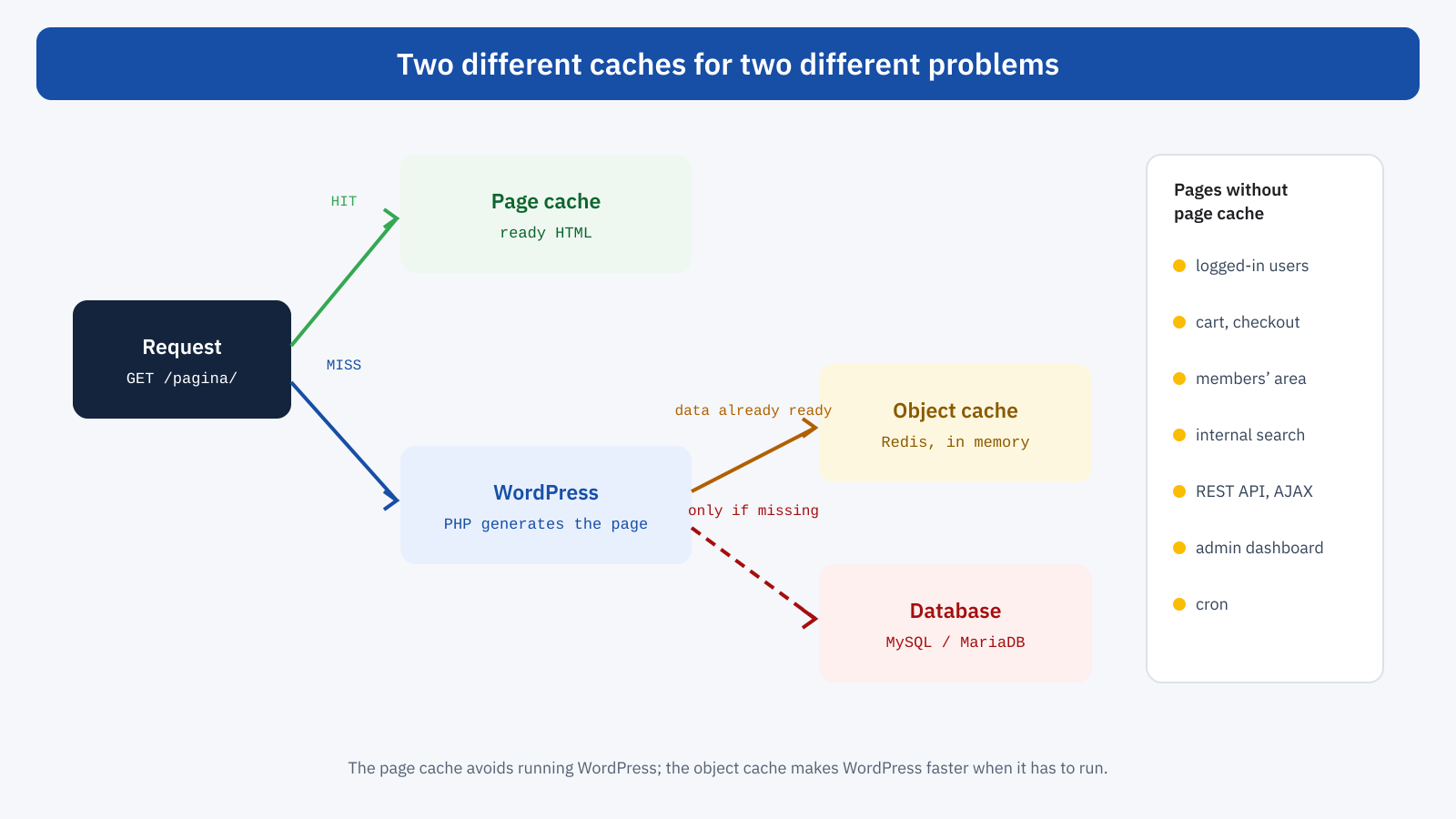
The page cache, which we covered in the article on TTFB and page caching, stores the complete HTML of a page and returns it on subsequent requests without running WordPress. It is the most effective tool for performance: a page served from the cache arrives in a few tens of milliseconds, whatever the complexity of the site.
The object cache works at a different level. It does not store pages, but the individual pieces of data WordPress uses to build them: site options, posts, metadata, taxonomies, the results of some queries, plugin transients. When WordPress has to generate a page, instead of asking the database for this data every time, it looks in the cache first. It does not avoid running WordPress, but it makes it faster.
The WordPress object cache, with and without Redis
WordPress has always had a built-in object cache: all core functions use wp_cache_get() and wp_cache_set() to store data that has already been read. By default, however, this cache lives only in the memory of the individual request: it avoids reading the same option twice while generating a page, but on the next request it starts from zero. Every generated page has to read everything again from the database.
A persistent cache changes this behavior. With a file called object-cache.php in the wp-content folder, a so-called drop-in, WordPress replaces its own implementation with one that saves data in an external system, such as Redis or Memcached, where it stays available from one request to the next. The drop-in is usually installed by a plugin, such as Redis Object Cache or more advanced commercial solutions, or directly by the hosting provider. Redis is an in-memory data store, extremely fast: reading a value takes fractions of a millisecond, against the milliseconds of a database query.
With a persistent cache active, transients also change, the temporary data many plugins use to store expensive results: instead of being saved in the database’s options table, they are saved in the cache. And since version 6.1 WordPress also caches the results of many content queries, a further advantage when the cache is persistent.
When it is really needed
The key question is: how many of the site’s pages are generated by WordPress instead of being served from the page cache? If the answer is “almost none”, Redis has little to offer. If the answer is “many”, it can make a big difference. Typical cases where the page cache cannot step in are:
- Online stores. Cart, checkout, customer account and, in many setups, every page visited by someone with a product in the cart, as explained in the article on Core Web Vitals for WooCommerce.
- Sites with logged-in users. Members’ areas, membership sites, e-learning platforms, forums and communities, where pages are personalized.
- Dynamic requests. Internal search, filters, REST API and AJAX calls, which are rarely cached.
- Administration. The dashboard and the editor, where editors and managers work every day.
- Cold cache. The first request after a page cache purge, or rarely visited pages that are never in the cache.
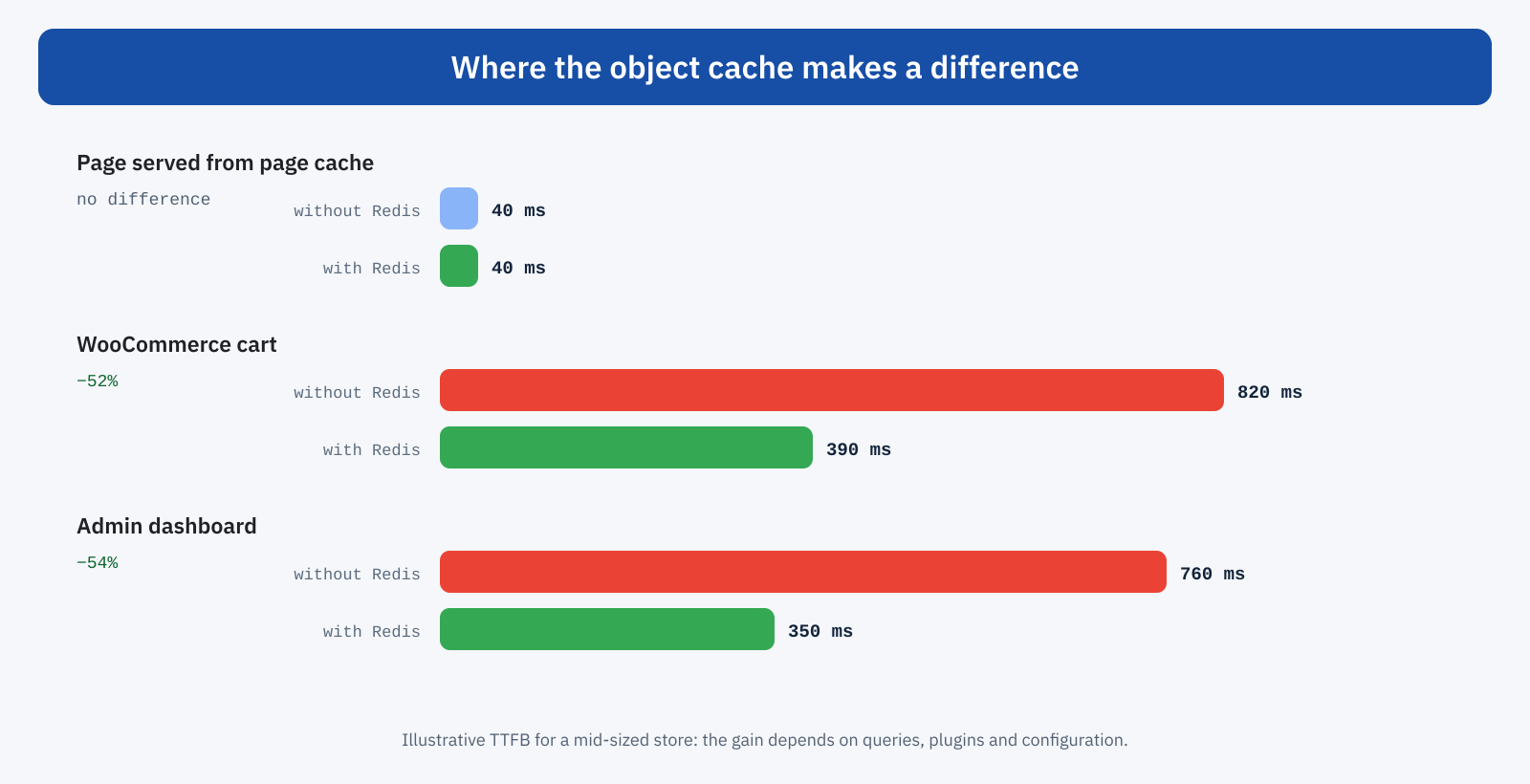
In all these cases, every request runs the whole of WordPress, and the number of database queries can be in the tens or hundreds. Reducing them with an in-memory cache lowers generation time, and therefore TTFB, often by half or more, and at the same time reduces the load on the database, which is frequently the bottleneck of sites with a lot of dynamic traffic.
When it is not needed
For a brochure website or a blog with few pages, visited almost only by anonymous users and served entirely from the page cache, Redis brings no measurable benefit to visitors: their pages do not go through WordPress. It may make the dashboard a little faster for those who write, but it is not an intervention on Core Web Vitals. In these cases the priority is to make sure the page cache works well and covers every page.
There are also cases where a persistent cache can make things worse. If Redis is on another server with significant network latency, hundreds of reads per page can cost more than the queries they replace. If the allocated memory is insufficient, data is evicted constantly and the hit rate collapses. And some plugins cache enormous values, such as entire product lists or external API responses, which slow down every read and saturate memory.
Configuration: the details that matter
A correct configuration makes the difference between a Redis that speeds up the site and one that just takes up memory. A few points deserve attention.
- Memory and eviction policy. An adequate memory limit should be set with
maxmemory, along with an eviction policy such asallkeys-lru, which removes the least recently used data when memory is full. Without a limit, Redis can grow until it puts the server in trouble. - Local connection. If Redis is on the same server as PHP, a Unix socket reduces latency further compared with a TCP connection.
- Persistence on disk. For a cache it is not necessary to save data to disk: if Redis restarts, the cache repopulates itself. Disabling persistence avoids useless writes.
- Separation between sites. If several sites share the same instance, each must have a different key prefix, to prevent data from getting mixed up.
- Serialization and compression. The more advanced solutions allow more efficient serializers and value compression, useful when the stored data is plentiful or large.
# redis.conf: typical settings for a WordPress cache
maxmemory 256mb
maxmemory-policy allkeys-lru
save ""
appendonly no
unixsocket /var/run/redis/redis.sock
unixsocketperm 770
// wp-config.php: connection through a socket and a dedicated prefix
define( 'WP_REDIS_SCHEME', 'unix' );
define( 'WP_REDIS_PATH', '/var/run/redis/redis.sock' );
define( 'WP_REDIS_PREFIX', 'negozio_' );
define( 'WP_REDIS_MAXTTL', 86400 );The exact names of the constants depend on the plugin used; those in the example are typical of the Redis Object Cache plugin. On many managed hosting platforms Redis is already configured, and you just have to enable it from the control panel.
The problem of autoloaded options
A special case deserves a mention. On every request WordPress loads, in one go, all the options flagged as autoloaded, and with a persistent cache it stores them as a single value. Many plugins, even after being uninstalled, leave large options in this list. The result is a value of several megabytes read and deserialized on every generated page, with or without Redis. Checking the size of autoloaded options and cleaning up the useless ones is a complementary intervention that is often worth as much as installing the cache itself; the Site Health tool flags when this size is excessive.
Redis or Memcached?
Memcached is the other long-standing solution for the WordPress object cache, and for typical use as a cache the performance of the two systems is comparable. Redis has established itself as the default choice thanks to some practical features: it supports richer data structures, allows selectively flushing groups of keys, offers more complete diagnostic tools and is supported by a wider plugin ecosystem. If your hosting already offers a well-configured Memcached, there is no reason to switch; if you are starting from scratch, Redis is generally the easier choice to manage.
Invalidation and flushing
A cache is only useful if the data it holds is correct. WordPress core automatically invalidates the entries for a post, a term or an option when they are modified, and well-written plugins do the same with their own data. Problems arise with code that writes directly to the database, bypassing WordPress functions, for example with bulk imports or custom scripts: the cache keeps returning the old values until they expire or it is flushed.
For this reason it is worth including an object cache flush in release procedures and after any direct database operation, and being wary of solutions that flush it too often. A plugin that performs a full flush on every content save cancels out much of the benefit: the hit rate collapses exactly at moments of peak activity.
A typical example
Consider a store with about three thousand products, an efficient page cache for anonymous visitors and traffic concentrated in the evening hours. Catalog pages respond in 50 milliseconds; the cart and checkout, however, take over 800 milliseconds, with more than 200 queries per page, and during promotions the database hits its limit. With local Redis, 256 megabytes of memory and a cleanup of autoloaded options, queries per page drop below 40, the TTFB of cart and checkout halves and the database load at peak times falls dramatically. The catalog stays at 50 milliseconds, as before: the page cache was already doing the work there.
How to measure the effect
Before enabling Redis it is worth measuring the starting point on the pages that do not go through the page cache: TTFB of the cart, the members’ area, search, the dashboard. The Query Monitor plugin shows, for each page, the number of database queries, their total time and, with a persistent cache active, the percentage of reads served from the cache. On the Redis side, the INFO stats command reports the total of hits and misses, from which the overall ratio can be derived.
After activation, the signs of an effective configuration are clear: queries per page drop noticeably, the hit rate stays above 90%, the TTFB of dynamic pages is reduced. If queries do not decrease, the drop-in may not be active; if the hit rate is low, memory is probably insufficient or some plugin is flushing the cache too often.
In short
A persistent object cache with Redis does not replace the page cache and does not speed up pages the page cache already serves. Its field is everything WordPress has to generate on every request: carts and checkouts, members’ areas, logged-in users, searches, APIs and administration. There it can halve response time and lighten the database, with direct effects on TTFB and therefore on the LCP of the pages most important to the business.
For a brochure website fully cached it is of little use; for an online store or a site with many logged-in users it is often one of the most effective measures. What makes the difference is the configuration, with adequate memory, a local connection and separate prefixes, and measurement, before and after, on the right pages.
