
On the Contact page there is a map to find the office. In the footer, a widget with the latest customer reviews. On the home page, a grid with the most recent photos from the company’s social profile. These are elements that almost every business site ends up having, and that are added with a copy and paste: the service provides a snippet of code, usually an iframe or a script that creates one, and the content appears on the page.
The simplicity of embedding hides the cost. Every iframe is a complete web document, with its own HTML, its own stylesheets, its own scripts, its own fonts and its own connections to the provider’s servers. An interactive map can weigh as much as the whole rest of the page put together. In this article we look at what these widgets really cost, how they affect Core Web Vitals and which alternatives make it possible to offer the same information at a fraction of the weight.
A document inside the document
An iframe embeds one web page inside another. The browser loads it as it loads any page: it resolves the domain, opens a connection, downloads the HTML, then the stylesheets, scripts, images and data needed. For an interactive map, this means the map’s rendering library, image tiles, fonts, icons, configuration data and often the provider’s analytics tools. For a reviews widget, the framework it is built with, the review data, profile photos. For a social feed, dozens of images and the code to handle them.
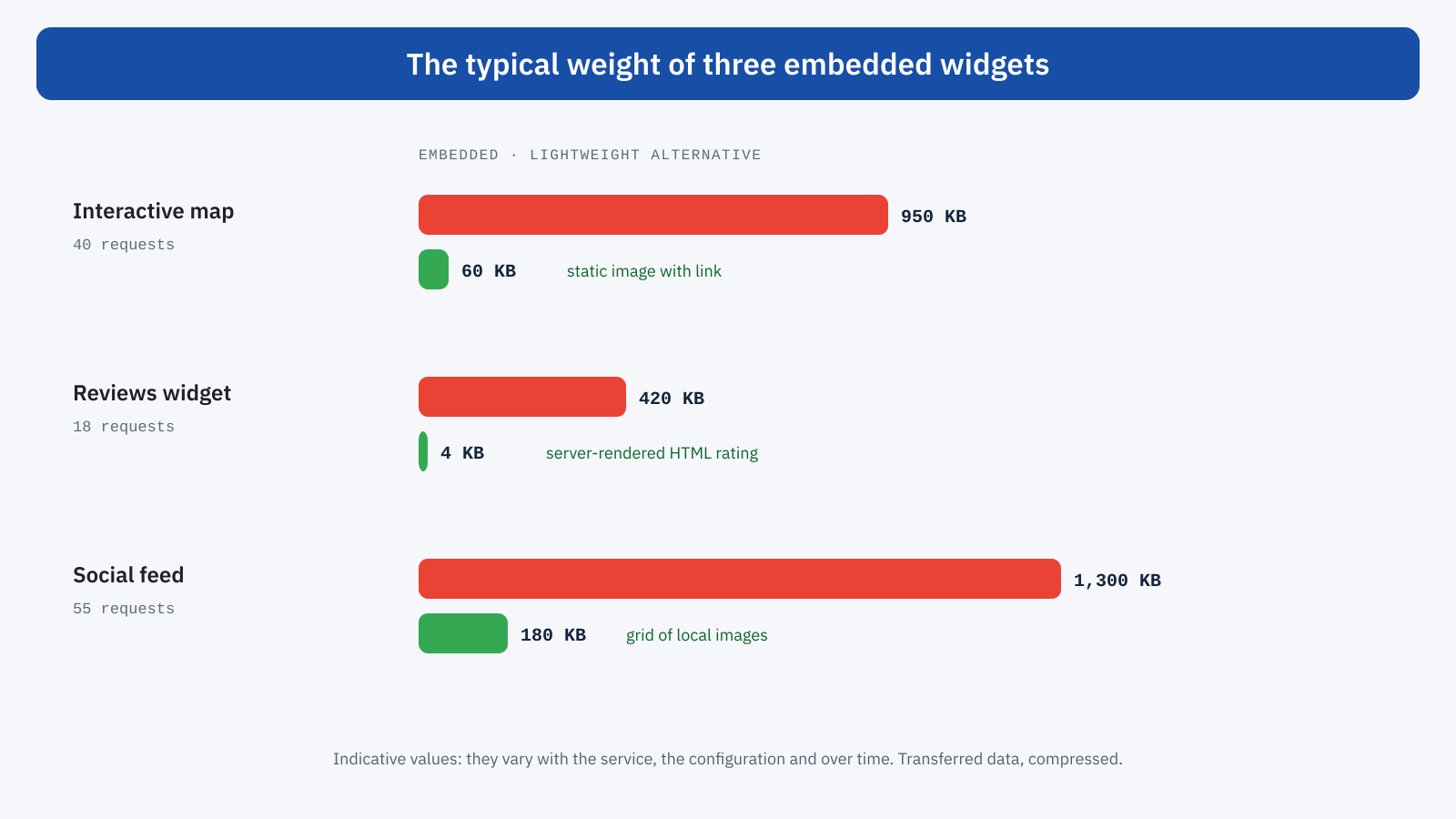
For security reasons, modern browsers can run iframes from other domains in separate processes, but this does not make them free: the resources still go through the same network connection, the code runs on the same processor and takes up the same device memory. On a mid-range smartphone, an interactive map that initializes while the page is loading slows down everything else.
How they affect Core Web Vitals
The effect on LCP is indirect but concrete: widget resources compete for bandwidth with those of the page, and if the widget is near the top, like a map in the upper part of the Contact page, it can delay the main image or text. CLS is hit when the iframe has no reserved dimensions: many widgets start with a minimum height and expand when the content arrives, pushing everything that follows down. INP suffers from the work that widget scripts do during and after loading, just when the user starts interacting.
There is a detail that makes these problems hard to spot. Page scripts cannot see what happens inside iframes from other domains, so JavaScript-based measurement tools, including the web-vitals library, do not record layout shifts or interactions that take place inside them. Field data collected by Chrome for the Chrome UX Report, on the other hand, can take them into account. The result is that the data from your own monitoring system and that from Search Console can diverge, and the embedded widget is one of the possible causes.
The first fix: lazy loading and dimensions
Two minimal fixes should be applied to any iframe, and they do not require changing the widget. The first is the loading="lazy" attribute, which postpones loading until the user scrolls near the iframe. For a widget in the footer this means that most visitors, who do not reach the bottom, never load it at all. WordPress adds it automatically to content iframes since version 5.7, but not to those inserted in theme templates or by plugins, which need to be checked.
The second is reserving space: explicit dimensions or a ratio with aspect-ratio, and for widgets that change height a minimum height equal to the typical height of the final content. That way the iframe can load whenever it likes without shifting anything.
<iframe src="https://widget.esempio.com/recensioni?azienda=123"
	loading="lazy" width="600" height="420"
	title="Customer reviews"
	style="width: 100%; height: auto; aspect-ratio: 600 / 420; border: 0;"></iframe>
These fixes reduce the damage, but they do not eliminate the cost for those who scroll down to the widget, nor for widgets placed near the top. For those, more radical alternatives are needed.
Maps
The interactive map is the most common case and the one with the most effective solution: the facade. In place of the map, the page shows a static image of the area with a marker on the office, and a button to open the interactive map. Only when the user taps it is the image replaced by the iframe. For most visitors, who only need to see where the office is or get directions, the image is enough.
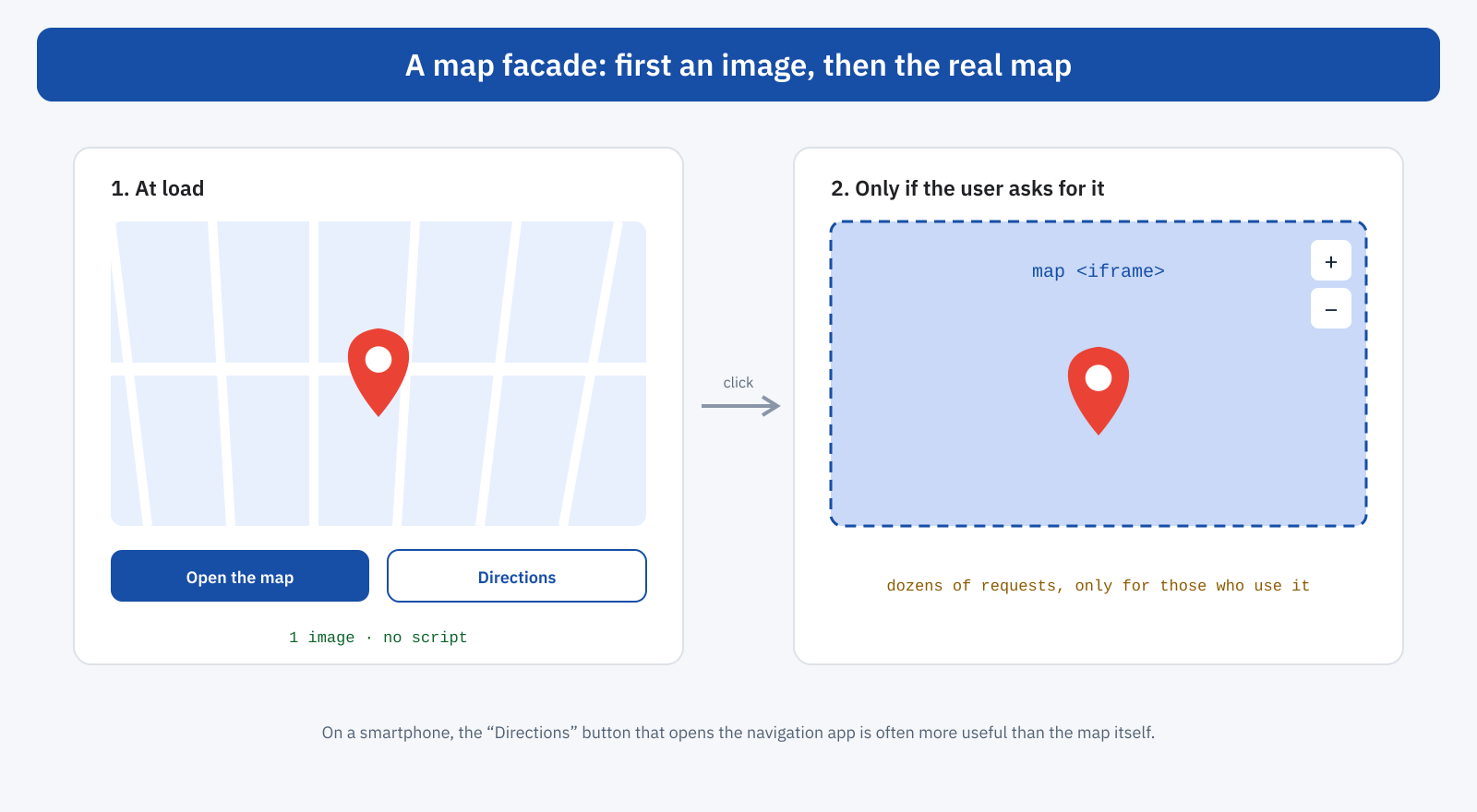
The image can be generated with the static map services of the main providers, or prepared once and hosted on your own site, since the location of an office rarely changes. Next to it, a link to directions that on a smartphone opens the navigation app directly is often more useful than the map itself: whoever has to reach the office wants a route, not a map to move with their fingers inside a web page.
<div class="mappa-facciata">
	<img src="/media/mappa-sede.webp" width="1200" height="675" loading="lazy"
		alt="Map of the area with the office at via Roma 10, Milan">
	<button type="button" data-src="https://www.google.com/maps/embed?pb=…">
		Open the interactive map
	</button>
	<a href="https://www.google.com/maps/dir/?api=1&destination=Via+Roma+10+Milano">
		Directions
	</a>
</div>
A few lines of JavaScript, on the button click, create the iframe with the address given in the data-src attribute and swap it in for the image, with the same dimensions so as not to shift anything. It is the same technique seen for videos in the article on video and Core Web Vitals.
Reviews
Review widgets from specialized platforms show the average rating, the number of reviews and a few recent comments. This is useful information for visitors’ trust, but it rarely changes hour by hour. Besides the widget, many platforms offer a programming interface from which to read the same data: the site can fetch it periodically, for example once a day, store it and show it as normal HTML, with its own styles. The result is a block of a few kilobytes, visible immediately, with no shifts and no external scripts.
When the platform requires by contract the use of its own widget, it is at least worth choosing the simplest version, such as a badge with the rating instead of a carousel of reviews, loading it lazily and reserving space for it. And it is worth checking whether the widget is really needed on all pages or only on those where trust matters most, such as product pages or the services page.
Social feeds
Social platform feeds embedded in a site are among the heaviest widgets: dozens of high-resolution images, scripts for carousels and detail windows, tracking tools. Their value to the visitor is often modest, and in most cases a link to the social profile, accompanied by a few selected images, serves the same purpose.
If the feed is considered important, the alternative is the same as for reviews: periodically fetch the latest images through the platform’s interface, save them on your own site in modern formats and the right sizes, and show them as a normal image grid with lazy loading. There are WordPress plugins that do exactly this; it is best to choose those that store images locally instead of loading them from the platform’s servers on every visit.
Other common widgets
The same reasoning applies to many other embedded elements: booking calendars, contact forms from external services, comment systems, weather forecasts, currency converters, share buttons with counts. For each, it is worth asking three questions. Is it really needed by all visitors, or only some? Can it be shown in static form and loaded in interactive form only on request? Can the data it shows be fetched by the server and rendered as HTML? Almost always at least one of the answers opens the way to a lighter alternative. The general picture is the one described in the article on third-party scripts.
Privacy and consent
There is a further reason to prefer static alternatives: many widgets set cookies and transmit browsing data to the providers, and in many cookie banner configurations they are blocked until the user gives consent. The result, if badly handled, is an empty box or a warning message in place of the map, followed by a layout shift when the content arrives. A facade or server-rendered content does not contact the provider until needed, always takes up the correct space and simplifies consent management, as we saw when discussing consent banners.
An example: the Contact page
Consider the Contact page of a professional firm: at the top a full-width interactive map, below it a contact form, in the footer a carousel of reviews and the feed of the latest photos posted on social media. On a smartphone the page transfers almost three megabytes, opens connections to a dozen domains and has an LCP of over four seconds, because the largest element is the map, which has to load its own tiles before it can be painted. While the reviews arrive, the footer gets longer and shifts the content.
There are three fixes: the map becomes a static image with buttons to open it and to get directions; the reviews are read once a day by the server and shown as text with the average rating; the social feed is replaced by a link to the profile with three locally saved images. The page drops below three hundred kilobytes, the LCP becomes the map image, light and with high priority, and nothing shifts any more. The information offered to visitors is exactly the same.
How to spot and measure them
Lighthouse explicitly flags third-party embeds that could be replaced by a facade and reports the resource weight of each provider. In the DevTools Network panel, by grouping or filtering requests by domain, you can see how many resources come from each service and when they load relative to the rest of the page. A test with and without the widget, for example by blocking the provider’s domain with the dedicated DevTools feature, directly measures its cost on LCP and load time.
In the field, comparing Search Console data with that of your own monitoring system, if you have one, can reveal problems that happen inside iframes. And for each widget it is worth asking how many visitors really use it: if fewer than five percent of users interact with the map, the remaining ninety-five percent pay its cost with no benefit at all.
In short
Maps, reviews, social feeds and other embedded widgets are complete documents inside the page, with their own resources and scripts, and they can weigh more than the rest of the site. They affect LCP by competing for bandwidth, CLS when they have no reserved space and INP with the work of their scripts, sometimes in ways the page’s measurement tools do not see.
The bare minimum is lazy loading with reserved dimensions. The best solutions are facades, which load the widget only when the user asks for it, and server-rendered alternatives, which show the same data as simple HTML. They offer the same information at a fraction of the weight, simplify privacy management and often give a better experience: a link to directions is more useful than a map to drag with your fingers.
