
Video has become a common element on many sites: the introductory film at the top of the home page, the YouTube tutorial embedded in an article, the product demo on an e-commerce product page, the animated background of a landing page. It is effective content, which holds attention and communicates in a few seconds what would take paragraphs of text. But it is also, in weight and complexity, one of the elements most likely to compromise a page’s performance.
The problems change depending on how the video is inserted. A video embedded from a platform brings the player and all its JavaScript with it; a video hosted on your own server weighs in through the data to transfer; a video at the top of the page can become the LCP element; a box without dimensions can cause layout shifts. Let’s look at the main cases and the solutions for each.
Videos embedded from YouTube and Vimeo
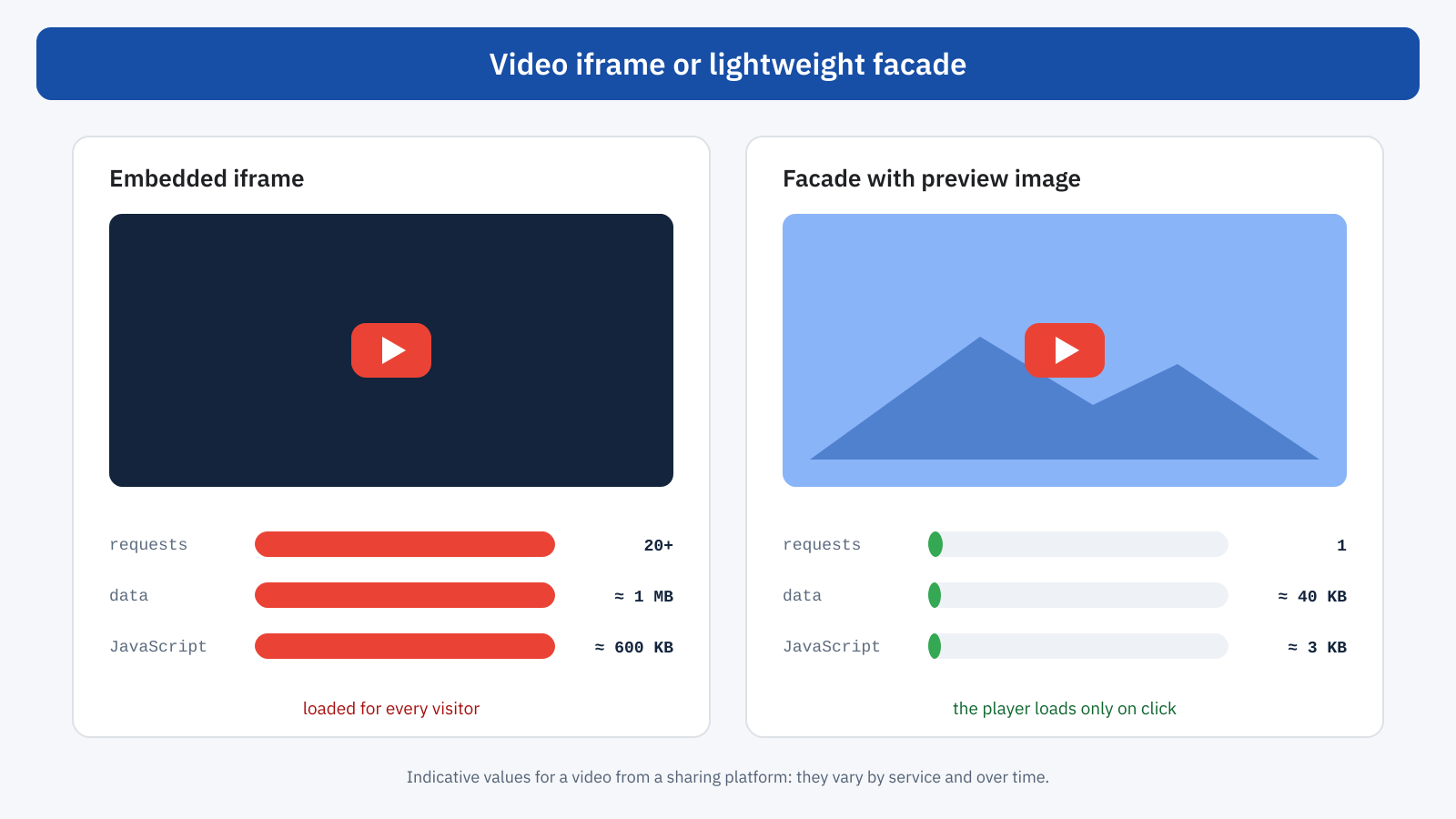
Embedding a YouTube or Vimeo video is very simple: you paste the address into the editor and WordPress generates an iframe with the player. What you don’t see is the cost. The iframe loads the player page, which in turn downloads stylesheets, fonts, scripts, images and configuration data: often dozens of requests and a data volume in the order of a megabyte, a substantial part of which is JavaScript to execute. And all of this happens for every visitor, even those who will never start the video.
The effect shows up mainly on the main thread: the player’s JavaScript competes with the page’s own during loading and can worsen the INP of the first interactions, as well as lengthening the overall load time. If the video is above the fold, it can also delay the LCP by taking bandwidth away from important resources.
The facade
The most effective solution is the facade: in place of the iframe, you show a preview image of the video with a play button, visually identical to the player. Only when the user clicks is the facade replaced by the real iframe, with the video starting automatically. The initial cost drops from a megabyte to a few tens of kilobytes, and anyone who doesn’t watch the video pays nothing.
Ready-made components exist, such as the various “lite embed” libraries for YouTube and Vimeo, as well as WordPress plugins that automatically apply the facade to existing embeds. If you prefer a solution of your own, you can build it in a few lines:
<button class="video-facciata" data-id="ID_VIDEO" aria-label="Play video">
	<img src="anteprima.webp" width="1280" height="720" loading="lazy" alt="">
</button>

<script>
document.addEventListener( 'click', ( e ) => {
	const f = e.target.closest( '.video-facciata' );
	if ( ! f ) return;
	const iframe = document.createElement( 'iframe' );
	iframe.src = `https://www.youtube-nocookie.com/embed/${ f.dataset.id }?autoplay=1`;
	iframe.allow = 'autoplay; encrypted-media; picture-in-picture';
	iframe.allowFullscreen = true;
	iframe.title = 'Video';
	f.replaceWith( iframe );
} );
</script>
The youtube-nocookie.com domain also reduces the cookies set before playback, an advantage for consent management. If you don’t want to use a facade, the loading="lazy" attribute on the iframe is the bare minimum for videos below the fold: the browser will load the player only when the user gets close, as explained in the article on lazy loading. It is less effective than the facade, because anyone scrolling the page still loads the player, but it is far better than nothing.
Reserving space: video and CLS
An iframe or video element without known dimensions initially takes up an arbitrary amount of space and then resizes, pushing the content below it down. With fluid layouts, where the video fills the full width of the column, the width and height attributes alone are not enough if the CSS changes the width: you need the aspect-ratio property, which keeps the proportions and lets the browser reserve the correct space from the start.
.video-facciata,
.contenuto iframe[src*="youtube"],
.contenuto video {
	width: 100%;
	height: auto;
	aspect-ratio: 16 / 9;
}
The WordPress editor’s embed blocks already apply a container with fixed proportions for the best-known services; the problem shows up mainly with hand-pasted embed code, with page builders and with custom players that initialize via JavaScript. The CLS produced by a video is often small in absolute terms, but it happens just as the user starts to read, and it is among the most annoying.
The video at the top of the page and LCP
A video that fills the top of the page is almost always the largest visible element, and therefore decides the LCP. For a video element, the browser considers the poster image and, in the most recent versions of Chrome, the first frame shown as well. Without a poster, the page has to wait for the browser to download and decode enough video data to show a frame: on a mobile connection, this can take seconds.
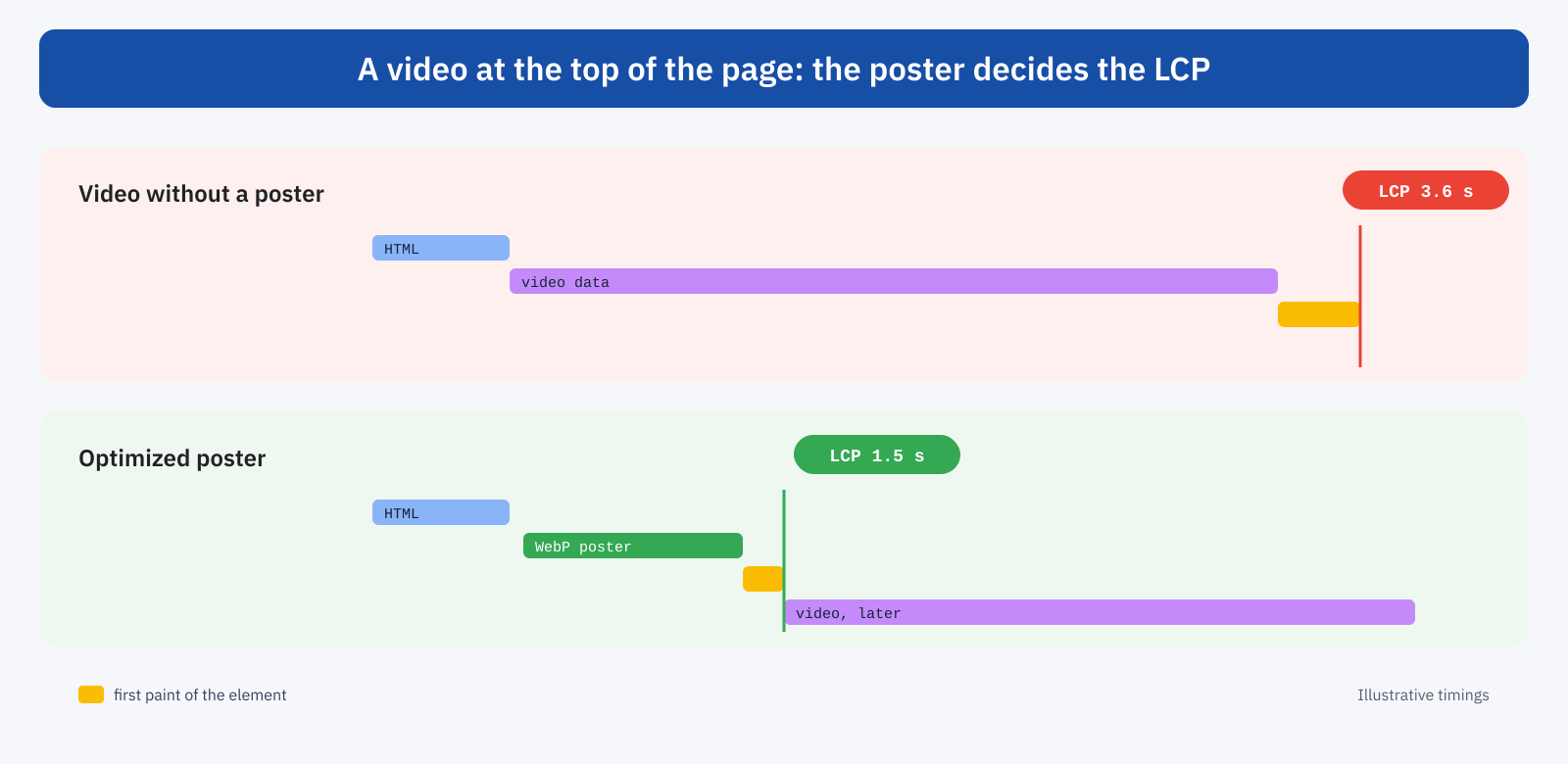
The solution is to treat the poster the way you treat a hero image: lightweight, in a modern format, appropriately sized and with high priority. Because the poster is an attribute of the video and not an image element, the browser discovers it a little later; a high-priority preload puts it straight at the top of the queue:
<link rel="preload" as="image" href="/media/hero-poster.webp" fetchpriority="high">

<video autoplay muted loop playsinline preload="metadata"
	poster="/media/hero-poster.webp" width="1600" height="900">
	<source src="/media/hero.webm" type="video/webm">
	<source src="/media/hero.mp4" type="video/mp4">
</video>
It is also worth asking whether the video at the top is really necessary on mobile. On a small screen, a background video often adds little compared with a well-chosen image, while it consumes data and battery. A common solution is to show only the poster below a certain width, or to serve a lighter version of the video, and to respect the user’s reduced-motion preference with the prefers-reduced-motion media query.
Videos hosted on your own server
Hosting videos yourself avoids the cost of the external player, but shifts the focus to file weight. A few practical rules make a big difference.
- Proper compression. A ten-second background video doesn’t need movie quality: a resolution suited to the space where it is shown, a modest bitrate, no audio track if it is muted.
- Modern formats. WebM with VP9 or AV1 is generally much lighter than MP4 with H.264 at the same quality; offering both with multiple
sourceelements lets the browser choose. - The preload attribute. For videos the user starts manually,
preload="none"orpreload="metadata"avoids downloading data before the click. - Video instead of GIF. An animation in GIF format can weigh ten times more than the same content as a video with
autoplay muted loop playsinline. Converting animated GIFs is one of the changes with the best ratio of effort to result. - Streaming for long videos. For films lasting minutes, adaptive streaming, such as HLS, sends the browser segments of a quality suited to the connection, instead of a single heavy file.
Finally, videos should be served with good HTTP caching and, if traffic is substantial, through a CDN. A video file served by the same server that generates the pages competes with PHP and the database for the same resources, and on a shared hosting plan it can slow down the whole site.
Custom players and JavaScript
Many sites use custom video players, with graphical controls, viewing statistics, chapters and subtitles. They are useful, but they add JavaScript that, if loaded synchronously at the top of the page, blocks rendering and occupies the main thread. The facade principle applies here too: show an image with the play button straight away and load the full player only when needed, or at least after the page has become interactive.
Video and cookie consent
There is a further reason to prefer facades: consent. The player of many platforms sets cookies and contacts third-party services as soon as it loads, and on many sites embeds are blocked until the user accepts the relevant cookies. The result, if handled badly, is an empty box or a generic message in place of the video, which is then replaced by the iframe after consent, often with a layout shift. A facade with a preview image solves both problems: it takes up the correct space from the start, it doesn’t contact the service until the user starts the video, and the play click can be the natural moment to ask for consent for that content.
Video on product pages
In e-commerce, video is increasingly part of the product gallery: a 360-degree rotation, a demonstration of use, a detail of the material. The typical case is a gallery in which the video is one of the slides, and the player is initialized on load even though the user sees the main image first. Here too the rule is to load the video only when its slide is shown, using the thumbnail as a preview, and to make sure the product’s main image remains the LCP element, with the highest priority. A video that starts automatically in a gallery competes for bandwidth with the very images the user is looking at, at the moment they decide whether the product interests them.
A typical example
Consider a company’s home page with a background video at the top, a 12-megabyte high-quality MP4 file, without a poster, and two YouTube videos embedded further down. On mobile the LCP exceeds four seconds, because the first frame arrives only after several megabytes of data, and the JavaScript of the two players, loaded for everyone, weighs on the main thread during loading. The fixes are simple: an 80-kilobyte WebP poster with a high-priority preload, the video recompressed to WebM and MP4 at a suitable resolution, bringing it below 3 megabytes, only the poster on the smallest screens, and two facades in place of the iframes. Mobile LCP drops below two seconds, the page weight falls by more than 70% and the look of the home page, for anyone visiting it, remains practically identical.
How to check
Lighthouse explicitly flags third-party embeds that could be replaced by a facade, and shows the weight of the resources loaded by players. In the DevTools Network panel, filtering by the video service’s domain, you can see how many requests start before any interaction. For LCP, PageSpeed Insights shows which element was chosen: if it is a video, check that it has a poster and that the poster is downloaded early. For CLS, the Performance panel highlights layout shifts and the element responsible.
On field data, the effect of these changes shows up differently depending on the video’s position. A video at the top of the page directly improves the LCP of the pages involved; facades on embeds further down are reflected mainly in INP and in the overall page weight, and therefore for people browsing on mobile with slow connections. Following the metrics by page template, for example with Real User Monitoring, lets you attribute each improvement correctly.
In short
Video can weigh on Core Web Vitals in three ways: the JavaScript and data of embedded players, which slow down loading and interactions; the video at the top of the page, which without an optimized poster delays the LCP; boxes without dimensions, which generate layout shifts. The solutions are just as clear: facades that load the player only on click, lightweight high-priority posters, proportions reserved with aspect-ratio.
For self-hosted videos, compression, modern formats, the preload attribute and delivery through a CDN all matter, and animated GIFs should be replaced with video. With these precautions, video remains an effective communication tool without becoming the reason the page containing it loads slowly.
