Animations have become part of the language of many sites: sliding menus, expanding cards, elements that appear as you scroll, buttons that react to the mouse, counters, carousels, parallax effects. Done well, they make the interface clearer and more pleasant. Done badly, they make the page slow, make scrolling stutter and hurt Core Web Vitals, in particular INP and, in some cases, CLS.
The difference between a smooth animation and one that slows everything down almost always comes down to a technical detail: which properties are animated and by whom. In this article we look at what the browser does on every frame, why some properties cost far less than others, how to use the compositing layer correctly, how to handle scroll-linked animations and how to check the result.
Sixteen milliseconds per frame
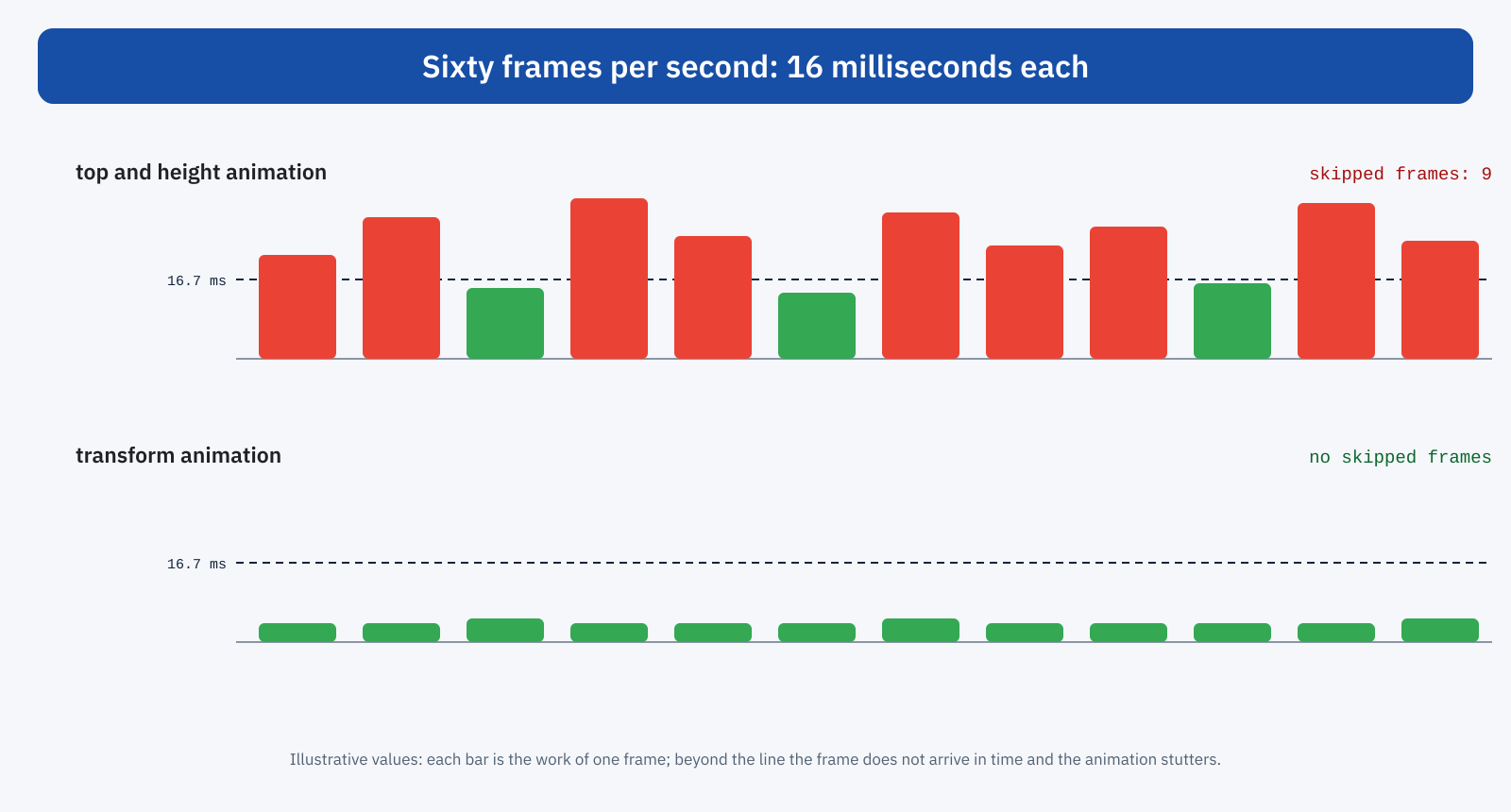
Most screens refresh sixty times per second. For an animation to look smooth, the browser has to produce a new frame at every refresh, that is about every 16.7 milliseconds, and in that time it has to do everything: run any scripts, recalculate styles, update the layout, repaint and composite the page. If a frame takes longer, it is skipped, and the animation stutters. On screens with higher rates, such as 90 or 120 refreshes per second, the available time is even shorter.
As we saw in the article on the critical rendering path, to show a page the browser goes through several stages: style calculation, layout, paint, compositing. An animation repeats them on every frame, but not always all of them: it depends on what changes.
Expensive and cheap properties
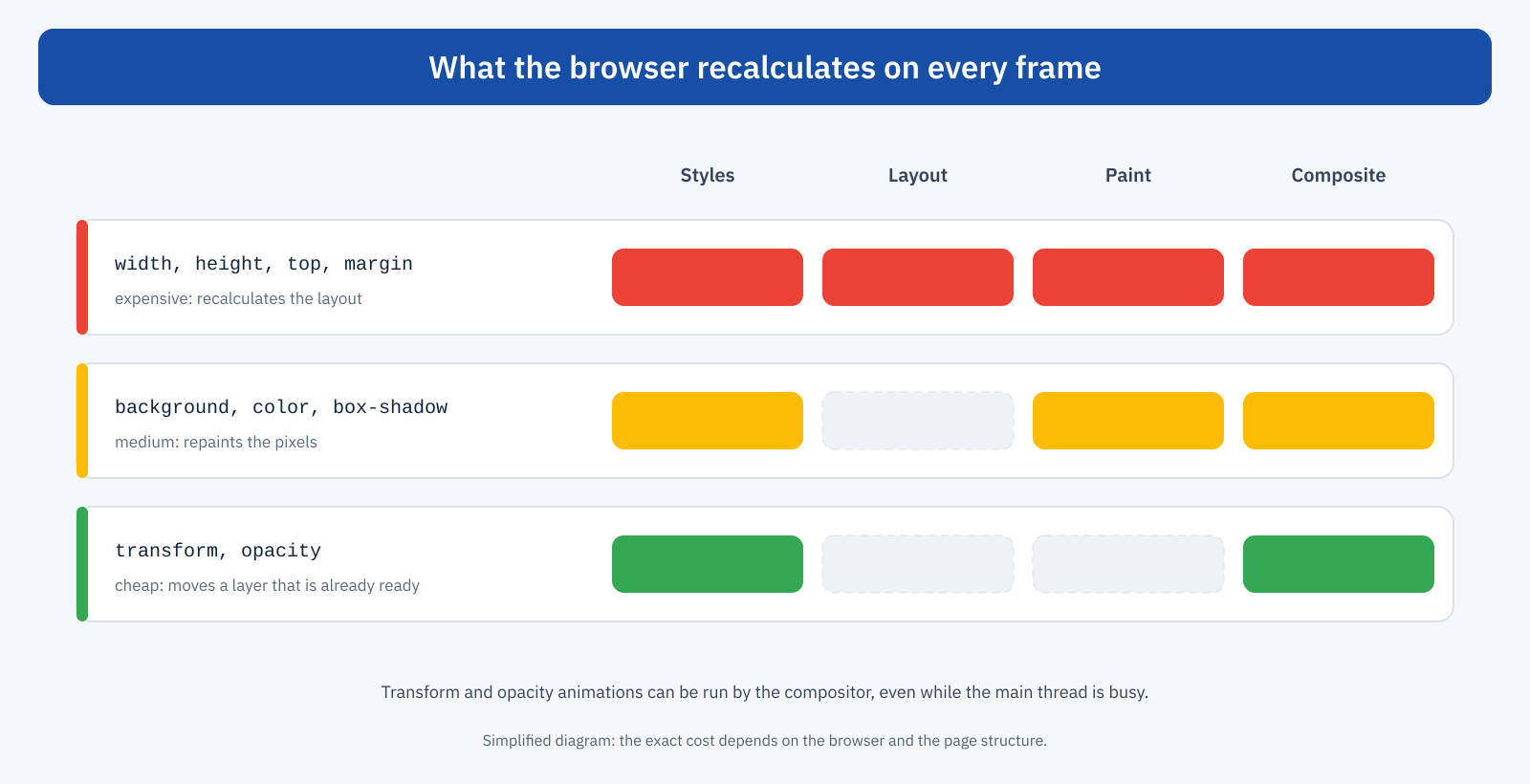
Properties that affect the geometry of elements, such as width, height, top, left, margin and padding, force the browser to recalculate the layout: the position and size of the animated element, but often also those of all the elements around it. Then it has to repaint the parts that changed and composite the result. It is the most expensive path, and on complex pages it can exceed the time of a frame on its own.
Properties that change only appearance, such as colors, backgrounds and shadows, do not touch the layout but require repainting the element’s pixels. The cost is intermediate, and grows with the repainted area: a wide shadow animated on a large element can be surprisingly heavy.
Finally, transform and opacity. Moving, resizing, rotating or fading an element with these properties does not change the layout and does not require repainting it: if the element sits on its own compositing layer, the browser takes the already painted image and moves it, scales it or changes its transparency, often with the help of the graphics card. That is why the most important rule for smooth animations is to animate only transform and opacity, whenever possible.
/* Avoid: the panel slides by changing left, layout recalculated on every frame */
.pannello { position: fixed; left: -320px; transition: left 0.3s; }
.pannello.aperto { left: 0; }

/* Better: the same effect with transform, compositing only */
.pannello { position: fixed; left: 0; transform: translateX( -100% ); transition: transform 0.3s; }
.pannello.aperto { transform: translateX( 0 ); }
The compositor and the main thread
There is a second advantage, less well known but even more important. CSS animations of transform and opacity can be run entirely by the compositor, a browser component that works on a thread separate from the main thread. This means they stay smooth even when the main thread is busy with JavaScript: a menu opening, a spinning loading indicator, a transition between tabs do not stutter even if the page is meanwhile running a heavy script.
Animations of geometric properties, on the other hand, depend on the main thread: if it is busy, frames wait. And the reverse is true too: an expensive animation occupies the main thread on every frame, leaving less time to respond to user interactions and worsening INP.
will-change and layers
For an element to be animated by the compositor, it must sit on its own layer. The browser creates layers automatically when a transform or opacity animation starts, but creation has a cost, and can produce a small hitch on the first frame. The will-change property lets you warn the browser in advance, so it prepares the layer before it is needed.
It should be used sparingly. Every layer takes up memory, often graphics memory, and a page with hundreds of elements on separate layers can become slower, not faster, especially on smartphones. will-change makes sense on elements that are about to be animated, such as a menu that is about to open, and should be removed when the animation ends. Applying it generically to all elements, as sometimes seen in stylesheets, is counterproductive.
Animations and CLS
Animations are also linked to CLS. An element that changes position in the layout, for example because its height or margin is animated, moves the elements that follow it, and these movements can be counted as unexpected shifts. Animations done with transform, on the other hand, do not change the layout and do not produce shifts counted by CLS, even when the element visibly moves. It is one more reason to prefer them: a banner that slides down from the top with transform does not move the rest of the page, one that grows in height does.
A frequent case is the expansion of content, such as a FAQ that opens or a description that gets longer: the height has to change, and the content below has to move. If the expansion happens in response to a user click, the shifts that follow within a short time are not considered unexpected and do not count toward CLS. The problem arises for animations that start on their own, at load or after some time.
Scroll-linked animations
Effects that trigger while the page scrolls, such as elements appearing, reading progress bars, parallax, are among the most widespread and among the most problematic. They have traditionally been built by listening to the scroll event in JavaScript and updating styles on every event: work on the main thread that repeats dozens of times per second while the user scrolls, and that makes scrolling itself less smooth.
There are better alternatives. To make elements appear when they enter the screen, the Intersection Observer API notifies JavaScript only when an element crosses a threshold, with no calculations on every scroll event. For continuous effects, modern browsers support scroll-driven animations directly in CSS, which link the progress of an animation to the position of the page and, for suitable properties, run off the main thread.
/* Reading progress bar, no JavaScript */
.avanzamento {
	position: fixed;
	inset: 0 0 auto 0;
	height: 4px;
	background: #174ea6;
	transform-origin: 0 50%;
	animation: cresci linear;
	animation-timeline: scroll( root );
}

@keyframes cresci {
	from { transform: scaleX( 0 ); }
	to   { transform: scaleX( 1 ); }
}
When you still use a scroll handler in JavaScript, it is best to declare it passive, so the browser does not have to wait for it to run before scrolling, and to limit updates to one frame at a time with requestAnimationFrame.
Forced layout
A frequent mistake in animations written in JavaScript is alternating reads and writes of geometric properties: reading the height of one element, changing another, reading the position of a third, and so on. Every read after a change forces the browser to recalculate the layout immediately to return an up-to-date value. In a loop over many elements, the layout gets recalculated dozens of times in the same frame. The fix is to group all the reads first and then all the writes, or to rely on animation libraries that do it automatically.
Reduced motion
Many operating systems let users ask to reduce motion, an important setting for people with vestibular disorders. The site reads it with the prefers-reduced-motion media query and can remove or simplify non-essential animations. It is an accessibility choice that also has an effect on performance: fewer animations, less work for the device.
Transitions between pages and states
View Transitions let you animate the change from one state of the page to another, or from one page to another, with a few lines of code: the browser captures an image of the previous state and of the next one and animates them with opacity and transform, that is, with the cheap properties. It is a way to get the smooth effect of single-page applications without their complexity. Keep in mind, though, that during the transition the page is waiting: long transitions extend the perceived time before the new content is usable. Short durations, around 200-300 milliseconds, are usually enough.
Libraries, themes and page builders
Many animations are not written by hand but come from a theme, a page builder or a library. It is worth checking what they animate: some entrance effects still use top or margin, some carousels move content by changing left, some parallax effects update the background position on every scroll event. Modern animation libraries use transform by default, but leave you free to animate any property. Also, every library has a weight, and loading a whole one to make three boxes appear is a disproportionate cost, already discussed in connection with the cost of page builders: often a few lines of CSS and an Intersection Observer are enough.
A concrete example
Consider a corporate site with a side menu for mobile devices, animated by changing the left property, and a series of boxes that appear while scrolling thanks to a scroll event handler that changes margin-top and opacity. On mid-range smartphones scrolling visibly stutters and the menu opening is uneven, especially in the first seconds, when the main thread is still busy with scripts. Rewriting the menu with transform, replacing the scroll handler with an Intersection Observer that adds a class, and animating the appearance with transform and opacity eliminates skipped frames, reduces main thread work during scrolling and removes from CLS the shifts caused by the margin change. A few hours of work, with effects visible on every visit.
How to check
Chrome DevTools offers several tools. In the Rendering panel you can highlight repainted areas, which flash on every paint, and the borders of compositing layers: an animation that makes large areas of the page flash is repainting too much. The Performance panel shows the frames, highlighting skipped ones, and for each the work done: style recalculation, layout, paint, scripts. Recording with CPU throttling on shows how the animation behaves on a mid-range device.
Lighthouse flags animations that cannot be run by the compositor, naming the responsible property. It is a good starting point for finding the animations to rewrite, especially in themes and page builders that offer ready-made effects.
In short
A smooth animation has to produce a frame every 16.7 milliseconds. Geometric properties force the browser to recalculate layout and repaint on every frame, occupy the main thread and can generate shifts counted by CLS; transform and opacity require only compositing, can be run by the compositor even when the main thread is busy and do not move the layout.
The practical rules are few: animate transform and opacity, use will-change only where needed and for as long as needed, replace scroll handlers with Intersection Observer or scroll-driven animations, avoid alternating reads and writes of geometric properties, respect the reduced motion preference. The result is an interface that is more pleasant and, at the same time, quicker to respond.
