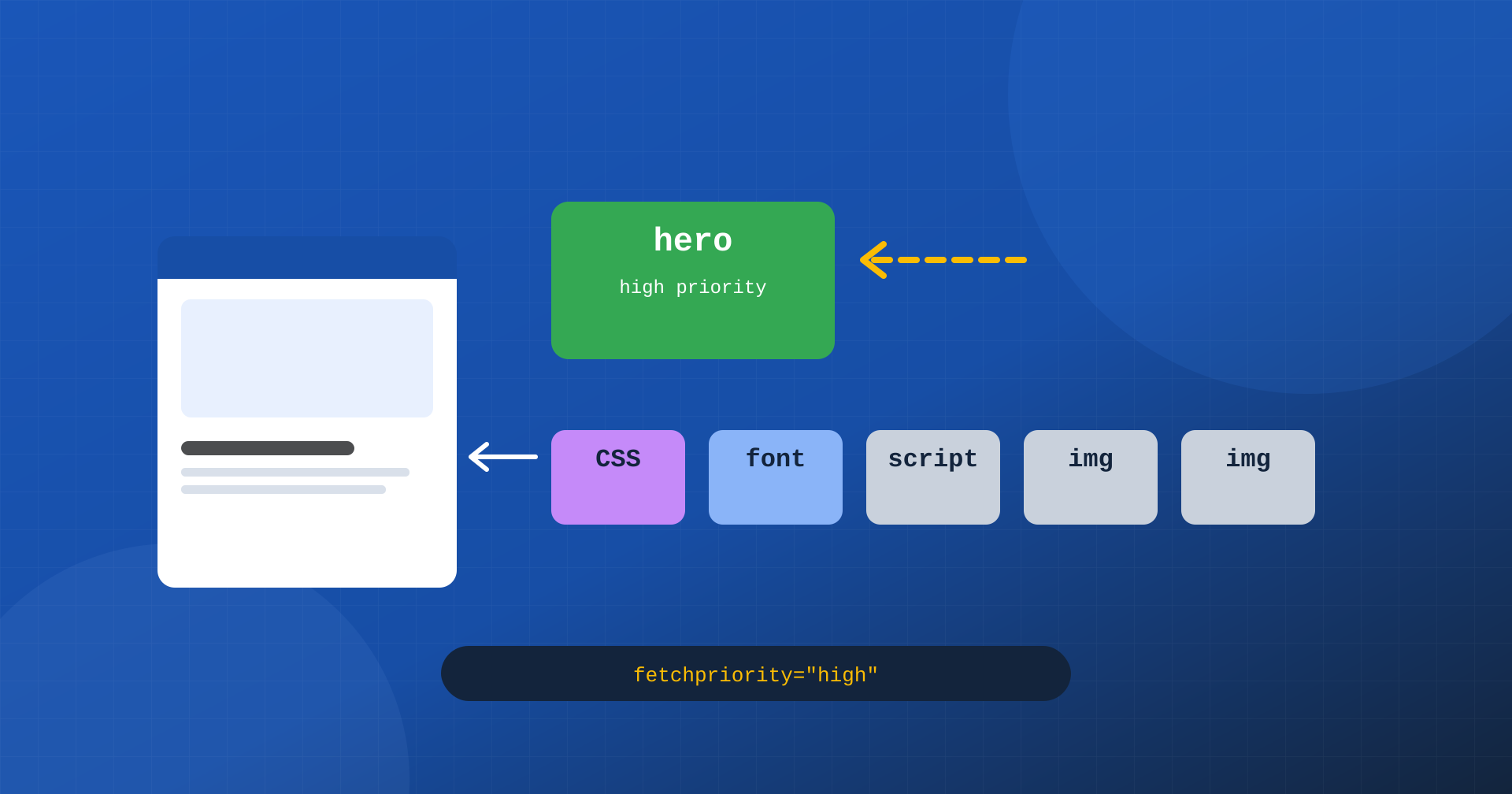
A browser loading a page has to make decisions constantly: which resource to download first, which can wait, which servers to open a connection to. It does so with sophisticated heuristics, based on the type of resource and its position in the document, but it doesn’t know the page the way whoever built it does. It doesn’t know that this image is the most important one, that this font is needed for the first paint, that this third-party domain will be contacted in a moment.
Resource hints and the fetchpriority attribute exist to bridge this gap: they are the way a developer can tell the browser what really matters. Used well, they bring critical resources forward and gain hundreds of milliseconds on LCP. Used badly, and it happens often, they make useless resources compete with the important ones and slow down exactly what they were meant to speed up. In this article we look at them one by one, with the cases where they help and those where they do damage.
How the browser decides priorities
To understand when a hint is useful, you need to know what the browser does without it. While reading the HTML, a component called the preload scanner scans the document ahead of time and identifies the resources to download: stylesheets, scripts, images. Each receives a priority based on its type: stylesheets in the head have the highest priority, because they block rendering; synchronous scripts high; fonts high, but they are only discovered when the CSS requests them; images, by default, low.
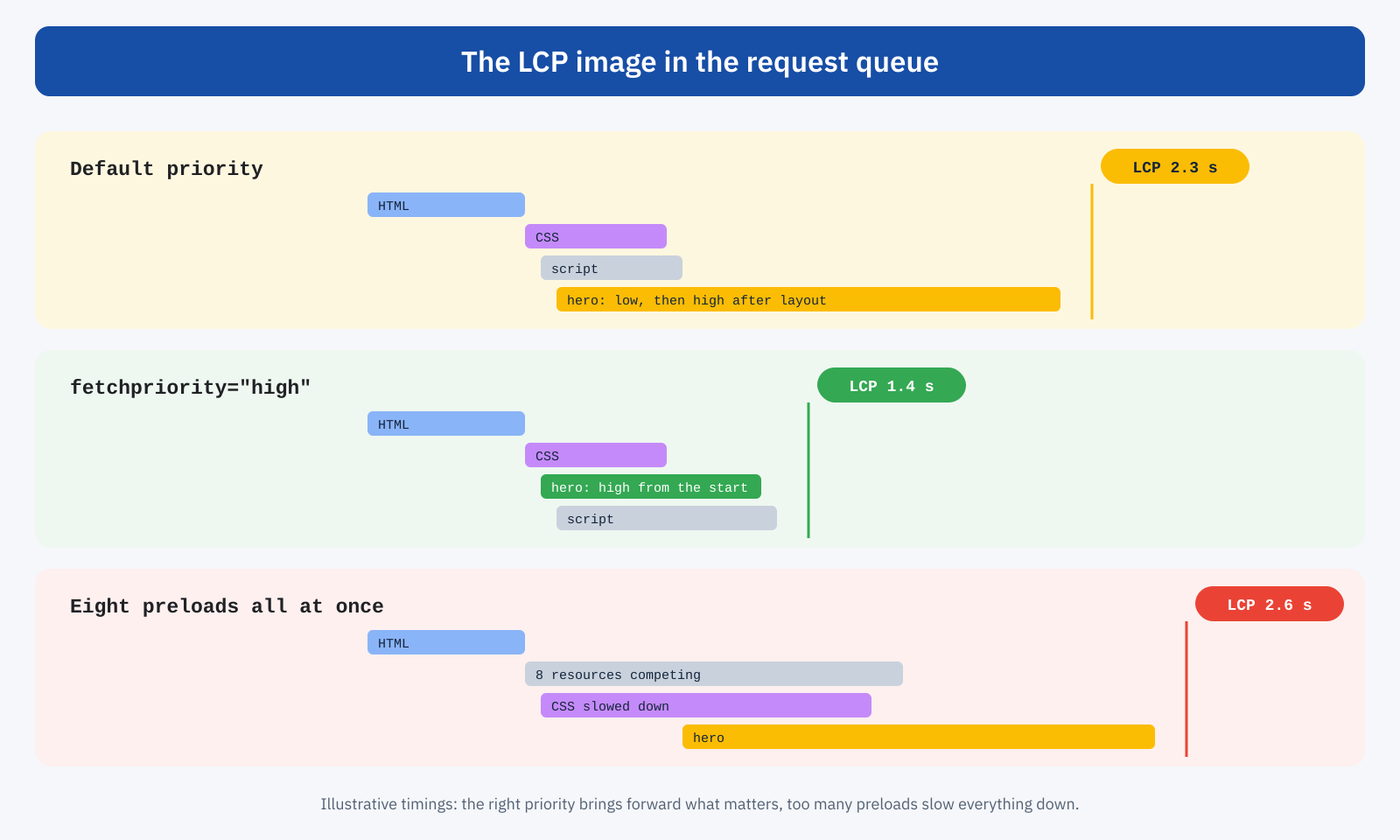
Images are the most delicate case. The browser doesn’t know which ones will be visible until it has computed the layout, and until then it treats them with low priority, with some exceptions for the first large images in the document in recent versions of Chrome. Only after layout, when it discovers that an image is on the initial screen, does it raise its priority. For a page’s main image, which is almost always the LCP element, this means starting late and behind other resources.
Then there are resources the preload scanner doesn’t see at all: fonts declared in CSS, background images defined in stylesheets, scripts inserted by other scripts, resources requested by JavaScript. The browser discovers them only when it reaches the point where they are used, often several hundred milliseconds after loading begins.
dns-prefetch and preconnect: preparing the way
Before downloading a resource from a new domain, the browser has to resolve its name via DNS, open a TCP connection and negotiate TLS encryption. On a mobile network these steps can take 100 to 300 milliseconds, and they repeat for every different domain: the image CDN, the font service, the analytics platform, the payment system.
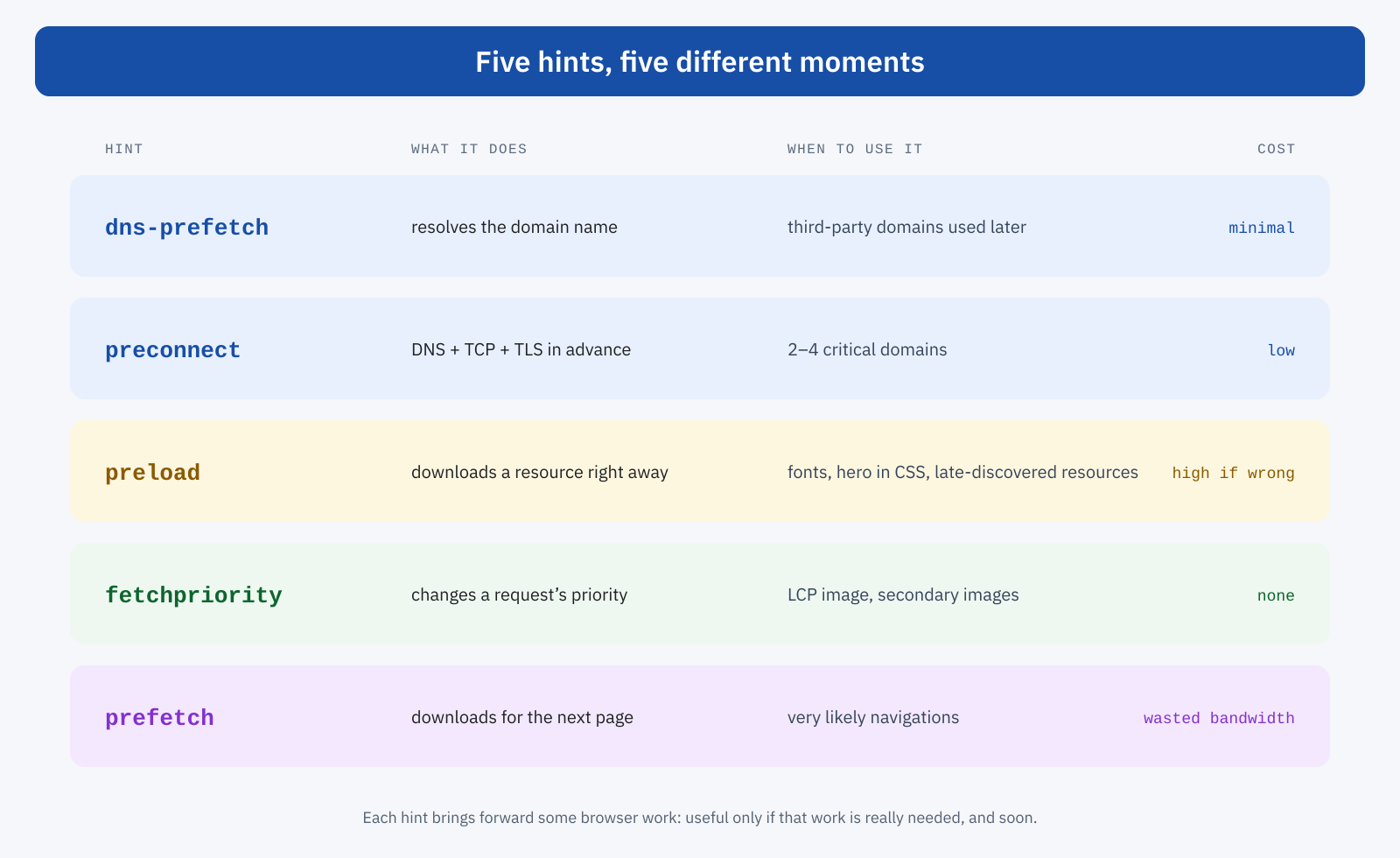
preconnect asks the browser to complete all these steps right away, so that the connection is ready when the resource is requested. dns-prefetch does only the first part, name resolution: it costs less and can be used for more domains.
<!-- Full connection: for domains critical to the first paint -->
<link rel="preconnect" href="https://cdn.example.com">
<link rel="preconnect" href="https://fonts.gstatic.com" crossorigin>

<!-- DNS only: for domains used later -->
<link rel="dns-prefetch" href="https://www.googletagmanager.com">
Preconnect makes sense for a few domains, two to four, from which resources needed for the first paint arrive: the image domain if different from the site’s, the font service, a static resource CDN. Opening connections in advance to ten domains has the opposite effect: the browser and the device work on connections that may be used after several seconds, or never, and that in the meantime may be closed for inactivity. The crossorigin attribute matters: fonts are requested in CORS mode, which uses a separate connection, and a preconnect without crossorigin to the font domain prepares the wrong connection.
The best way to save these steps, though, is not to need them: hosting fonts and static resources on the same domain as the site, as we saw when discussing font subsetting, eliminates the extra connections entirely.
preload: downloading right away what would be discovered late
preload asks the browser to download a specific resource immediately, with high priority, even if it hasn’t yet encountered it in the document. It is the tool for resources the preload scanner doesn’t see and that are needed early: the main font declared in CSS, the hero image set as a background in a stylesheet, the script loaded dynamically by another script but essential to the first paint.
<!-- Font used in the text above the fold -->
<link rel="preload" href="/fonts/plex-400.woff2" as="font" type="font/woff2" crossorigin>

<!-- Hero image defined as a CSS background, with responsive variants -->
<link rel="preload" as="image" href="/media/hero-1600.webp"
	imagesrcset="/media/hero-800.webp 800w, /media/hero-1600.webp 1600w"
	imagesizes="100vw" fetchpriority="high">
A few details make the difference between a useful preload and a harmful one. The as attribute is mandatory: it indicates the resource type, determines the priority and lets the browser reuse the downloaded resource when it meets it in the document. Fonts need crossorigin, even on the same domain, otherwise the browser downloads the font twice. For responsive images, imagesrcset and imagesizes make the browser pick the same variant the image element will pick; a single-size preload risks downloading a file that will then go unused.
Preload shouldn’t be used for resources the browser already finds on its own in time. A normal image in the HTML, with src and fetchpriority, doesn’t need a preload: the preload scanner finds it right away. Neither does a stylesheet in the head. Preload is for where there is a late discovery to eliminate, not a generic way of saying “this is important”.
The problem of excess
Preload is also the most abused tool. Optimization plugins, themes and configurations copied from other projects often end up preloading dozens of resources: all fonts in all variants, scripts, secondary stylesheets, images that aren’t above the fold. Because every preload gets high priority, the result is a competition in which nothing is truly a priority: the main stylesheet and the LCP image share bandwidth with resources that are needed later or not at all. Chrome flags in the console resources that were preloaded and not used within a few seconds: it is the first check to run on a site with many preloads.
fetchpriority: changing priority without bringing forward
The fetchpriority attribute is the most recent and, for LCP, often the most effective. It doesn’t bring forward the discovery of a resource: it changes its priority once discovered. It can be high, low or auto, and applies to images, scripts, stylesheets, iframes and preloads. It is supported by all the major browsers in recent versions; those that don’t support it ignore it.
The main use case is the LCP image. With fetchpriority="high", the browser downloads it with high priority from the start, instead of waiting for layout to discover that it is visible. The gain can be several hundred milliseconds, with a single word added to the markup, as explained in the article on LCP.
<!-- The main image: high priority, no lazy loading -->
<img src="/media/copertina.webp" width="1200" height="630"
	fetchpriority="high" alt="…">

<!-- The hidden slides of a carousel: low priority -->
<img src="/media/slide-2.webp" width="1200" height="630"
	fetchpriority="low" alt="…">

<!-- A non-critical script: low priority -->
<script src="/js/widget.js" async fetchpriority="low"></script>
The low value is as useful as high, and far less used. Carousel images that aren’t visible at the start, a large but secondary image above the fold, an async script that isn’t needed for the first paint: lowering their priority leaves more bandwidth for the resources that matter. Requests made with fetch() also accept a priority option, useful for distinguishing data needed right away from data that can wait.
Here too the rule of parsimony applies: fetchpriority="high" on one image per page, the LCP one, two at most. Assigning it to all visible images amounts to assigning it to none. And it should never be combined with loading="lazy", which defers loading until after layout and cancels the effect, as we saw in the article on lazy loading.
prefetch and modulepreload
prefetch asks the browser to download, with very low priority and when idle, a resource that will probably be needed on the next page. For a long time it was the only way to anticipate navigations; today, for whole pages, Speculation Rules offer much better control, with prefetch and prerender driven by user behavior. Prefetching individual resources remains useful in specific cases, such as the checkout page’s stylesheet preloaded from the cart.
modulepreload is the preload version for JavaScript modules: it downloads and parses a module ahead of time and, depending on the browser, its dependencies. It is useful in applications that use native modules, where the import chain would otherwise be discovered one step at a time.
Hints in HTTP headers
Preload and preconnect can also be sent as Link HTTP headers, instead of as elements in the HTML. The advantage is that the browser receives them with the headers, before even reading the document, and that they can be handled by the server or CDN without modifying templates. They are also the basis of Early Hints, with which the server communicates the same hints while the page is still being prepared.
Link: <https://cdn.example.com>; rel=preconnect
Link: </fonts/plex-400.woff2>; rel=preload; as=font; type="font/woff2"; crossorigin
The WordPress case
WordPress already handles some of these hints. Since version 6.3 it automatically adds fetchpriority="high" to the image it estimates to be the LCP element and doesn’t apply lazy loading to the first images. For preconnects and dns-prefetches there is the wp_resource_hints filter, and for preloads the wp_preload_resources filter, available since version 6.1:
// Preconnect to the image CDN
add_filter(
	'wp_resource_hints',
	function ( $urls, $type ) {
		if ( 'preconnect' === $type ) {
			$urls[] = 'https://cdn.example.com';
		}
		return $urls;
	},
	10,
	2
);

// Preload the theme’s main font
add_filter(
	'wp_preload_resources',
	function ( $resources ) {
		$resources[] = array(
			'href'        => get_theme_file_uri( 'fonts/plex-400.woff2' ),
			'as'          => 'font',
			'type'        => 'font/woff2',
			'crossorigin' => true,
		);
		return $resources;
	}
);
The automatic LCP image estimate works well with themes that use the standard image functions, but it can be wrong with page builders, sliders and custom blocks. And many optimization plugins add their own preloads and preconnects, sometimes overlapping with those of the theme or core. The result must therefore always be checked in the source code of the real page.
How to check
In the DevTools Network panel you can add the Priority column, which shows the priority of each request and, with the advanced settings, the initial one too. It is the most direct way to see whether the LCP image starts with high priority and when it is requested relative to other resources. The console flags unused preloads and unused preconnects. PageSpeed Insights, in the LCP diagnosis, indicates whether the image was discovered late and whether it would have benefited from fetchpriority or a preload, and shows which domains would deserve a preconnect.
A good exercise is to compare the waterfall chart before and after each change: an effective hint visibly moves the resource it applies to to the left without moving the critical ones to the right. If the main stylesheet or the LCP image start later than before, some hint is taking bandwidth away from them.
A rule to remember them by
- fetchpriority when the browser finds the resource in time but doesn’t know it’s important.
- preload when the resource is important but the browser would find it late.
- preconnect when the resource comes from another domain and is needed early.
- dns-prefetch when the domain will be needed later and isn’t worth a full connection.
- prefetch or Speculation Rules when the resource is for the next page.
In short
Resource hints and fetchpriority let you pass to the browser the knowledge that only whoever built the page has: which resource matters most, which will come from another domain, which would be discovered too late. For LCP, the most effective change is almost always fetchpriority="high" on the main image; preload is for fonts and resources hidden in CSS or JavaScript; preconnect for a few critical domains.
They are powerful tools precisely because they change the order in which the browser works, and for the same reason they should be used sparingly. Every superfluous hint takes resources away from the useful ones. The practical rule is simple: few hints, targeted, checked in the waterfall chart before and after.
