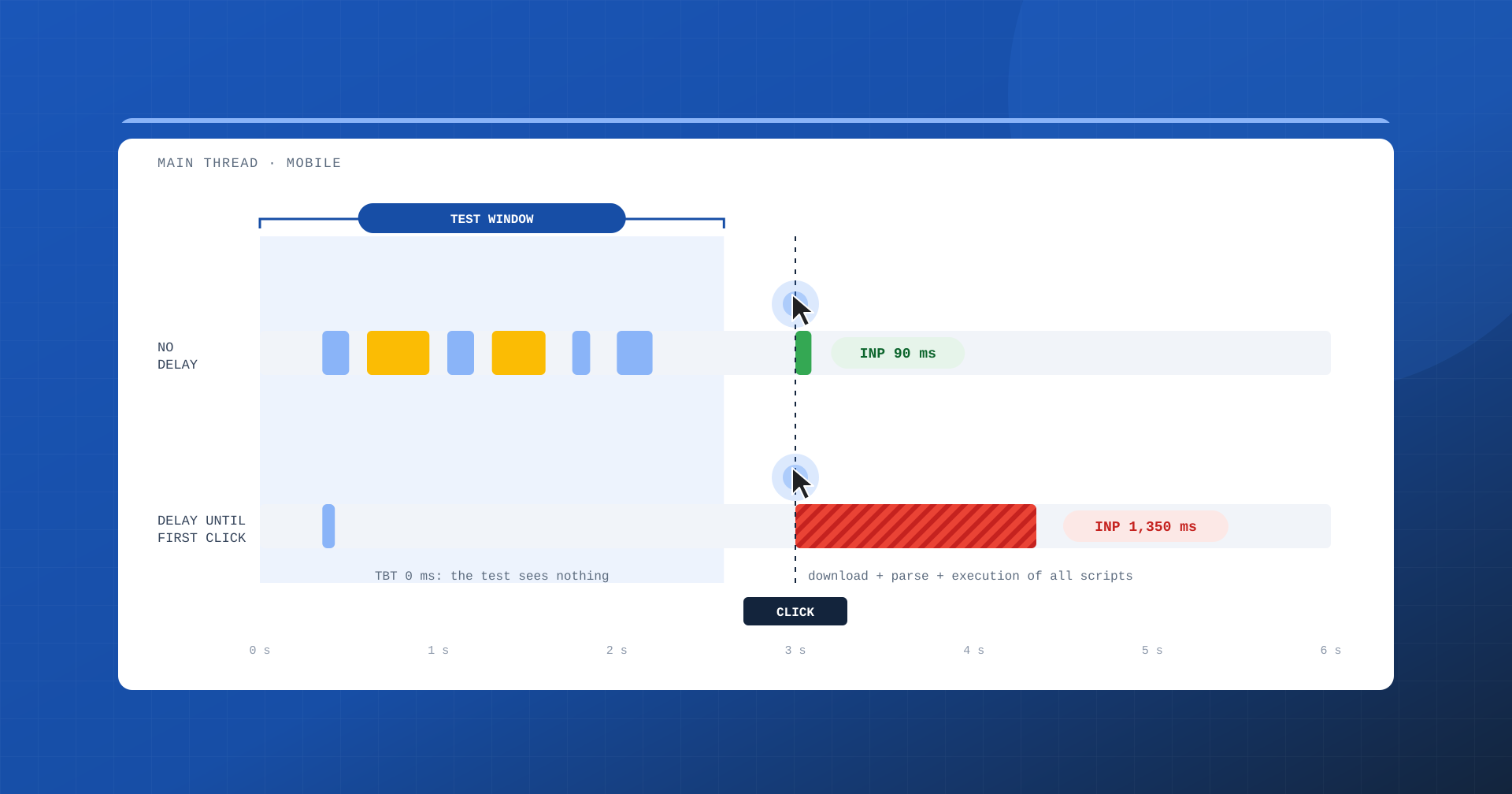
Among the most widespread optimizations of recent years is one that promises spectacular results with a single switch: delaying JavaScript execution until the user’s first interaction. Almost every performance plugin for WordPress offers it, under different names, and its effect on lab scores is immediate: Total Blocking Time collapses, the Lighthouse score goes up, the circle turns green.
The problem is that delayed JavaScript does not stop existing. The work that does not happen during loading will happen later, and the moment chosen to run it is the worst possible: the instant the user has just touched the screen and expects a response. In this article we look at how the technique works, why it improves tests, what it breaks and when it really makes sense to use it.
How delay until first click works
The principle is simple. While generating the page, the plugin rewrites the script tags so that the browser does not recognize them as code to run: the type becomes an invented value and the file’s address is moved from the src attribute to a placeholder attribute. A small loader, the only script run immediately, listens for events such as mouse movement, touch, scrolling or a key press. On the first interaction it restores the original tags and runs them, one after the other, in the order in which they appeared on the page.
<!-- as the theme writes it -->
<script src="/wp-content/plugins/slider/slider.js"></script>

<!-- as the optimization plugin serves it -->
<script type="delayed/javascript" data-src="/wp-content/plugins/slider/slider.js"></script>
Some implementations include a safety timer that loads the scripts after a few seconds anyway, others do not: without interaction, the delayed JavaScript is never executed. It is a detail that changes the site’s behavior a lot, and it is always worth checking in your own configuration.
Why scores improve so much
Lighthouse loads the page and observes it, but does not use it: it does not move the mouse, scroll, or touch menus or buttons. With delay enabled, then, for the whole duration of the test the delayed JavaScript is neither downloaded nor executed. The main thread stays free, Total Blocking Time drops to values close to zero and, if some scripts were hindering rendering, FCP and LCP improve too.
The test correctly measures what it sees. But what it sees is a page in which part of the code never came into play. It is a true result for the lab and misleading for the business, because no real user simply looks at a page without touching it.
The work does not disappear: it moves to INP
Since 2024, page responsiveness has been measured by INP (Interaction to Next Paint), which detects how much time passes between a user interaction and the next screen update, and reports the value of one of the worst interactions of the visit. It is exactly the metric onto which delay until first click offloads its cost.
When the user touches the page for the first time, the browser has to do everything at once: download the delayed scripts, parse them, compile them and run them in sequence, often initializing sliders, widgets, tracking and libraries in a single block of work. On a recent computer this can be a few hundred milliseconds; on a mid-range smartphone, on a mobile connection, a second or more. During that time the page does not respond: the menu does not open, the button does not react, the typed text does not appear.
The result, on real-user data, is a worse INP precisely on the pages that look perfect in the lab. And since INP is one of the three Core Web Vitals Google evaluates on Chrome UX Report data, the improvement in the lab score can coexist with a worsening of the assessment that really counts.
What breaks
Besides responsiveness, blanket delay has functional side effects that only emerge in real use:
- The first tap is lost. If the mobile menu, a filter or an “add to cart” button depends on a delayed script, the first interaction only serves to load it. The user taps, nothing happens, taps again. Some loaders try to replay the click, but they do not always succeed.
- Components that change appearance. Sliders, carousels, tabs and accordions appear in their “no JavaScript” form and transform at the first mouse movement, with layout jumps that worsen CLS.
- Late cookie consent. If the consent banner is among the delayed scripts, it only appears after the first interaction, with obvious problems for both experience and compliance.
- Order-dependent features. Inline scripts that expect a library to be already loaded, code tied to the
DOMContentLoadedevent that has meanwhile already passed, integrations that initialize twice: these are the hardest bugs to reproduce, because they depend on how and when the user interacts.
The hidden effect on marketing data
There is also a consequence that is rarely considered when turning on delay: analytics tools and advertising pixels are scripts like any other. If they are delayed, a visit without interactions is not recorded at all. Someone who arrives from a campaign, reads the top of the page and leaves without touching anything simply does not exist in the reports.
The consequences propagate in a chain. The bounce rate looks better than the real one, because the quickest bounces vanish. Conversion rates come out inflated, because the denominator shrinks. Advertising platforms receive fewer signals and optimize campaigns on partial data. An optimization born to improve a score ends up altering the metrics on which budget decisions are made.
When delay makes sense
Delay is not a technique to demonize, but one to use selectively. It works well for code that is not needed for the first interaction and that the user can comfortably wait for:
- support chats and messaging widgets;
- session recording tools and heatmaps;
- social widgets, embedded reviews and third-party content below the fold;
- embedded videos and maps, even better if replaced by a static preview that loads the player only on click.
Everything concerning navigation, consent, basic measurement and the main commercial functions should instead be excluded. In practice it means reversing the default approach of many plugins: not “I delay everything except the exceptions”, but “I delay only what I have verified to be superfluous at first impact”.
The alternatives that really reduce the work
The most effective way not to pay the cost of JavaScript is not to have to run it. Before delaying, it is worth asking how much code is really needed and where:
- Remove. Unused plugins, duplicate libraries, features enabled “just in case” and never used: it is the biggest and most stable gain.
- Load only where needed. The product configurator script should not be present on blog articles, the contact form script should not appear on product pages.
- Use defer and async correctly. Scripts with
deferdo not block rendering and run in order once the document is ready, without waiting for an interaction that may never come. - Load based on visibility. With
IntersectionObservera component below the fold can initialize when it is about to enter the screen, not at the first mouse movement. - Break up long tasks. Unavoidable work can be split into smaller chunks, periodically yielding control back to the browser, so that user interactions do not stay queued.
How to measure the real effect
Since the cost of delay only shows when someone uses the page, it has to be measured on real users or by simulating an interaction. In the lab, the Performance panel in Chrome DevTools, with the CPU throttled four times, lets you record the first tap on a button and observe how long the block of work that follows lasts.
In the field, the open source web-vitals library in its attribution build tells you which interaction produced the worst INP, on which element and how much time was spent waiting, processing and in the subsequent paint:
import { onINP } from 'web-vitals/attribution';

onINP( ( { value, attribution } ) => {
	console.log( 'INP', Math.round( value ), 'ms', {
		element: attribution.interactionTarget,
		inputDelay: attribution.inputDelay,
		processing: attribution.processingDuration,
		presentation: attribution.presentationDelay,
	} );
} );
If the first click shows a very long wait time and the element involved is always the first one the user touched, the culprit is almost certainly the bulk loading of the delayed scripts. The definitive comparison then comes from CrUX data: INP at the 75th percentile, before and after turning on delay, over two complete 28-day windows.
In summary
Delaying JavaScript until the first click greatly improves lab scores because the test does not interact with the page. For real users, on the other hand, the deferred work is concentrated at the moment of the first tap, worsens INP, can make menus and buttons ineffective, make cookie consent appear late and remove the shortest visits from reports.
Used with judgment, on non-essential third-party scripts and with well-defined exclusions, it remains a useful tool. But it does not replace the work that produces lasting results: removing superfluous code, loading it only where needed and making sure the necessary code does not block the main thread. Postponing work does not mean eliminating it, and in the end someone pays for it: the user.
