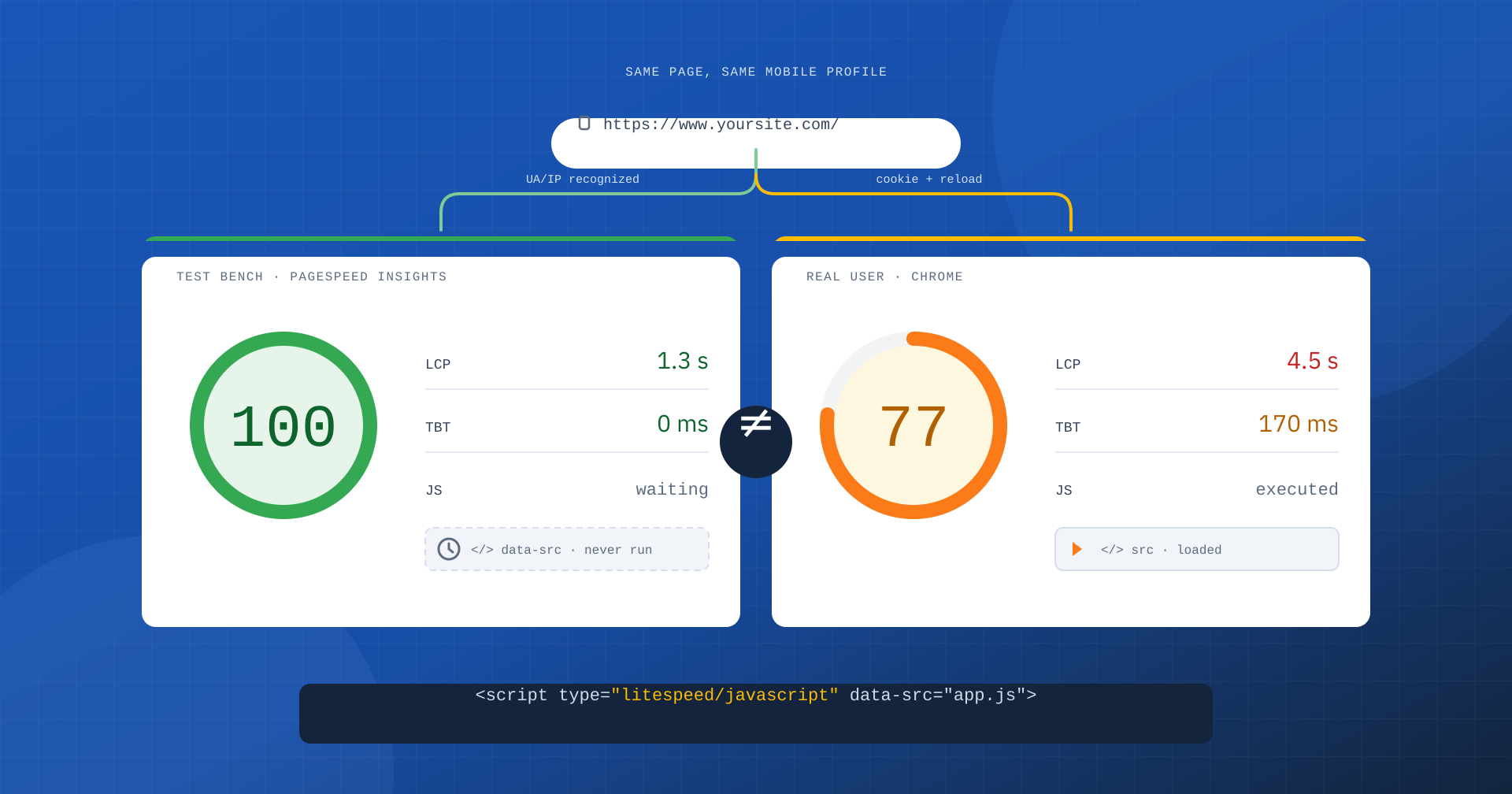
A benchmark only makes sense if it measures the same thing people will use. If the software under test can tell it is being measured and changes its behavior, the result no longer describes the site: it describes the site under exam conditions. This is what happens on many WordPress sites running LiteSpeed Cache when the Guest Optimization feature is on, and you can prove it by reading the plugin’s source code.
Two tests, two different sites
The starting point is a WordPress site on LiteSpeed Web Server with LiteSpeed Cache (LSCache), tested with Lighthouse’s mobile profile: an emulated Moto G Power on a slow 4G connection, a deliberately harsh test bench. On PageSpeed Insights the page gets a perfect score.
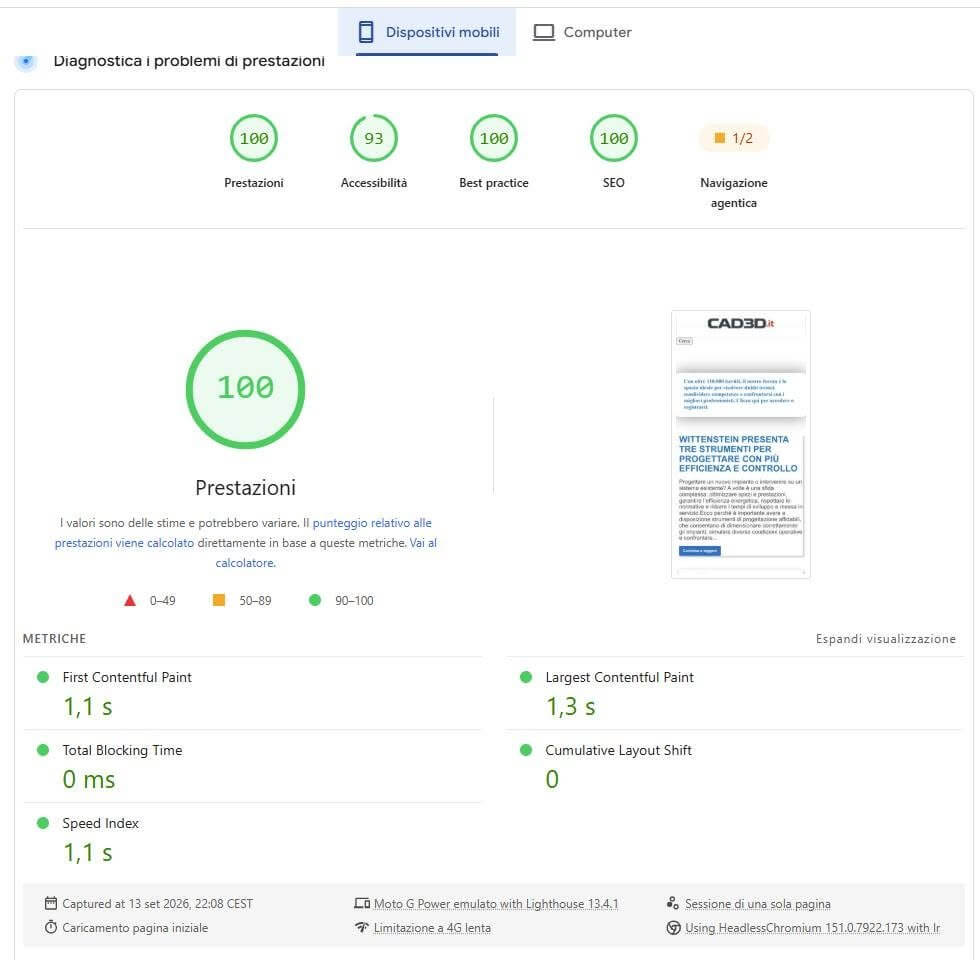
The same page, analyzed a few moments later with Lighthouse directly from Chrome DevTools and the same mobile profile, tells a different story.
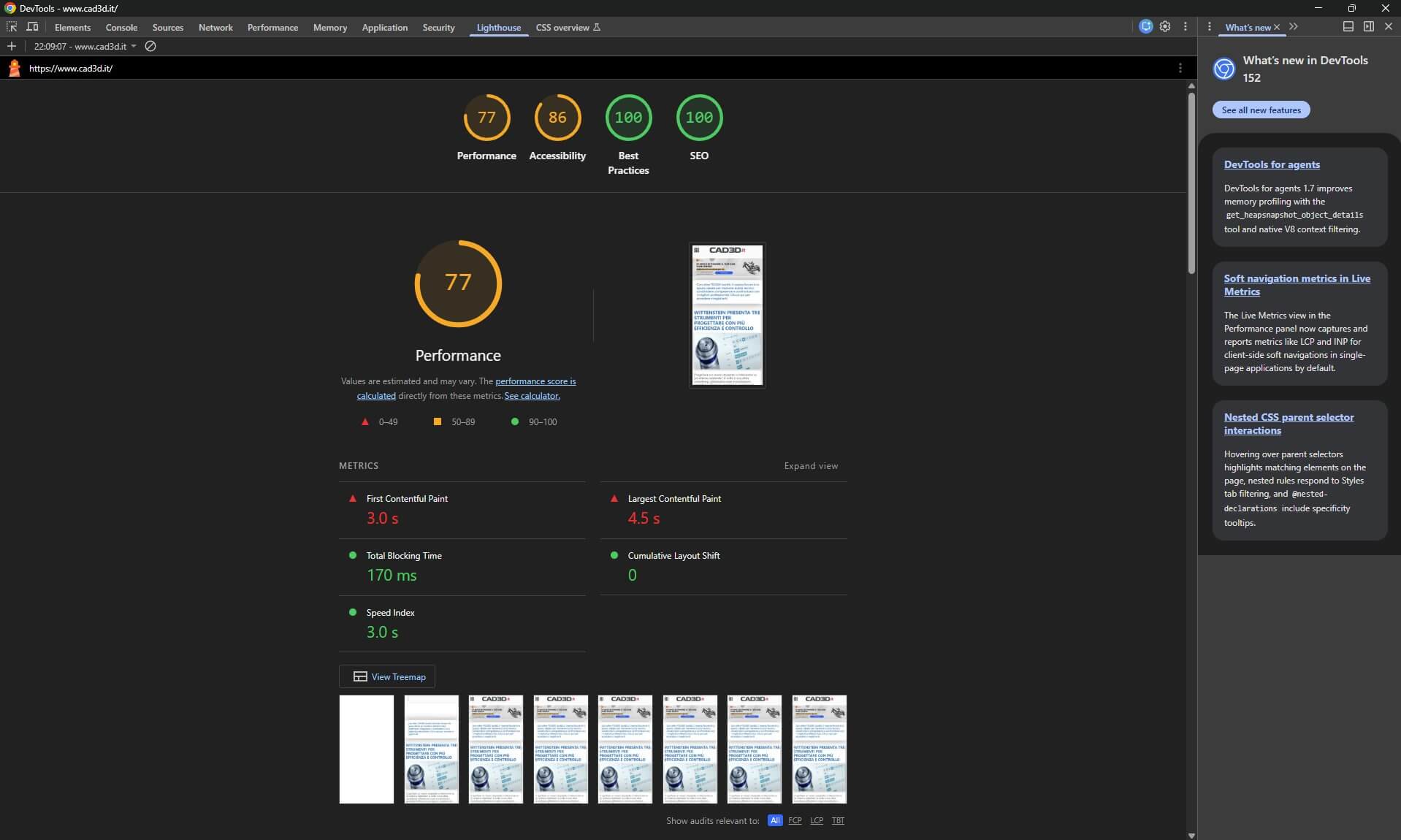
| Metric (mobile) | PageSpeed Insights | Lighthouse in Chrome |
|---|---|---|
| Performance | 100 | 77 |
| First Contentful Paint | 1.1 s | 3.0 s |
| Largest Contentful Paint | 1.3 s | 4.5 s |
| Total Blocking Time | 0 ms | 170 ms |
| Speed Index | 1.1 s | 3.0 s |
| Cumulative Layout Shift | 0 | 0 |
Two Lighthouse runs never give the same number: CPU, browser version and throttling always introduce some variability. But a variability of a few points does not explain an LCP that goes from 4.5 to 1.3 seconds, nor 170 milliseconds of main thread blocking that become zero. At that point it is better to stop looking at the green circle and open the code. All the references that follow are to the official litespeedtech/lscache_wp repository, version 7.9.1, and anyone can verify them.
This is not ordinary JavaScript delay
A necessary premise: delaying JavaScript is not wrong in itself. Defer, delay, minification, Critical CSS and lazy loading are legitimate techniques, used by many optimization tools, and when applied to real users they can genuinely improve the experience. The problem arises when the software tells who is measuring it and reserves for the tester a different version of the page from the one a visitor’s browser will receive. That is the difference between optimizing a site and optimizing the result of an exam.
How the plugin recognizes who is measuring it
Recognition happens on two levels. The file data/gm_uas.txt contains the list of User-Agents to always treat as “Guest”:
Lighthouse
GTmetrix
Google
Pingdom
bot
spider
PTST
HeadlessChrome
The entries are combined into a case-insensitive regular expression, so it is enough for one of these words to appear in the User-Agent. The single entry Google catches both PageSpeed Insights and Googlebot. Next to it is data/gm_ips.txt, with the address blocks to recognize regardless of User-Agent: among the first are Google ranges, including Googlebot’s historic block, and two GTmetrix blocks. The recognition is therefore double: changing the User-Agent is not enough to escape it.
Since version 7.7 there is a further change. The two lists, previously editable from the plugin panel, are downloaded every day from the QUIC.cloud APIs and take precedence over the files bundled with the plugin, while the corresponding options are removed from the database during the update. In practice, the list of who receives the variant for testers is no longer decided by whoever runs the site, but by the plugin’s vendor, who can update it at any time on all installations.
Two gates: who enters Guest Mode and who leaves it
The mechanism has two separate decision points. The first is inside WordPress, in the _maybe_guest_mode() method, and it looks at neither User-Agent nor IP: it only checks for the presence of the _lscache_vary cookie. Anyone who arrives without that cookie, person or robot, gets the Guest variant.
The second decides who receives the cookie, that is, who leaves the Guest variant. At the bottom of the Guest page the plugin inserts a small script that calls guest.vary.php. There, the update_guest_vary() method contains the decisive step:
if ( $this->always_guest() ) {
	echo '[]';
	exit;
}
If the request belongs to a recognized tester, it does not receive the cookie and is not invited to reload the page. Everyone else receives the cookie and a response that tells the browser to reload the page, which from then on will be served in the normal variant. Side by side, the two paths look like this:
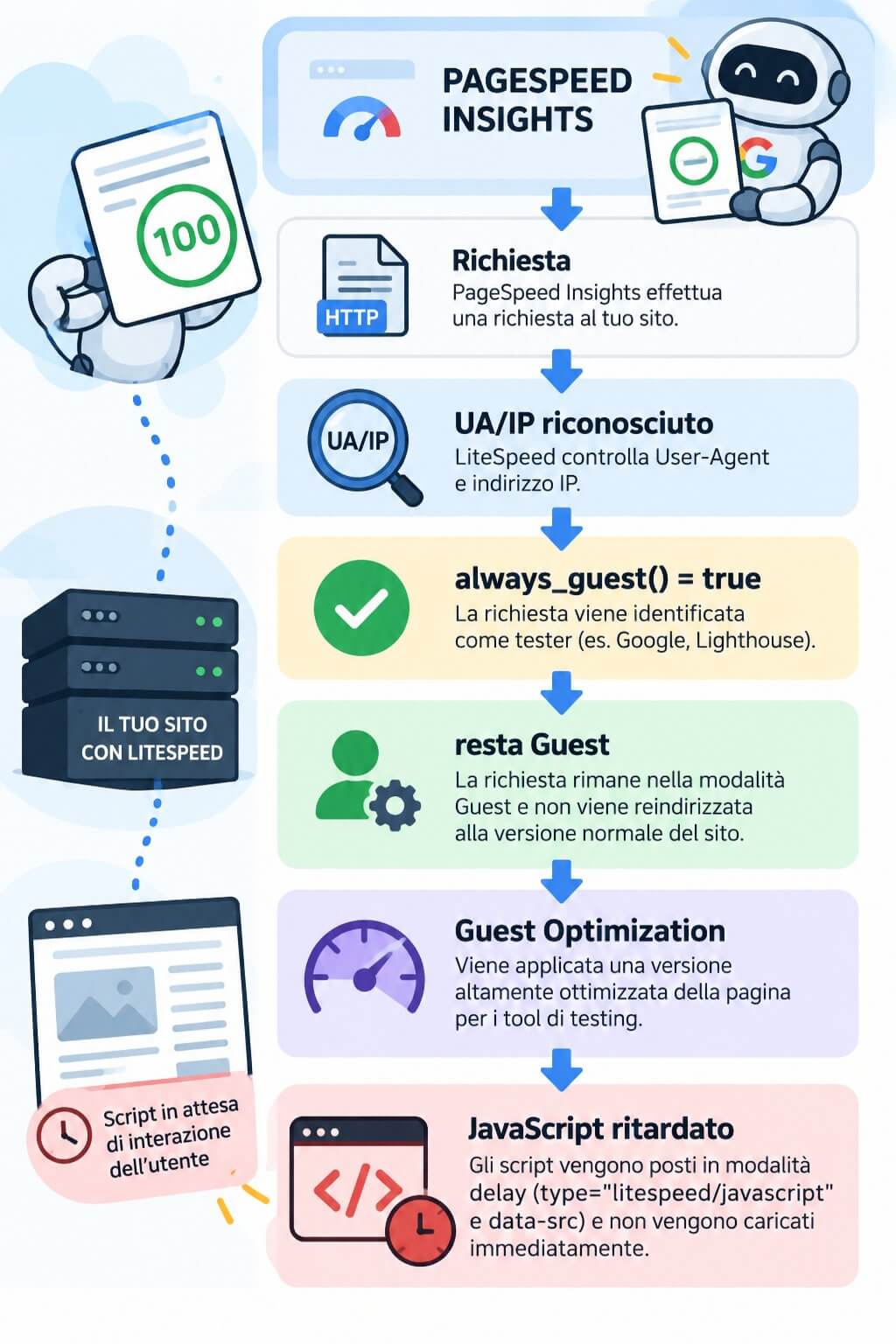
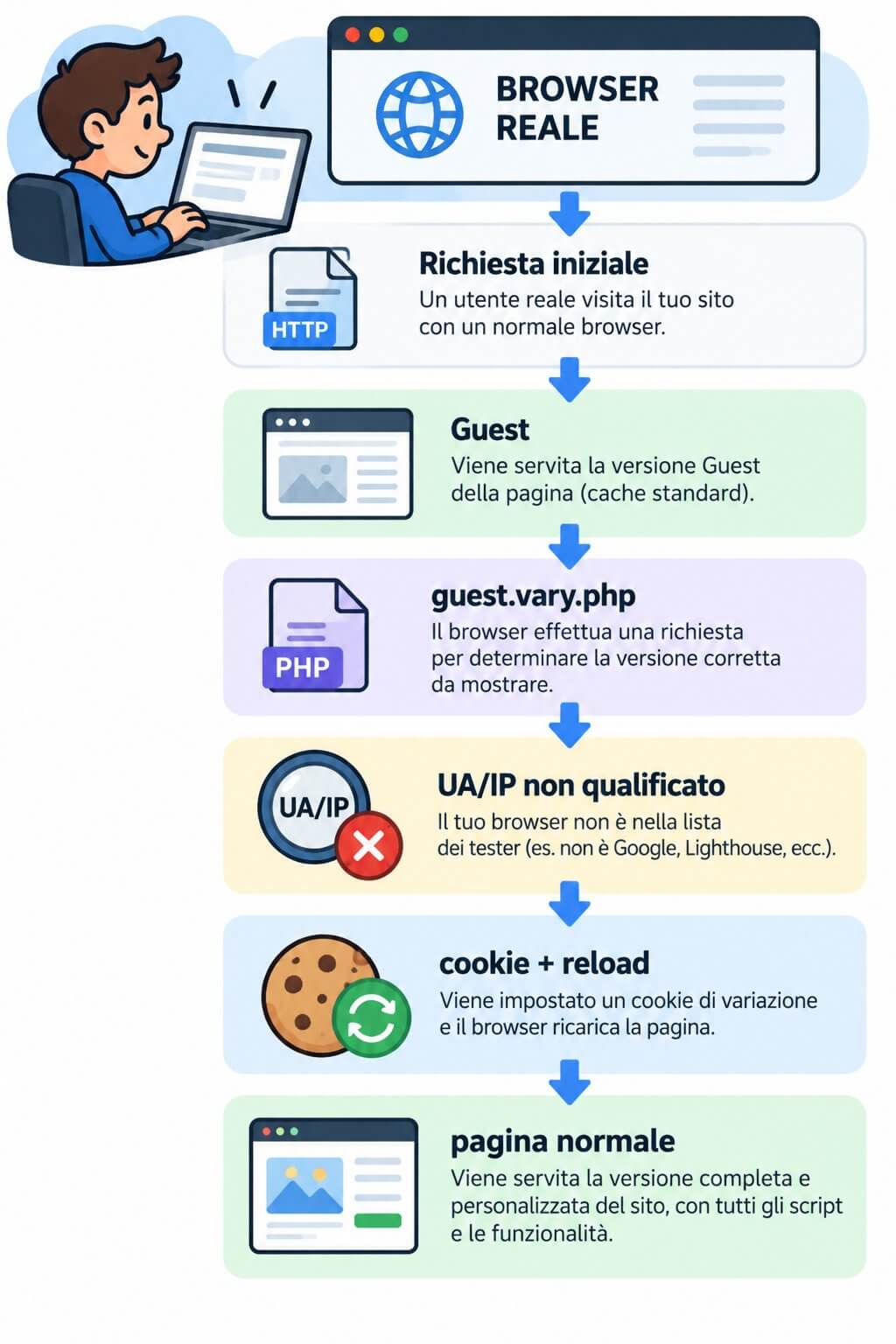
PageSpeed Insights always starts from a clean profile, arrives from a Google address and declares a User-Agent containing Chrome-Lighthouse: it is served as Guest and stays there for the whole test. The developer’s Chrome, on the other hand, already has the cookie or receives it on the first visit: Lighthouse launched from DevTools therefore measures the normal variant, the same one seen by anyone who has already visited the site, which is most users.
The cost for the real user: the page loads twice
Guest Mode is presented as the way to make the first visit extremely fast. But the first real visitor receives the Guest page, the browser draws it, the script contacts guest.vary.php, receives the cookie and reloads the whole page, this time in the normal variant. The actual cost of the first visit is the sum of the two loads.
The plugin itself implicitly acknowledges this: in the <head> it inserts a script that, after the reload, overwrites document.referrer with the value saved earlier. Without this fix, analytics tools would see the site itself as the source of every visit and organic traffic would vanish from reports. The tester, which never reloads, pays none of these costs.
What changes in the variant for testers
When Guest Optimization is on, the constant LITESPEED_GUEST_OPTM is defined, and in src/optimize.cls.php the JavaScript configuration chosen by the administrator is replaced:
$this->cfg_js_defer = $this->conf( self::O_OPTM_JS_DEFER );
if ( defined( 'LITESPEED_GUEST_OPTM' ) ) {
	$this->cfg_js_defer = 2;
}
The value 2 corresponds to delayed mode, not simple defer. And that is exactly the situation created by the official “Advanced” and “Aggressive” presets, the ones recommended for most sites: Guest Mode and Guest Optimization on, JavaScript set to 1, that is defer, for everyone else. An administrator who applies the preset with one click ends up, without knowing it, with two sites: the tester gets delay, the user gets defer.
JavaScript is only the most visible part. In the Guest variant the plugin also forces minification and combination of CSS and JavaScript, removal of Google Fonts, lazy load of images and iframes, removal of <noscript> fallbacks and placeholders for images. Above all, it ignores the URL and role exclusions the administrator configured precisely because some optimizations break something: for the tester they are applied anyway. The tester does not open menus and does not fill in forms, so it will never notice what has broken.
Scripts that only start if someone interacts
In delayed mode an ordinary script tag is rewritten like this:
<!-- before -->
<script src="/wp-content/themes/theme/app.js"></script>

<!-- after -->
<script data-optimized="1" type="litespeed/javascript"
        data-src="/wp-content/themes/theme/app.js"></script>
litespeed/javascript is not a type the browser executes, and the file’s address is no longer in src: the network request simply never starts. The same happens to inline scripts and iframes, so embedded videos, maps and ads. In the JavaScript files served, moreover, the string DOMContentLoaded is replaced with an event defined by the plugin, emitted only after the delayed scripts have loaded.
What reactivates everything is the js_delay.js loader, which listens for events such as mouseover, click, keydown, wheel and touchstart. In the source there is also a safety timer that would have loaded the scripts after 70 milliseconds anyway, but it is commented out. Without interaction, therefore, the delayed JavaScript is never executed. And Lighthouse does not move the mouse or touch the screen: during the measurement window the cost of that code never enters the calculation. A Total Blocking Time of zero does not mean JavaScript has become free, but that it was not executed during the test.
How to check it on your own site
Two requests are enough. The first simulates the tester, with no cookie and with Lighthouse in the User-Agent; the second simulates a returning visitor, with the vary cookie:
curl -s -A "Mozilla/5.0 (Linux; Android 11; moto g power (2022)) Chrome-Lighthouse" \
  https://www.yoursite.com/ | grep -c 'type="litespeed/javascript"'

curl -s -A "Mozilla/5.0 (Windows NT 10.0; Win64; x64) Chrome/128.0.0.0" \
  -b "_lscache_vary=1" https://www.yoursite.com/ | grep -c 'type="litespeed/javascript"'
If the first command returns dozens of occurrences and the second zero, the two variants are right in front of you. To get a number from PageSpeed Insights that represents real users, you have to turn off Guest Optimization, or apply the same level of optimization to everyone that is reserved for testers. The score will drop: that is the real number.
Why it is a business problem
LiteSpeed’s own documentation warns that Guest Optimization can mask real problems and suggests turning it off to get an accurate assessment from testing tools. It is an important admission, but the greater damage is organizational. A 77 raises questions: why is LCP at 4.5 seconds, which script blocks the main thread, whether the theme is too heavy. A 100 says the work is done. The client sees 100, the agency sees 100, and whoever should approve more hours of optimization sees no reason to. The problem remains, but nobody is looking for it anymore.
Meanwhile, the data that matters keeps telling the truth. The Core Web Vitals Google uses as a ranking signal do not come from Lighthouse, but from the Chrome UX Report, that is, from real users’ browsers: the ones with the cookie, on the normal variant. It is no coincidence that the same PageSpeed Insights report can show a lab 100 next to insufficient field data. And since Google and the Googlebot ranges are in the lists, the crawler also receives the variant with JavaScript neutralized: something to evaluate carefully for sites that generate content on the client side.
What we are not saying
LiteSpeed Web Server and its server-side cache are effective tools, on a par with Nginx’s FastCGI cache or Varnish: serving ready-made HTML without starting PHP and the database is an excellent technique. Likewise, minification, Critical CSS, lazy load, defer and delay are valid tools. What we object to is a variant of the page that the tester can be recognized for, which makes the benchmark observe conditions different from those of users. It should be added that, to take advantage of LiteSpeed Web Server’s cache on WordPress, the LSCache plugin is in practice necessary for page invalidation: separating the server from the plugin is not always possible in practice.
In summary
The mechanism is documented by the source: lists of testers’ User-Agents and IPs updated by the vendor, a cookie denied only to those who are recognized, a variant in which JavaScript is forced into delayed mode and loaded only after an interaction that does not happen during an automated audit. The result is a 100 on PageSpeed Insights and a 77 in Chrome on the same page, with a real user who on the first visit even pays for two loads.
The comparison with Dieselgate is unavoidable, even if the consequences are not comparable: there too the software recognized the test bench and changed its behavior. Our rule is simple: a fast site does not need to know who is testing it. It has to be fast for PageSpeed Insights, for Lighthouse and above all for a person opening the site on their own phone. When the test bench and the road tell different stories, we believe the road.
The full analysis, with all the references to source files and methods, is published on Managed Server.
