
Lazy loading, the deferred loading of images, is one of the best-known and simplest optimizations to apply. The principle is intuitive: why download dozens of images right away when the user will only see them by scrolling, or perhaps never? Postponing them frees up bandwidth and resources for what is really needed at first glance, and on long pages the saving in transferred data can be enormous.
Precisely because it is so simple, though, it often gets applied to everything, without distinction. And applied to the wrong image, lazy loading doesn’t speed the page up: it slows it down, and worsens exactly the metric that depends most on images, Largest Contentful Paint. In this article we look at how native deferred loading works, when to use it, when to avoid it and how WordPress handles it.
How native lazy loading works
For years, deferred loading required JavaScript libraries that replaced the src attribute with a data-src and restored it when the image got close to the screen. Today all the main browsers support the native loading attribute, for images and iframes:
<img src="galleria-1.webp" width="800" height="600" loading="lazy" alt="…">
<iframe src="https://www.youtube-nocookie.com/embed/…" loading="lazy" title="…"></iframe>
With loading="lazy" the browser doesn’t download the image until it is within a certain distance of the screen. It doesn’t wait for it to be visible: it loads it with a safety margin, so it is ready when the user scrolls to it. In Chrome this margin is about 1250 pixels on fast connections and about 2500 pixels on slow ones, where more time is needed. The default value, loading="eager", matches the normal behavior: download immediately.
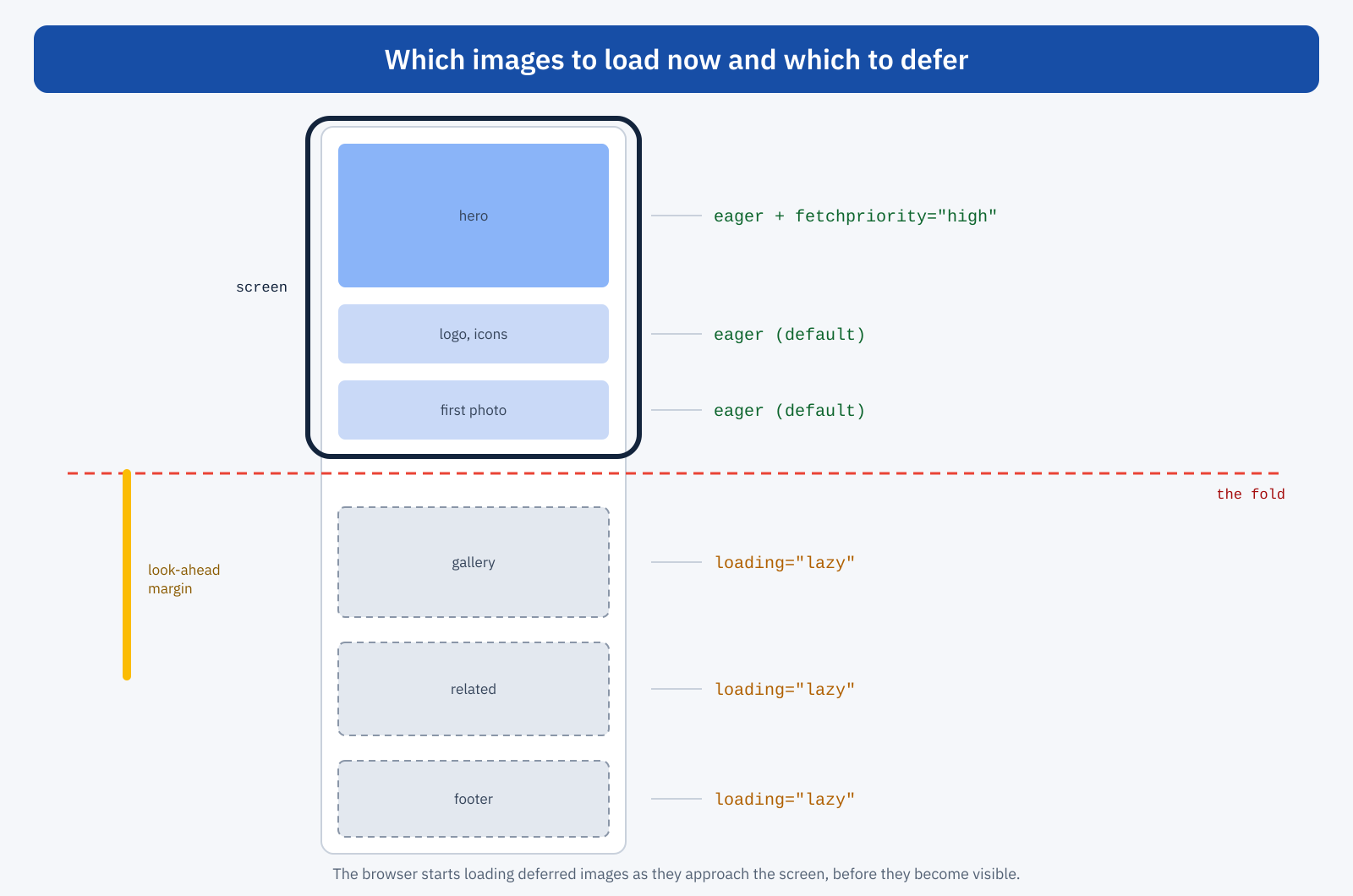
The advantage of the native solution over libraries is considerable. No JavaScript is needed, so there is no code to download and run; the browser knows the connection speed and adapts the margin; and the image remains a normal img element with its src, readable by any tool, search engines included.
The most common mistake: the deferred LCP image
The problem arises when loading="lazy" ends up on the most important image on the page: the opening photo, the main image of a product page, the cover of an article. Almost always it is the LCP element, and deferring it has a precise effect. Normally the browser discovers images while reading the HTML, thanks to the preload scanner, and requests them straight away, in parallel with stylesheets and scripts. A deferred image, on the other hand, can’t be requested until the browser knows where it sits on the page, that is until it has downloaded the CSS and calculated the layout. Only then does it find out that it is visible and start the download.
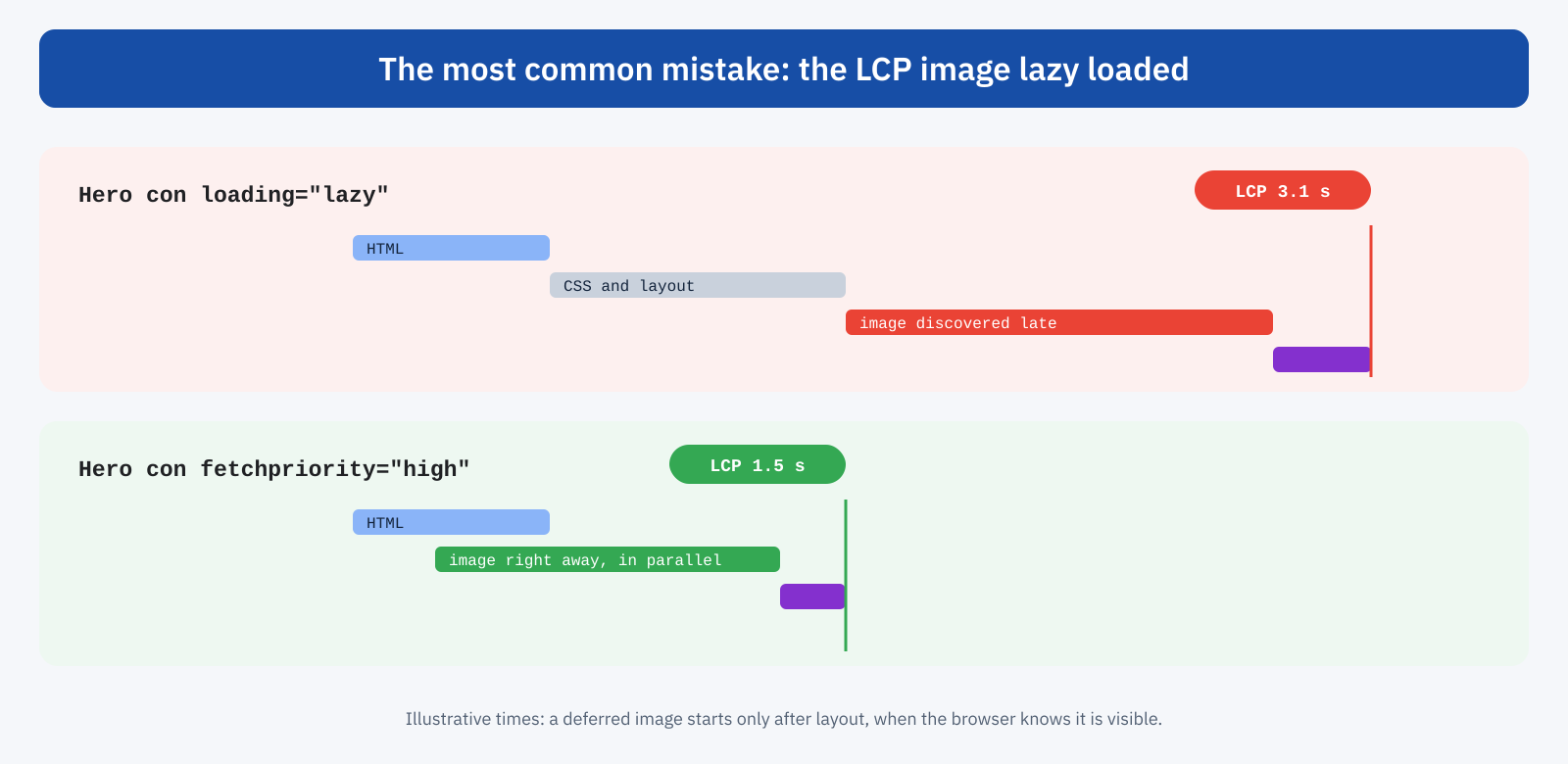
The resulting delay can easily exceed a second on mobile, and adds directly to LCP. Lighthouse flags it with a specific warning when the LCP image was lazy loaded, and it’s one of the most frequent suggestions in WordPress site reports. The fix is simple: remove loading="lazy" from that image and, in fact, give it top priority with fetchpriority="high", as explained in the article on LCP.
With JavaScript libraries the damage is even greater. An image with data-src isn’t an image for the preload scanner: the browser doesn’t see it until the script has been downloaded, executed and has calculated the position of the elements. On the LCP image this can mean seconds of delay, and that’s why lazy loading libraries should be replaced by the native attribute, or configured to exclude images above the fold.
Which images to defer and which not
The general rule is simple to state: load right away what is visible at first glance, defer the rest. In practice, the fold isn’t a fixed line. It changes with the device, with screen orientation, with the presence of banners or cookie notices, with the length of headlines. An image that is below the fold on desktop can be visible on a tablet, and vice versa. A few criteria help decide.
- Never defer the LCP element. The main photo, the cover, the first product image: immediate loading and, for the most important one,
fetchpriority="high". - Don’t defer small images above the fold. Logo, icons, avatars in the header: they weigh little and deferring them brings no benefit, while it can make them appear late.
- Defer everything clearly further down. Galleries, images in the body of an article after the first paragraphs, related products, partner logos in the footer, embedded maps and videos.
- When in doubt, think mobile. That’s where the most critical Core Web Vitals are measured, and that’s where the fold is highest: on a smartphone screen, often only the first image is visible.
Grids deserve attention. On a category page with four products per row on desktop and two on mobile, the images in the first row should be loaded right away and the others deferred. In carousels, the first slide should be treated as an image above the fold, the following ones can be deferred, but only if the carousel doesn’t make them visible automatically after a few seconds.
Explicit dimensions: lazy loading without CLS
A deferred image arrives after the page has already been painted. If the browser doesn’t know in advance how much space it will take, when it arrives it will shift the content below, generating CLS. That’s why every image, deferred or not, must have width and height attributes, or an aspect-ratio in the CSS: the browser reserves the right space and the image fills it without moving anything. Deferred images are the most exposed to the problem, because they arrive when the user is already reading or scrolling.
A placeholder, such as a background color matching the image or a blurred, very light version, improves perception during fast scrolling, when the image hasn’t had time to arrive. It must, however, occupy exactly the same space and must not need heavy JavaScript to work.
Beyond images: iframes, backgrounds and rendering
Iframes are often the best candidates for deferred loading, because an embedded video or map drags in hundreds of kilobytes of JavaScript. loading="lazy" on iframes works in all the main browsers; for videos, a facade that shows only the preview and loads the player on click is even more effective, as we saw when talking about third-party scripts.
Background images defined in CSS don’t support the loading attribute. If they are above the fold they need care, because the browser discovers them only after reading the CSS: when they are the LCP element, it’s best to turn them into a real img element or preload them with <link rel="preload">. If they are below the fold, they can be assigned with a class applied through an Intersection Observer.
There is also a form of deferral that concerns rendering instead of download: the CSS property content-visibility: auto lets the browser skip layout and paint calculation for off-screen sections until they get close. On very long, complex pages it can reduce the initial work, but it needs to be paired with contain-intrinsic-size to avoid scrollbar jumps.
How much you really save
The benefit of deferred loading depends on the length of the page and on user behavior. On an article with fifteen images, of which most readers see only the first three or four, the saving can exceed a megabyte per visit: less data for those browsing on a limited plan, less bandwidth used during the initial load, less traffic on the server or CDN. On a short page with two images, the benefit is negligible and the risk of picking the wrong image to defer is proportionally higher.
There is also a less obvious but important effect: non-visible images that are downloaded right away compete for bandwidth with visible ones and with critical resources. Even if the browser gives them a low priority, on a limited mobile connection ten simultaneous downloads slow down the one that matters. Deferring them means leaving the road clear for the LCP image, the stylesheets and the fonts.
On pages with infinite scroll, such as some product lists or article archives, lazy loading is indispensable, but it isn’t enough: each new block of content adds elements to the DOM and work for the browser. Beyond a certain size, traditional pagination is better, which also offers stable addresses for search engines, or an explicit button to load more results, which leaves control to the user and makes the behavior predictable.
How WordPress behaves
WordPress adds loading="lazy" automatically to content images from version 5.5 and to iframes from 5.7. In the early versions it applied it to all images, including the first, with the result of worsening the LCP of many sites. Since version 6.3 the behavior is smarter: the core estimates which images are probably above the fold, doesn’t defer them and adds fetchpriority="high" to the one it considers to be the LCP element.
The estimate is based on a threshold: by default, the first three content images are loaded without deferral. The value can be changed with the wp_omit_loading_attr_threshold filter, and it’s worth doing when you know the theme’s structure. On this site’s pages, for example, the only image above the fold in articles is the cover, and the threshold is set to one: all body images are deferred.
// In articles only the cover is above the fold
add_filter(
	'wp_omit_loading_attr_threshold',
	function ( $threshold ) {
		return is_singular( 'post' ) ? 1 : $threshold;
	}
);
The core’s estimate works well with themes that use the standard image functions, but it can be wrong with page builders, sliders and custom blocks that generate the markup in their own way. On top of that come optimization plugins that apply their own lazy loading, often JavaScript-based, overlapping with the core. The result must always be checked on the real page: look in the source code at which image has fetchpriority="high", which have loading="lazy", and compare it with the LCP element reported by PageSpeed Insights.
Lazy loading and SEO
Native lazy loading doesn’t create indexing problems: Googlebot sees the src attribute and loads images normally. The case of JavaScript solutions that load content only in response to scrolling is different: the crawler doesn’t scroll the page like a user, and content that appears only after a scroll event risks not being seen. With the native attribute, or with an Intersection Observer, the problem doesn’t arise.
How to check
Three checks are enough for most sites. In PageSpeed Insights or Lighthouse, check which element is the LCP and that the warning about the LCP image being lazy loaded doesn’t appear. In the DevTools Network panel, reload the page without scrolling and check that only the visible images are downloaded, plus those within the look-ahead margin. Finally, scroll quickly on a simulated slow connection and see whether images appear in time and whether the content stays still while they arrive.
In summary
Lazy loading is an effective tool if applied with judgment: it reduces transferred data and leaves bandwidth for important resources, but on the wrong element it delays exactly what the user needs to see first. The rule is to load right away what is above the fold, with the highest priority for the LCP element, and to defer everything else, always with explicit dimensions to avoid layout shifts.
The native loading attribute has made almost all JavaScript libraries unnecessary, and WordPress handles it automatically with a reasonable estimate of the images above the fold. But an estimate is still an estimate: knowing the structure of your own pages, adjusting the threshold and checking the result in the field is what separates lazy loading that speeds things up from lazy loading that, without anyone noticing, slows them down.
