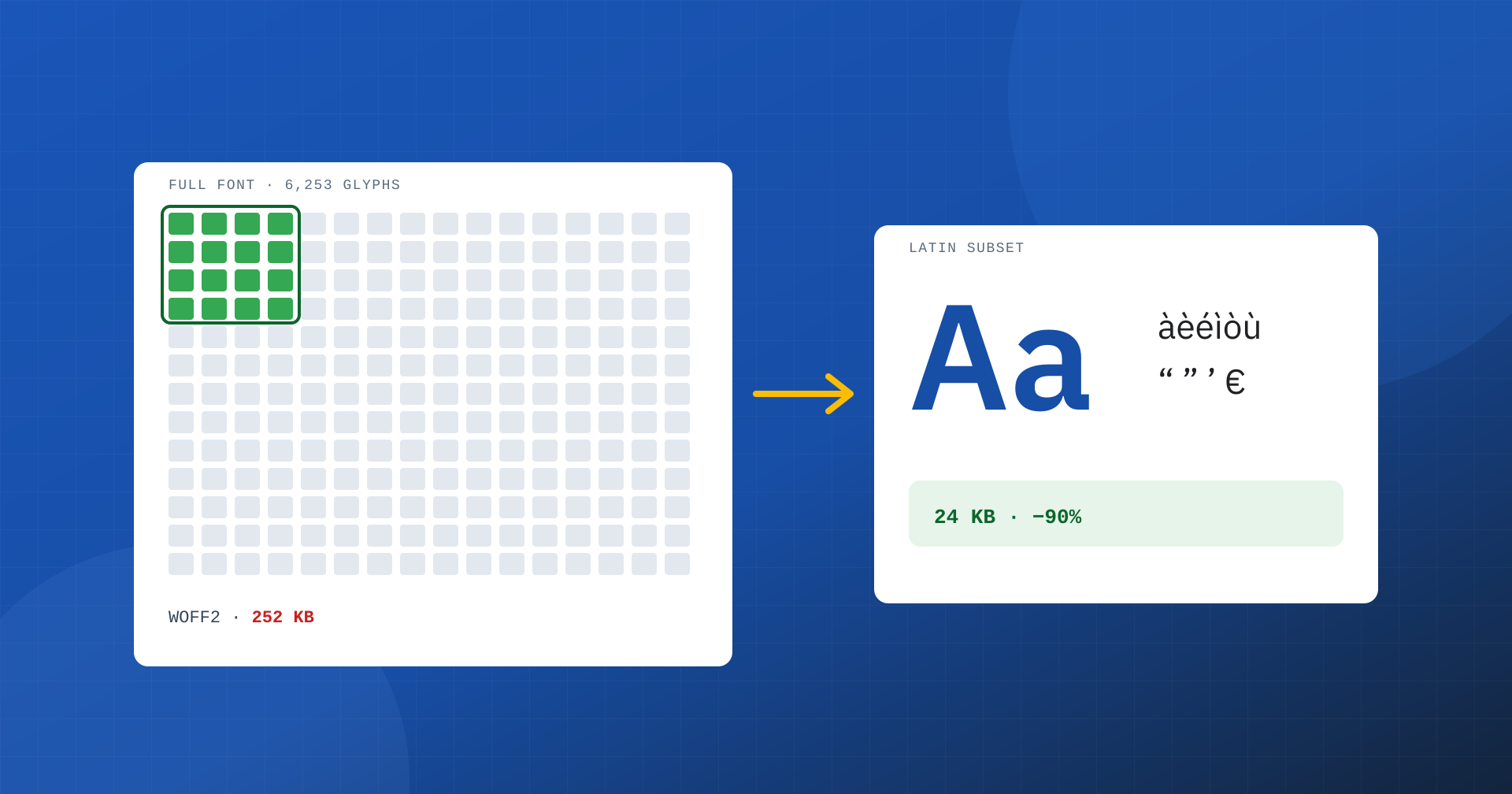
Fonts are one of the most underrated resources when it comes to speed. A site can have optimized images and bare-bones JavaScript and still load hundreds of kilobytes of typefaces: multiple weights and styles, each with thousands of glyphs for alphabets that no visitor will ever read. Subsetting, that is reducing a font to only the characters you need, is one of the optimizations with the best ratio of effort to result. In this article we look at why fonts weigh on web performance, how to create a subset and how to load it the right way.
Why fonts weigh on performance
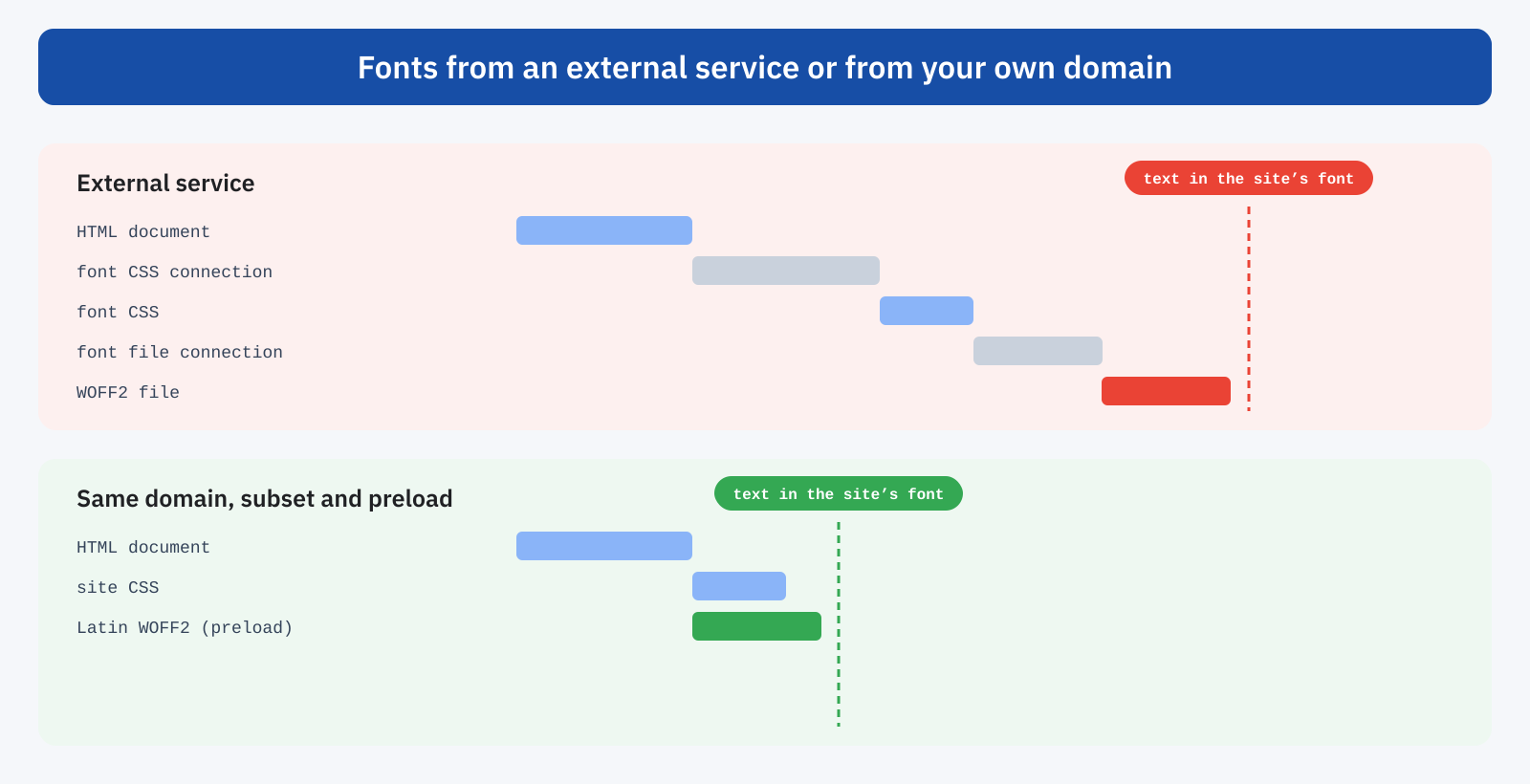
A web font affects metrics in three ways. The first is weight: every file must be downloaded before it can be used, and on a mobile connection a few hundred kilobytes of fonts compete with the main image and the CSS for the available bandwidth. The second is late discovery: the browser knows which fonts are needed only after downloading and processing the stylesheets, and only then starts downloading them. The third is the behavior while waiting: the text can stay invisible until the font arrives, or appear with a fallback font and change appearance at the moment of the swap.
The consequences show up directly in Core Web Vitals. When the largest element on the page is a headline or a block of text, which is common in articles and corporate pages, LCP depends on the font. And when the fallback font has different dimensions from the final one, the swap shifts lines and blocks and worsens CLS.
What subsetting is
A modern font can contain thousands of glyphs: extended Latin, Greek, Cyrillic, mathematical symbols, arrows, box-drawing characters. An Italian-language site uses a few hundred: basic letters, accented letters, digits, punctuation, typographic quotation marks, the euro symbol. Subsetting creates a copy of the font that contains only those characters, removing everything else.
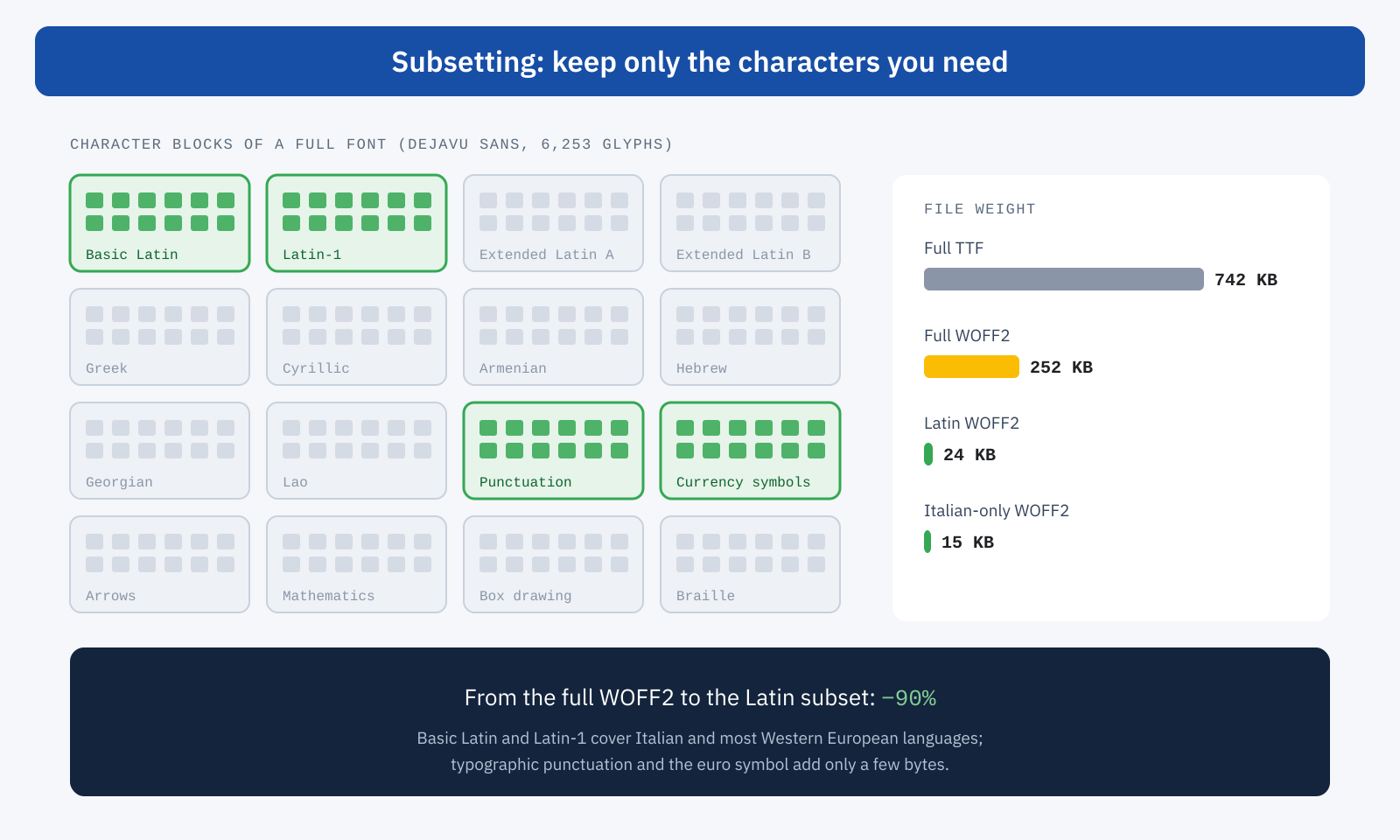
The numbers, measured on a full open source font such as DejaVu Sans, give the idea. The original TTF file weighs 742 KB; converted to WOFF2, the compressed format designed for the web, it drops to 252 KB. Reduced to the Latin subset, which includes basic Latin, Latin-1, typographic punctuation and the euro, it weighs 24 KB. Limited to only the characters of Italian, 15 KB. The same font, for the visitor, is identical: only what they would never have seen changes.
This site follows the same principle: the main typeface is a variable version of IBM Plex Sans, which contains all weights from thin to bold in a single 45 KB WOFF2 file with only the Latin subset.
How to create a subset
The reference tool is pyftsubset, part of the open source fontTools library. You specify the characters to keep, by Unicode ranges or as text, the typographic features to retain and the output format:
# Latin subset, with ligatures and kerning, as WOFF2
pyftsubset IBMPlexSans-Variable.ttf \
  --unicodes="U+0000-00FF,U+0131,U+0152-0153,U+2000-206F,U+20AC,U+2122,U+FEFF,U+FFFD" \
  --layout-features="*" \
  --flavor=woff2 \
  --output-file=ibm-plex-sans-latin.woff2
There are two ways to choose the characters. The most cautious is to start from standard ranges, such as those Google Fonts uses for the Latin subset, which cover Italian and the main Western European languages. The most aggressive is to analyze the site’s content and keep only the characters actually present, with tools that crawl the pages. This is a choice to make with care: product names, user comments or quotations in other languages may contain unexpected characters, which the browser would display with a different font.
When a site serves several languages, the solution is to create multiple files and declare them with the unicode-range property: the browser downloads only the subsets that contain characters present on the page.
@font-face {
	font-family: "IBM Plex Sans";
	font-weight: 100 700;
	font-display: swap;
	src: url("/fonts/ibm-plex-sans-latin.woff2") format("woff2");
	unicode-range: U+0000-00FF, U+0131, U+0152-0153, U+2000-206F, U+20AC;
}

@font-face {
	font-family: "IBM Plex Sans";
	font-weight: 100 700;
	font-display: swap;
	src: url("/fonts/ibm-plex-sans-cyrillic.woff2") format("woff2");
	unicode-range: U+0400-045F, U+0490-0491, U+04B0-04B1;
}
WOFF2, variable fonts and weights
Subsetting gives its best results together with two other choices. The first is the format: WOFF2 is supported by all modern browsers and compresses much better than TTF and the old WOFF, so today there is no reason to serve anything else. The second concerns weights: every combination of weight and style is a separate file, and a theme that uses regular, medium, semibold and bold, with their italics, loads eight fonts. A variable font contains all the weights in a single file: it is convenient when you use several, less so when you need only one. In any case it pays to ask how many weights you really need, and to give up those used in only one spot on the site.
Loading them the right way
A lightweight font loaded badly is still slow. Many sites still use external services, which force the browser to open a connection to another domain for the font stylesheet and often another for the actual files. Since browsers started partitioning the cache by site, the advantage of a font that is “already cached” because it was downloaded on another site no longer exists. Hosting fonts on your own domain, already subsetted, eliminates these connections and lets you announce them early with a preload.
<link rel="preload" href="/fonts/ibm-plex-sans-latin.woff2"
      as="font" type="font/woff2" crossorigin>
preload should be reserved for the font used in the visible part of the page, usually just one: preloading every weight and style would take bandwidth away from the main image. The crossorigin attribute is required even for fonts on the same domain, otherwise the browser downloads the file twice.
What the user sees while waiting
The font-display property determines what happens until the font has arrived. With block the text stays invisible for a period that can reach three seconds. With swap it appears immediately in the fallback font and is replaced when the final one arrives. With optional the browser uses the site’s font only if it is available almost immediately, otherwise it keeps the fallback for the whole visit and will use the site’s font from the next one, when it is cached.
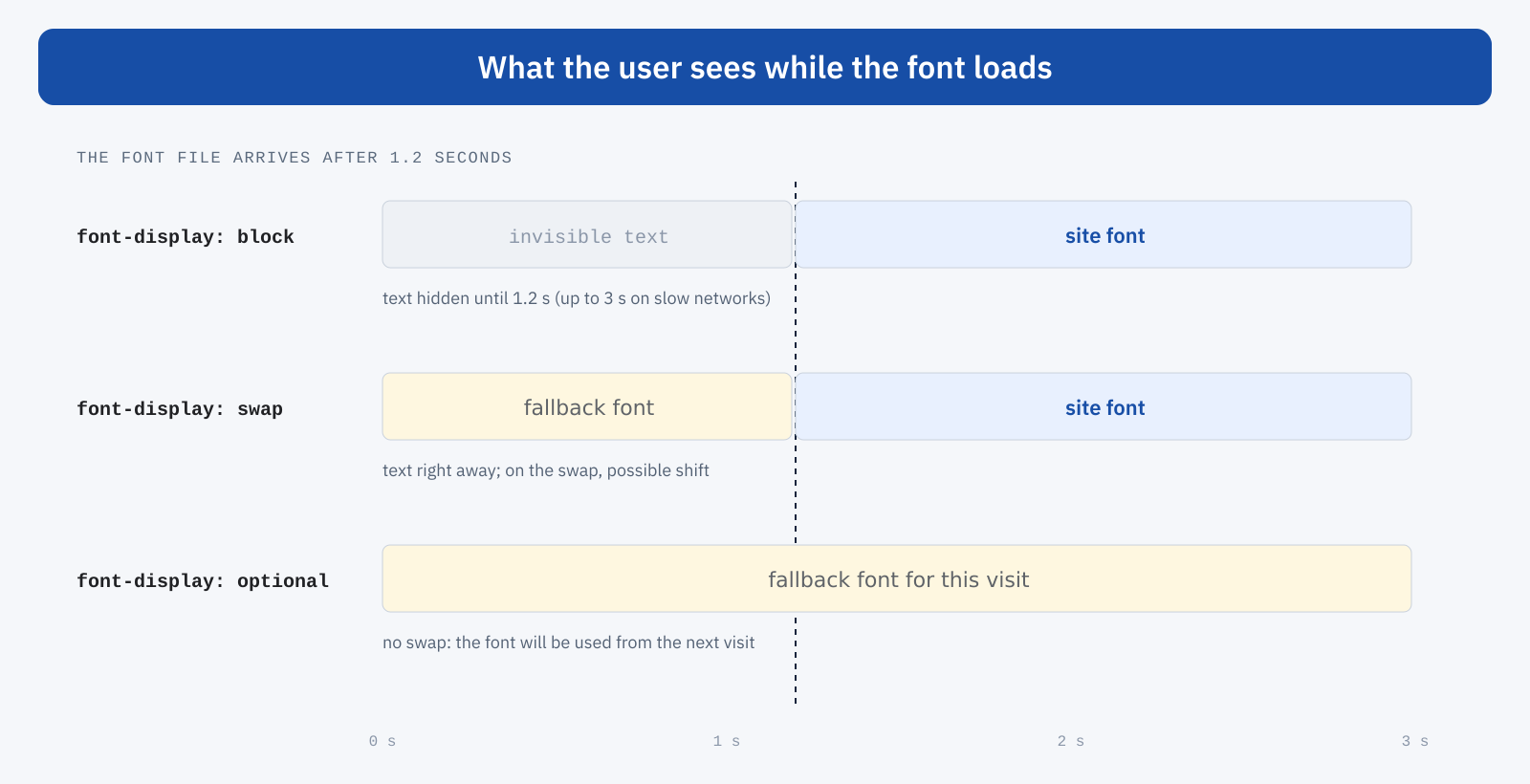
For most sites swap is the right choice, provided you reduce the shift at the moment of the swap. This is achieved by defining a local fallback font with the correct metrics, through the size-adjust, ascent-override and descent-override descriptors, so that it takes up the same space as the final font:
@font-face {
	font-family: "Plex fallback";
	src: local("Arial");
	size-adjust: 102%;
	ascent-override: 98%;
	descent-override: 26%;
}

body {
	font-family: "IBM Plex Sans", "Plex fallback", sans-serif;
}
The values depend on the pair of fonts and must be calculated or checked by eye; there are tools that derive them automatically from the metrics of the two typefaces.
Mistakes to avoid
- Removing characters you need. Typographic quotation marks, the curly apostrophe, dashes, the euro symbol and accented capital letters are often forgotten: the browser displays them with another font, with an unprofessional effect.
- Dropping typographic features. Kerning and ligatures are part of text quality: keep them explicitly, because some tools remove them by default.
- Forgetting italics and bold. If a weight or style is not declared, the browser simulates it by distorting the regular font, with a lower-quality result.
- Preloading too many files. A preload for every variant turns an optimization into an obstacle for LCP.
- Ignoring the license. Fonts with an open license, such as the SIL Open Font License, can be modified and self-hosted; some commercial licenses forbid subsetting or conversions. Check before you start.
How to check the result
In the DevTools Network panel, filtering by “Font”, you can see how many files are downloaded, how much they weigh, which domain they come from and when they start: ideally one or two lightweight files, started right after the document. Lighthouse flags text that is invisible while fonts load and fonts that are not preloaded and block LCP. For the real effect, as always, user data is what counts: LCP and CLS at the 75th percentile, before and after the intervention, over CrUX’s 28-day window.
In summary
Fonts weigh on web performance because of their weight, their late discovery and their behavior while waiting. Subsetting reduces a font to only the necessary characters and can cut its weight by 90%; WOFF2, few weights or a variable font, hosting on your own domain and a targeted preload complete the job. With font-display: swap and a fallback font with aligned metrics, the text appears immediately and does not move.
It is an intervention done once, during development, whose benefits apply to every page and every visit: fewer kilobytes, readable text sooner and a more stable page. Little work, for a result that users see right away.
