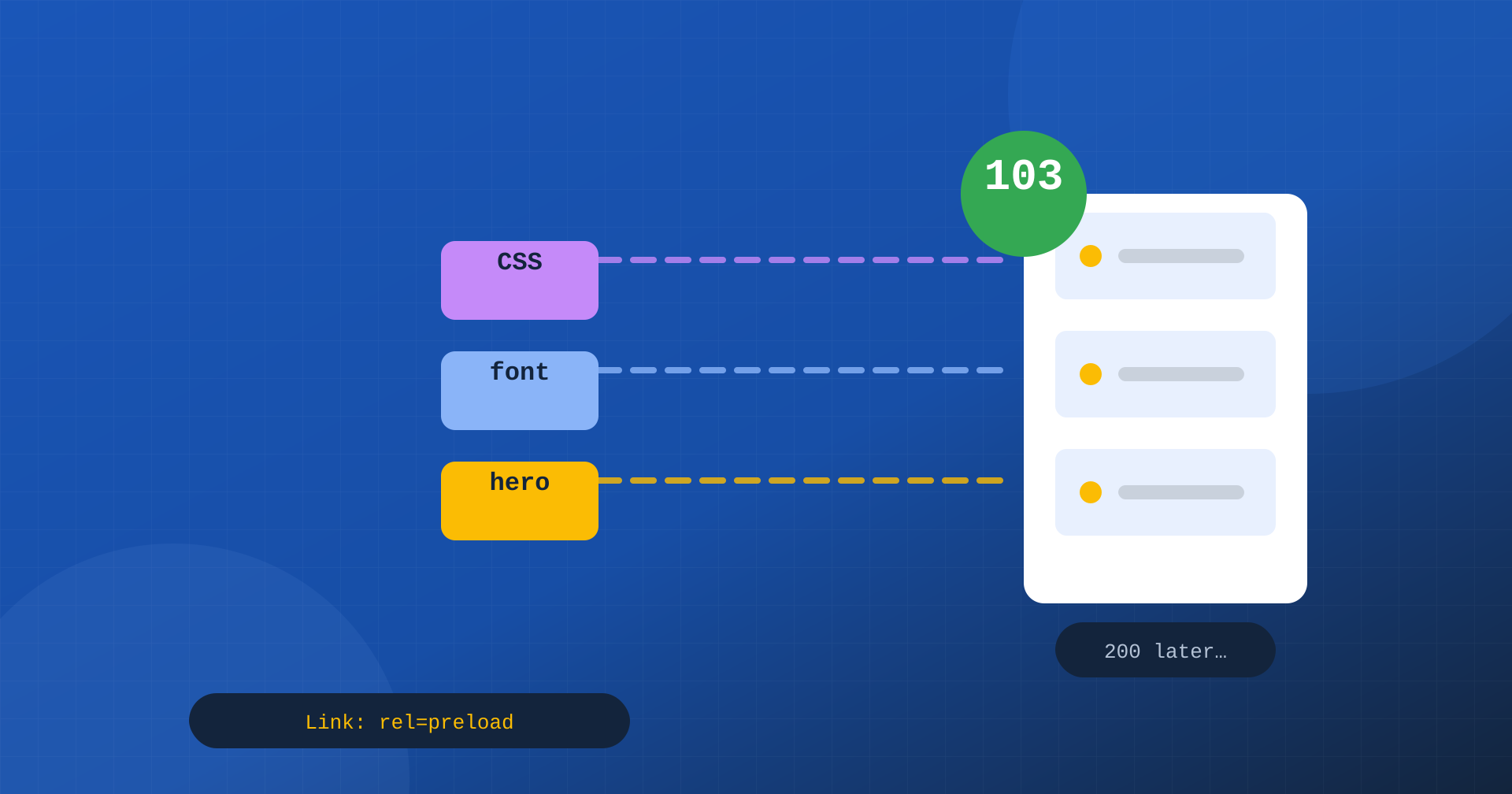
Every time a browser asks for a page, there is a moment when nothing happens. The request has gone out, the server is processing it, querying the database, running the application code, building the HTML. The browser waits. Only when it receives the response does it find out which stylesheets, fonts and images it needs to show the page, and start downloading them. On a site with a page cache this interval lasts a few tens of milliseconds; on dynamic pages, such as the cart, members’ areas or search results, it can last hundreds of milliseconds, sometimes more than a second.
Early Hints, the HTTP 103 status code, exists to make use of this dead time. The server, or the CDN in front of it, can immediately send a preliminary response that tells the browser: while I prepare the page, start downloading these resources, because you will need them. When the real response arrives, the critical resources are already on their way or already downloaded.
How the 103 code works
Status codes in the 1xx family are informational responses: they do not conclude the request, but they can precede its final response. The 103 Early Hints response contains one or more Link headers, with the same syntax used for preload and preconnect. A typical sequence looks like this:
HTTP/2 103
link: </wp-content/themes/tema/style.css>; rel=preload; as=style
link: </wp-content/themes/tema/fonts/plex.woff2>; rel=preload; as=font; crossorigin
link: <https://cdn.example.com>; rel=preconnect

HTTP/2 200
content-type: text/html; charset=UTF-8
link: </wp-content/themes/tema/style.css>; rel=preload; as=style

<!doctype html>…
Having received the 103, the browser immediately starts downloading the stylesheet and the font and opens the connection to the indicated domain. Then it keeps waiting for the 200 response, which arrives when the server has finished. By then, the announced resources are already available or well under way, and the browser can build and paint the page without the usual chain of waits.
Why preload in the HTML is not enough
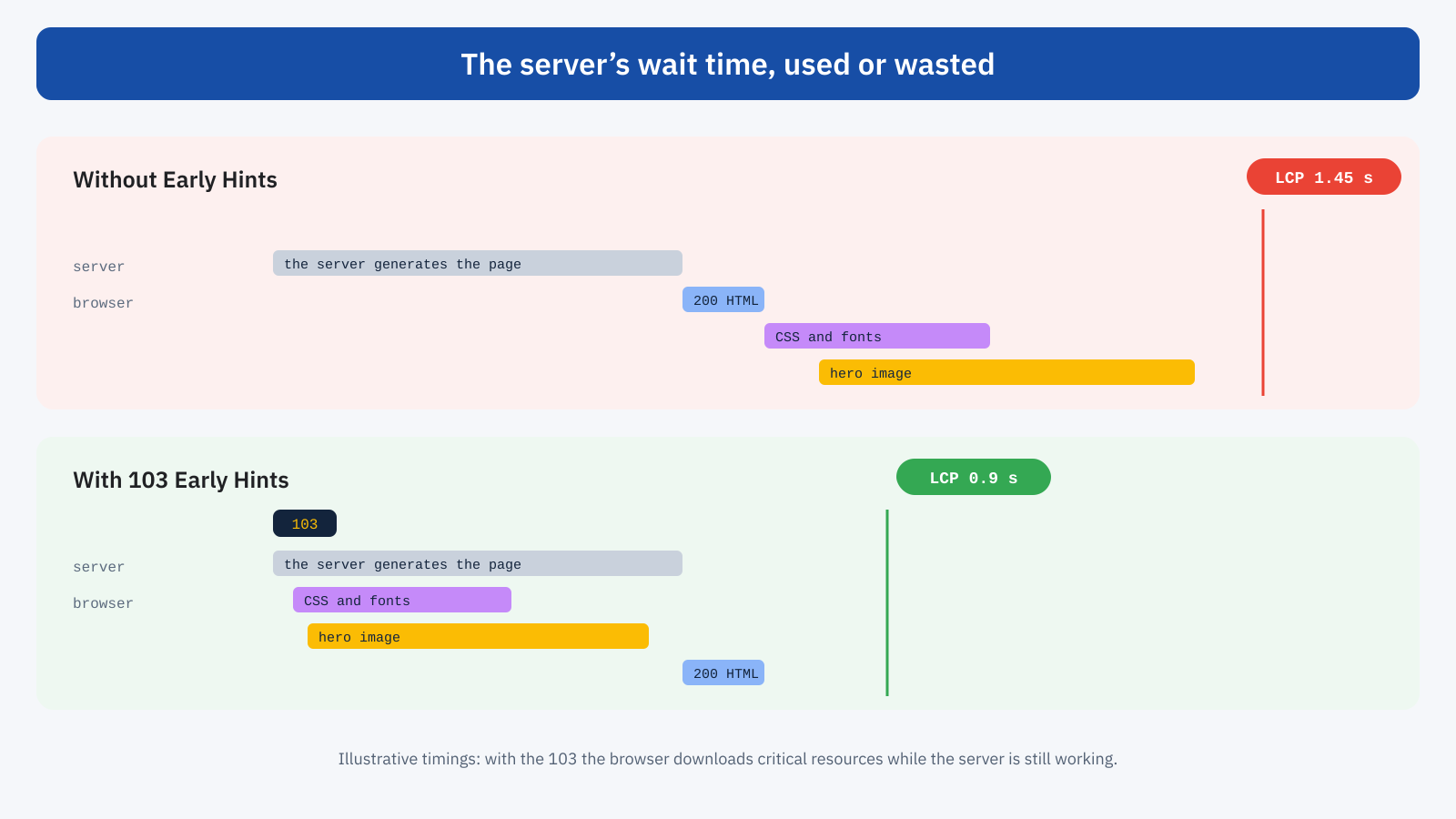
A <link rel="preload"> in the HTML head has the same purpose, but an obvious limit: the browser only reads it when it receives the HTML, that is, after the server has finished its work. Preload speeds up the discovery of resources compared with when they would be found in the CSS or further down the document, but it cannot bring it forward relative to the response itself. Early Hints moves this moment to the start of the request, before the server has produced a single byte of the page.
It was proposed as the successor to HTTP/2 Server Push, the mechanism by which the server could send resources to the browser without being asked. Push proved hard to use well, because the server did not know which resources the browser already had in its cache and ended up sending useless data; Chrome removed it in 2022. Early Hints instead leaves the decision to the browser: the server suggests, and the browser downloads only what it does not already have, using its own cache.
When it really pays off
The benefit of Early Hints is proportional to the server’s wait time. If a page arrives from the cache with a TTFB of 40 milliseconds, there is almost no dead time to exploit, and the gain is negligible. If a page takes 600 milliseconds to process, the browser can use them to download stylesheets, fonts and even the main image, and the gain on LCP can be several hundred milliseconds.
The most favorable cases are therefore pages that cannot be cached: cart and checkout of an e-commerce site, members’ areas, personalized pages, internal search results, pages with parameters. They are also important pages for the business, and often the slowest on the site. For pages already served from the cache, Early Hints is a small improvement; for dynamic ones, it can be one of the few possible interventions without rewriting the application.
A concrete example
Imagine the cart page of an online store, which cannot be cached and which the server generates in about 700 milliseconds, between session, price calculation, shipping and recommended products. Without Early Hints, the browser sits idle for all that time; then it receives the HTML, discovers the main stylesheet, downloads it in 150 milliseconds on a mobile network, discovers the font, downloads it, and finally paints. LCP arrives after more than a second, even though the text and the product thumbnails are very light.
With a 103 announcing the stylesheet and the font, the browser downloads them during the 700 milliseconds of processing. When the HTML arrives, it already has everything it needs to paint, and LCP comes very close to TTFB. The server has not become faster, but the page appears a few hundred milliseconds earlier, exactly at the point of the purchase journey where the user is closest to completing, as we saw when discussing Core Web Vitals for WooCommerce.
Who can send it: the CDN first
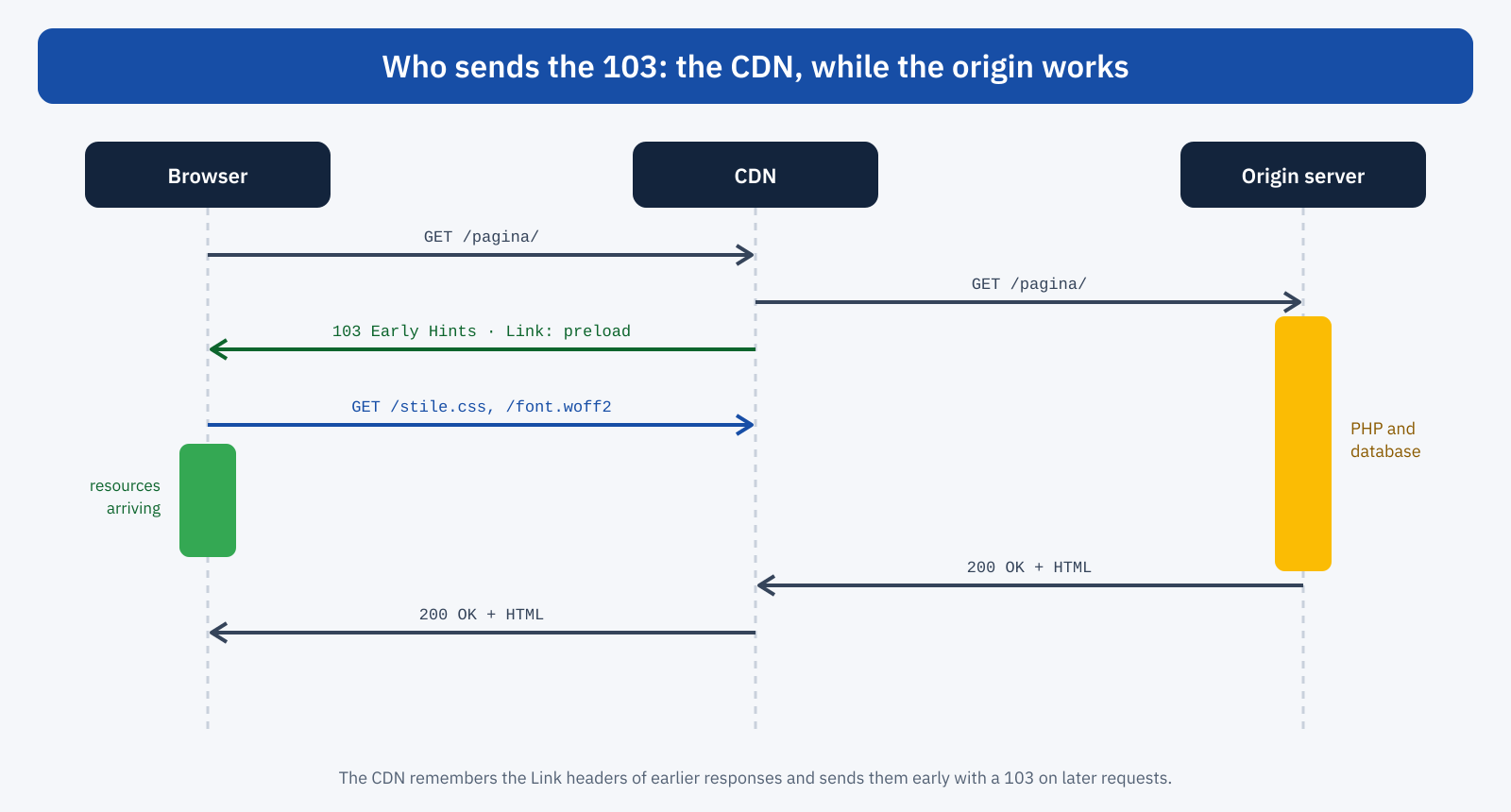
Sending a 103 means responding before you have the response, and that is not trivial for many applications. PHP, for example, in the traditional PHP-FPM setup, has no simple way to send an informational response and then keep processing the page. For this reason the most common way to use Early Hints goes through the CDN.
Some CDNs, such as Cloudflare, take an elegant approach: they observe the Link headers with rel=preload or rel=preconnect present in the origin’s 200 responses, store them for that URL and, on subsequent requests, immediately send them to the browser as a 103 while forwarding the request to the origin. The site only has to include the Link headers in its own responses and enable the feature in the CDN dashboard.
Some web servers also support sending Early Hints: Apache, with the HTTP/2 module, can turn configured Link headers into a 103, and other modern servers and application environments offer dedicated features. Support remains less uniform than on CDNs, though, and should be checked case by case.
The WordPress case
On WordPress the most practical approach is to add Link headers to HTML responses and leave it to the CDN to send them early. The theme’s main stylesheet and the most used above-the-fold font are the ideal candidates, because they are the same on every page:
add_action(
	'send_headers',
	function () {
		if ( is_admin() ) {
			return;
		}
		$tema = get_template_directory_uri();
		header( "Link: <{$tema}/style.css>; rel=preload; as=style", false );
		header( "Link: <{$tema}/fonts/plex.woff2>; rel=preload; as=font; crossorigin", false );
	}
);
The URLs must match exactly those used in the page, including any version parameters such as ?ver=1.2: if they differ, the browser downloads the same resource twice. For this reason it is best to generate the headers with the same functions the theme uses to register styles, or rely on optimization plugins that produce them automatically and consistently.
What to announce and what not to
Early Hints is a tool to use sparingly. Every announced resource competes for bandwidth with the others, and announcing too much is the same as prioritizing nothing. A few practical rules:
- Critical CSS, always. The stylesheet that blocks rendering is the best candidate: without it the page cannot be painted.
- One or two fonts. The ones used in above-the-fold text, in WOFF2 format, preferably already reduced with subsetting.
- Preconnect to critical domains. The image CDN or a third-party domain essential to the first paint. A preconnect costs little and saves the round trips of opening the connection.
- The LCP image only if it is the same. A cover image that changes from page to page cannot be announced by a CDN that stores headers per URL only after the first visit; it makes sense for a fixed image, such as a home page one.
- No non-critical scripts. Bringing forward the download of JavaScript that will run later does not speed up the first paint and takes bandwidth away from what is needed.
The most common mistakes
The first mistake is the mismatched URL. If the header announces style.css and the page loads style.css?ver=6.8, to the browser they are two different resources: the first is downloaded and then ignored, the second is requested again. The result is worse than not using Early Hints, because bandwidth is wasted at the most delicate moment of loading. DevTools flags it with a warning about a resource that was preloaded but not used within a few seconds.
The second mistake concerns fonts: preloading a font requires the crossorigin attribute, even when the font is on the same domain, because fonts are always requested in CORS mode. Without it, the browser downloads the font twice. The third is announcing resources other than the ones actually needed, for example after a theme update that changed file names or paths: the headers stay the old ones, and the CDN keeps announcing files the page no longer uses. After every structural change it is therefore worth rechecking that the announced and the used resources match.
Finally, Early Hints should not be mistaken for a fix for server problems. If a page takes two seconds to generate, bringing CSS and fonts forward improves the situation, but the user still sees a blank page until the HTML arrives. Work on TTFB, with page cache, object cache and query optimization, remains the priority; Early Hints is the complement that recovers the time you cannot eliminate.
Browser support
Chrome and Edge support Early Hints for preload and preconnect in navigation requests, over HTTP/2 and HTTP/3 connections. Firefox supports it in recent versions; Safari supports preconnect but, at the time of writing, not preload via 103. Browsers that do not support it ignore the informational response and wait for the final response, as always: here too, as with Speculation Rules, it is a progressive enhancement with no negative effects for those who do not benefit from it.
How to verify
In Chrome DevTools, resources downloaded thanks to Early Hints show a dedicated initiator in the Network panel, and the Resource Timing API flags them with initiatorType equal to early-hints. It is the most reliable way to check that the headers actually reach the browser and that the URLs match those used by the page:
performance.getEntriesByType( 'resource' )
	.filter( ( r ) => r.initiatorType === 'early-hints' )
	.forEach( ( r ) => console.log( r.name, Math.round( r.responseEnd ) ) );
From the command line, curl -I on a URL served by the CDN shows any 103 responses before the 200. To measure the effect, compare TTFB and LCP of dynamic pages before and after activation, using field data or a real-user monitoring system: on cached pages the difference will be small, on dynamic ones it should be clear.
In short
Early Hints lets the server, or more often the CDN, tell the browser which critical resources to download while the page is still being prepared. It turns the server’s wait time into useful time, and the benefit grows with how slow the page is: modest for cached pages, significant for cart, checkout, members’ areas and personalized pages.
It is enabled with a few well-chosen Link headers and a CDN that turns them into a 103; it should be limited to truly critical resources, with URLs identical to those of the page, and verified with DevTools. It does not replace an efficient cache or a fast server, but when the page cannot be generated any faster, it is one of the best ways to make sure the wait is not wasted.
