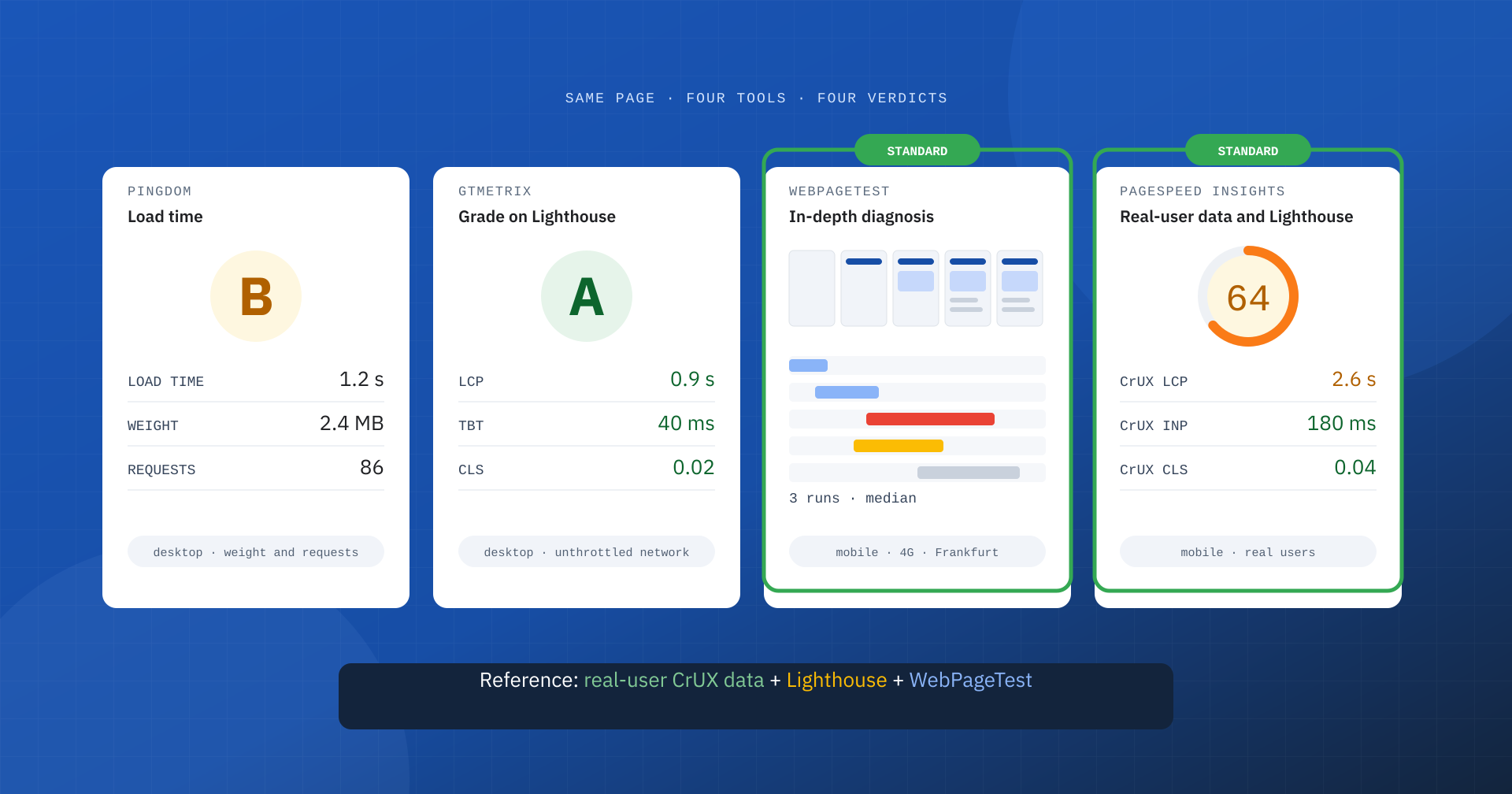
Anyone who looks after a website sooner or later tries them all: Pingdom, GTmetrix, WebPageTest and PageSpeed Insights. You enter the same address in four tools and get four different verdicts: a load time of one second, an “A” grade, a very long waterfall, an orange score. None of these tools is wrong, but they answer different questions, under different conditions and with different metrics. Choosing the right one, and knowing which to treat as the reference, makes the difference between a useful analysis and a collection of numbers that cannot be compared.
In this article we look at what they are, what they measure, how they differ and which combination is today’s industry standard for anyone working seriously on web performance.
Two ways of measuring: load time and experience
Before the tools, an essential distinction. For years the speed of a site was expressed with a single number: the full load time, meaning the moment the browser has downloaded all the page’s resources, together with its weight and the number of requests. These are useful technical indicators, but they say little about what the user perceives: a page can show its main content in one second and keep loading third-party scripts for another five, or stay blank for a long time and complete everything right afterwards.
Modern metrics are instead centered on the user: when the main content appears (LCP), how quickly the page responds to interactions (INP) and how stable it stays (CLS). These are the Core Web Vitals, which Google evaluates on real-user data. The tools we are discussing sit at different points between these two worlds, and this explains much of their differences.
Pingdom
Pingdom started out as an uptime monitoring service: it checks at regular intervals that a site responds and alerts you when it does not. Today it is part of SolarWinds’ offering and also covers real-user monitoring and transaction monitoring. Its best-known free tool, however, is its speed test: you pick a location from those available in Europe, the Americas, Asia and Oceania, enter the address and get a report.
The speed test focuses on traditional metrics: load time, page weight, number of requests, a breakdown by content type and by domain, a waterfall of resources and a grade based on good-practice rules such as compression and caching. It is clear and immediate, and useful for understanding how many resources a page loads and where they come from. It is not the right tool for evaluating perceived experience or Core Web Vitals, though: its load time measures when the page has finished downloading everything, not when it became useful.
GTmetrix
GTmetrix is a Canadian service created to make performance reports accessible. Since 2020 it has been based on Lighthouse: its “GTmetrix Grade” combines the Lighthouse Performance score with a structure score of its own, and the report shows LCP, Total Blocking Time, CLS, a detailed waterfall, the loading video and a test history for each URL.
The thing to know is the default settings. With a free account the test starts, unless changed, from a location in Canada, with a desktop browser and an unthrottled connection. For an Italian site visited mostly from smartphones, this is a very favorable scenario: transatlantic latency worsens the TTFB, but the absence of network limits and the power of the desktop improve everything else. Paid plans let you choose location, mobile devices and connection profiles, and add periodic monitoring. GTmetrix produces clear reports that are easy to share, but its grade should be read knowing under which conditions it was obtained.
WebPageTest
WebPageTest is the specialists’ reference tool. Born in 2008 as an open source project and now run by Catchpoint, it runs tests with real browsers from dozens of locations around the world, including on mobile devices, applying packet-level network limits that realistically reproduce the latency and bandwidth of a mobile connection.
Its strength is depth. It runs several loads and reports the median, distinguishes the first visit from a repeat visit with a warm cache, shows the full waterfall with the DNS, connection and TLS times of every request, the connection view, the filmstrip and the loading video, the main thread timeline and the Core Web Vitals with the responsible element identified. It also lets you write navigation scripts, block individual domains to measure the weight of third parties and compare several tests side by side. It takes more expertise to interpret, but it is the tool that really explains how a page loads.
PageSpeed Insights
PageSpeed Insights is Google’s service that combines two things: a lab analysis run with Lighthouse on Google’s servers, with a mobile or desktop profile, and the real-user data of Chrome users collected by the Chrome UX Report over the last 28 days, for the URL and for the whole origin. Of the four, it is the only one that directly shows the Core Web Vitals assessment on field data, that is, on the same data Google uses as a page experience signal.
The lab part is more basic than WebPageTest and does not let you choose locations or conditions, but its mobile profile, with a simulated mid-range smartphone and a slow 4G connection, is deliberately strict. We covered the differences between PageSpeed Insights and Lighthouse in a dedicated article.
The comparison in a table
| Pingdom | GTmetrix | WebPageTest | PageSpeed Insights | |
|---|---|---|---|---|
| Type of data | Lab | Lab | Lab | Lab and field |
| Engine | Its own | Lighthouse | Its own, real browsers | Lighthouse and CrUX |
| Main metrics | Load time, weight, requests | Grade, LCP, TBT, CLS | Core Web Vitals, waterfall, filmstrip | Real-user Core Web Vitals, Lighthouse score |
| Locations | A few, your choice | One on the free plan | Dozens, your choice | Google’s servers |
| Device and network | Desktop | Desktop with no network limits, by default | Desktop and mobile, configurable network | Simulated mobile or desktop |
| Typical use | Quick check, uptime | Shareable reports | In-depth diagnosis | Google’s assessment, real-user data |
Why they give such different results
The differences are not a flaw of one tool compared with the others: they depend on four variables that completely change the measurement.
- Location. A test from Vancouver to a server in Milan adds over a hundred milliseconds of latency to every network exchange, and weighs mainly on the TTFB. A test from Frankfurt adds only a few.
- Device and network. A desktop on an unthrottled connection hides almost every JavaScript and image weight problem; a mid-range smartphone on slow 4G makes them obvious.
- The metric. Pingdom’s full load time, WebPageTest’s Largest Contentful Paint and Lighthouse’s score measure different things, even when they are all expressed in seconds.
- The grade. Pingdom’s grade, GTmetrix’s and the PageSpeed Insights score are calculated with different formulas. Comparing them is like comparing grades from different schools.
On top of these comes a less innocent factor. Some testing tools can be recognized by their User-Agent or IP address, and certain setups serve them a different page from the one users get: this is what we documented in the LiteSpeed Cache case, which explicitly includes Pingdom, GTmetrix and Google’s services in its own lists. An excellent lab result that finds no confirmation in the real-user data should always be checked.
What the industry standard is
If the question is which tool to treat as the reference, the answer has two parts, because two questions matter.
To assess the experience, the reference is the real-user data of the Chrome UX Report, available in PageSpeed Insights and, for the whole site, in the Core Web Vitals report in Search Console. Not because Google is infallible, but because this is data collected from real users’ browsers and it is what Google itself uses. No lab score, from any tool, replaces this assessment.
To diagnose, the standards are Lighthouse and WebPageTest. Lighthouse, through PageSpeed Insights, Chrome DevTools or continuous integration pipelines, is the common language: its metrics and audits are the ones developers, agencies and clients know. WebPageTest is the professional tool for in-depth analysis, when you need to understand exactly what happens on the network and in the browser, from a specific location and on a realistic device.
GTmetrix and Pingdom have their place: the former for quick, shareable reports, provided you set a location and device consistent with your audience; the latter mainly for uptime monitoring and an immediate view of weight and requests. Neither of them, on its own, should drive decisions about Core Web Vitals.
Which one to use, question by question
- “Does my site pass Core Web Vitals?” PageSpeed Insights, the real-user data section, and Search Console.
- “Why is LCP slow on mobile?” WebPageTest from a location close to your audience, with a mobile profile and several runs; alternatively Lighthouse in DevTools.
- “How much do third-party scripts weigh?” WebPageTest, comparing the normal test with one in which external domains are blocked.
- “Did today’s release make anything worse?” Lighthouse in a continuous integration pipeline, with defined performance thresholds.
- “How is it doing over time?” Real-user data from CrUX and periodic synthetic monitoring, always with the same configuration, be it GTmetrix, WebPageTest or the PageSpeed Insights API.
- “Is the site up?” An uptime monitoring service such as Pingdom.
Mistakes to avoid
- Testing from a location far from your audience. A site for the Italian market should be measured from Europe, preferably close to the data center and the users.
- Settling for the desktop profile. If most visits come from smartphones, a desktop test on a fast network describes the best possible site, not the real one.
- Comparing grades from different tools. A GTmetrix “A” and a PageSpeed Insights 70 do not contradict each other: they measure different things under different conditions.
- Using load time as a goal. Reducing the full load time does not necessarily improve what the user perceives; decisions should be made on user-centered metrics.
- Relying on a single test. Every lab measurement has natural variability: several runs and the median, always with the same configuration, are the minimum for a serious comparison.
Our method
In our daily work we use these tools in sequence. We start from the real-user CrUX data, in PageSpeed Insights and Search Console, to understand which pages and which metrics are critical and on which type of device. Then we move to the lab: WebPageTest from Europe with a mobile profile for network and loading diagnosis, Lighthouse in DevTools for the main thread and JavaScript. After each intervention we check in the lab that there are no regressions and, in the following weeks, that the real-user data confirm the result, taking the 28-day window into account.
In every report we state the tool, location, device, network profile and number of runs behind each value. It is the only way to make measurements taken at different times comparable and to stop the discussion from shifting from the site to the thermometer.
In summary
Pingdom mainly measures load time, weight and requests, and was created for uptime monitoring. GTmetrix offers clear reports based on Lighthouse, but with very favorable default settings. WebPageTest is the most complete tool for diagnosis, with real browsers and configurable locations and networks. PageSpeed Insights is the only one that shows the real-user data on which Google evaluates Core Web Vitals, alongside a Lighthouse analysis with a strict mobile profile.
The recommended standard is not a single tool but a combination: real-user CrUX data to know how users are doing, Lighthouse and WebPageTest to understand why and to verify every intervention. Everything else is useful only if you know exactly which question you are asking, and under which conditions.
