When a site is slow, one of the first questions is whether hosting is to blame. Sometimes it is, sometimes it is not, and often the answer is “partly”. Hosting determines how fast the server responds, its ability to withstand many simultaneous visitors and the availability of tools such as page cache and object cache. It does not determine the weight of images, the amount of JavaScript or the structure of pages, which depend on the site itself.
Understanding what hosting can and cannot do matters both for those who have to choose a service and for those weighing whether to change it. In this article we look at which aspects of hosting affect Core Web Vitals, how the main models differ, from shared to cloud, and how to compare different offers without being fooled by unrepresentative tests.
What depends on hosting
The main link between hosting and Core Web Vitals runs through TTFB, the time the server takes to start responding. TTFB is the foundation of all the other loading metrics: LCP cannot arrive before the HTML has arrived, and a TTFB of one second leaves only a second and a half for everything else if you want to stay within the 2.5-second threshold. The threshold considered good for TTFB, at the 75th percentile, is 800 milliseconds.
TTFB depends on several aspects of hosting. Processor speed, above all single-core speed, because generating a WordPress page is largely sequential work. The PHP version and the configuration of its compiled-code cache, OPcache. The speed of the database and disks, today almost always solid state, but with very different performance. The availability of caches: a server-level page cache and an object cache such as Redis. And the location of the data center relative to users, with the quality of the network that connects it, which determines the cost of every round trip, as we saw in the article on DNS, TLS and connections.
Then there is an aspect that isolated tests do not show: capacity under load. A server that responds in 300 milliseconds to one request at a time can take three seconds when it receives fifty simultaneous requests. The number of PHP processes available, often called PHP workers, and the memory and computing power reserved for the site decide when the service starts to slow down.
What does not depend on hosting
It is just as important to know what hosting does not fix. A three-megabyte image stays three megabytes on any server; two megabytes of JavaScript take the same execution time on the user’s smartphone; a banner that shifts content generates CLS wherever the site is hosted. Many sites change hosting hoping to fix problems that are in the front end, and get a better TTFB with an almost unchanged LCP. Before changing, it is worth understanding which part of the loading time depends on the server and which on the browser, for example with the LCP breakdown in PageSpeed Insights: if TTFB is a small fraction, the problem lies elsewhere.
Hosting models
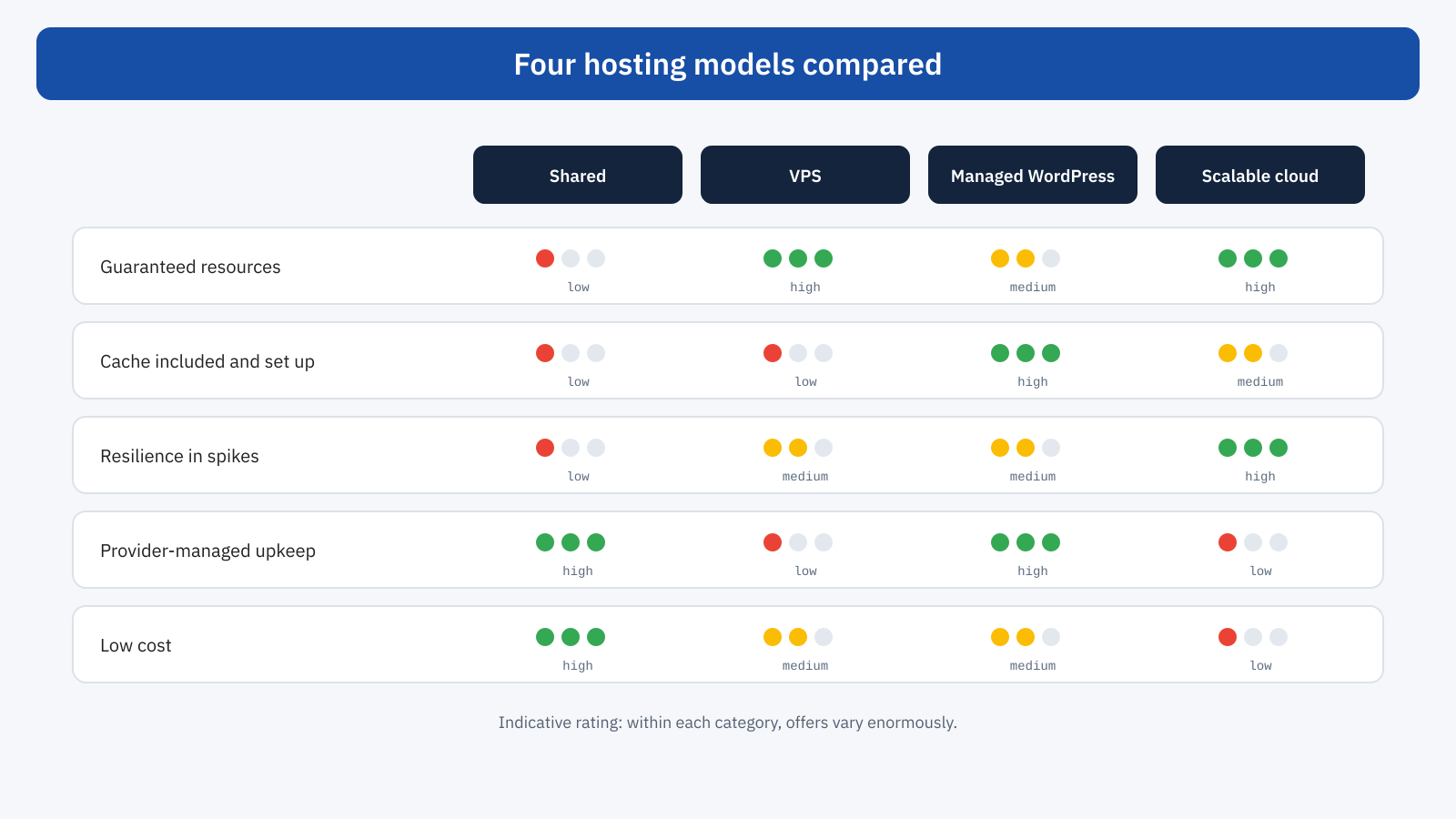
The offers on the market can be grouped into four broad models, with increasingly blurred boundaries. Within each, the differences in quality between one provider and another are enormous, so the characteristics that follow are tendencies, not rules.
Shared hosting
In shared hosting many sites live on the same server and share its resources. It is the cheapest and simplest solution: the provider manages everything and the customer deals only with the site. The main limit is unpredictability: the resources available to each site are limited and also depend on the activity of the other sites, the so-called noisy neighbors. Performance can be good in normal conditions and collapse at moments of load. “Unlimited resources” offers should be read carefully: limits always exist, often expressed as simultaneous processes, CPU usage or disk operations.
Good shared hosting, with modern servers, a server-level page cache and few sites per machine, can be adequate for brochure sites and blogs with modest traffic. It becomes tight for online stores, sites with many logged-in users or with predictable traffic spikes.
Virtual private server
A VPS offers reserved resources, processor, memory and disk, on a dedicated virtual machine. Performance is predictable and control is complete: you choose the operating system, the web server, the PHP version, the cache configuration. The flip side is management: in the unmanaged version, installation, configuration, security updates, backups and monitoring are the customer’s responsibility. A powerful but badly configured VPS, with no cache and default parameters, can be slower than good shared hosting.
Managed WordPress hosting
Managed hosts specialized in WordPress offer an already optimized environment: server-level page cache, often an object cache, recent PHP versions, automatic updates and backups, and support that knows the platform. For many professional sites they are the best compromise between performance and simplicity. The limits are found in the details of the offers: number of PHP workers per plan, which determines how many dynamic requests the site can handle at once; traffic or visit limits; disallowed plugins; extra charges for additional resources.
Scalable cloud
Cloud infrastructures make it possible to increase resources as load grows, even automatically, and to distribute the site across several servers and regions. They are the solution for sites with large traffic volumes or very pronounced spikes, but they require specific skills to be designed and managed, and costs can grow less predictably. There are also managed services built on top of cloud infrastructures, offering their scalability with simplified management.
The difference shows under load
The most common way to compare two hosts, a PageSpeed Insights test on the home page, is also the least meaningful. The home page is almost always cached, and an isolated test measures a server answering a single request. In these conditions almost every host looks fast. The differences emerge on pages that cannot be cached, such as cart, checkout, members area and search, and when many users request them at the same time.
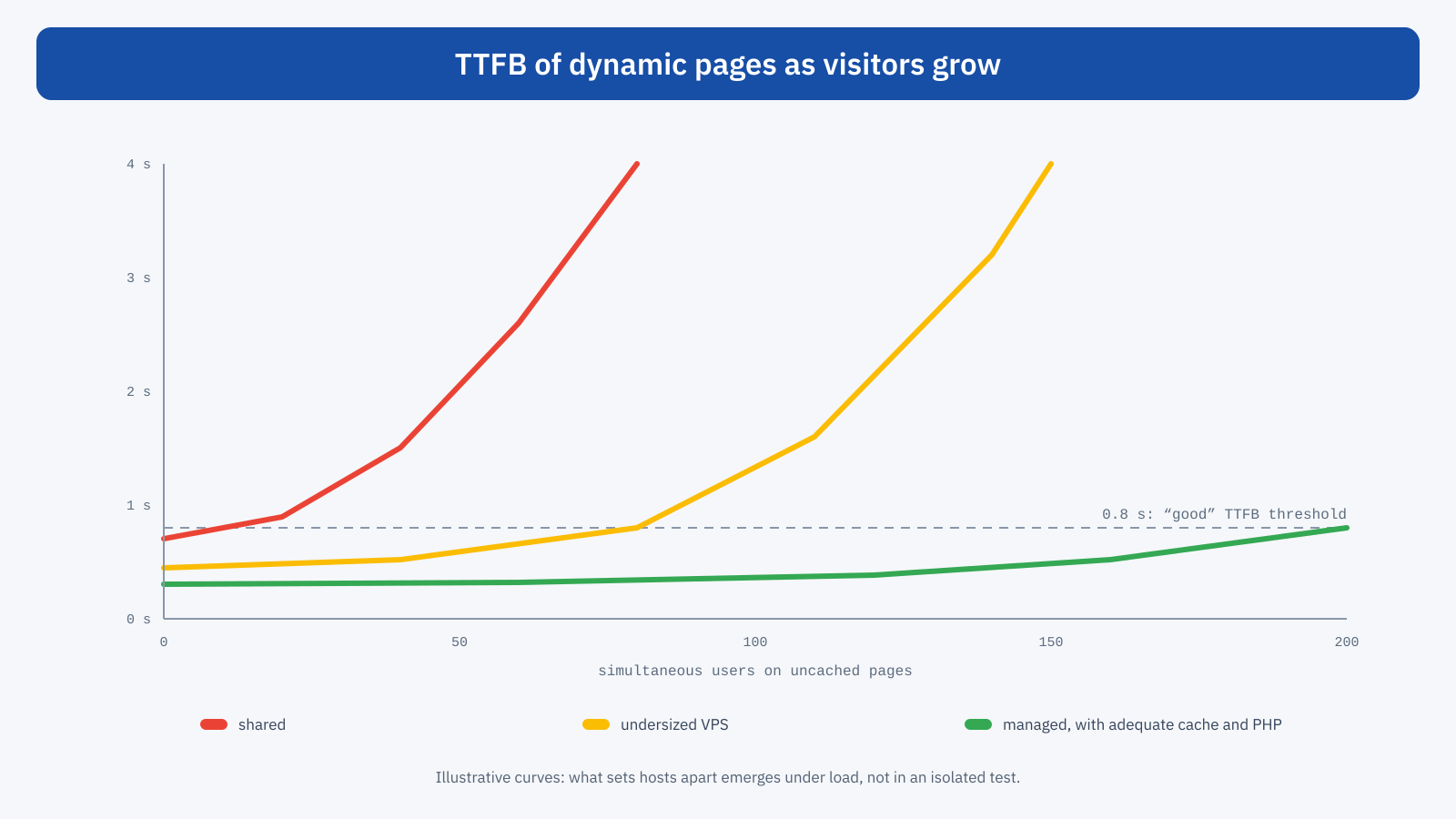
A load test, which simulates many simultaneous users, is the most reliable way to evaluate a host, and we will look at it in detail in the article on traffic spikes. Even without specific tools, though, a few checks are within everyone’s reach: measure the TTFB of the admin dashboard and of dynamic pages, at different times of day and from a location close to users; check Search Console and Chrome UX Report data in the weeks of heaviest traffic; ask the provider how many PHP processes are available and what happens when they run out.
Remember that published comparisons, even those from providers, often measure different configurations, as we saw in the article when the benchmark sees a different site: the useful comparison is the one made on your own site, with your own pages and your own plugins.
Questions to ask a provider
- Where are the servers? For an Italian audience, in Italy or nearby Europe; for an international audience, with a CDN or several regions.
- Which resources are guaranteed? Processor, memory, number of PHP processes, usage limits, and what happens when they are exceeded.
- What cache is available? Server-level page cache, object cache, integration with WordPress for automatic purging.
- Which software stack? PHP and database versions, web server, support for HTTP/2 and HTTP/3, Brotli compression.
- How are spikes handled? Whether resources can be increased temporarily, times and costs.
- Who takes care of what? Updates, security, backups, monitoring, support in case of performance problems.
Hosting and the CDN
A CDN does not replace good hosting, but it can compensate for some of its limits. By serving static resources and, if configured to do so, cached pages from nodes close to users, it reduces the load on the origin server and the network times for distant visitors. It does not help, however, with dynamic pages, which still have to be generated by the server. Here too the distinction between CDN and page cache seen in the article on Cloudflare applies: turning on a CDN on slow hosting improves image delivery, but does not speed up a store’s cart.
The stack has to be maintained
Hosting performance is not fixed over time. Every new PHP version has brought speed improvements, and a site stuck on a years-old version gives up free gains, besides exposing itself to security problems. The same goes for the database, the web server and system libraries. Many hosts let you change the PHP version from the control panel: before doing so it is worth checking theme and plugin compatibility in a test environment, but putting off the update for years costs both in performance and in security.
A concrete example helps to understand the order of magnitude. An online store on cheap shared hosting has a TTFB of about 400 milliseconds on cached pages and 1.8 seconds on cart and checkout, which in the evening hours goes above three seconds. Moving to managed hosting with server-level page cache, object cache and an adequate number of PHP processes brings cached pages under 100 milliseconds and dynamic pages to around 500, with no significant variation at peak hours. The rest of the site does not change: images, scripts and structure are the same, and later improvements to LCP will depend on front-end work.
When to switch
Changing hosting makes sense when the data indicates that the server is the bottleneck: high TTFB even on cached pages, or on dynamic pages despite an object cache and a well-optimized site; recurring slowdowns at peak hours; errors or very high response times during campaigns; inability to get recent software versions or the necessary caching tools. It makes no sense when the main problem is the weight of the front end: in that case better hosting slightly improves a problem that stays elsewhere.
When you decide to switch, the migration itself must be planned so as not to lose performance, with measurements before and after, checking of cache configurations and monitoring of field data in the following weeks: we cover this in the article on migrations.
In short
Hosting affects Core Web Vitals mainly through TTFB: processor speed, PHP version, database, availability of caches, server location and the ability to withstand many simultaneous users. It does not affect the weight and complexity of the front end, which remain the site’s responsibility.
Shared, VPS, managed WordPress and cloud answer different needs, and within each model quality varies a lot. Comparing them takes measurements on dynamic pages and under load, not a test of the home page. And before changing, it is worth checking that the server really is the bottleneck: the best hosting in the world will not make a heavy page light, but inadequate hosting can make even the lightest page slow.
