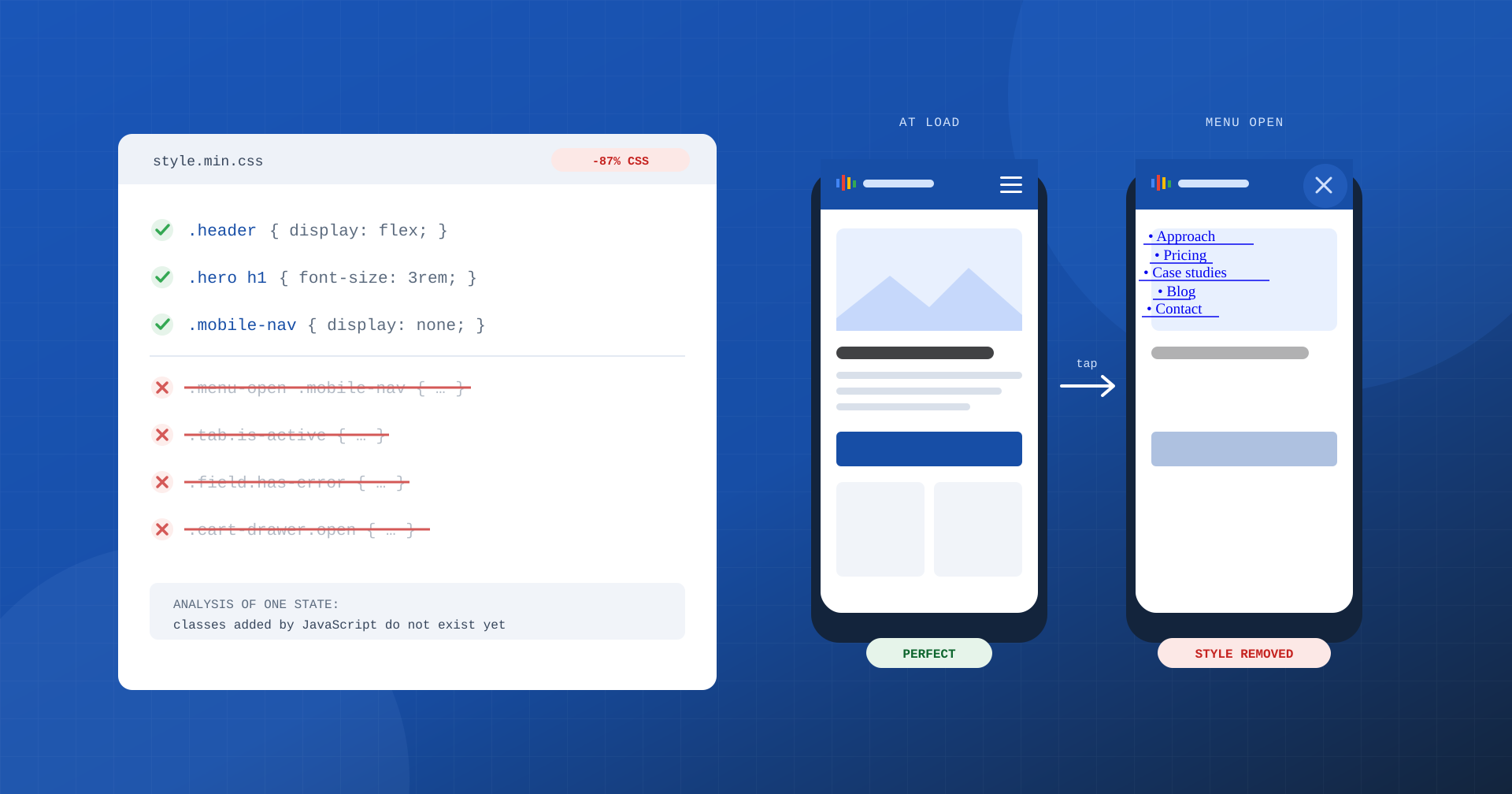
“Reduce unused CSS” is one of the suggestions Lighthouse shows most often, especially on WordPress sites built with multipurpose themes and page builders. The number next to the suggestion is eloquent: tens or hundreds of kilobytes of rules that the page downloads but does not use. The temptation to fix it with one click is strong, and many optimization plugins offer exactly that: a feature that analyzes the page, removes everything that is not needed and serves a stylesheet cut to the bare minimum.
It works, as long as the user touches nothing. The CSS that is “unused” at the time of analysis is often simply CSS not yet used: the CSS for the open menu, for a form’s error message, for the selected tab, for the cart sliding in from the side. In this article we look at why CSS weighs on performance, how automatic removal works and why dynamic states are its weak point.
Why CSS weighs on performance
CSS is a render-blocking resource: until the browser has downloaded and processed the stylesheets in the <head>, it draws nothing on the screen. Every extra kilobyte lengthens the download, and every extra rule increases the work needed to build the style model and calculate the appearance of each element. On a mid-range smartphone, on a mobile connection, the difference between 40 and 400 kilobytes of CSS shows up directly in FCP and LCP.
The Coverage panel in Chrome DevTools shows how much of the stylesheets is actually applied to the page. On a site based on a multipurpose theme it is not unusual for 80 or 90% of the CSS to come out as unused: styles for components never used, variants for dozens of layouts, plugin rules loaded on every page even when they are only needed on one.
How automatic removal works
The tools that generate the “used” CSS almost always follow the same scheme. A headless browser loads the page, observes which selectors match elements present in the document and produces a stylesheet containing only those. The result is inserted in the page in place of the original stylesheets, which, depending on the configuration, are removed, loaded asynchronously or loaded only on the first interaction.
The limit lies in the very concept of “used”: the analysis takes a snapshot of the page at a single moment, in a single state, often at a single screen width. Everything that does not exist in the document at that moment is considered superfluous.
The more advanced tools still keep pseudo-classes such as :hover, :focus or :checked, because they can verify that the base selector matches an element. What they cannot know is which classes JavaScript will add later, or which elements will be inserted into the document after loading: for them, whatever does not exist at the instant of analysis will never exist.
The problem of dynamic states
A modern page is not a static document. JavaScript adds and removes classes in response to what the user does, and each of these classes has its own style rules. A typical example is the mobile menu:
/* Theme CSS */
.mobile-nav { display: none; }
.menu-open .mobile-nav { display: block; position: fixed; inset: 0; }

/* Theme JavaScript */
toggle.addEventListener( 'click', () => {
	document.body.classList.toggle( 'menu-open' );
} );
At the time of analysis the body does not have the menu-open class: the second rule matches nothing and is removed. The result, for the user, is a menu that on tap appears as an unstyled list of links over the content, or does not appear at all. The same happens in dozens of common situations:
- headers that become compact and fixed after scrolling;
- tabs, accordions and sliders with the active element’s class;
- modal windows, promotional popups and cookie consent banners;
- side mini cart, product-added notices, WooCommerce messages;
- form error and confirmation states, highlighted required fields;
- variants visible only to logged-in users or to those who already have products in the cart.
To these are added the differences between page templates, such as a product page with variants compared with one without, and between screen widths, when the analysis runs at a single resolution. These are exactly the points where the user is about to do something important: open the menu, choose a size, complete a form, reach the cart.
The safelist: a patch that needs maintaining
To limit the damage, removal tools let you specify a safelist: a list of selectors, or parts of selectors, to always keep. It is a necessary but fragile solution. Someone has to know all the dynamic classes used by the theme, plugins and third-party scripts, and update the list with every change. A theme update that renames a class, a new plugin that introduces its own popup, a campaign that activates a different banner: every change can reopen the problem without anyone noticing, because automated performance tests keep showing the initial state, which is perfect.
There is also an operational cost. The reduced CSS has to be generated for each page or template, stored and regenerated when content or styles change. If regeneration does not happen, or happens late, the page is served with a stylesheet that no longer matches the markup, with visible errors that are hard to trace back to the cause.
When the original stylesheets arrive later
Many configurations look for a compromise: they serve the reduced CSS immediately and load the full stylesheets asynchronously, or on the first interaction. It is safer than total removal, because sooner or later all the rules arrive. But it shifts the problem to other metrics. If the full stylesheets arrive while the user is already reading, elements can change size or position, with layout shifts that worsen CLS. If they arrive on the first interaction, the first tap also has to wait for the styles to download and apply, with effects on INP. It is the same pattern as JavaScript delay: the cost does not disappear, it changes moment.
Critical CSS, meaning inlining in the page only the styles needed for the part visible at load followed by the full non-blocking stylesheet, follows the same logic and has the same risks if the critical style is incomplete. It works well when it is generated and verified for every page template, badly when it is generated once and forgotten.
Reducing CSS at the source
The most robust approach is to stop superfluous CSS from reaching the page, rather than removing it after generating it. In practice it means:
- Split styles by page template. The styles for the home page, articles, product pages and checkout go in separate files, loaded only where needed. This site works that way too: the styles for the home page sections are never loaded on the blog pages, and vice versa.
- Load block styles only if present. WordPress, with block themes, can include each block’s CSS only on the pages that contain it.
- Disable plugin styles where they are not needed. The contact form stylesheet has no reason to be loaded on every page of the site, nor the slider’s on pages without a slider.
- Clean up at development time, not at runtime. Tools such as PurgeCSS can remove unused rules during the build, analyzing templates and scripts with a safelist versioned together with the code and verified by tests, instead of a snapshot of the page in production.
- Assess the weight of the theme and page builder. When most of the CSS belongs to features the site does not use, the lasting solution is a leaner theme, not a tool that hides its weight.
How to check that nothing has broken
Whatever strategy you choose, verification must cover states, not just the freshly loaded page. The Coverage panel can record CSS usage while you interact with the page: by opening the menu, selecting a variant and submitting an empty form, you see the share of used rules grow, and it becomes clear how much “unused” CSS was really just waiting.
For sites where continuity matters, it is worth automating the check with visual regression tests that capture the main states: menu open on mobile, cart with products, form with errors, consent banner, each at the most used widths. And after any change to how CSS is handled, watch the trend of CLS and INP, as well as LCP, in real-user data.
In summary
Unused CSS is a real problem, because it blocks rendering and slows down the first display of the page. Automatic removal tackles it by taking a snapshot of the page in a single state, and for that reason it also removes the rules for menus, forms, carts and interactive components that the user will meet a moment later. Safelists and delayed loading limit the damage, but they need continuous maintenance and shift the cost to CLS and INP.
Every shortcut has a cost to be measured. The most reliable way to have little CSS is not to load superfluous CSS in the first place: styles split by page template, loaded only where needed, cleaned up at development time and verified on all the states that matter to the user and to the business.
