Sooner or later, in every optimization project, the same question comes up: should CSS go directly into the HTML page or be loaded from an external stylesheet? The classic answer is clear-cut: an external file, downloaded once and then reused from the cache for all subsequent pages. The first page pays a small cost, the others get faster.
It is correct reasoning, but it rests on an assumption that often does not match how users really behave: that a second page follows the first. Many visits start from a Google result, a social post, a newsletter or a link shared in a chat. The user opens the page, reads what they were looking for and leaves. The next navigation, the one in which the cache would have repaid the initial cost, simply does not happen. And this is where it pays to rethink how we deliver CSS.
The advantage of external CSS: the cache
The most common way to include styles is a link to a file:
<link rel="stylesheet" href="/css/style.css">It is a clean solution and easy to maintain. With the right cache headers the browser keeps the file and reuses it on all the pages that call it, without downloading it again. A single stylesheet can hold the rules for header, menu, articles, forms, tables and product pages, and every change propagates to the whole site. For a site with hundreds of pages this is a concrete advantage.
Why external CSS slows the first paint
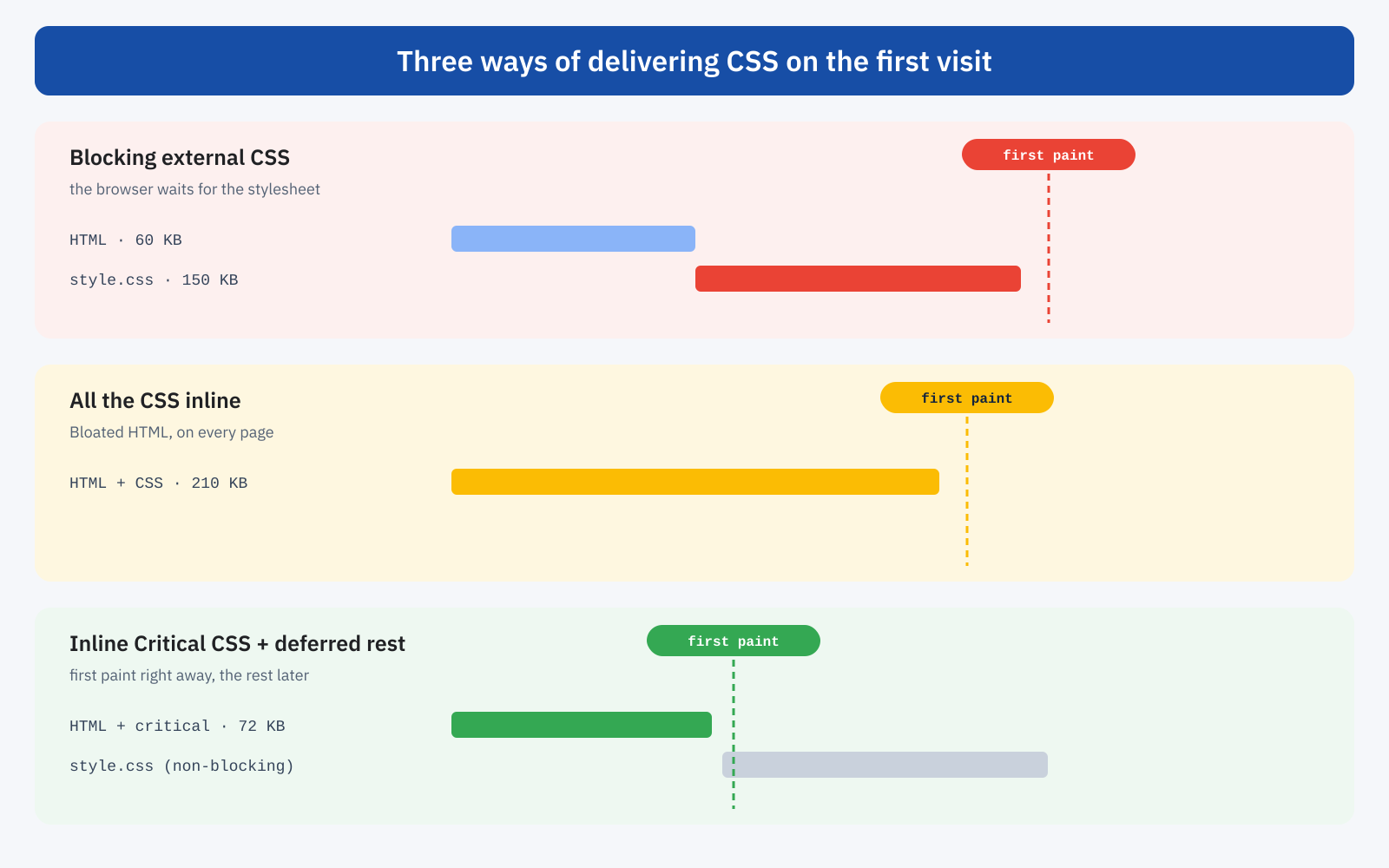
The limit of the external stylesheet is its role in the critical rendering path. When the browser reads the <head> and finds a <link rel="stylesheet">, it must download and parse that file before painting the page: CSS is a blocking resource. The reason is sensible, because showing an unstyled page and then repainting it would be worse. But it means the first paint waits for one more network request.
On the office fiber connection this wait is imperceptible: a few tens of milliseconds for a 150 KB file. On a smartphone with a mediocre 4G network, in a mountain area, in a building with thick walls or in a tourist location far from major infrastructure, the situation changes. It is not only bandwidth that matters: latency matters, that is the time between discovering the resource, requesting it and the arrival of the first bytes. Every additional critical dependency becomes visible in these conditions.
The “slightly slower first page” bias
The traditional reasoning accepts a slightly slower first page in exchange for very fast subsequent pages. From a technical point of view it holds up perfectly. It becomes wrong when it is mistaken for a description of how users behave. Someone who searches Google for how to configure a feature, opens the article, finds the answer and closes the tab will never visit the home page, the category or five other articles. The same goes for campaign landing pages, product pages reached from a comparison site, articles shared on social media and documentation pages.
For all these visits the goal is not to make navigation within the site fast, but to make the page the user has decided to open right now extremely fast. The first page, very often, is also the last.
What if we put all the CSS inline?
The opposite conclusion seems natural: if the external file adds a request, let’s put all the CSS in a <style> block in the HTML. The rules arrive together with the document and there is nothing to wait for. With a few kilobytes it works very well. With a modern stylesheet, it does not.
On WordPress, WooCommerce, Magento or PrestaShop, especially with multipurpose themes and page builders, CSS easily exceeds 150 or 200 KB. Inserted in every page, it turns a 60 KB HTML document into a 200 or 300 KB one. And HTML is the most precious resource of loading: until it arrives and is parsed, the browser does not discover images, fonts, scripts and preloads. Bloating it means delaying everything that comes after. On top of that, the same rules are transferred again on every page: inline CSS cannot be cached as a standalone, shared resource.
Both are right, both are wrong
External CSS offers reusability, a cache independent of the HTML, simple maintenance and lightweight documents, but it adds a blocking dependency right on the first load. Inline CSS removes that dependency, but if it is too large it bloats the HTML, repeats the same rules on every page, gives up caching and complicates code management. As so often in performance, the solution does not lie in either extreme.
The solution: Critical CSS
Critical CSS starts from a simple question: how much CSS is really needed to show what the user sees as soon as they open the page? Not the footer’s, six thousand pixels further down; not the modal window’s, which may or may not be opened; not the checkout’s, while reading an article. Only what the first screen needs, the “above the fold” content.
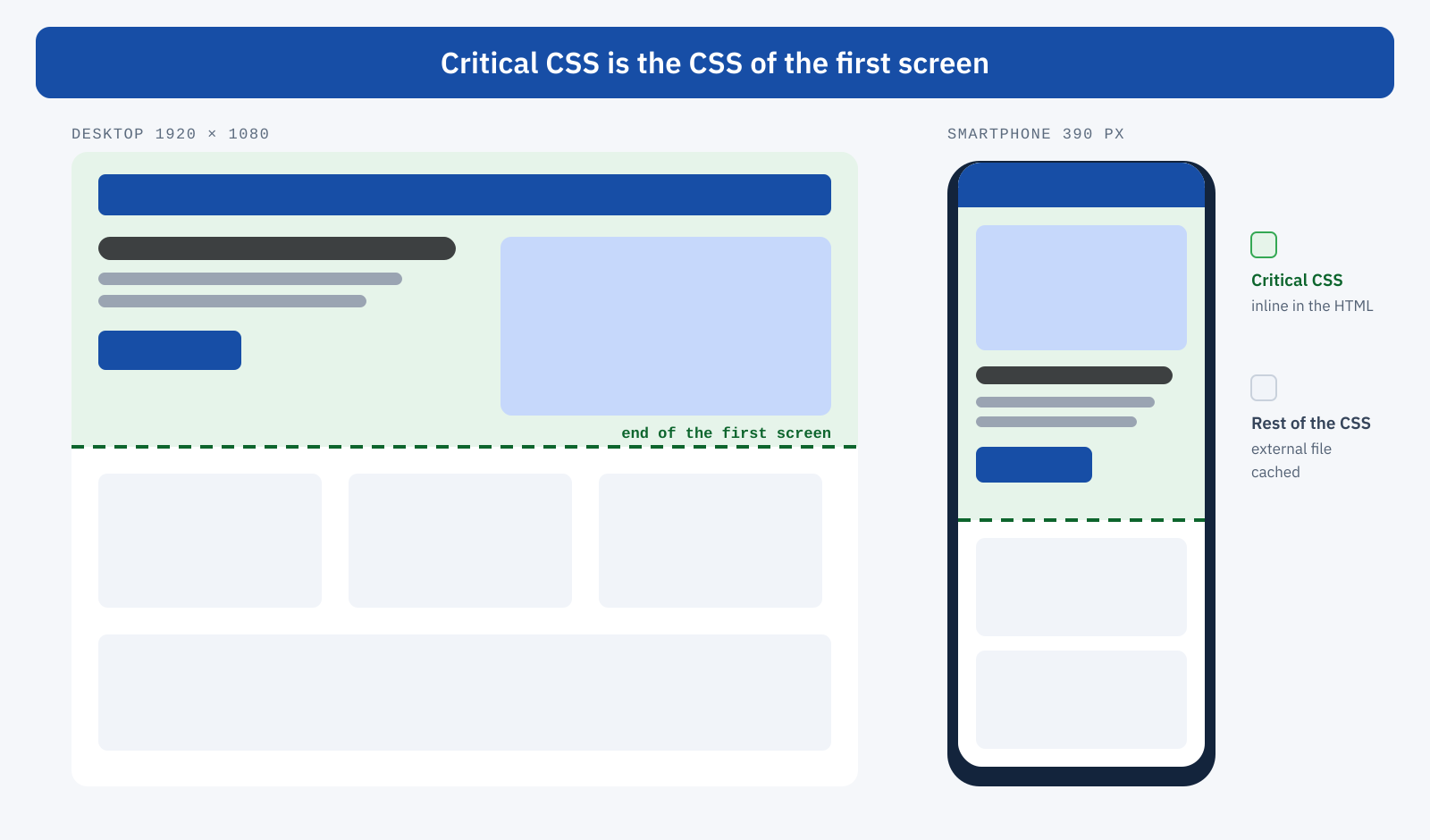
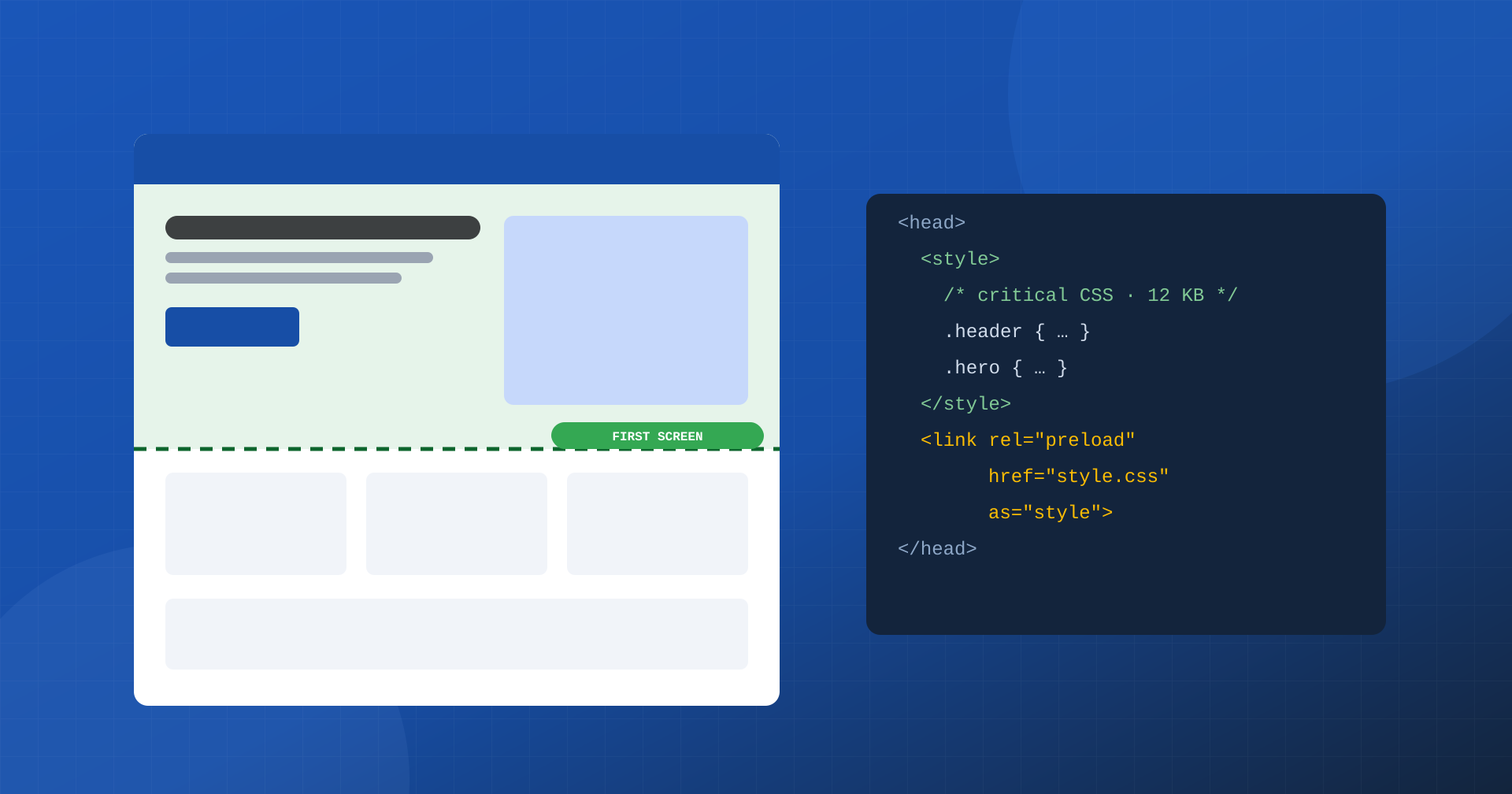
That small amount of rules goes inline in the <head>, so the browser immediately has everything it needs to paint the initial part of the page. The rest of the CSS continues to live in an external file, shared and cached, and is loaded without blocking the first paint. A common technique is this:
<head>
	<style>
		/* critical CSS: header, title, hero of the first screen */
		.site-header { height: 80px; background: #fff; }
		.hero { max-width: 1200px; margin: 0 auto; }
		.article-title { font-size: 42px; line-height: 1.1; }
	</style>

	<link rel="preload" href="/css/style.min.css" as="style"
	      onload="this.onload=null;this.rel='stylesheet'">
	<noscript><link rel="stylesheet" href="/css/style.min.css"></noscript>
</head>
It is not a recipe to apply blindly: asynchronous loading of stylesheets must be designed and tested, because it has implications for the Content Security Policy, for resource priority and for the risk of briefly seeing unstyled content. But the principle holds: make available right away what is needed right away, and postpone what will be needed later.
Critical CSS does not mean “the first lines of the stylesheet”
A frequent mistake is thinking it is enough to take the first two hundred lines of the stylesheet. Critical CSS depends on what actually appears on the first screen, and changes from one page template to another: a home page needs the hero styles, an article needs title, author and featured image, a product page needs gallery, price, availability and the buy button. It also changes with the device, because what fits in the first screen of a monitor is not the same as what fits in a 390-pixel-wide smartphone.
This is why Critical CSS should be generated automatically, in the build or optimization process, for each page template and for the main widths, and regenerated when templates and styles change. Maintaining it by hand, line by line, quickly leads to missing or outdated rules.
Critical CSS must not become another inline monster
There is a trap many automatic tools fall into: inserting huge amounts of CSS into the critical block “just to be safe”. If the inline CSS reaches 100 or 150 KB, almost all of the advantage is lost, and you fall back into the problems of fully inline CSS. The goal is the opposite: the bare minimum needed to paint the first meaningful content correctly, usually a few kilobytes, with everything else outside the critical path.
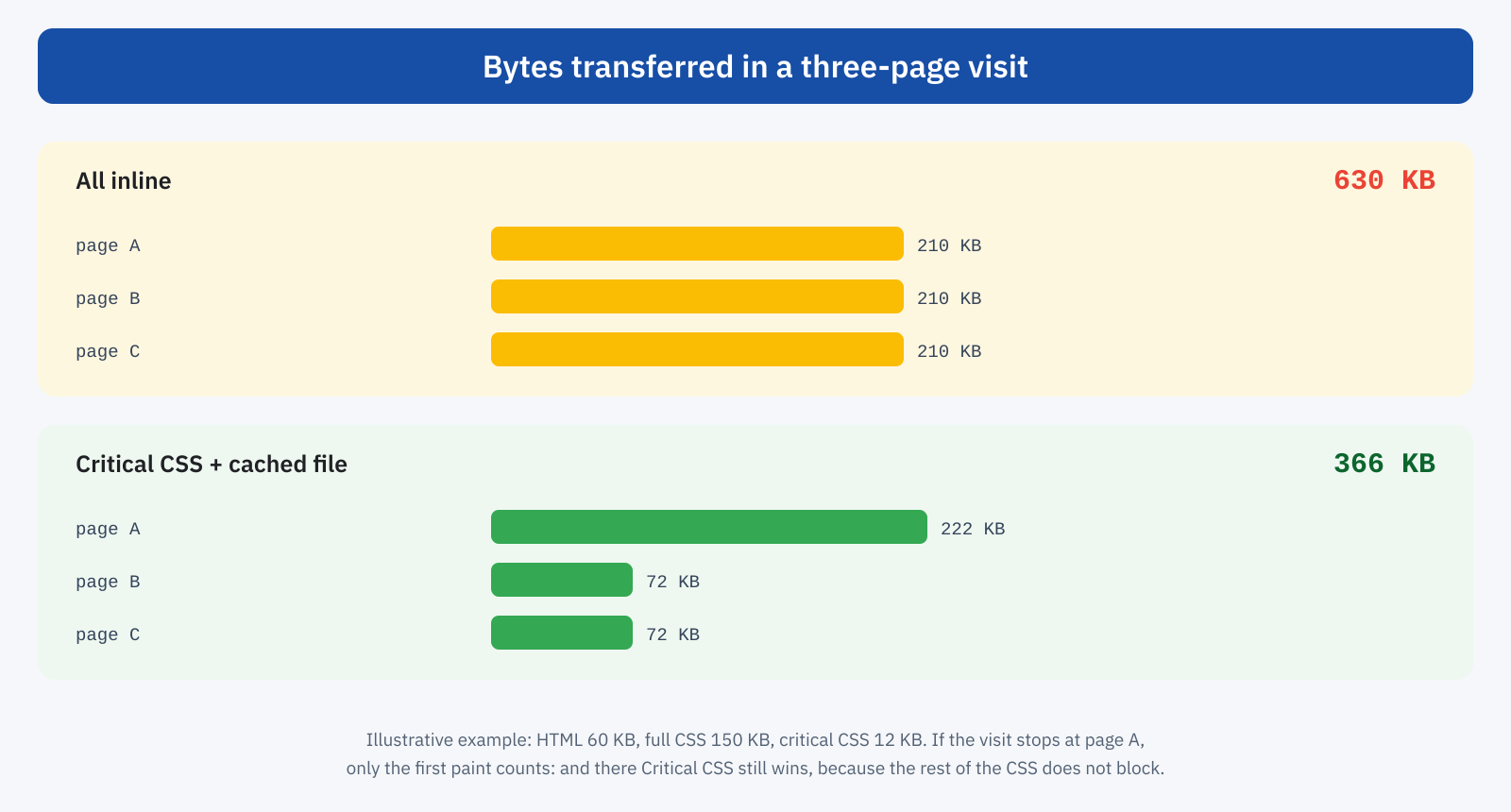
Comparing the bytes transferred clarifies the trade-off. In a three-page visit, all-inline CSS is transferred three times; with Critical CSS the first page downloads the critical block plus the full stylesheet, the following ones only the critical block, because the stylesheet is in the cache.
Test like a user on a mediocre network
This is probably the most important piece of advice. Anyone who develops while connected to a fiber line of hundreds of megabits should not use their own experience as a benchmark. In Chrome DevTools you can simulate high latency, reduced bandwidth and less powerful processors: it is under these conditions that the critical path becomes obvious, and that a stylesheet that arrives instantly at your desk turns out to be the reason for hundreds of milliseconds of blank screen. The Coverage panel shows how much of the CSS the first screen really uses, and the Performance panel when the first paint happens.
The definitive answer, as always, comes from real-user data: First Contentful Paint and LCP at the 75th percentile, especially on mobile. And be careful not to confuse Critical CSS with the automatic removal of “unused” CSS, which takes a snapshot of the page in a single state and can remove rules that are needed later, as we explained when discussing unused CSS and dynamic states: here, the full stylesheet always arrives.
The right question
“Inline or external CSS?” is too simple a question for a problem about priorities and timing. The right question is: which CSS is needed now, and which can arrive later? What is needed immediately must be small, targeted and available without critical dependencies. The global, less urgent CSS can stay external, benefit from the cache and serve the rest of the page and of the navigation.
In summary
The classic model, a slightly slower first page and then very fast navigation thanks to the cache, is technically valid but describes many real visits poorly, in which the first page is also the last. Putting all the CSS inline is not the answer: it bloats the HTML, repeats the same bytes and gives up the cache. Critical CSS is the smart compromise: very little inline CSS to paint the first screen immediately, a non-blocking external stylesheet for everything else.
It is less about downloading less than about not waiting for what is not needed yet. The user does not judge the site by the theoretical speed of the fifth page: they judge it at the moment they tap a search result and wait for something to appear on screen. And at that moment there is only one chance to seem fast: to be fast immediately.
